


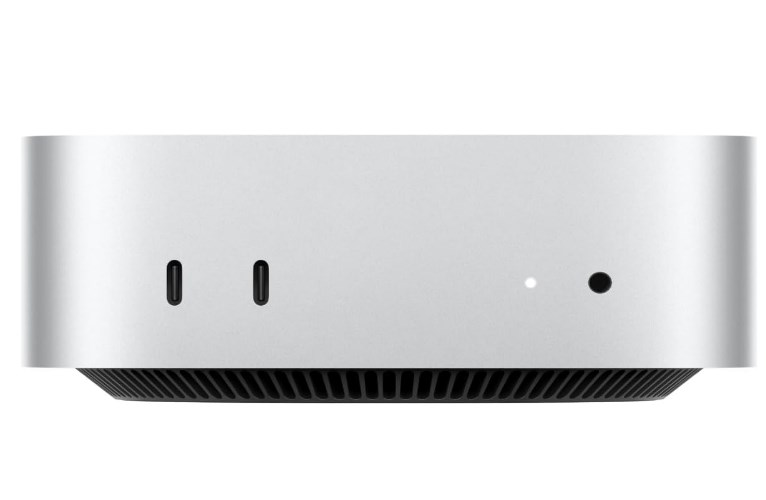
If you’re looking for a mini PC deal this Black Friday, and are a fan of the MacOS operating system, this could be the one for you. The 2026 Mac mini combines excellent everyday performance, strong media capabilities and useful AI acceleration in an exceptionally compact desktop. This 16GB and 512GB configuration is well suited to office work, software development, photo editing and moderate creative workloads, although neither the memory nor internal storage can be upgraded later. It is a capable small computer, and the M6 represents a substantial architectural upgrade over the chips used in earlier entry-level Mac mini systems: it has a 12-core CPU comprising two super cores, four performance cores and six efficiency cores, alongside a 12-core GPU, hardware-accelerated ray tracing and Neural Accelerators built into every GPU core. Pick it up now for $150 off the usual asking price.
🔥 More offers: see our Black Friday deals 2026 guide, updated daily.
Prices and savings can change. Check the retailer for the current price.
Read below if you want more detailed specification information on this Mini computer, or see the foot of this page for more Black Friday Mini PC deals.
Black Friday is finally here. Below, you'll find some of the biggest and best deals from this year's most exciting sales event!
- Samsung 49" Odyssey - was $1,268.29 now $854.98
- HP HyperX OMEN 16 OLED - was $3,199 now $2,399
- Acer Predator X32 X 4K QD-OLED 240Hz - was $999.99 now $649.99
- Samsung 9100 PRO 2TB SSD - was $679.97 now $349.99
- CyberPowerPC RTX 5060 Ti gaming PC - was $1,629.99 now $1,299.99
- LG 77-inch OLED C6 - was $2,499.99 now $1,899.99
- MSI Prestige 16 Flip - was $2,149 now $1,789
- Hisense 85-inch U6 Pro Series - was $1,999.99 now $947.99
Prices correct as of November 27th, 2026 (Black Friday evening).
What we like about the Apple 2026 Mac mini desktop computer with M6 chip
A significantly faster 12-core CPU
The M6 introduces two more CPU cores than the preceding entry-level generation. Its unusual arrangement includes two very high-performance super cores, four additional performance cores and six efficiency cores. The fast individual cores help everyday applications launch quickly and keep the operating system feeling responsive. The complete 12-core arrangement also provides enough multithreaded performance for software builds, media processing and other demanding workloads.
Independent testing places the M6 close to some previous Pro-series chips in CPU tasks. Older Pro chips may retain an advantage in sustained GPU-heavy work or memory-intensive applications, but the standard M6 is no longer limited to basic home and office use. Its strong performance per watt is equally important. The compact enclosure can deliver considerable processing power without the power consumption, heat output or constant fan noise associated with many full-size desktop computers.
A 12-core GPU with Neural Accelerators
The integrated 12-core GPU includes hardware-accelerated ray tracing and a Neural Accelerator within each GPU core. This allows supported applications to use the graphics hardware for conventional rendering and machine-learning calculations. Apple claims up to four times faster AI performance than the M4 Mac mini in selected tests. That headline should not be interpreted as a universal fourfold improvement, because performance depends on the model, framework, memory requirements and whether an application can use the new accelerators.
Creative applications can use the GPU to accelerate filters, image processing, video effects and 3D previews. It should be sufficient for moderate creative work, but professionals rendering complex 3D scenes or working with large visual-effects projects will benefit from the additional GPU resources in the M5 Pro or Mac Studio. The GPU uses the same unified-memory pool as the CPU. This avoids repeatedly copying data between separate system and graphics memory, but it also means the installed 16GB must accommodate macOS, applications and graphics allocations simultaneously.
Dual 16-core Neural Engine architecture
The M6 includes a Dual 16-core Neural Engine designed for on-device machine-learning tasks. Apple’s operating-system frameworks can access both engines together, potentially improving supported generative AI, transcription, image analysis and language-processing workloads. Running AI tasks locally can reduce reliance on cloud processing and keep appropriate data on the computer. The Mac mini is also practical as an always-on desktop for automation, development agents and smaller local language models because it is quiet, compact and energy efficient.
Memory remains the limiting factor for large local models. A 16GB system is appropriate for learning, experimentation and smaller quantised models, but serious local AI work will benefit from a 24GB or 32GB M6 configuration—or a more powerful Mac with substantially greater unified memory. Apple’s advertised AI gains also refer to properly optimised software. Applications that rely only on the CPU, or that have not been updated for the M6’s accelerators, will not necessarily realise the same improvement.
16GB of unified memory as standard
This configuration includes 16GB of unified memory, which is a sensible baseline for a modern Mac. It provides enough capacity for typical multitasking, office applications, programming tools and moderate creative work. Unified memory is shared efficiently between the processor’s CPU, GPU and AI engines. This design can deliver good results without the larger memory figures sometimes found in PCs with separate system RAM and video memory.
The memory is integrated into the Apple silicon package and cannot be expanded after purchase. Buyers who regularly use virtual machines, very large development projects, professional video software or local AI models should consider 24GB or 32GB at the time of ordering. The retailer information combines two different bandwidth specifications. This 16GB configuration provides 153GB/s of memory bandwidth, while Apple associates the higher 170GB/s figure with the 24GB and 32GB M6 configurations. The 16GB model should therefore not be advertised as having 170GB/s bandwidth.
Faster 512GB SSD storage
The included 512GB SSD offers a more practical capacity than the entry-level 256GB configuration. It provides room for macOS, productivity software, development tools and a moderate collection of media or project files. Apple says M6 Mac mini storage can be up to twice as fast as the previous generation, and independent testing has found strong sequential performance. Faster storage helps with application launches, large file transfers, project loading and virtual-memory activity.
The internal SSD is not designed for straightforward user replacement. Selecting an appropriate capacity at purchase is therefore important, especially for buyers working with video, photography or large software libraries. External storage offers a practical alternative. Thunderbolt and USB4 SSDs can provide fast project storage, while less expensive USB drives work well for archives, Time Machine backups and media libraries. An external drive does add another device and cable to an otherwise extremely tidy setup.
Excellent hardware media support
The M6 media engine provides hardware acceleration for H.264, HEVC, ProRes and ProRes RAW. It includes dedicated video encode and decode engines as well as ProRes encode and decode acceleration. AV1 hardware decoding improves efficiency when playing compatible online and locally stored video. The dedicated media hardware allows the Mac mini to process supported formats without placing the entire workload on its general-purpose CPU cores.
This makes the system a strong option for content consumption, media servers and moderate video-editing projects. Final Cut Pro and other optimised applications can take particularly good advantage of Apple’s media engines. Professional editors working with complex multicamera timelines, heavy effects or higher-resolution deliverables should still consider additional unified memory and a Pro-series processor. The base M6 is fast, but memory capacity and GPU resources remain relevant as projects become more complicated.
An exceptionally compact enclosure
The Mac mini measures approximately 5 inches wide, 5 inches deep and 2 inches tall. At around 1.5 pounds, it can sit beneath a monitor, attach to a compatible mounting system or travel between workspaces without occupying much space. Despite the small enclosure, Apple retains active cooling. This allows the processor to sustain heavier workloads more effectively than a completely fanless design.
The system is very quiet under ordinary use, although its fan may become audible during long renders, software builds or other sustained workloads. Its compact dimensions also mean that it should be positioned where the ventilation system is not obstructed. Apple uses recycled materials extensively in the enclosure and internal components. The aluminium exterior feels more substantial than the plastic cases used by many inexpensive mini PCs.
Support for as many as three displays
The M6 Mac mini supports up to three external displays through its Thunderbolt and HDMI connections. This is useful for productivity, software development, trading, media production and other workflows that benefit from several screens. With three displays connected, it can drive two screens at up to 6K 60Hz or 4K 165Hz, plus another display at up to 5K 60Hz over Thunderbolt or 4K 60Hz over HDMI. Available combinations change when using particularly high resolutions or refresh rates.
With two displays, the system can support configurations including an 8K 60Hz, 5K 120Hz or 4K 240Hz primary screen, subject to the selected connection and display capabilities. Actual compatibility also depends on cables, adapters and monitor input standards. A display supporting a headline resolution or refresh rate over one connector may not necessarily offer it through every input.
A useful selection of front and rear ports
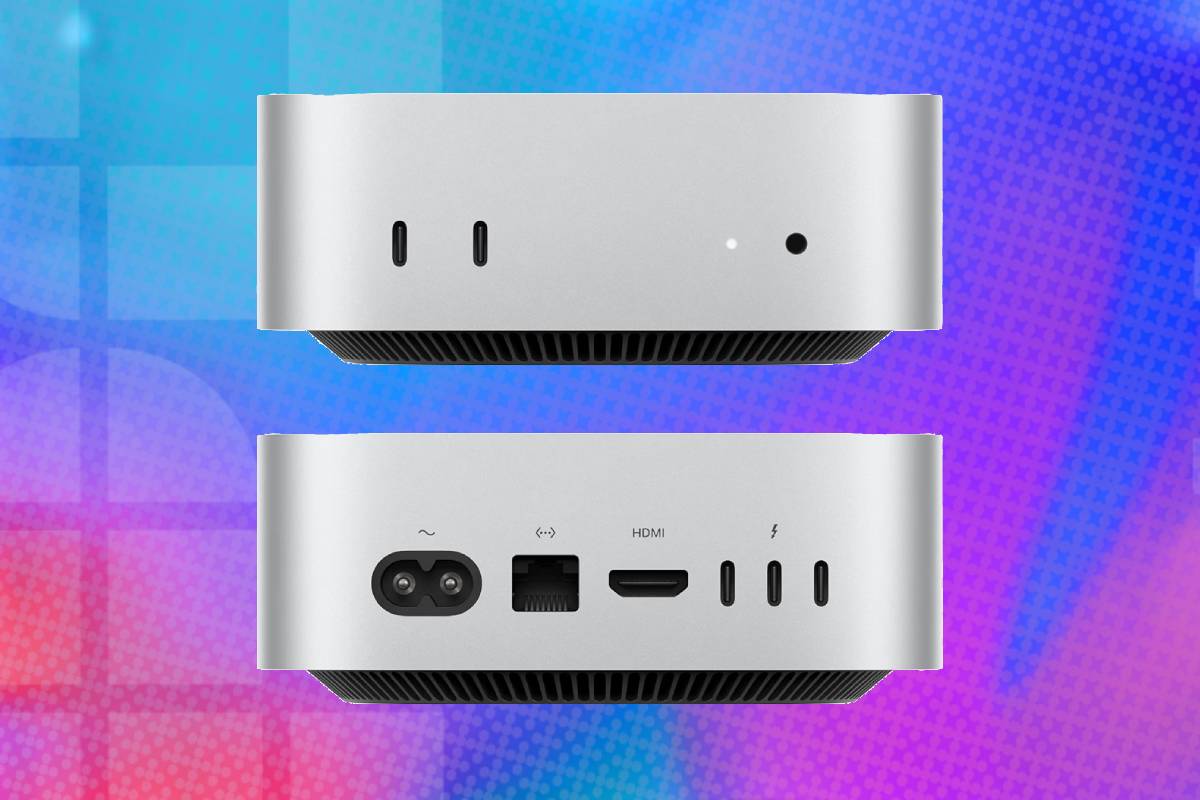
The front of the M6 Mac mini provides two USB-C ports supporting USB 3 speeds of up to 10Gbps, alongside a 3.5mm headphone connection. Front access is convenient for temporary storage, phones, card readers and wired headphones. The rear includes three Thunderbolt 4 ports, HDMI, 2.5Gb Ethernet and the power connection. Thunderbolt 4 supports data transfer at up to 40Gbps, USB4 devices and DisplayPort video output.
The M6 version does not include Thunderbolt 5. Apple reserves three Thunderbolt 5 ports for the M5 Pro configuration, so the retailer’s specification table should not be read as suggesting that both processors include the same rear connectivity. There are no traditional USB-A ports and no built-in SD card reader. Owners of older peripherals or cameras may therefore need a hub, dock or individual adapters.
Faster wired and wireless networking
The 2026 Mac mini includes 2.5Gb Ethernet as standard, improving wired transfer speeds for users with compatible routers, switches and network storage. A 10Gb Ethernet option is available separately through Apple’s configuration process. Wi-Fi 7 provides faster wireless-network potential and more efficient operation on compatible infrastructure. It remains backward compatible with earlier Wi-Fi generations, so a Wi-Fi 7 router is not required.
Bluetooth 6 supports wireless keyboards, mice, headphones and other accessories. As always, actual wireless performance depends on the connected device, radio conditions and supported standards at both ends. Thread networking support can also be useful in compatible smart-home environments. Its relevance will depend on the user’s home platform and connected devices.
Strong audio and video connectivity
The HDMI port supports multichannel audio output, making the Mac mini suitable for connection to televisions, monitors and home-cinema receivers. Supported playback formats include Dolby Atmos, Dolby Digital Plus, Apple Lossless and FLAC.
The front headphone connection includes advanced support for high-impedance headphones. This is useful for owners of demanding wired headphones who would otherwise need a separate amplifier or audio interface.
A small speaker is built into the computer, but it is intended primarily for alerts and basic audio. Most users will want monitor speakers, headphones or a separate external speaker system for music and entertainment.
macOS and Apple ecosystem integration
The Mac mini ships with macOS and benefits from tight integration between Apple’s hardware and operating system. Features such as iPhone Mirroring, AirDrop, Handoff, Universal Clipboard and Sidecar are particularly useful to people who already use an iPhone or iPad.
Sidecar can turn a compatible iPad into an additional display, while Universal Control allows a Mac keyboard and pointing device to move between supported Apple products. Messages, FaceTime, Photos and iCloud files can remain synchronised across devices.
Apple Intelligence and Siri AI are integrated into supported applications and system features. Availability can vary by language, region and software version, and some processing may still require an internet connection.
Software compatibility should be checked before moving from Windows. Most major productivity and creative applications have Mac versions, but specialist engineering software, some enterprise utilities and many games remain Windows-only.
A capable development computer
The combination of fast single-core performance, 12 CPU cores and Unix-based macOS makes the Mac mini well suited to web development, iOS development and general programming. It can run Xcode, container tools, local databases and common development environments.
The 16GB memory capacity is adequate for many projects but may become restrictive when running several containers, large integrated development environments and virtual machines simultaneously. Developers with heavier workflows should consider 24GB or 32GB.
Apple silicon cannot natively run x86 versions of Windows through Boot Camp. Virtualisation can run ARM-compatible operating systems, but software and driver compatibility should be checked before relying on a Windows virtual machine.
No display, keyboard or mouse included
The compact purchase price covers the Mac mini and its power cord. A monitor, keyboard and pointing device must be supplied separately.
Existing USB-C and Bluetooth peripherals can often be reused, while USB-A accessories require an adapter or hub. Apple’s own Magic accessories are optional rather than included.
The retailer specification stating that a lithium-ion battery is required is erroneous. The Mac mini is an AC-powered desktop computer and contains no user-facing operating battery. It must remain connected to mains power during use.
One configuration among several
This listing combines the M6 processor, 16GB unified memory and a 512GB SSD. It should not be confused with the less expensive 256GB version or configurable models with 24GB or 32GB of memory.
It should also be distinguished from the M5 Pro Mac mini. The M5 Pro provides more GPU resources, higher memory capacity, substantially greater memory bandwidth and Thunderbolt 5, making it better suited to demanding professional workflows despite using an earlier chip-generation name.
The retailer description’s reference to “up to 32GB” correctly describes the broader M6 range, but this particular unit remains fixed at 16GB. Likewise, references to the M5 Pro’s ports and weight do not apply to this exact SKU.
Who should consider this 2026 Mac mini M6 deal?
The 2026 Mac mini with M6 is best suited to home users, students, developers and office workers who want a fast, quiet desktop without a large tower. It is especially attractive for existing iPhone and iPad owners who can take advantage of Apple’s cross-device features. This 16GB and 512GB configuration is a balanced choice for web browsing, document work, programming, photo editing, music production and moderate 4K video projects. The larger SSD is easier to live with than the 256GB base model while avoiding the cost of Apple’s highest storage tiers.
It can also work well as a compact media server, living-room computer or always-on automation machine. Its low noise, small footprint, 2.5Gb Ethernet and strong media engine suit those roles.
Users running large local AI models, several virtual machines or professional creative applications should consider more unified memory. Because memory cannot be added later, buying 24GB or 32GB is safer when the intended workload already approaches the limits of 16GB.
The M5 Pro model is better for sustained GPU rendering, complex professional video work and other heavily parallel workloads. A Windows PC remains the more flexible option for broad game compatibility, replaceable components and specialist Windows-only applications.
The Mac mini’s historic strength has been exceptional performance for its price. The M6 model remains an impressive compact desktop, but its higher starting price means buyers should compare discounts carefully and avoid paying extra for performance or configuration options they will not use.
More Black Friday mini PC deals



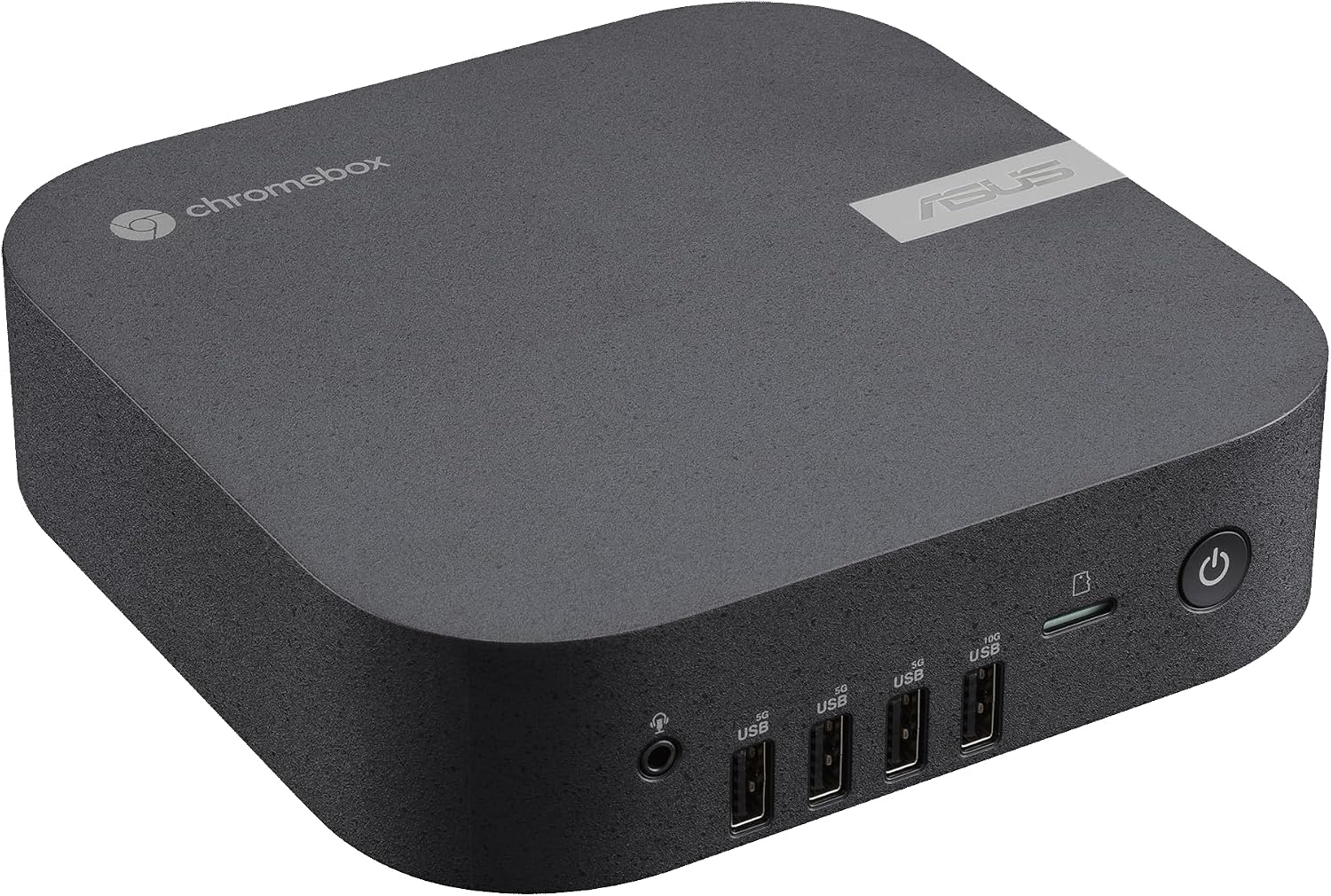
Prices and savings can change. Check the retailer for the current price.
Written by
