
Heroic Games Launcher adds fullscreen “console-like” mode ideal for Steam Deck, new deals page, and more

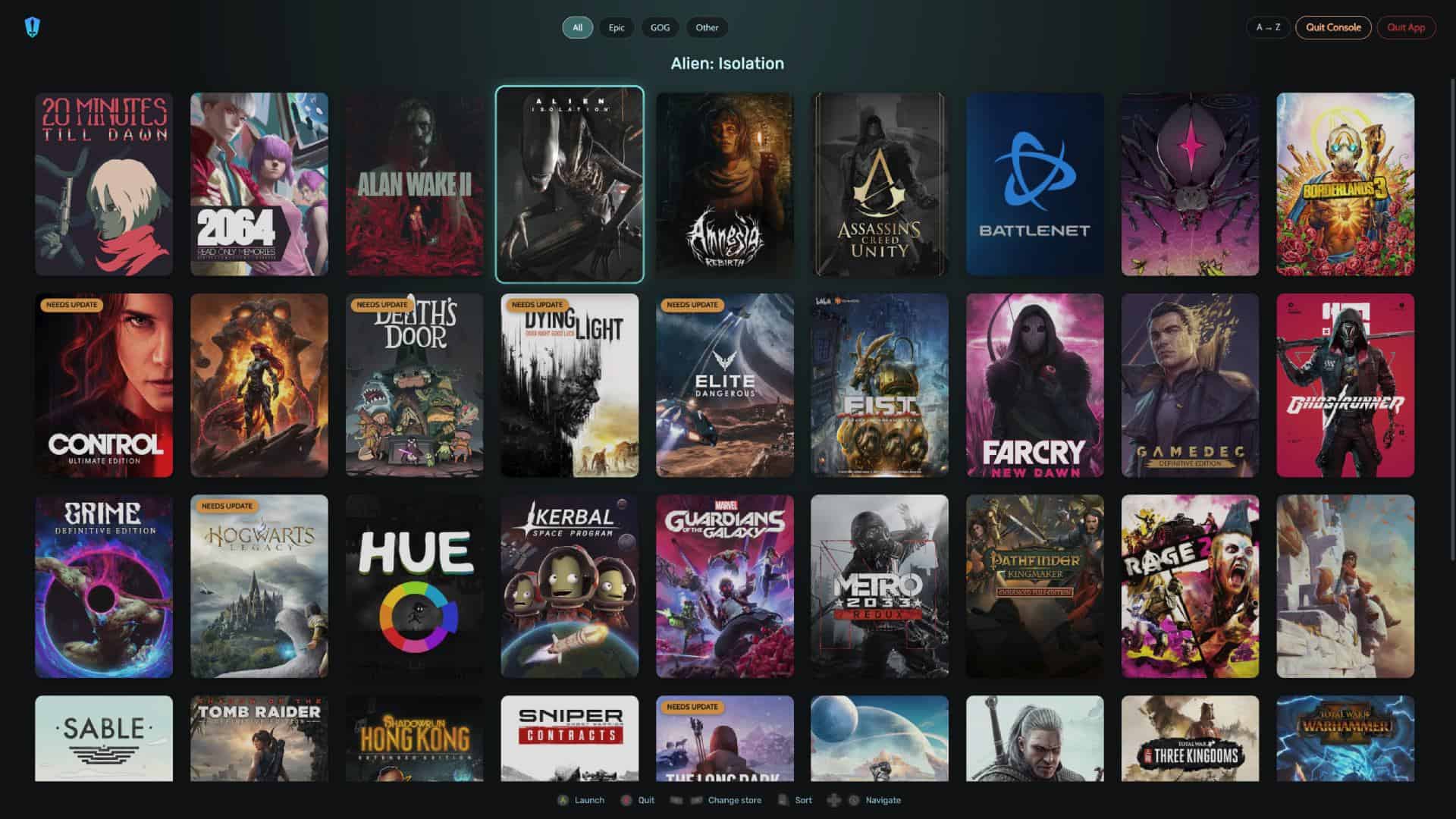
Table of Contents
The Heroic Games Launcher has just received a new update, and it brings one amazing feature that many users have been hoping for. The latest version, 2.21.0, introduces a new fullscreen “console-like” mode, along with several other improvements that make the launcher arguably more user friendly, especially on devices like the Steam Deck – where it is commonly used.
For those unfamiliar, Heroic Launcher is an open-source game launcher that allows you to access and play games from platforms like Epic Games and GOG. It’s especially popular among Steam Deck users, as it makes it much easier to run non-Steam games in a clean and organized way. Instead of switching between different apps, Heroic puts everything in one place.
What does the update offer?
Heroic 2.21.0 “Loki” Highlights
Source: GitHub
- New Fullscreen “Console-like” Mode for joystick navigation (#5490)
- New Deals page with current GOG promotions (#5497)
- Achievements on the game info page for GOG games (#5208)
- Pick covers from SteamGridDB directly on the sideload dialog when a SteamGrid API key is set (#5213)
- Wine manager screen cleanup + new Wine settings screen (#5306)
- Electron updated to v41.1.1 (#5467)
- How Long To Beat data fixed (#5466)
- Fixed the Installation of Ubisoft Games bought on Epic
- Import button moved next to the Install button for better discoverability (#5339)
- GitHub Sponsors link added to the sidebar (#5499)
The biggest addition in this update is the new full-screen console mode. This mode is designed for joystick and controller navigation, making it feel more like a console interface. It’s clearly aimed at users who play on a TV with controller in hand, or in Steam Deck’s Game Mode. You can browse your installed games and launch them without needing a mouse or keyboard, which should make the process smoother.
Latest PC & Tech deals
- AMD Ryzen™ 9 9900X 12-Core - was $499 now $337
- iBUYPOWER Element Gaming PC - was $1,999 now $1,699
- LG 27GX700A-B 27-inch Ultragear- was $599 now $485
- Samsung SSD 9100 PRO 1TB - was $339 now $249
- HP OmniBook 5 16 inch - was $961 now $799
Prices correct as of September 21st, 2026.
However, this new mode is still quite basic for now. While it works well for launching games, it doesn’t let you install new titles or change settings. So, for now, it feels more like a simple launcher view rather than a full replacement for the main interface. Still, it’s a solid start, and there’s a good chance it will improve in future updates.
Aside from the new UI, the update also adds a few useful features. There’s now a dedicated deals page that shows current GOG promotions, making it easier to find discounted games. On top of that, GOG achievements are now visible directly on the game page.
Another helpful addition is direct SteamGridDB support. This lets you easily pick custom covers for your games, helping you keep your library looking clean. On top of that, the Wine manager has been improved with a cleaner layout and its own settings screen. For the complete list of changes, you can check out the update log on GitHub.
About the Author