


Table of Contents
The Steam Deck comes in two models: LCD and OLED. The OLED version was released over a year after the LCD model and is significantly more expensive. And if you own the LCD model and are thinking about upgrading to the OLED for better visuals, you might want to consider this custom setup instead.
🔥 More offers: see our Steam Deck Black Friday deals 2026 guide, updated daily, or browse all Black Friday deals.
Custom Steam Deck OLED setup
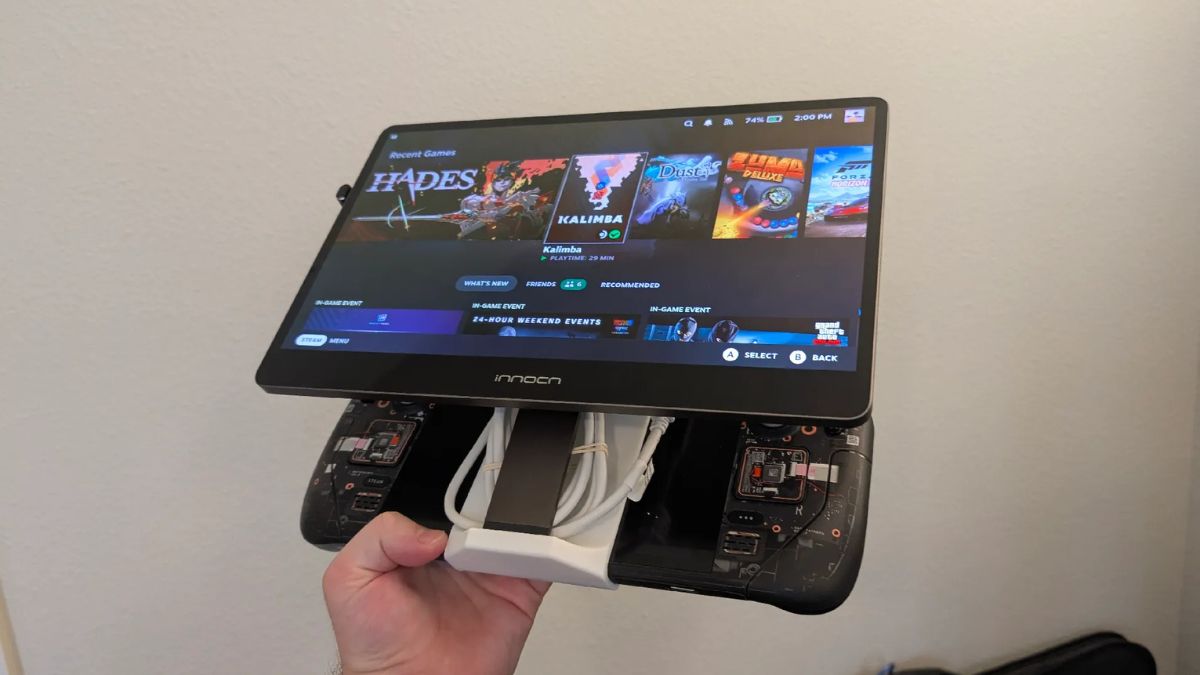
According to user Djared on Printables, they purchased the Steam Deck LCD model when it first launched. When the OLED version came out, they couldn’t justify the upgrade, so instead, they bought a portable OLED monitor and designed a 3D-printed mount for the Steam Deck.
Latest tech deals.
- AMD Ryzen™ 9 9900X 12-Core - was $499 now $331
- Sony INZONE M10S 27-inch - was $899 now $748
- Thermaltake LCGS View i1470S-170 - was $2,399 now $2,099
- Apple 2026 MacBook Air - was $1,999 now $1,891
- Bose QuietComfort Headphones - was $359 now $169
- LG 77-inch OLED C6 - was $2,499 now $1,999
- MSI Prestige 16 Flip - was $2,149 now $1,870
- Hisense 85-inch U6 Pro Series - was $1,999 now $997
Prices correct as of November 5th, 2026.
Djared used the INNOCN 13.3″ OLED portable monitor for the setup, which is currently available on Amazon for $119 due to a discount (originally priced at $199.99). The display features a 100% DCI-P3 color gamut and a 100,000:1 contrast ratio, so the images should be crisp and clear. On top of that, thanks to its peak brightness of 400 nits, it is suitable for outdoors. The only downside is that while the original Steam Deck OLED display is 90 Hz, this one is only 60 – the same as the LCD model.

Now, while the INNOCN portable monitor is much bigger than the original Steam Deck OLED screen, it can be easily attached to the handheld using the custom mount created by Djared. The mount clips onto the Steam Deck and uses the monitor’s built-in stand to hold everything in place. It also helps manage the cables, keeping the setup neat and tidy. And since the monitor is magnetic, you can tilt or rotate it forward or backward for better viewing angles. And, of course, it doesn’t hinder the controls.
For anyone interested, all 3D-printable files are available for free on Printables. This setup is a great option for those who want to keep their Steam Deck LCD model but still enjoy the benefits of an OLED display. And if you opt for the INNOCN portable monitor, the experience will feel similar to gaming on a laptop.
Written by
