



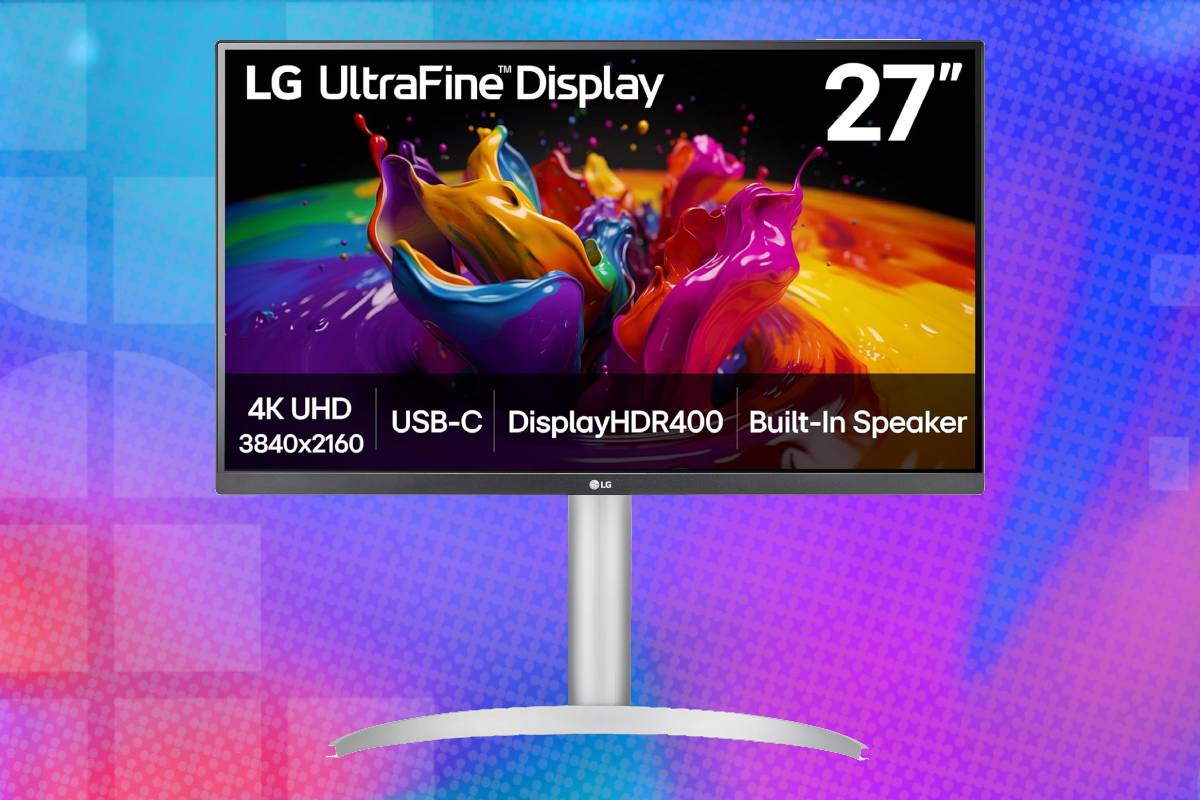
The LG 27UP850K-W is a versatile 27-inch 4K monitor for office work, content creation and single-cable laptop setups, combining sharp image quality with broad color coverage and 90W USB-C Power Delivery. Its 60Hz refresh rate, modest IPS contrast and entry-level HDR performance make it less suitable for competitive gaming or buyers seeking a transformative HDR experience. It is best used by those looking for a general purpose display with good color reproduction within the sRGB gamut – making it suitable for color accurate work in this space. Laptop users can benefit from its USB hub, built-in speakers and ergonomic stand. Pick it up now for just $259.99!
🔥 More offers: see our Black Friday monitor deals 2026 guide, updated daily, or browse all Black Friday deals and the best Amazon Black Friday deals.
Prices and savings can change. Check the retailer for the current price.
The supplied stand supports height adjustment, tilt and pivot. Its height range allows the top of the screen to be placed closer to eye level, while pivot adjustment enables portrait use for documents, coding or vertical photographs. A 100 x 100mm VESA interface is available for an alternative monitor arm or wall mount. The display weighs approximately 5.9kg with its stand and around 4.1kg without it. Those figures should be considered when selecting a monitor arm.
Latest tech deals.
- AMD Ryzen™ 9 9900X 12-Core - was $499 now $331
- Sony INZONE M10S 27-inch - was $899 now $748
- Thermaltake LCGS View i1470S-170 - was $2,399 now $2,099
- Apple 2026 MacBook Air - was $1,999 now $1,891
- Bose QuietComfort Headphones - was $359 now $169
- LG 77-inch OLED C6 - was $2,499 now $1,999
- MSI Prestige 16 Flip - was $2,149 now $1,870
- Hisense 85-inch U6 Pro Series - was $1,999 now $997
Prices correct as of November 5th, 2026.
What we like about this LG 27UP850K-W 27-inch UltraFine UHD monitor
The 4K IPS panel is well suited to productivity
A 27-inch 4K screen provides a useful combination of desktop space and fine detail. Text in documents and development tools appears smooth, while spreadsheets, editing timelines and reference material can occupy the screen simultaneously. The 16:9 aspect ratio also works naturally with 4K video. Full-resolution UHD content can be displayed without the scaling required by a lower-resolution monitor, making the LG a practical option for previewing footage.
The IPS panel keeps colors relatively consistent across the screen when the user moves position. This is useful when sharing work with another person or rotating the display into portrait orientation.
Its wide color gamut supports creative work
Coverage of 95% DCI-P3 gives the monitor access to a broader range of saturated colors than a display limited to standard sRGB coverage. This benefits compatible video, photographs and games. Wide gamut alone does not guarantee perfect accuracy. Creative users should select an appropriate color mode, use color-managed software and calibrate the monitor for their working environment.
Hardware-calibration support is a welcome addition at this level. Instead of relying exclusively on a software profile, compatible calibration can adjust the monitor’s internal processing for more consistent results.
USB-C simplifies a laptop workstation
The USB-C connection can carry a 4K video signal, data for the integrated USB hub and as much as 90W of charging power through one cable. A compatible laptop can therefore connect to the monitor and attached peripherals without requiring a separate display cable and charger. Ninety watts is enough for most ultrabooks, MacBooks and mainstream professional laptops. High-performance mobile workstations and gaming laptops may still require their original power adapter, particularly under sustained CPU or GPU load.
The USB-C cable is included, reducing the risk of buying a replacement that lacks the required video or charging capabilities. HDMI and DisplayPort cables are also supplied.
The monitor has USB-C with DisplayPort Alternate Mode, data transfer and Power Delivery; LG does not describe it as a Thunderbolt connection.
The integrated USB hub reduces desktop clutter
Two downstream USB 3.0 ports allow a keyboard, mouse, storage device or other peripheral to remain connected to the display. When a laptop is attached over USB-C, these devices can be accessed through the same cable carrying video and power. This arrangement can replace a basic docking station for users with modest connectivity requirements. It does not provide the wider selection of Ethernet, card-reader and high-speed USB ports available on a dedicated Thunderbolt dock.
A 3.5mm headphone output is included. The monitor does not provide a microphone input or dedicated audio-input connection.
Two HDMI inputs and DisplayPort add flexibility
The LG provides two HDMI ports, one DisplayPort 1.4 connection and the USB-C video input. This allows a desktop, work laptop and games console to remain attached simultaneously.Its maximum native refresh rate is 60Hz regardless of the selected input. The supplied source and cable must support 3840 x 2160 at 60Hz to obtain the intended experience.
The monitor does not include a KVM switch. Although several computers can be connected, the user may need to move USB peripherals manually or use an external switch when changing between them.
DisplayHDR 400 adds basic HDR compatibility
The LG accepts HDR10 signals and carries VESA DisplayHDR 400 certification. Its 400cd/m² typical brightness and wide color gamut allow HDR material to appear brighter and more colorful than it would on a basic SDR-only office monitor.
DisplayHDR 400 remains an entry-level HDR tier. Local dimming is not normally required at this level, and the panel’s approximately 1,200:1 contrast cannot reproduce simultaneously bright highlights and deep blacks with the impact of Mini LED or OLED displays.
HDR support is therefore best treated as a compatibility benefit rather than a defining reason to buy the monitor. It can display HDR games and video, but buyers seeking dramatic highlight intensity and convincing dark-scene performance should consider a higher-tier local-dimming display or OLED monitor.
The speakers are convenient for everyday audio
The built-in stereo speakers provide 5W per channel and use Waves MaxxAudio processing. They are adequate for calls, online video, system sounds and casual listening. Integrated speakers reduce the number of accessories needed on a small desk. Their limited cabinet volume means they will not provide the bass extension, stereo separation or overall scale of good external speakers or headphones.
FreeSync makes occasional gaming smoother
AMD FreeSync can synchronize the monitor’s refresh cycle with a compatible graphics processor, reducing visible tearing when a game’s frame rate varies. Dynamic Action Sync is intended to reduce processing delay, while Black Stabilizer can make shadow detail easier to see. The 5ms grey-to-grey response time is quoted using the Faster overdrive mode. LG’s own guidance warns that the most aggressive setting may introduce visible artifacts, so the Fast setting may provide a better balance between motion clarity and overshoot.
The 60Hz ceiling means this is not a competitive gaming monitor. It is suitable for strategy games, role-playing games, console play and occasional PC gaming, but a 120Hz or faster display will provide noticeably smoother motion and lower perceived latency.
LG’s screen-management tools improve multitasking
LG’s software can divide the desktop into configurable regions, helping users arrange several applications without repeatedly resizing windows. This is particularly useful on a 4K display, where multiple windows can remain readable at once. Its software can control layouts and selected monitor settings, but it does not transform the display into a standalone streaming device. Netflix and other services still require a connected computer, console or streaming player.
Who should consider this 4K monitor deal?
The LG 27UP850K-W is best suited to laptop users who want a sharp desktop display and a simplified one-cable connection. Its USB-C port can provide video, peripheral data and up to 90W of charging, making it particularly useful for a MacBook, business laptop or USB-C-equipped creative notebook. It is also a strong fit for office work. The high pixel density produces clear text, the 4K workspace accommodates multiple applications, and the adjustable stand makes it easier to establish a comfortable working position.
Photographers, designers and video editors working at an enthusiast or semi-professional level can benefit from its 95% DCI-P3 coverage, factory calibration and hardware-calibration support. Anyone performing color-critical commercial work should still measure the individual unit and consider a display with stronger uniformity controls.
The monitor works well for mixed productivity and entertainment use. Its speakers, multiple video inputs, HDR compatibility and FreeSync support make it more versatile than a basic office screen. Console owners can connect through HDMI and use the panel’s 4K resolution, but the 60Hz maximum prevents it from taking full advantage of 120Hz console modes. Its limited HDR contrast also means it will not reproduce cinematic games as convincingly as a good OLED television or Mini LED monitor.
Competitive PC gamers should choose a higher-refresh-rate display. The LG’s 5ms response specification and 60Hz refresh rate are adequate for casual gaming but not optimized for fast esports. It is a sensible purchase for someone prioritizing image sharpness, USB-C convenience and flexible positioning over high refresh rates or premium HDR. At the right price, it provides a balanced combination of productivity features without requiring a separate basic docking station.
More Black Friday monitor deals








Prices and savings can change. Check the retailer for the current price.
Written by
