



Table of Contents
The Keychron Q12 HE is one of the latest boards from a brand which typically targets a price point just below that of the most premium brands, offering many of the same high-end features though at a slightly reduced level of quality.
The HE in the name of this particular board stands for ‘Hall Effect’, which are a type of key switch that use a magnetic action, rather than a classic mechanical one. This allows you to actually modify the actuation distance of your keys – either setting them to a shorter distance for an effectively more responsive, faster action for each key press (ideal for twitch-shooters), or to a longer distance to reduce the chance of accidental keypresses.
Having reviewed a couple of other releases from the company over the last year or so (specifically the Keychron Q6 Max and the Keychron V5 Max), we were eager to see how this one measured up.
Latest tech deals.
- AMD Ryzen™ 9 9900X 12-Core - was $499 now $331
- Sony INZONE M10S 27” - was $899 now $748
- Thermaltake LCGS View i1470S-170 - was $2,399 now $2,099
- Apple 2026 MacBook Air - was $1,999 now $1,891
- Bose QuietComfort Headphones - was $359 now $169
- LG 77-inch OLED C6 - was $2,499 now $1,999
- MSI Prestige 16 Flip - was $2,149 now $1,870
-
Hisense 85" U6 Pro Series-
Prices correct as of November 5th, 2026.


- Form Factor: 96%
- Key-switches: Hall Effect
- Actuation Force / Travel: 40/60gf with variable 0.2-3.8mm travel
- Connectivity: 2.4GHz WiFi / Bluetooth 5.2 / USB Type-C (180cm braided cord), USB-C to A adapter included
- Keycaps: OSA PBT Doubleshot
- Memory: 256K Flash
- Weight: 1546g ± 10g
- Dimensions: 327.53 x 121 x 32.78mm
- Battery: 4000 mAh (rated up to 115 hours with backlight off)
A not-quite premium board, the Keychron Q12 HE nevertheless has a lot to praise, with great adjustability from the actuation distance of the switches to the many different assignable features and macros within the user-friendly software. If you don’t mind paying the higher asking price for the Hall Effect switches, it’s a great option if you’re looking for a keyboard that can switch between feather-light twitch gaming and something where more deliberate key presses are required. That being said, it doesn’t come with the high quality in every detail you might expect if you’re paying this kind of money.
- Adjustable actuation switches are excellent for gaming
- Durable PBT Doubleshot keycaps
- Feature rich with assignable macros, SOCD, DKS, & rapid trigger
- Wired, Wi-Fi & Bluetooth Windows/Mac/Linux functionality
- User-friendly software
- Good build quality overall
- No height adjustment
- Font on the keycaps looks a tad cheap
- No shine-through lettering
- Hall Effect switches push up the price
- Heavy weight means less portable
Price & Availability
Unlike many Keychron boards there is no barebone variant of the Q12 HE; it comes in one fully-assembled form with a control knob for $249.99. The keyboard comes with Gateron Double-Rail Magnetic Switches only and is non-hotswappable: these are the only ones compatible with it. Two color options are available: Carbon Black and Shell White.
At the time of writing the keyboard is available on the Keychron webstore only, however we assume it will be made available on the brand’s Amazon storefront at some point.
To provide a bit of clarity on the different similarly-named variants offered by the brand, the ‘12’ signifies the Southpaw (i.e. left-sided numpad) 96% size. There are a few Q12 models: (in price order) the Q12 QMK, Q12 Max QMK/VIA, and the Q12 HE QMK we are reviewing here today – the first of these has the most color options, is built on a steel plate (so is around 300g heavier), and is a wired-only connection; the second is built on a PC plate and has wired, wireless and Bluetooth connectivity; the third is built on an aluminium plate, has wired, wireless and Bluetooth connectivity, but unlike the first two is not available barebone and crucially comes with non-swappable Hall-Effect switches only.
Design & Specifications




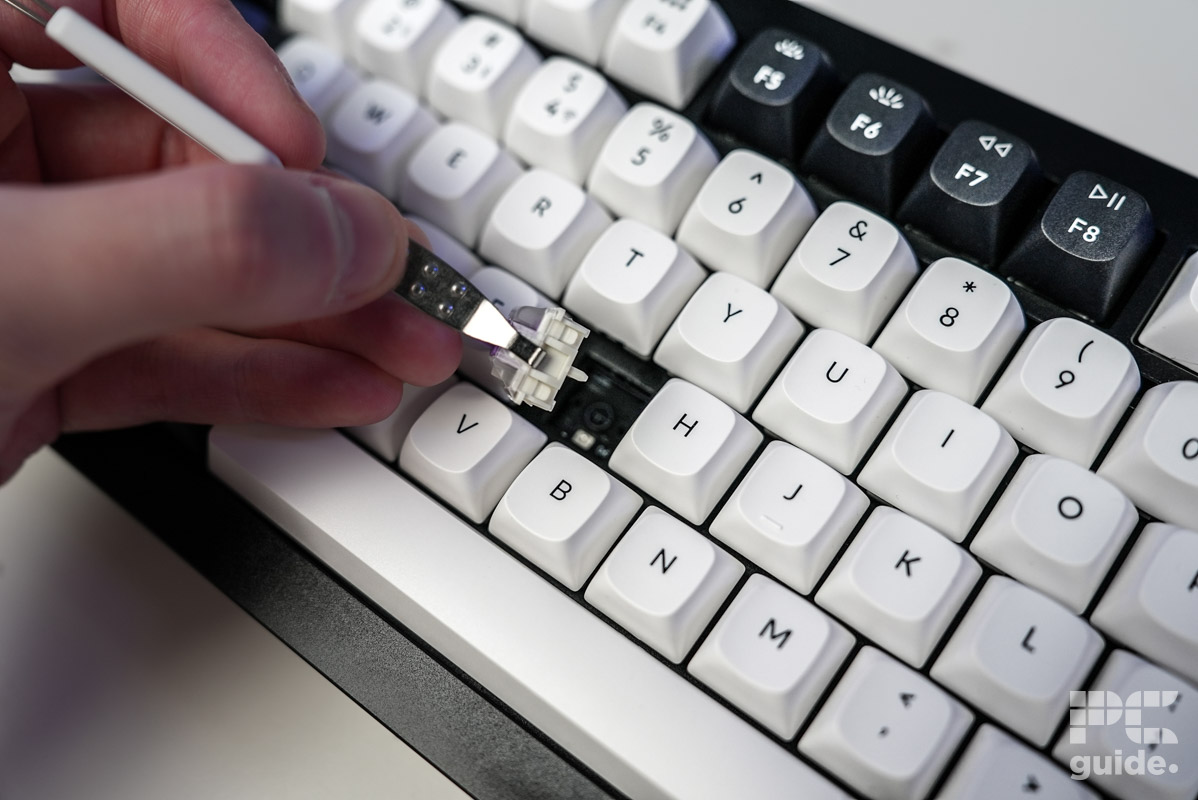

Inside the box you get all the usual accoutrements: a keycap/keyswitch removal tool, alternative Windows/Mac keycaps, a wireless dongle, 1.8m braided connection cable, USB-C to A female-to-female adapter, a miniature screwdriver plus Allen key and various spare screws and feet grips.
Like the plate, the chassis of the board is made from aluminium (CNC machined), making it very tough but also very heavy. It uses a double gasket mount design with silicone pads between the plates to minimize noise, and also makes the end of a key depress feel more ‘cushioned’ when typing.
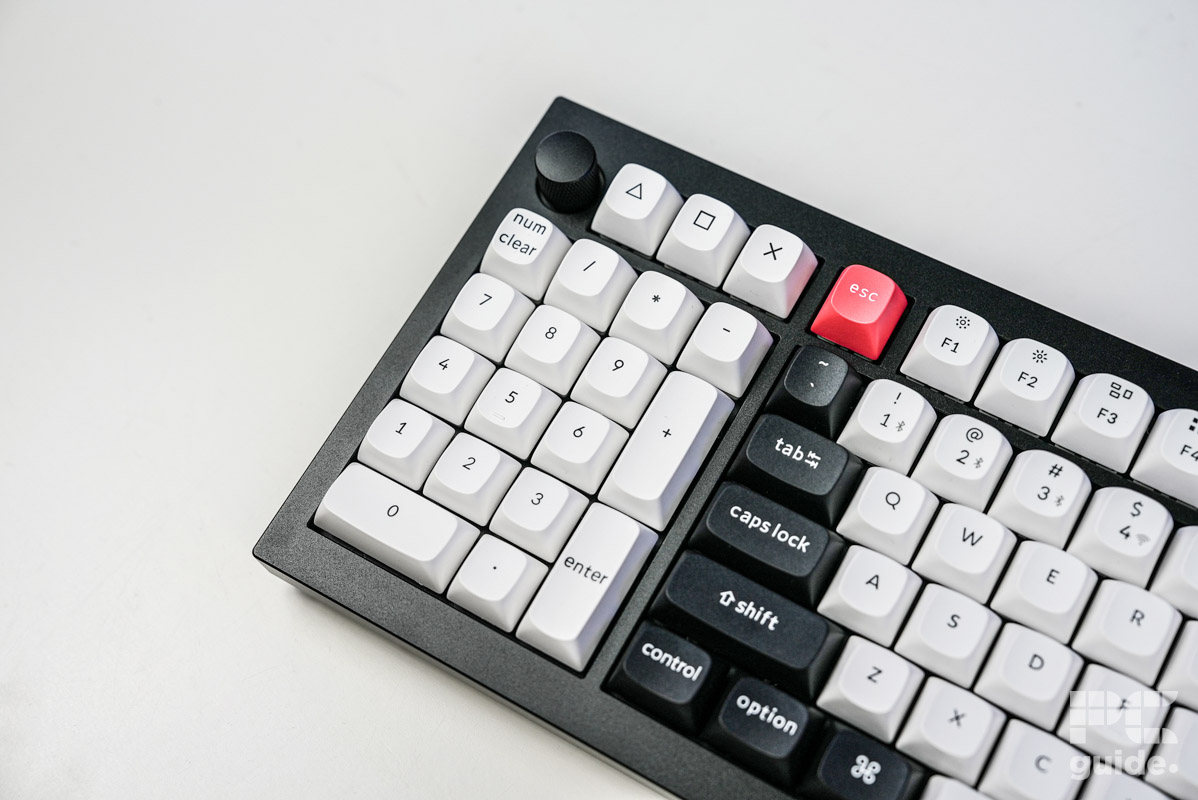
The keycaps are similar PBT keycaps with an OSA profile/shape that we’ve seen in other Keychron boards we’ve reviewed, with good durability oil-resistance. The caps that come with the board do not have shine-through, so you’ll need to buy some additional ones if this is something you’re looking for (though these will have to match the south-facing RGB lighting to work properly).
The only switches you can equip with this board are the Gateron Double-Rail Magnetic Nebula, which have a sensitivity of 0.1mm and an adjustable actuation distance of between 0.2 – 3.8mm that can be set via the in-browser Keychron Launcher software (more on this below). The keyboard comes with QMK firmware which allows for extensive key-remapping, which can again be done in the Keychron Launcher.
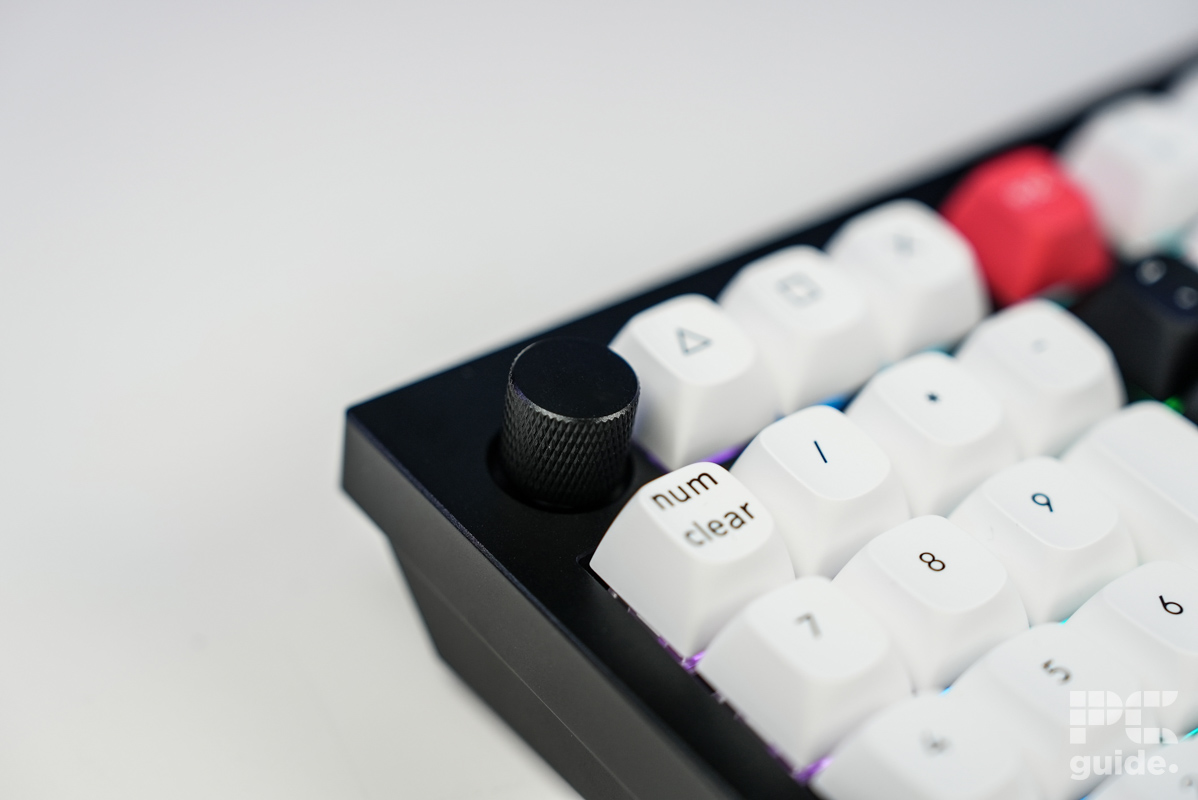
As a 96% size keyboard it lacks the ‘Insert’, ‘End’, Print Screen’, ‘Scroll Block’, and ‘Pause/Break’ keys that you get on a 100% board, but has everything else, and actually there’s an additional ‘light’ key for cycling through the board’s RGB, plus three customizable keys added above the numpad (with △, ◻, X icons) that you wouldn’t normally get. Also above the numpad on the left side is the customisable dial which can be turned or pressed – most typically used for volume control but you can set it to many other functions.
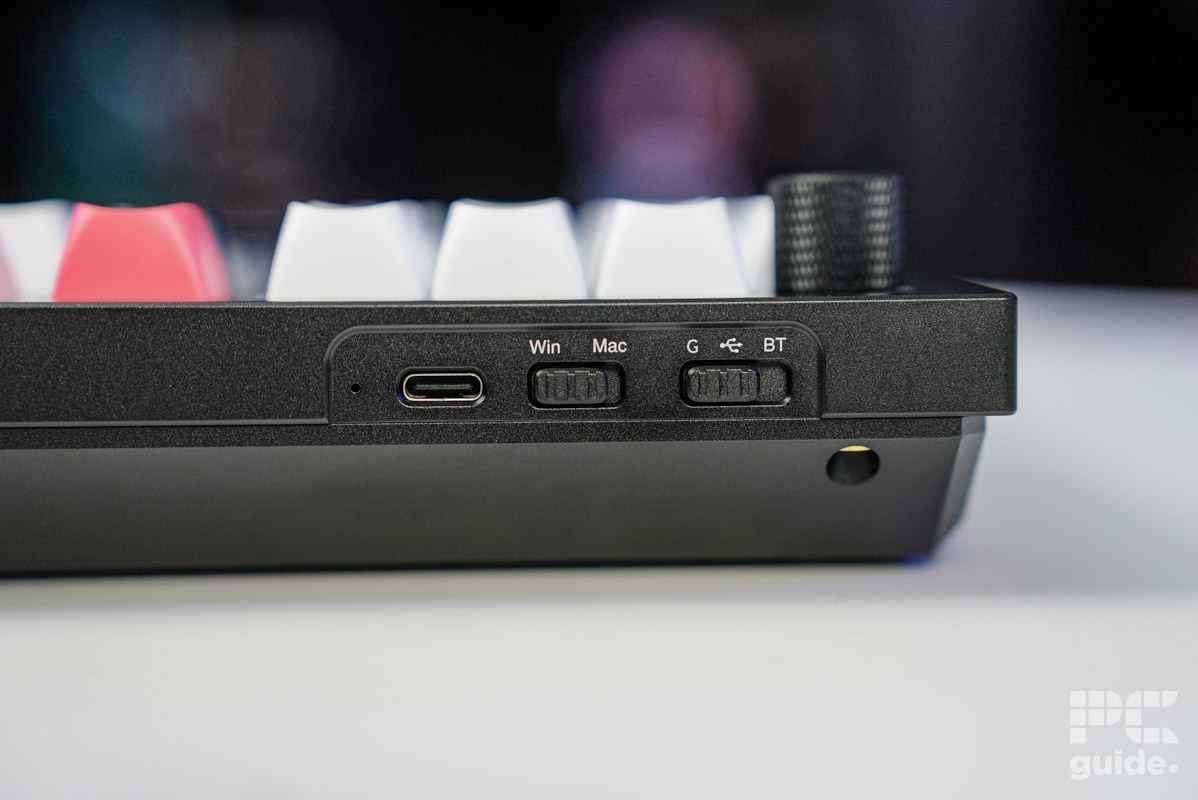
The 1KHz polling rate on the board means 1ms latency, which is fine for the majority of users, though true high-end competitive gamers might wish to look elsewhere for 8KHz capable premium options (though these will typically cost more). As mentioned, connectivity is either by Bluetooth, wired, or wireless connection, which you can select using the switch on the back left of the board.
Performance


The typing experience on the Keychron Q12 HE was very nice, as expected. It’s a louder board than some of the other Keychron models we’ve tested, which were pretty quiet, with the aluminium plate resulting in a more higher-pitched clacking sound than the more milky thock you get on Polycarbonate plate boards. Louder does not equate to loud however – we’d say it’s around the middle of the market in terms of volume. The board has decent stabilization, and the nice key-spacing plus OSA caps and the switches we used minimized typing errors.
From a tactile perspective, the keycaps felt great, with a nice, slightly matte texture, helping to minimize slipping. The lack of ‘shine-through’ lettering to allow the RGB to illuminate the key designations however can potentially make typing in the dark a bit difficult.
In terms of how the switches feel, they’re most similar to the linear Cherry MX Red mechanical switches, and the degree to which you can adjust their actuation is quite impressive. When doing this, the Keychron (web) Launcher is a pleasure to use. Compatible with Windows, macOS, and Linux, it has a nice stripped-back design that’s easy to navigate, and lets you assign macros to the keyboard (including the knob/dial), alter basic key assignment, customize backlighting, and create your own profiles. With the board’s 256K Flash memory, you can save at least six off these on the keyboard itself. Features such as SOCD, DKS, and rapid trigger are all available options – ideal for gamers.
The action of the multimedia dial/knob (which is made of plastic) is fairly quiet, although it doesn’t feel quite as sturdy as the rest of the board, or as good as some of the premium models we’ve tested. The metal chassis feels as solid as a rock however. Although not always a reality for heavier boards like this, the lack of adjustable feet is a feature we miss, and the rubberised, rounded stick-on feet aren’t exactly premium (you do get some spare ones included in the box though).
Aesthetically, Keychron boards continue to use the rather cheap looking font, which is one of the tell-tale signs this is not a true premium board, and one of the main things we hope they change in the future. Besides this though, it’s a nice looking board – we just wish this HE model had more color-variants available to choose from in store.
Final Word: Is the Keychron Q12 HE keyboard worth a buy?
Typically, the main Keychron selling point is that you can get access to many of the features of premium-grade boards at a cheaper price, with the trade-off that the aesthetic quality and some of the other details aren’t quite there with the products of the true quality brands. With the Q12 HE, however, the inclusion of the Hall-Effect switches do push this keyboard’s price into premium territory. Ultimately, whether this board is right for you depends on how much you value specifics like impeccable aesthetics, adjustable feet, and a premium build quality (in every detail) over functionality and adjustability – if the former are less important to you than the latter, then this is an ideal option.
- Form Factor: 96%
- Key-switches: Hall Effect
- Actuation Force / Travel: 40/60gf with variable 0.2-3.8mm travel
- Connectivity: 2.4GHz WiFi / Bluetooth 5.2 / USB Type-C (180cm braided cord), USB-C to A adapter included
- Keycaps: OSA PBT Doubleshot
- Memory: 256K Flash
- Weight: 1546g ± 10g
- Dimensions: 327.53 x 121 x 32.78mm
- Battery: 4000 mAh (rated up to 115 hours with backlight off)
Written by
