



Table of Contents
There were a good number of Philips Evnia displays released in 2025, covering a variety of different sizes, resolutions, and use-cases (we’ve already had the pleasure of reviewing the Evnia 27M2N3800A). This particular model is targeted at budget-focused competitive gamers who just want an FHD/1080p resolution screen with a high maximum refresh rate at an affordable price.
The Philips Evnia 25M2N3200U/00, to give this monitor its full name, is a smaller, 24.5-inch-sized IPS screen with stripped-back connectivity, but a lightning-fast 310Hz refresh rate. Let’s see how it fared in our tests.

- Panel type: IPS
- Resolution: 1920×1080
- Refresh rate: 300Hz (310Hz with OC)
- Response time: 0.3ms with MPRT/MBR enabled
- Panel size: 24.5”
- I/O ports: 2x HDMI 2.0, 1x DisplayPort 1.4, 1x 3.5mm headphone jack
The Philips Evnia 25M2N3200U/00 performs decently as a cheap, compact gaming monitor. Considering the asking price, it has surprisingly good sRGB accuracy and gamut coverage (with some tinkering), solid brightness, and of course the very fast 310Hz maximum refresh rate. The display comes with G-Sync support, although if you want to play at the max refresh rate without motion blur you unfortunately have to maximize MBR, which will disable this (and any other VRR).
The real-world image is marred a bit by the excessive anti-glare coating, which means the final picture isn’t particularly sharp when viewing text considering this is an IPS, and it doesn’t have any USB ports whatsoever, but for competitive gaming on a budget it’s a solid choice, despite the limitations.
- Good value for money
- 310Hz max refresh rate
- Decent brightness
- Great color accuracy for the price
- Good contrast (for an IPS monitor)
- Great adjustability (including portrait mode)
- Great reflection handling
- Heavy anti-glare coating muddies text clarity
- Significant motion blur at max refresh rate unless MBR is maximized
- Backlight bleed as with all IPS monitors
- High sRGB gamut coverage requires tinkering with the OSD
- Plasticky design (though build quality isn’t terrible)
- No USB connectivity
Pricing & availability
The Philips Evnia 25M2N3200U/00 was released in the middle of October 2025, but at the time of writing, it’s quite difficult to find on either Amazon US or Amazon UK. The current MSRP for the display is £160, which puts it in the same region as competing models like the 27-inch, 280Hz ASUS TUF Gaming VG279QM1A.
Latest tech deals.
- AMD Ryzen™ 9 9900X 12-Core - was $499 now $328
- CORSAIR 4000D PC Case - was $124.99 now $75.99
- Hisense 65" Class E6SR - was $549 now $377.99
- Apple 2026 MacBook Air - was $1,999 now $1,799
- Skytech Gaming PC Desktop (9850X3d) - was $4,299 now $3,799
- Apple Magic Mouse - was $79 now $59
- MSI Prestige 16 Flip - was $2,149 now $1,899
- Kotin 9700X Gaming PC - was $2,399 now $2,199
Prices correct as of October 9th, 2026.
Design & specifications


As stated, the Evnia 25M2N3200U/00 comes with a 24.5-inch screen based on an IPS LCD panel with a W-LED backlight. The 1920×1080 resolution on this size screen gives it a PPI (Pixels Per Inch) of 90. The screen has a matte coating to combat reflections, specifically ‘Anti-Glare, 3H, Haze 25%’ according to the specifications on the Philips website: it’s a fairly heavy-looking coating, as we’ll discuss later.
As far as we’re aware, there’s only one color variant – which is an off-black with a slight speckling/dusting effect (common to the other Evnias), of lighter grey and darker black colors. Again, as with the other Evnia we’ve reviewed, the material is a recycled plastic that has an interesting matte, textured feel to it. As you’d expect for the price, the build does feel very plasticky, although reasonably well put together. There is a degree of screen wobble, though we’ve definitely seen much worse in this price bracket from other products.
The adjustability of the stand is top-notch, with a 0-130mm height adjustment, a ±90° pivot that allows you to switch between portrait and landscape, plus a -5° to +20 tilt, and a ±30° swivel. If you want to replace the stand, the monitor is compatible with a 100x100mm VESA mount, though you’ll need to buy this separately.
The limited ports and sockets include two HDMI 2.0 ports, a single DisplayPort 1.4, and a 3.5mm audio jack… and that’s that – there’s no USB ports whatsoever. The 310Hz maximum refresh rate can only be achieved via the DisplayPort connection, with there being a 240Hz cap via the HDMI ports.
The display doesn’t have any integrated speakers, but that’s no loss as monitor speakers are almost always terrible. The joystick/button for the menu is located on the right, behind the monitor, and also acts as the power button.
OSD, features, settings & warranty


As with other Philips Evnia models, we’re not a fan of the OSD control system/layout, specifically the way you go up/down into the submenus, but besides that, it’s pretty much your typical setup.
Features of particular note under the Game Mode menu (which we’ll discuss more later) include SmartResponse (essentially overdrive) which has Off, Fast, Faster, or Fastest settings. There’s also a slider setting under Smart MBR (Motion Blur Reduction) which you can set between 0-20 to minimize motion blur in fast-paced gaming.
There’s a fairly large number of visual presets to choose from, many of which are fairly useless when gaming besides Standard and Movie (which we’ll be testing below), although there is a LowBlue Mode and an EasyRead Mode (basically grayscale/black and white), which are good for general productivity.
The warranty for this display, as with most Philips monitors, is 3 years. You can read more about the terms here.
Screen testing & performance
We conducted our standard array of tests on the monitor using the DisplayCAL software.
Color gamut
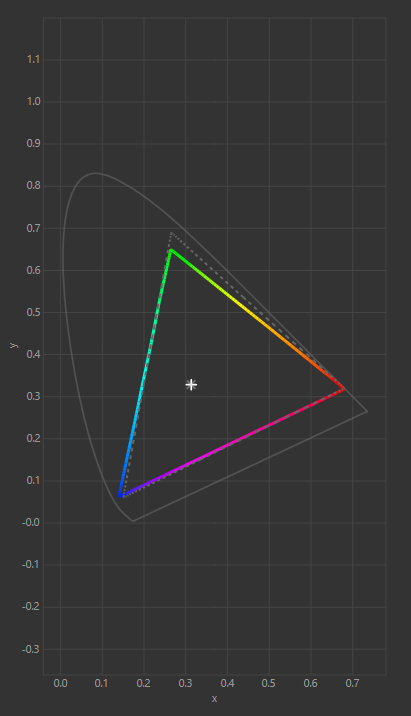
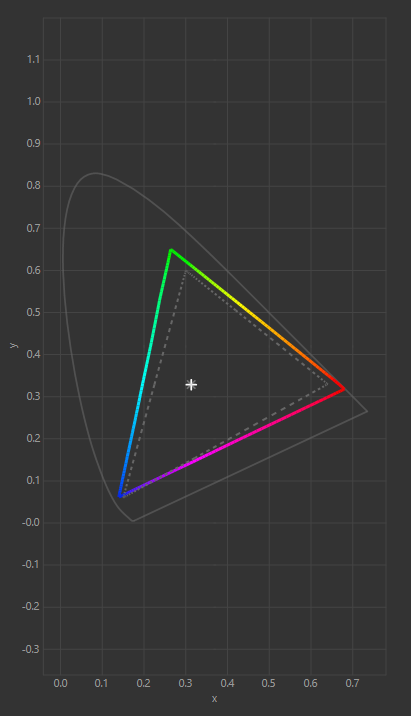

Philips claims 123% sRGB / 91% DCI-P3 / 91% Adobe RGB as a ‘typical’ color gamut coverage on the monitor’s specifications page. In practical testing, however, the display fell short of this as you can see above.
When set to the Standard preset with sRGB Mode selected within in it, we recorded 96.5% sRGB / 71.5% DCI-P3 / 69.4% Adobe RGB – not good at all, however after manually adjusting the RGB settings within the preset (to R:94, G:98, B:98, Brightness: 21) we got the results above specifically 99.2% sRGB / 89.4% DCI-P3 / 87.4% Adobe RGB. This latter result is not bad at all if you’re content with working solely in the sRGB gamut, and means the monitor could potentially be used for color-accurate work.
Color accuracy, contrast, gamma & brightness
In the table below we have listed each of the presets we tested from the menu of the monitor. As ever, we took the white point, black point, contrast ratio, average deltaE*00 (a measure of color accuracy), gamma, and brightness data for each preset. The top row of the table shows the ideal values for each of these data points, though it should be noted that the ‘ideal’ here is a technical standard, and might not reflect presets you’d prefer when viewing your content of choice.
| Monitor preset | white | black | contrast | average deltaE*00 | max deltaE*00 | gamma | Recorded luminance | Brightness setting |
| IDEAL | 6500K | 0/m² | infinity:1 | <2.00 | 2.2 | |||
| Standard | 6683K | 0.0989 cd/m2 | 1199:1 | 2.31 | 6.78 | 2.2 | 118.5cd/m2 | 60 |
| Standard (sRGB Mode + Brightness 20) | 6863K | 0.1018 cd/m2 | 1167.3:1 | 1.19 | 4.22 | 2.24 | 118.85cd/m2 | 20 |
| Movie | 6740K | 0.1279 cd/m2 | 1182.1:1 | 2.98 | 6.81 | 2.38 | 151.1cd/m2 | 30 |
After testing Standard as-is, we enabled sRGB mode and reduced the brightness to 20% to achieve the second result, which was the best we managed to get out of the monitor in terms of the average deltaE*00 score. 1.19 is a fantastic result for this data point, with anything below 2.00 being the threshold for professional color-accuracy. Both contrast and black point were pretty good by IPS standards across the board, as was the white point. Gamma results were good for the Standard presets but not under Movie.
The highest SDR brightness that we recorded was 369.27cd/m² when we set the brightness to 100% under the Standard preset, which is a respectable result and actually higher that the 350 nits claimed by Philips. The lowest brightness measurement we recorded was 49.86cd/m² at 0%, and at 21% brightness we recorded 120cd/m² (the approximate value for natural light).
Panel uniformity
The final step in our DisplayCAL evaluation is the panel uniformity test, which measures how consistently the screen maintains both brightness and colour across its surface. For this assessment, the display is divided into a 5×5 grid, with the centre square used as the benchmark against which all other areas are compared.
Any region with a variance score below 1.00 is shown in green, meaning the deviation is so small it’s essentially imperceptible – exactly what you’d hope for in monitors aimed at professional color work. Scores between 1.00 and 3.00 appear in yellow and indicate moderate variation; readings closer to the lower end of this range rarely pose an issue and generally remain acceptable for colour-sensitive workloads. Anything above 3.00 is highlighted in red and represents a more noticeable inconsistency that could hinder truly accurate editing.

Looking at the results above, most of the grid performs reasonably well, with many green cells and several yellow regions with sub-2.00 scores. The worst performing area was the right-hand side, which was all yellow, with a couple of the segments having an average score just above 2.00.
Overall, we’d say this means the monitor isn’t the best candidate for proper professional work, however amateur level color grading could still be done on it, and it’s completely fine for everyday creative tasks, general productivity, and of course, gaming.
It’s also important to remember that uniformity varies from unit to unit due to the so-called ‘panel lottery’. While these results offer a reasonable indication of typical performance, your own sample may perform slightly better or slightly worse than the one tested here.
Viewing angles


According to Philips, the display should have a 178° viewing angle, but we noticed a significant drop in image quality and color vibrancy before this point, likely in part due to the matte coating. We’d judge the angle to be closer to 150°.
Gaming performance
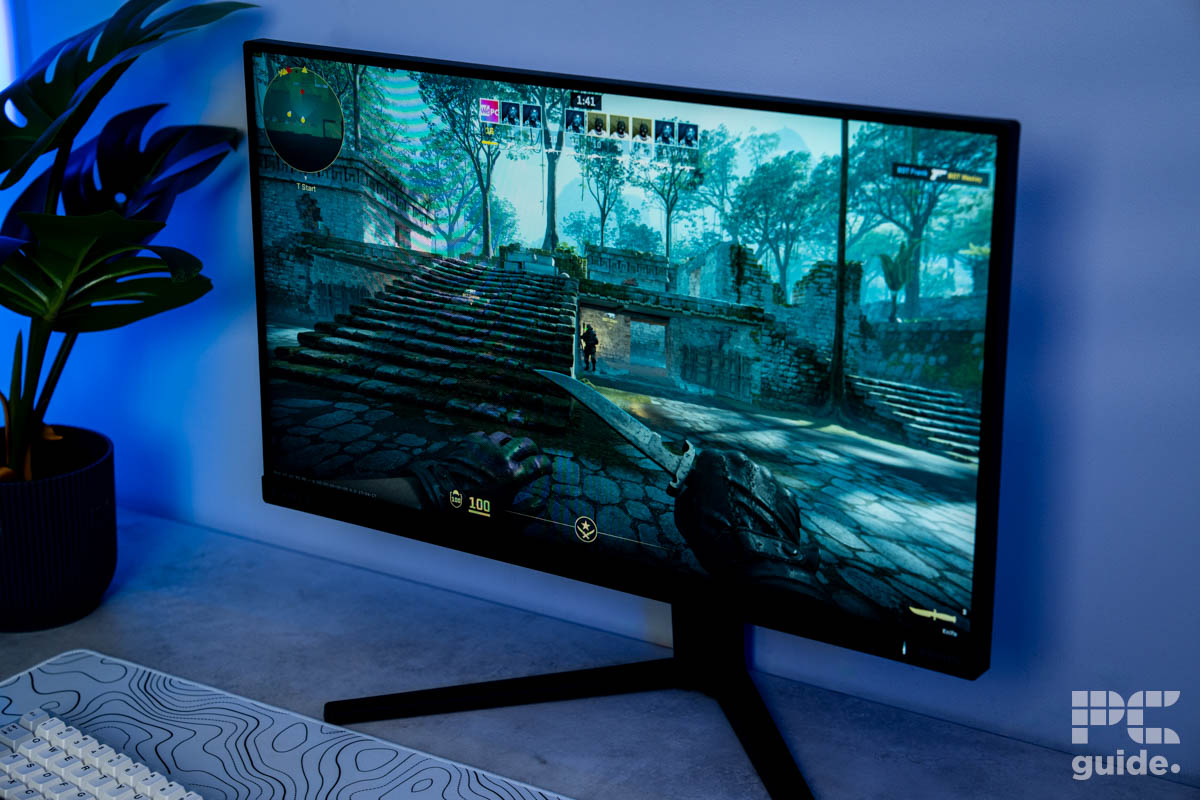
Using our typical range of games, including Cyberpunk 2077, Battlefield 6, DOOM: The Dark Ages, and CS2, we gave the Evnia 25M2N3200U/00 a spin. In the more immersive, single-player titles, the small size of the screen does hamper immersion, and the matte finish removes some of the color vibrancy, but the contrast in the darker scenes was impressive for such a cheap IPS display.
That being said, this monitor is meant for fast-paced competitive gaming, and in Battlefield 6 and CS2 it performed very nicely – with great fluidity thanks to the high refresh rate and only minimal screen tearing thanks to the G-Sync support (albeit more than you’d see in more premium displays). That being said, ghosting and motion blur can be a notable problem on this monitor unless you enable MBR (Motion Blur Reduction) within the OSD menu, which takes care of most of it on the higher settings, but unfortunately also disables Adaptive Sync (i.e. G-Sync or FreeSync). If you want to keep Adaptive Sync enabled, your best bet is to switch on SmartResponse (i.e. overdrive) within the monitor’s settings and set it to ‘fastest’, which certainly improves things but doesn’t quite manage what MBR does, so it’s a trade-off.



General performance & productivity
A screen this small isn’t ideal for productivity, although the respectable peak brightness and matte finish do make it good for reflection handling. The EasyRead preset is nice for reading documents, but generally, the display doesn’t have great text clarity, despite being an IPS. The color replication is good, though in the sRGB space, after playing around with the settings a bit as we did in our screen testing section above, so you can use it for color-accurate productivity tasks within this gamut.
Final Word: is the Philips Evnia 25M2N3200U/00 worth buying?
If you’re solely after a small-sized monitor for competitive gaming at 1080p, then the Philips Evnia 25M2N3200U/00 is worth the money, if you can get over the G-Sync vs motion blur trade-off. Its uses beyond this are a bit limited, and it’s unfortunate that the text clarity isn’t great for general productivity (particularly considering this is an area where IPS monitors typically do well), but if you’re after a specific tool for that specific job, at a very affordable price, then its 310Hz maximum refresh rate is very attractive.
Written by
