

Best NAS for Plex in 2026


Table of Contents
Plex remains one of the best ways to organise and stream your personal media collection, but not every NAS is built to handle it well. While basic file storage is relatively undemanding, Plex can place heavier demands on a system, particularly when transcoding video for playback across different devices. For most users, a good Plex NAS needs more than just plenty of storage bays. Processor performance, hardware transcoding support, memory capacity, and network connectivity can all have a major impact on your experience, especially if streaming 4K content.
During testing, we found the UGREEN AI NASync iDX6011 to be the best NAS for Plex overall, albeit slightly overkill for some. Its powerful Intel Core Ultra processor, extensive expansion options, dual 10GbE networking, and excellent storage flexibility make it one of the most capable consumer NAS devices currently available.
Products at a glance
-
Best premium NAS for Plex
UGREEN AI NASync iDX6011
- Processor: Intel Core Ultra 5 125H
- Memory: 32GB / 64GB LPDDR5x
- Max storage: 196TB (6 SATA + 2 NVMe)
- Networking: Dual 10GbE (20Gbps aggregate)

-
 Best value 4-bay NAS
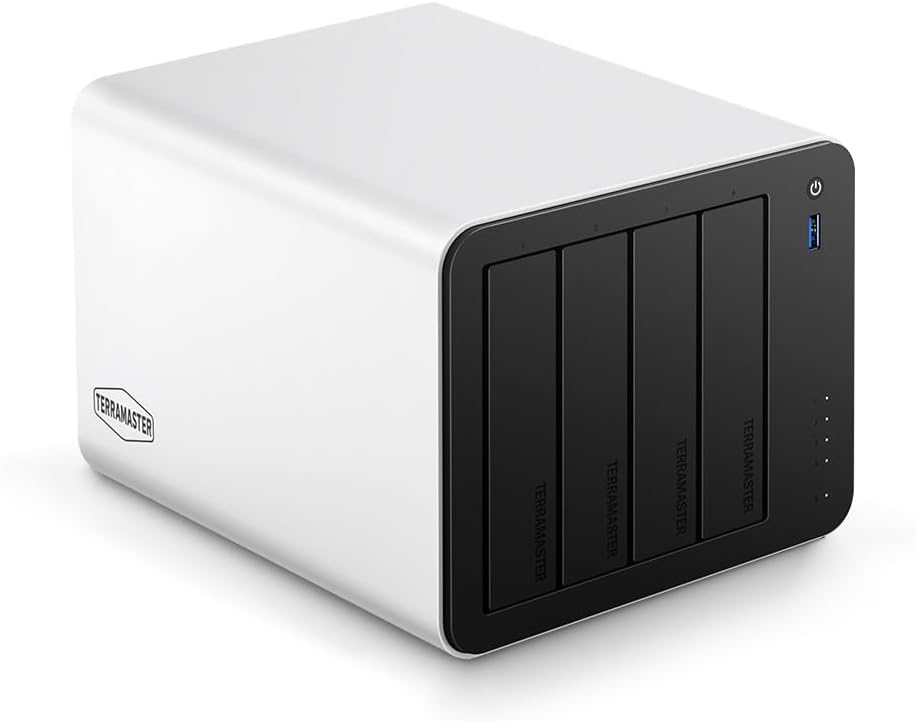
TERRAMASTER F4-425 Plus
- Processor: Intel N150 Quad-Core
- Memory: 16GB
- Max storage: 144TB (4× HDD + 3× M.2 SSD)
- Networking: Dual 5GbE LAN Ports up to 1020MB/s
-
 Best budget NAS for Plex
TERRAMASTER F2-425
- Processor: Intel x86 Quad-Core
- Memory: 4GB
- Max storage: 60TB
- Networking: 2.5GbE
-
 Best Synology for Plex
Synology DS225+
- Processor: Intel Celeron J4125
- Memory: 2 GB
- Max storage: 48 TB
- Networking: 2.5GbE



How PC Guide tests NAS devices
At PC Guide, we evaluate NAS devices based on performance, ease of use, connectivity, expandability, and overall value. We look at everything from the initial setup process and software experience through to storage configuration, networking options, and hardware capabilities.
Latest tech deals.
- AMD Ryzen™ 9 9900X 12-Core - was $499 now $328
- CORSAIR 4000D PC Case - was $124.99 now $75.99
- Hisense 65" Class E6SR - was $549 now $377.99
- Apple 2026 MacBook Air - was $1,999 now $1,799
- Skytech Gaming PC Desktop (9850X3d) - was $4,299 now $3,799
- Apple Magic Mouse - was $79 now $59
- MSI Prestige 16 Flip - was $2,149 now $1,899
- Kotin 9700X Gaming PC - was $2,399 now $2,199
Prices correct as of October 9th, 2026.
For Plex-focused recommendations, we place particular emphasis on processor performance, hardware transcoding support, storage flexibility, and long-term upgrade potential. We combine hands-on testing, where available, with extensive market research to identify the NAS devices that offer the best experience for media streaming and home server workloads.
The best NAS for Plex
From affordable two-bay systems to high-performance devices, these are the NAS we recommend for Plex.
1. UGREEN AI NASync iDX6011



- Processor: Intel Core Ultra 5 125H
- Memory: 32GB / 64GB LPDDR5x
- Max storage: 196TB (6 SATA + 2 NVMe)
- Networking: Dual 10GbE (20Gbps aggregate)
- Exceptional performance from Intel Core Ultra platform
- Dual 10GbE networking
- Six drive bays with NVMe expansion
- Thunderbolt 4 connectivity
- Expensive
- UGOS Pro still lacks the maturity of DSM
The UGREEN AI NASync iDX6011 is one of the most powerful consumer NAS devices we’ve tested, making it an easy choice for our top spot. It’s worth noting that this device may be total overkill for many users, but it is one of the best for those in the market for something premium. Its Intel Core Ultra processor has more than enough performance for large media libraries, multiple concurrent streams, and demanding transcoding workloads, while dual 10GbE networking ensures it won’t become a bottleneck as your storage needs grow. Between its six drive bays, NVMe support, PCIe expansion, and Thunderbolt 4 connectivity, it can comfortably serve as the centrepiece of a home lab, creative workflow, or large Plex setup. It’s expensive, but if you want a NAS that can do everything, this is one of the best options currently available.
2. TERRAMASTER F4-425 Plus
- Processor: Intel N150 Quad-Core
- Memory: 16GB
- Max storage: 144TB (4× HDD + 3× M.2 SSD)
- Networking: Dual 5GbE LAN Ports up to 1020MB/s
- Intel N150 processor with hardware transcoding + 16GB DDR5 memory included
- Dual 5GbE networking
- Three M.2 slots
- TOS software still trails DSM for ease of use
- Overkill for users with small media libraries
The TerraMaster F4-425 Plus sits in a sweet spot between entry-level NAS devices and far more expensive models. Its Intel N150 processor and generous 16GB of DDR5 memory provide plenty of headroom for Plex, whether you’re streaming locally, managing a growing media library, or running additional services alongside your media server. Dual 5GbE networking, three M.2 slots, and four drive bays give it a level of flexibility that’s difficult to find at this price point.
3. TERRAMASTER F2-425
- Processor: Intel x86 Quad-Core
- Memory: 4GB
- Max storage: 60TB
- Networking: 2.5GbE
- Affordable entry point for Plex users
- Intel processor with hardware transcoding support
+ 2.5GbE networking - Compact and power-efficient design
- Limited to two drive bays
If you’re building your first Plex server, the TerraMaster F2-425 is one of the easiest recommendations to make. It focuses on the features that matter most, pairing an Intel processor with hardware transcoding support and modern networking while keeping costs relatively low.
4. Synology DS225+
- Processor: Intel Celeron J4125
- Memory: 2 GB
- Max storage: 48 TB
- Networking: 2.5GbE
- Excellent DSM software platform
- Intel processor with hardware transcoding support
- Dedicated 2.5GbE networking
- Straightforward setup and management
- More expensive than some similarly specced rivals
The Synology DS225+ is another NAS we’d recommend to anyone buying their first Plex server. While some competitors offer stronger hardware specifications on paper, Synology continues to lead when it comes to software, usability, and long-term ownership experience. DSM remains one of the best NAS operating systems available, making everything from initial setup to backups, remote access, and media management remarkably straightforward.
Do I need Plex Pass for a NAS?
One of the most common mistakes new users make is assuming every feature is available with the free version. While basic media streaming works without issue, features such as hardware-accelerated transcoding require a Plex Pass subscription. If you plan to stream content remotely, share your library with family, or make use of a NAS’s hardware transcoding capabilities, Plex Pass is often worth the investment. Without it, transcoding tasks rely solely on the CPU, which can significantly impact performance.
How much storage do I need for a Plex server?
The answer depends entirely on the size and quality of your media collection. A modest library of movies and TV shows can fit comfortably on a few terabytes of storage, while large 4K collections can quickly consume tens of terabytes. For most, a two-bay NAS provides enough capacity to get started, particularly when paired with larger modern hard drives. If you expect your library to grow substantially over time, investing in a four-bay or larger NAS can provide more flexibility and reduce the need for future upgrades.
Final word
Plex places different demands on a NAS than standard file storage, making processor performance, hardware transcoding support, and long-term expansion just as important as raw capacity. The right choice ultimately depends on the size of your media library, how you stream your content, and how much room you want to leave for future growth. While our top choice, the UGREEN AI NASync iDX6011, is overkill, the specs will not let you down.
Written by
