


Table of Contents
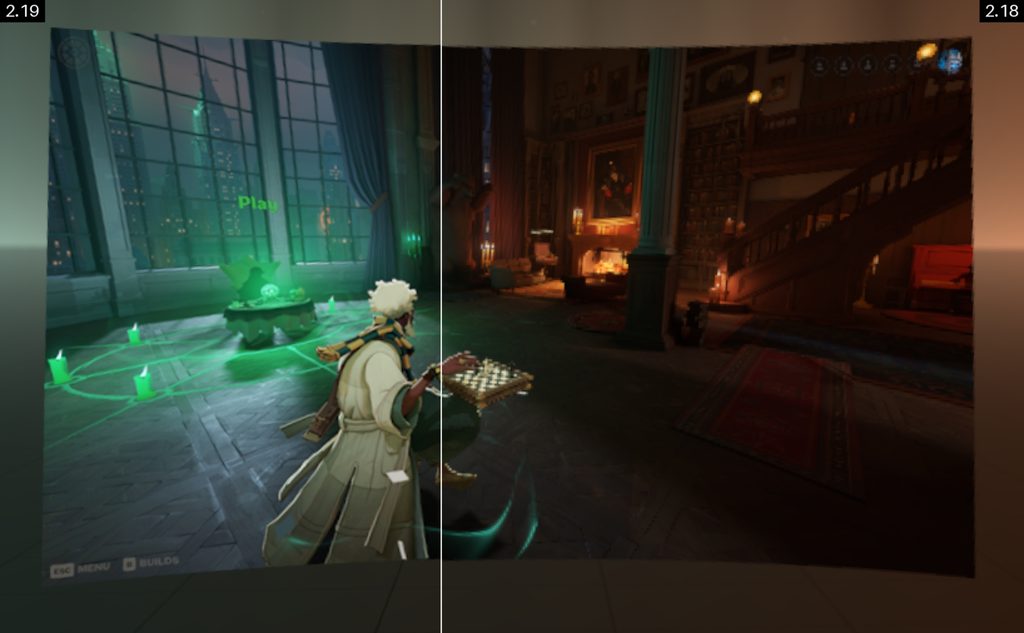
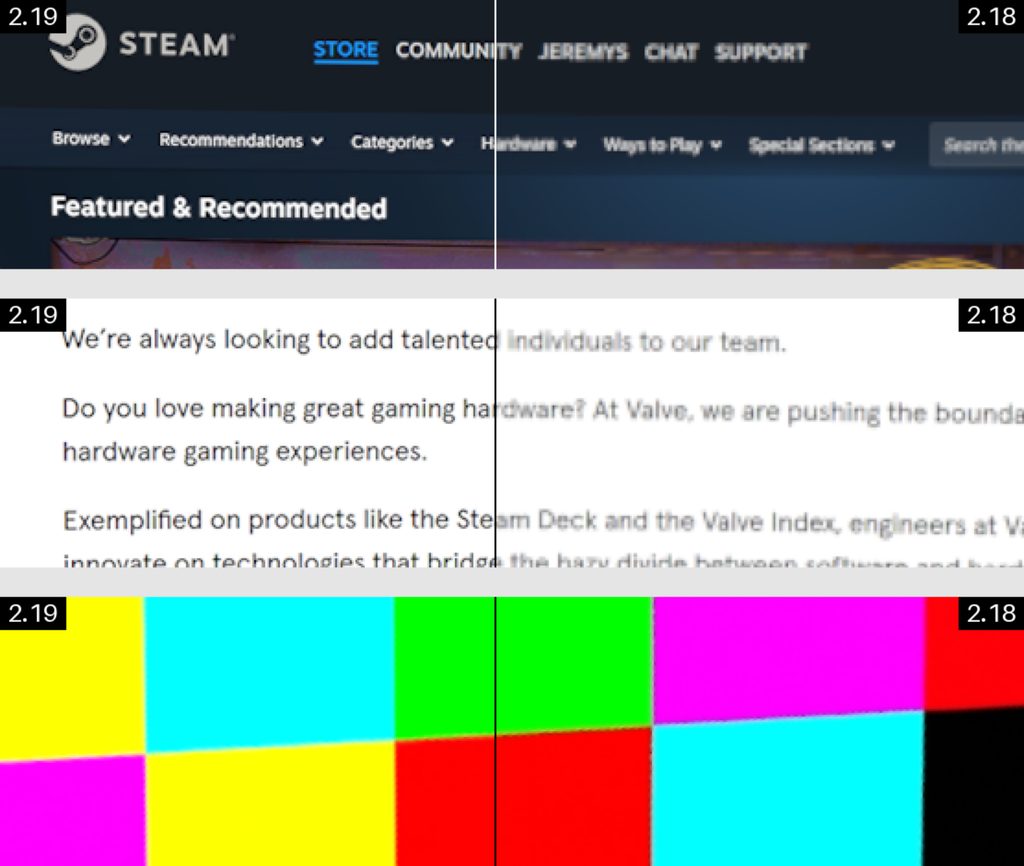
The latest SteamVR beta (version 2.19) has been released, and there’s lots to unpack. One of the standout improvements is the streamed image quality, resulting in “sharper text, clear colors, and better detail,” says Valve. The default render resolution has been upped to render scale 1.5, or 1.4x the headset’s panel resolution, while the default encoded video size has grown from 1152 to 1216 on the Steam Frame.
There should also be higher-quality visuals in your peripheral vision while in VR, as Valve has improved the downscaler for visuals outside of the foveated region. Aside from the straight-up better resolution/rendering, there’s also “improved color clarity” thanks to a new higher-quality filter in effect, along with better brightness preservation, crisper text and UI, and more.
It’s no surprise to see SteamVR development being pushed after Valve launched its new VR headset in September, with more than 4% of headset owners rocking the “streaming-first” Steam Frame, according to the latest Steam Survey. Valve is still rolling out invites through the length reservation queue, so we can only expect this number to grow, especially with the Valve Index now discontinued.
Latest tech deals.
- AMD Ryzen™ 9 9900X 12-Core - was $499 now $328
- CORSAIR 4000D PC Case - was $124.99 now $75.99
- Hisense 65" Class E6SR - was $549 now $377.99
- Apple 2026 MacBook Air - was $1,999 now $1,799
- Skytech Gaming PC Desktop (9850X3d) - was $4,299 now $3,799
- Apple Magic Mouse - was $79 now $59
- MSI Prestige 16 Flip - was $2,149 now $1,899
- Kotin 9700X Gaming PC - was $2,399 now $2,199
Prices correct as of October 9th, 2026.
SteamVR 2.19.1 patch notes
Below you can find the full SteamVR 2.19.1 patch notes if you’re looking to delve deeper into the latest version. VR owners can even compare the two versions thanks to ‘Default’ and ‘Legacy’ options within Steam Link settings. Anyone looking to move to the beta version can do so by locating SteamVR in their Steam Library > Right-click SteamVR > Properties > Game Versions & Betas > Beta Participation > Beta – SteamVR Beta Update.
Streaming (Steam Link):
- Higher Default Resolution
- Increased the default recommended render resolution for streamed PC VR applications (render scale 1.5, targeting 1.4× the headset’s panel resolution).
- Steam Link no longer runs a GPU performance test to choose the recommended resolution.
- Increased the default encoded video size on Steam Frame from 1152 to 1216.
- Sharper Colors and Details
- Improved color clarity, using higher-quality filter to downsample color before encoding, preserving fine colored details.
- Improved brightness preservation at edges between strongly saturated colors (see below).
- Sharper peripheral image quality through higher-quality downscaling outside the foveated region.
- Crisper text and UI throughout SteamVR, including the dashboard, third-party overlays, theater screen, and SteamVR Home.
- A new system-layer rendering pipeline renders foveated and non-foveated views directly from their source textures, eliminating an intermediate render texture and an extra resampling step.
Compare Before and After
Interested users can compare the new streaming quality with the previous implementation. On the host PC, go to Steam Link > Advanced > Stream Quality and choose Default or Legacy. Legacy reproduces the previous streaming image quality.
Additional Steam Link (Streaming) Updates:
- Reorganized the Steam Link settings page.
- Added Preferred Foveated Sharpness (System UI) under Steam Link (on your PC). Adjust the size of the sharp foveated region for the SteamVR interface, choosing a narrower, sharper area or a wider area.
- Fixed several issues that could cause incorrect frame timing at startup.
- Fixed a possible cause of Error 17.
- Fixed IPv4 and IPv6 address comparisons when selecting network links.
- Improved head motion prediction.
- Corrected eye view poses for projection layers to include the eye-to-head offset.
- Added per-application refresh rate overrides.
- When connecting an eye-tracking headset, SteamVR now asks whether to share eye tracking data with PC applications.
- Improved eye-tracked foveation alignment during rapid head movement.
- Meta Quest: Fixed the 72 Hz notification remaining visible in Battery Saver mode
- HTC Focus Vision: Added support for face tracking data over OSC with the face-tracking accessory
General:
- Improved image quality for SteamVR Interface and 3rd party overlays. (smoother edges, reduced shimmer, fewer visual artifacts, and better image quality at different distances)
- Updated Settings > Video > Overlay Render Quality to use improved filtering, with a new Ultra quality option. Also available under Steam Link > Advanced.
- Reduced aurora color movement during theater transitions.
- Added a minimum brightness to stars in the construct, preventing the environment from becoming completely black.
- Fixed laser mouse dragging being interrupted by grip presses or brief tracking loss.
- Per-application settings now show “Not Supported” when Motion Smoothing is unavailable.
- Fixed settings sliders extending beyond their tracks for out-of-range values, and Advanced-only sliders not hiding correctly.
- Improved anti-aliasing on the play area floor grid.
- Fixed a crash during shared resource manager shutdown.
- Fixed a crash caused by a dangling texture during Steam’s VR manager shutdown.
- Fixed a crash when unblocking previously blocked add-ons.
- Fixed crashes in SteamVR’s web handler caused by malformed requests.
OpenXR:
- Added XR_KHR_composition_layer_cylinder support on PC and Steam Frame.
- Added XR_FB_composition_layer_image_layout support on Steam Frame.
- Added XR_EXT_stationary_reference_space support.
Linux:
- SteamVR now runs under the Sniper runtime, supporting Steam Runtime 3 clients while retaining the scheduling priority SteamVR needs.
- Non-Proton OpenXR games can now launch without SteamVR already running.
- OpenVR and OpenXR runtimes can now run inside Flatpak, bubblewrap, and other sandbox environments.
- Added a symlink for the 32-bit OpenXR runtime, which can also be used by Proton.
- Added support for all Render Quality options. (High quality samplers were previously disabled)
Written by
