


Table of Contents
When it comes to covering your home with strong WiFi coverage, mesh routers are one of the easiest ways to do it. Often offered with one central router and multiple satellites, they work in tandem to provide greater range for your wireless network in a large home. With that in mind, Netgear has a great range of options to choose from to satisfy those needs.
One of the newer options in Netgear’s lineup is the Orbi 970 range. Expanding on its already extensive options, the WiFi 7 router comes with greater coverage, faster speeds, and support for a larger number of concurrent devices. So, I got hands-on with the router to see what it is capable of and what the setup process is like.
- Standard: WiFi 7
- Frequency Bands: 6GHz, 5GHz-1, 5GHz-2, 2.4GHz
- Max Speed: 27Gbps
- LAN Ports: 1x 10Gbps & 4x 2.5Gbps (Router), 1x 10Gbps & 2x 2.5Gbps (Satellites)
- WAN Ports: 1x 10Gbps (Router)
- CPU: Quad-core 2.2 GHz
- Memory: 2GB RAM and 4GB Flash
- USB: N/A
- Dimensions (HxWxD): 294.03 x 144.38 x 130.79mm (11.58 x 5.68 x 5.15 inches)
- Weight: 1.79kg (3.96 lbs)
The Netgear Orbi 970 is the next-generation mesh router that somehow still manages to improve on the WiFi 7 capabilities. It expands on the number of connections available and the range the three-pack can achieve. That does come at a ludicrously high price, though, nearly doubling what the 870 costs, so it’s definitely not an affordable option for a large network.
Even then, you still have to pay a subscription to get their extra Armor security and much-improved parental controls. So it can be a kick in the guts to have to pay even more. But if you can afford it, you certainly get an impressive and fast network to take advantage of, with options for guest and IoT networks too.
- Very fast connectivity across the board
- Low latency across frequencies
- Lots of high-speed Gigabit Ethernet ports on the router and satellites
- Easy setup process including satellites
- Plenty of security options and multiple networks available
- Large coverage
- Very expensive, a big jump over previous generations even
- Locks parental controls and key Armor behind subscription
- Still no USB ports on it
- Limited WiFi control and setup options on main network
Design
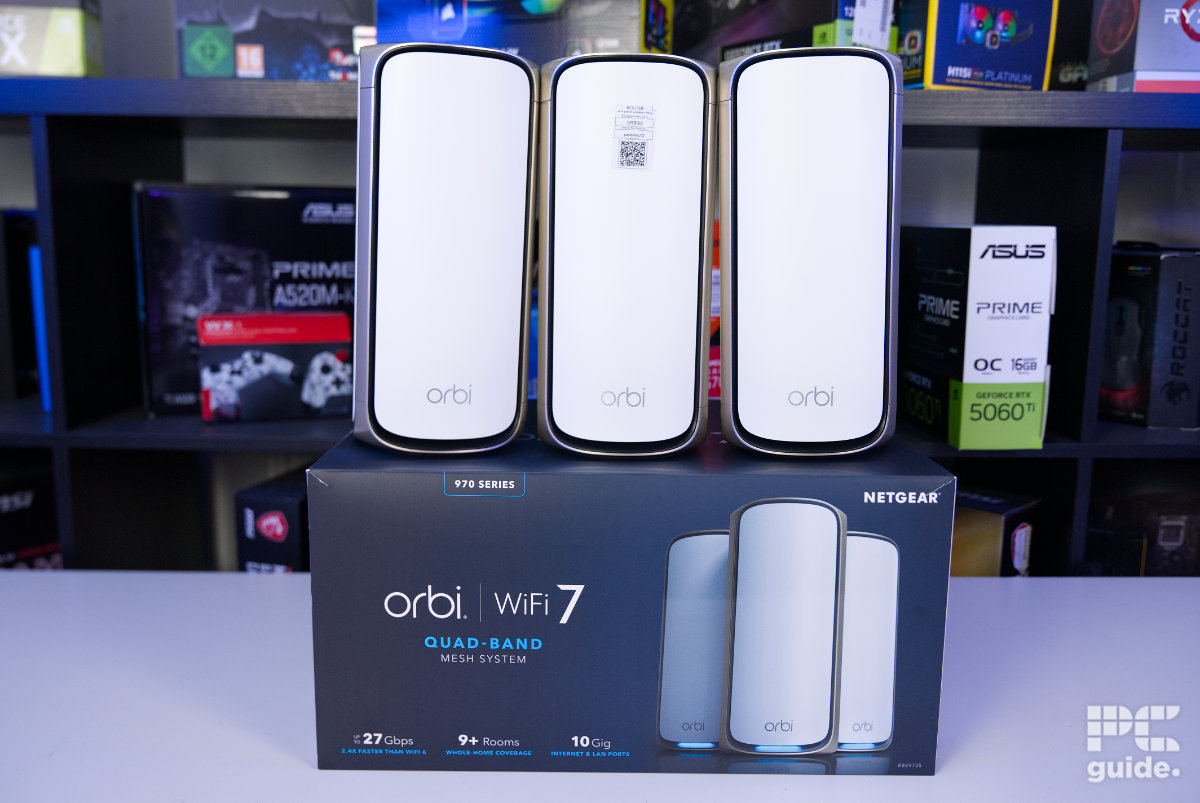
To start with, the box the Orbi RBE973S comes in is no small thing. With the three-pack all in one, it’s definitely a massive and bulky package to try and move around. Each of the individual units weighs in at 1.79 kg (3.96 lbs), meaning a total of 5.37 kg (11.88 lbs) just for the hardware, with plenty of other bits also included inside the box.
Latest tech deals.
- AMD Ryzen™ 9 9900X 12-Core - was $499 now $328
- CORSAIR 4000D PC Case - was $124.99 now $75.99
- Hisense 65" Class E6SR - was $549 now $377.99
- Apple 2026 MacBook Air - was $1,999 now $1,799
- Skytech Gaming PC Desktop (9850X3d) - was $4,299 now $3,799
- Apple Magic Mouse - was $79 now $59
- MSI Prestige 16 Flip - was $2,149 now $1,899
- Kotin 9700X Gaming PC - was $2,399 now $2,199
Prices correct as of October 9th, 2026.

Netgear Orbi RBE973S box top, Image by PC Guide

Netgear Orbi RBE973S box front, Image by PC Guide

Netgear Orbi RBE973S box back, Image by PC Guide

Netgear Orbi RBE973S side (1), Image by PC Guide
Opening up the great big box, I am greeted with another large one. This one is a lot sturdier, though, and lacking all the coloring and product information, it’s plain white instead. Embossed with the Orbi logo, opening it up reveals yet another box on top. This one is flat and not as deep, so it can be taken out much more easily, as it only holds the accessories and takes up a lot less space.
Inside that top box are the quick-start instructions and some extra information. Opening it up, everything is essentially sorted into three columns. For each unit, there is a power brick and cable, and in our case, it comes with either a UK or EU plug tip to attach to it. Plus, a single Ethernet cable is also included to the side of the box.

Netgear Orbi RBE973S inner box, Image by PC Guide

Netgear Orbi RBE973S inner box open, Image by PC Guide

Netgear Orbi RBE973S accessories box, Image by PC Guide
Taking that whole thing out, it unveils the three Orbi units underneath. With the router in the center and the two satellites on either side of it. Each one is nicely tucked away in its individual box, where they are wrapped in plastic. Then there are ribbons coming out from beside each one to Taking that whole thing out unveils the three Orbi units underneath, with the router in the center and the two satellites on either side. Each one is nicely tucked away in its own individual box, where they are wrapped in plastic. There are also ribbons coming out from beside each one, making it easier to pull them out.easily be able to pull them out.
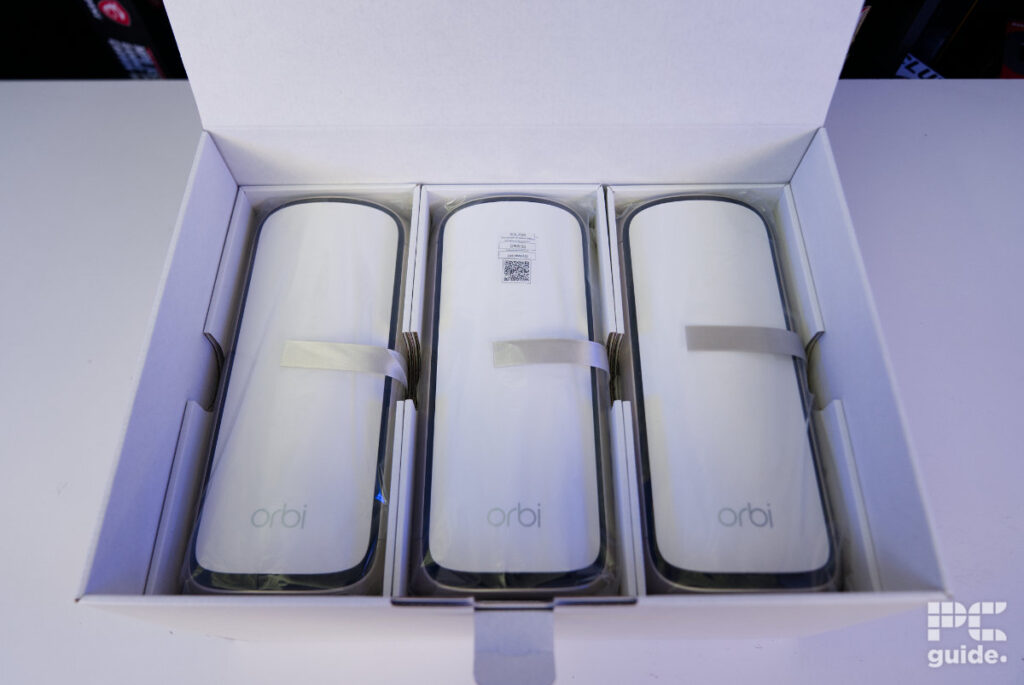
Taking the three of them out, there isn’t too much difference between each unit. The primary router can be easily recognized by the QR code and login details on the front. On the back, it also has extra connection ports compared to the satellites. It has four 2.5Gbps LAN ports and an additional 10Gbps port, in addition to the other 10Gbps LAN port, whereas the satellites feature just one 2.5Gbps and two 10Gbps ports.

Netgear Orbi RBE973S trio front, Image by PC Guide

Netgear Orbi RBE973S main router front, Image by PC Guide

Netgear Orbi RBE973S main router rear IO, Image by PC Guide
In general, this generation of Orbi adds some silver and black accents to its otherwise white-themed design. With the faceplates rounded, the three of them are surrounded by a black border and silver lining. This creates a rather elegant, fine-looking design that attempts to blend in rather than stand out, unlike some gaming routers might – especially with all twelve antennas built inside rather than sticking out.

Netgear Orbi RBE973S satellite front, Image by PC Guide

Netgear Orbi RBE973S satellite side, Image by PC Guide
Netgear Orbi RBE973S main router front, Image by PC Guide

Netgear Orbi RBE973S main router left side, Image by PC Guide

Netgear Orbi RBE973S main router right side, Image by PC Guide
At the top, these silvery sides culminate in a ring with a dip before a central circle is formed. The bottom instead has a rubber ring around the center as its base, with more network information in the middle and two mounting holes as well. Down the spine of the routers and satellites, the silver section is wider and accommodates the connections and controls.

Netgear Orbi RBE973S top, Image by PC Guide

Netgear Orbi RBE973S satellite top & bottom, Image by PC Guide

Netgear Orbi RBE973S bottom, Image by PC Guide

Netgear Orbi RBE973S satellite rear, Image by PC Guide

Netgear Orbi RBE973S satellite rear IO, Image by PC Guide

Netgear Orbi RBE973S main router rear, Image by PC Guide
Finally, there are the lights on the routers. Plugging it in via the barrel jack, there is a simple green light above to show that it is powered. At the front, it has a more obvious and larger light shining from the bottom behind the panel. Shining down onto the table underneath it, this varies between a range of colors depending on its status, making it easy to spot and understand.

Netgear Orbi RBE973S front light, Image by PC Guide

Netgear Orbi RBE973S power cable and light, Image by PC Guide
Setup and other features
Setting up the RBE973S is a rather straightforward process. With the instructions being fairly basic and included in the box, they direct you to install the Orbi app on your phone. It was a process that took some time to configure, as it first connects to the router, making me wait around five minutes for it to completely boot.
From there, it is a fairly simple process of following the instructions and setting the network to your preference. It then prompts you to set up the satellites, which only requires plugging them in and letting them automatically connect to the router. One thing that did keep coming up during this time was the help dialog. Seemingly every time I put my phone down with a bit more weight than usual, it would pop up for some reason.

Netgear Orbi RBE973S setup (1), Image by PC Guide

Netgear Orbi RBE973S setup (2), Image by PC Guide

Netgear Orbi RBE973S setup (3), Image by PC Guide

Netgear Orbi RBE973S setup (4), Image by PC Guide

Netgear Orbi RBE973S setup (5), Image by PC Guide

Netgear Orbi RBE973S help prompt, Image by PC Guide
After the setup, I was taken to the dashboard of the Orbi app. This contains a range of settings and further adjustments that can be made to the router beyond what it initially offers during setup. Primarily, it has options for creating both guest and IoT networks, which can both be used to add security, as well as creating separate frequency options, with the main network running an all-in-one setup.
There are also options for both parental controls and Armor security, but both are very limited in what you can do for free. This is rather frustrating, as it’s already an expensive router, and it’s surprising that it doesn’t include those features as standard but instead locks them behind a subscription. As it stands, the parental controls are fairly basic, with the free options essentially limited to disconnecting devices from the web.

Netgear Orbi RBE973S settings and IoT WiFi, Image by PC Guide

Netgear Orbi RBE973S router and WiFi settings, Image by PC Guide

Netgear Orbi RBE973S home and network map, Image by PC Guide

Netgear Orbi RBE973S Armor and parental controls, Image by PC Guide
Pricing
One of the big drawbacks of this router is just how expensive it is. The three-pack is available for a whopping $1,999.99/£2,199.99, with individual satellites coming in at $799.99/£799.99. Even for a Netgear router, it is expensive, as previous ones we’ve reviewed haven’t quite reached that level.
Take the Orbi 870, for example, which was half that at $999.99/£899.99. Or something like the Acer Wave 7, which is a fraction of that at £300. Looking at its standalone routers, the RS600 costs $500/£500, so it is the cost of the newer build and mesh setup that pushes this to such an astronomical price.
Performance
With it all set up and checked out, I then evaluated its performance. Connecting it up to our network, which had a speed of around 300 Mbps, I connected my Google Pixel 9 Pro and PC to test its speed and coverage. I used the WiFiMan and Speedtest apps for this. These tests were done using just the one router, so I could compare it with other routers in our testing.
Signal strength
First up is the signal strength of the router, seeing how far the main unit itself can reach and how strong a signal it provides at various distances. I measured at four distances: 10ft/3m, 30ft/9m, 60ft/18m with a room in between, and 90ft/27m with two rooms in between. The signal is given in negative dBm, so the closer to zero it is, the stronger the signal.
In the case of the Orbi, on 2.4 GHz, it sits at a decent strength and is similar to other routers at this level. But at 5 and 6 GHz, it is a bit weaker, while still being capable of connecting at longer distances. Not without some cost, as the speed will showcase in the next test, but that’s where the satellites come in to extend the range and speed.
| Distance (ft/m) | Netgear Orbi RBE973S 2.4GHz | Netgear Orbi RBE973S 5GHz | Netgear Orbi RBE973S 6GHz | Netgear Orbi 770 2.4GHz | Netgear Orbi 770 5GHz | Acer Wave 7 2.4GHz | Acer Wave 7 5GHz | Acer Wave 7 6GHz |
|---|---|---|---|---|---|---|---|---|
| 10/ 3 | -46 | -54 | -60 | -46 | -46 | -44 | -44 | -58 |
| 30/ 9 | -59 | -53 | -58 | -54 | -56 | -47 | -56 | -69 |
| 60/ 18 + wall | -70 | -71 | -77 | -69 | -69 | -62 | -68 | -83 |
| 90/ 27 + 4 walls | -85 | -75 |
Speed
At those distances, I also measured the speed of the router. First, I looked at the PHY speeds, which measure the physical connection speed between the phone and router, and then an actual internet speed test to see what it achieves at that range. The latter is more limited in speed due to our broadband connection, but it is still a good comparison.
Firstly, with the PHY speed, the RBE973S manages to maintain its speed across the 2.4 GHz frequency, while at 5GHz it does slowly lose connection over the distance, as does 6 GHz but to a smaller extent. That is to be expected, and it manages to maintain a greater speed in general.
When it comes to the speed test, it’s actually 2.4 GHz that loses the most speed, while 5 GHz and 6 GHz maintain their faster speeds close to the 300 Mbps limit. This is very much on track with the other routers, which follow a similar trend. It also keeps that performance up over LAN, where the speeds utilize the full extent of the WAN connection.
| Distance (ft/m) | Netgear Orbi RBE973S 2.4GHz | Netgear Orbi RBE973S 5GHz | Netgear Orbi RBE973S 6GHz | Netgear Orbi 770 2.4GHz | Netgear Orbi 770 5GHz | Acer Wave 7 2.4GHz | Acer Wave 7 5GHz | Acer Wave 7 6GHz |
|---|---|---|---|---|---|---|---|---|
| 10/ 3 | 103/258 | 2268/2161 | 2401/2882 | 229/258 | 960/1200 | 216/229 | 1134/1134 | 1814/1633 |
| 30/ 9 | 103/229 | 1729/172 | 2041/2041 | 172/229 | 720/864 | 195/216 | 816/816 | 1633/1102 |
| 60/ 18 + wall | 137/172 | 816/864 | 1152/1102 | 51/137 | 216/432 | 97/146 | 680/544 | 432/367 |
| 90/ 27 + 4 walls | | 48/34 | | 25/34 | | | | |
| Distance (ft/m) | Netgear Orbi RBE973S 2.4GHz | Netgear Orbi RBE973S 5GHz | Netgear Orbi RBE973S 6GHz | Netgear Orbi 770 2.4GHz | Netgear Orbi 770 5GHz | Acer Wave 7 2.4GHz | Acer Wave 7 5GHz | Acer Wave 7 6GHz |
|---|---|---|---|---|---|---|---|---|
| 10/ 3 | 70.9/33.1 | 277/293 | 279/292 | 44.3/62.8 | 206/264 | 75.3/78.1 | 274/290 | 280/290 |
| 30/ 9 | 64.2/20.5 | 279/293 | 279/293 | 50.1/57.8 | 237/212 | 63.2/38 | 277/288 | 279/289 |
| 60/ 18 + wall | 12.7/3.35 | 280/285 | 273/293 | 15.6/18.9 | 198/110 | 43.4/1.42 | 215/225 | 279/276 |
| 90/ 27 + 4 walls | | 33/31.3 | | 0.01/3.5 | | | | |
| Netgear Orbi RBE973S | Netgear Orbi 770 | Acer Wave 7 | |
|---|---|---|---|
| Download/ Upload | 267.15/285.72 | 279.73/285.19 | 273.32/285.13 |
Latency
As for the latency of the router at a distance, it is rather high at 2.4 GHz but not too different from other options out there. At the higher frequencies, it does, in fact, stay rather low across the distances, so there is minimal delay between wireless connections.
| Distance (ft/m) | Netgear Orbi RBE973S 2.4GHz | Netgear Orbi RBE973S 5GHz | Netgear Orbi RBE973S 6GHz | Netgear Orbi 770 2.4GHz | Netgear Orbi 770 5GHz |
|---|---|---|---|---|---|
| 10/ 3 | 13 | 7 | 8 | 13 | 12 |
| 30/ 9 | 22 | 9 | 7 | 20 | 15 |
| 60/ 18 + wall | 22 | 8 | 7 | 20 | 17 |
| 90/ 27 + 4 walls | | 10 | | 30 | |
- Standard: WiFi 7
- Frequency Bands: 6GHz, 5GHz-1, 5GHz-2, 2.4GHz
- Max Speed: 27Gbps
- LAN Ports: 1x 10Gbps & 4x 2.5Gbps (Router), 1x 10Gbps & 2x 2.5Gbps (Satellites)
- WAN Ports: 1x 10Gbps (Router)
- CPU: Quad-core 2.2 GHz
- Memory: 2GB RAM and 4GB Flash
- USB: N/A
- Dimensions (HxWxD): 294.03 x 144.38 x 130.79mm (11.58 x 5.68 x 5.15 inches)
- Weight: 1.79kg (3.96 lbs)
Conclusion
Overall, the Netgear Orbi 970 is an impressive WiFi 7 mesh system, providing strong wireless speeds, broad coverage, and a relatively easy setup. With the three-pack offering a reported coverage of 8,200 sq. ft., it can be an effective way of extending a network throughout a larger home and eliminating WiFi dead spots.
The biggest issue is the price, with the three-pack costing $1,999.99/£2,199.99. That’s a significant jump over previous Orbi systems, while some useful features, including more advanced parental controls and security options, are still locked behind subscriptions. The connectivity also isn’t quite as extensive as you might expect at this price. Even so, if you’re looking for a high-end WiFi 7 mesh system with strong coverage and a straightforward setup, the Orbi 970 has plenty of performance to offer.
Written by
