



Table of Contents
Gigabyte announced its next-generation gaming PCs back in August of 2025, and when the high-end prebuilts finally launched, they hit shelves equipped with some of the best hardware the market has to offer. The Gigabyte AORUS Prime 5, which we’ll be reviewing today, utilizes a powerful configuration that’s perfect for both AAA gaming and creative workflows.
At its core, the Prime 5 uses AMD’s powerful Ryzen 7 9800X3D alongside Nvidia’s RTX 5070 Ti, a formidable pairing that benefits from all the high-end technologies found in Nvidia’s 50-series GPU lineup. A 2TB Aorus Gen 4 NVMe SSD and 32GB of RAM complete that build, all housed in a large Aorus case – which is not only striking but also incredibly quiet.
Like always, we’ll be putting Gigabyte’s latest gaming PC to the test in a number of different scenarios, including several games, synthetic benchmarks, and cooling. So, is the Aorus Prime 5 as good as it looks? Let’s find out.
Latest tech deals.
- AMD Ryzen™ 9 9900X 12-Core - was $499 now $328
- CORSAIR 4000D PC Case - was $124.99 now $75.99
- Hisense 65" Class E6SR - was $549 now $377.99
- Apple 2026 MacBook Air - was $1,999 now $1,799
- Skytech Gaming PC Desktop (9850X3d) - was $4,299 now $3,799
- Apple Magic Mouse - was $79 now $59
- MSI Prestige 16 Flip - was $2,149 now $1,899
- Kotin 9700X Gaming PC - was $2,399 now $2,199
Prices correct as of October 9th, 2026.



- CPU: AMD Ryzen 7 9800X3D
- GPU: Gigabyte RTX 5070 Ti Windforce OC SFF
- RAM: TeamGroup T-Force Delta 32GB (2*16) 5600MT/s CL40
- Storage: 2TB AORUS Gen 4 NVMe SSD
- CPU cooler: AORUS Liquid Cooler 240
- Motherboard: AORUS Prime 5 B580
- PSU: Gigabyte UD850GM PG5 V2
- Fans: 4x AORUS EZ CHAIN 120
- Case: Gigabyte AORUS PRIME 5
The Gigabyte AORUS PRIME 5 is a well-packed gaming PC. With a nice and clean finish to it, the components and performance are there to match. Offering a high level of gaming and productivity, it is a well-rounded option. All of which plays out quietly and at an excellent temperature; you might just struggle to find it anywhere, and for a reasonable price.
- Great performance across the board
- Keep cool under loads
- Well-built and thought-out design
- Basically no bloatware
- Plenty of connectivity
- Expensive and hard to find in stock
- Front fans are an all-in-one solution that can be tedious to replace
- Could make video connectivity more obvious around the back for newbies
Out-of-the-box experience and setup
Before starting any of the performance tests, we begin by unboxing the rig (to see how well packaged it was) and running through the various setup processes.
Packaging
Unpacking the PC was pretty straightforward, as you’d expect. One neat addition to the box, however, was how Gigabyte had added two small cutouts where the handles are – allowing you to shift the handles out of the way when sliding the PC out. A minor detail, but one that is probably worth mentioning.
Sliding the PC out of the box revealed the large amount of packaging used to ensure no damage occurred during transit. On top, you will find the accessories bag, containing all the extra power supply cables (great for future upgrades). There is also an instruction manual that does inform you of how to set it up and, crucially, which video output to use, something individuals buying prebuilts may not be fully aware of.
As for the packaging, the PC comes with two large, soft pieces of foam on both sides of the case. They are quite thick and should prevent any impact damage to the PC, which itself is then wrapped in plastic foil. Taking it all off and unveiling the PC, there’s not much else to do to get it up and running.
Unlike many other prebuilt gaming PCs, the AORUS Prime 5 does not come with internal hardware protection materials, meaning there’s no need to dig into the PC before powering it up. Instead, it is all held well in place, as the graphics card has a whole bracket bracing it from above and below. This alone will prevent it from getting loose in transit and doing a load of damage. The only other thing that would be good to see is covering the display ports on the motherboard to ensure users use the right output, even without reading the manual.

Gigabyte AORUS PRIME 5 box, Image by PC Guide

Gigabyte AORUS PRIME 5 box inside, Image by PC Guide

Gigabyte AORUS PRIME 5 foam and plastic, Image by PC Guide

Gigabyte AORUS PRIME 5 side panel, Image by PC Guide
Gigabyte AORUS PRIME 5 with box angled, Image by PC Guide
BIOS and Windows setup
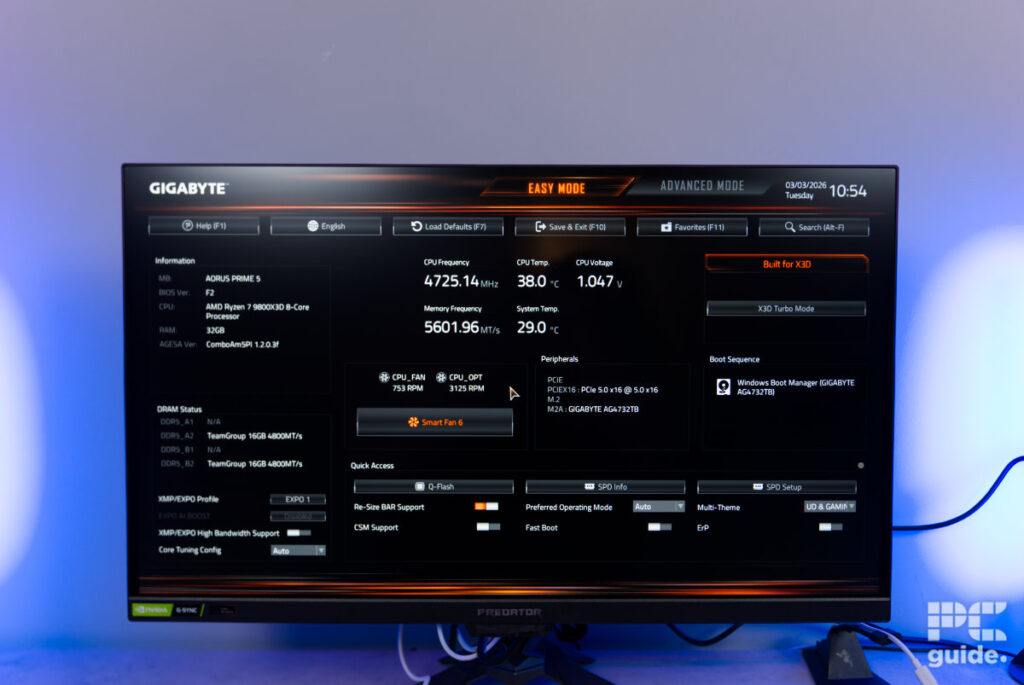
After the rather quick unpacking, I then booted up the PC to see how it was set up. Firstly, I checked the BIOS to see how that was configured. Immediately, I could see that the EXPO settings were set and the DDR5 RAM was running in its overclocked state, making sure you’re using every bit of your expensive memory.
There is also a custom fan curve set for its behavior, taking it all the way down to the 6th Smart Fan setting. Although it did run an older version of the BIOS, Gigabyte’s site was already offering the F3 version from back in October 2025. But it shouldn’t have too much of an impact, as it seems to just improve DRAM compatibility.
After exiting from that, it does boot into the standard Windows 11 out-of-the-box experience. That itself takes quite a bit of time to get through, with plenty of menus to go through with options, and then the time to update it means a load of waiting before being able to get going.
Once I finally got in, I was surprised to find barely anything in there. Unlike many laptops I’ve reviewed, it barely has anything else installed on it. It just had the Gigabyte software that controls the lights, apps, and other general PC settings – a great experience for those who want a more stripped-back setup.
Build quality and design
The whole machine comes in a large, solid Gigabyte Aorus case. Front on, it has a singular mesh panel partially covering the RGB fans, alongside some AORUS branding (in both writing and logo formats). It is a non-removable mesh on the front, and you have to take off the whole thing if you do want to dust it out. Behind that is a very convenient three-fan, all-in-one panel that limits the cabling, but it is a bit inconvenient to replace if one of them breaks, and you have to replace them all.
Similarly, on the bottom, the mesh is non-removable and built directly into the case. So to clean it out beyond dusting, you might have to remove the power supply as well. The top, on the other hand, does have a removable mesh panel that covers the AIO exhaust and makes for a lot easier cleaning.

Gigabyte AORUS PRIME 5 front side, Image by PC Guide

Gigabyte AORUS PRIME 5 front, Image by PC Guide

Gigabyte AORUS PRIME 5 left side, Image by PC Guide

Gigabyte AORUS PRIME 5 left side logo, Image by PC Guide

Gigabyte AORUS PRIME 5 rear, Image by PC Guide

Gigabyte AORUS PRIME 5 top, Image by PC Guide

Gigabyte AORUS PRIME 5 bottom, Image by PC Guide

Gigabyte AORUS PRIME 5 front angled on, Image by PC Guide

Gigabyte AORUS PRIME 5 front on, Image by PC Guide

Gigabyte AORUS PRIME 5 side close up on, Image by PC Guide

Gigabyte AORUS PRIME 5 side on, Image by PC Guide
Getting inside the case is pretty easy, too, with captive thumb screws on each side panel, which let you undo them and not worry about misplacing them. Sliding off the panels shows off the fairly clean and well-laid-out interior.
In the main chamber, there is little to see beyond the PC components and the massive bar in front holding up the GPU. Even then, it has little that stands out that looks to be off or out of place, apart from maybe the motherboard, which is a bit plainer than a higher-end model might be.
At the front end of the case, you’ll see a large hole that offers another area for additional case fan mounting, or (when not in use) acts as extra access to the rear of the PC – which itself is rather well managed and clean. All the cabling are set in place with cable ties and bundled out of the way. There is also a fan hub that runs the only two connectors needed for the ones inside the build, resulting in a very nice-looking build with plenty of space for additions.

Gigabyte AORUS PRIME 5 side, Image by PC Guide

Gigabyte AORUS PRIME 5 AIO, Image by PC Guide

Gigabyte AORUS PRIME 5 GPU, Image by PC Guide

Gigabyte AORUS PRIME 5 GPU sag bracket, Image by PC Guide

Gigabyte AORUS PRIME 5 top minus mesh, Image by PC Guide

Gigabyte AORUS PRIME 5 top IO, Image by PC Guide

Gigabyte AORUS PRIME 5 rear bottom, Image by PC Guide

Gigabyte AORUS PRIME 5 rear top, Image by PC Guide

Gigabyte AORUS PRIME 5 front feet, Image by PC Guide

Gigabyte AORUS PRIME 5 PSU fan mesh, Image by PC Guide

Gigabyte AORUS PRIME 5 AIO on, Image by PC Guide

Gigabyte AORUS PRIME 5 back chamber top, Image by PC Guide

Gigabyte AORUS PRIME 5 fan hub, Image by PC Guide

Gigabyte AORUS PRIME 5 PSU chamber, Image by PC Guide

Gigabyte AORUS PRIME 5 back chamber, Image by PC Guide

Gigabyte AORUS PRIME 5 RAM and power, Image by PC Guide

Gigabyte AORUS PRIME 5 top AIO fans, Image by PC Guide
Pricing and availability
Although announced back in August 2025 and released since then, stock can be difficult to find – especially with the ongoing parts shortage we’re currently facing. That said, the configuration we tested currently sets you back £2,799 – a fairly reasonable fee considering the current landscape.
As a comparison, a similar Gigabyte AORUS gaming PC, which has an RTX 5070 Ti and a 9700X, is available for $2,200. Whereas a CyberPowerPC with a 9800X3D costs $2,2429.99 and the Skytech Gaming King 95 is $2,899.99.
Performance
Next up, I tested the performance of the gaming PC by putting it through our testing lab. With a range of benchmarks including gaming, synthetics, and thermals, it should cover a wide range of applications and use cases for the system.

Gigabyte AORUS PRIME 5 desktop, Image by PC Guide

Gigabyte AORUS PRIME 5 desktop 2, Image by PC Guide

Gigabyte AORUS PRIME 5 CS2, Image by PC Guide

Gigabyte AORUS PRIME 5 CS2 (2), Image by PC Guide

Gigabyte AORUS PRIME 5 CS2 (3), Image by PC Guide

Gigabyte AORUS PRIME 5 CS2 (4), Image by PC Guide

Gigabyte AORUS PRIME 5 CS2 (5), Image by PC Guide

Gigabyte AORUS PRIME 5 Cyberpunk 2077, Image by PC Guide

Gigabyte AORUS PRIME 5 Cyberpunk 2077 (2), Image by PC Guide
Gaming
First up are the gaming benchmarks, where I tested the whole PC across the three main resolutions of 1080p, 1440p, and 4K. We did this in a number of different settings, including rasterization, with Ray Tracing enabled, and using Nvidia’s various upscaling technologies.
For the Aorus Prime 5, in Counter-Strike 2, it averaged 435fps at 1080p, 314fps at 1440p, and 163 at 4k. In Cyberpunk 2077, the PC reached an average of 175, 117, and 57 fps, respectively. In pure rasterization, with ray tracing enabled, the averages dropped to 86, 55, and 28. There’s plenty of upscaling to utilize in the game too, which is well needed when you consider the harsh 17FPS average we hit when using ray tracing overdrive. Using the quality DLSS mode pushed averages to 33fps, with performance mode increasing that to 52fps. If you’re looking to maximise framerates, then running frame gen boosts that number to 100, and 4x DLSS jumps to 152fps.
Now, in Doom Eternal, it certainly had no problems getting into the triple digits, even with ray tracing on. In fact, it averaged a framerate of 433, 364, and 204fps at 1080p, 1440p, and 4k, respectively. With RT turned on, those became 305, 254, and 152. Similarly, Assassin’s Creed Mirage achieved an average of 169, 145, and 95fps.
Then, when it comes to Horizon Zero Fawn Remastered, it averaged 170, 140, and 87fps, with testing DLSS increasing those framerates to 180, 165, and 133fps. In Indiana Jones Great Circle, the PC averaged 234, 171, and 110fps. Lastly, in F1 2024, it achieved framerates of 153, 114, and 68fps with DLSS increasing those to 185, 168, and 137fps.

Gigabyte AORUS PRIME 5 F1 24, Image by PC Guide

Gigabyte AORUS PRIME 5 Horizon Zero Dawn Remastered, Image by PC Guide

Gigabyte AORUS PRIME 5 Doom Eternal, Image by PC Guide

Gigabyte AORUS PRIME 5 Cyberpunk 2077, Image by PC Guide

Gigabyte AORUS PRIME 5 CS2, Image by PC Guide

Gigabyte AORUS PRIME 5 Indiana Jones, Image by PC Guide

Gigabyte AORUS PRIME 5 AC Mirage, Image by PC Guide
Synthetics
With gaming aside, we ran the Prime 5 through a number of synthetic and other performance benchmarks. Firstly, 3DMark and further 3D processing of the GPU, it achieved a score of 17,621 in Fire Strike Ultra, 13,243 in Time Spy Extreme, 19,143 in Port Royal, and 6,731 in Steel Nomad.
Then, benchmarking in Blender (to gauge its rendering capability), the GPU managed to score 3112.595029, 2238.552054, and 1792.176372 samples per minute in monster, junkshop, and classroom, respectively. In the same test, the CPU scores 134.084337, 102.184569, and 75.794347 instead.
In Cinebench, the GPU managed a score of 93,989, as the CPU achieved scores of 5,263 in multiple threads, 697 in single core, and 514 in single thread cases. Next in Geekbench AI and its capabilities in LLMs, this CPU scored 6,263 in single precision, 2,527 in half precision, and 12,539 in quantized. While the GPU achieved scores of 35,708, 63,271, and 26,908, respectively.
Then in Geekbench 6, the GPU scored 251,177 in OpenCL and 236,983 in Vulkan, with the CPU scoring 3,180 in single core and 17,794 in multi core.

Gigabyte AORUS PRIME 5 Geekbench AI, Image by PC Guide

Gigabyte AORUS PRIME 5 Blender 5, Image by PC Guide

Gigabyte AORUS PRIME 5 Cinebench 2026, Image by PC Guide

Gigabyte AORUS PRIME 5 3DMark, Image by PC Guide

Gigabyte AORUS PRIME 5 Geekbench 6 GPU, Image by PC Guide

Gigabyte AORUS PRIME 5 Geekbench 6 CPU, Image by PC Guide
Thermals
After all of that, I did put the system through a thermal test to see how it copes with all the components and cooling. Running it through a 20-minute Furmark 2 load on CPU and GPU, it puts the PC to its limit. Seeing if it could handle the power and heat produced, and here are the results.
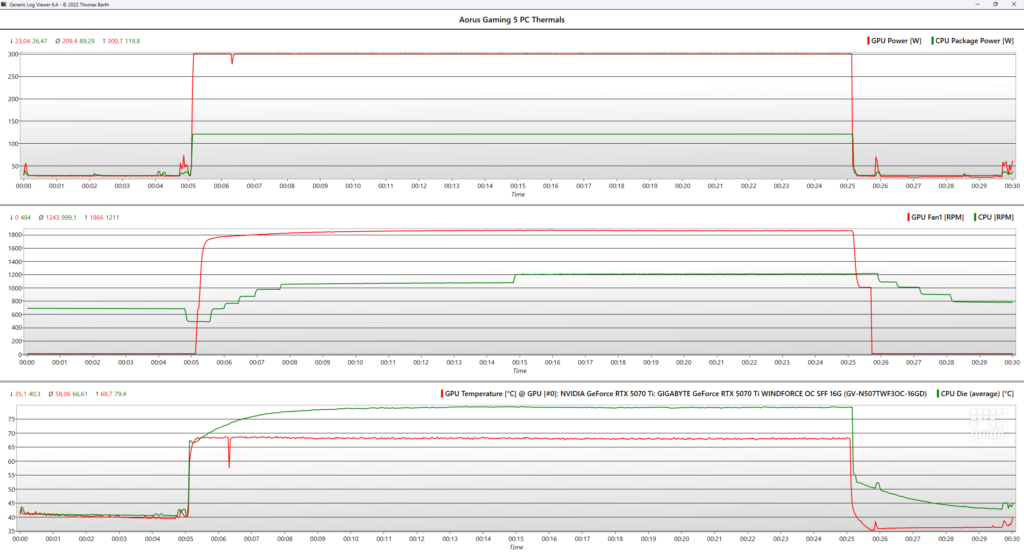
During that 20-minute load, the power spiked on both the CPU and GPU, with thermals reaching their max after around 10 minutes. Here, the graphics card peaked at a power of around 300W, while the CPU reached 120W. In that time, the temperatures of the two reached 69°C and 80°C, respectively.
To achieve those temp levels, the fans ran at over 1800RPM on the GPU and 1200RPM on the AIO. But even at that speed, the noise level coming from the system was quite minimal; you could barely make it out at all. All this results in relatively quiet operation, regardless of task or load, making it a fine choice for individuals trying to create a tranquil setup.
- CPU: AMD Ryzen 7 9800X3D
- GPU: Gigabyte RTX 5070 Ti Windforce OC SFF
- RAM: TeamGroup T-Force Delta 32GB (2*16) 5600MT/s CL40
- Storage: 2TB AORUS Gen 4 NVMe SSD
- CPU cooler: AORUS Liquid Cooler 240
- Motherboard: AORUS Prime 5 B580
- PSU: Gigabyte UD850GM PG5 V2
- Fans: 4x AORUS EZ CHAIN 120
- Case: Gigabyte AORUS PRIME 5
Conclusion
Overall, the Gigabyte Aorus Prime 5 gaming PC is an impressive and well-built system. With top hardware at its core that are capable of gaming at 4k, it not only delivers a captivating gaming experience, but also runs surprisingly quiet too. Oh, and it doesn’t come with a bunch of unwanted, preinstalled apps either. So, if you’re looking for a gaming PC that does it all, then the Aorus Prime 5 is a fine choice.
Written by
