



Table of Contents
If you’re wondering which is the best GTX 1650 graphics card for your PC build, then we have you covered right here
Now, the RTX 1650 was released in 2019, so this GPU is a few years old and not the best option for AAA games. However, the graphics card can still run games at decent frame rates, especially at 1080p resolution, with some graphical settings adjustments. This makes it a great option for budget-minded gamers or those looking for a capable card for esports titles.
With that said, in this guide, we have listed some of the best GTX 1650 graphics cards from partner manufacturers that you can find on the market.
Latest tech deals.
- AMD Ryzen™ 9 9900X 12-Core - was $499 now $331
- Sony INZONE M10S 27-inch - was $899 now $748
- Thermaltake LCGS View i1470S-170 - was $2,399 now $2,099
- Apple 2026 MacBook Air - was $1,999 now $1,891
- Bose QuietComfort Headphones - was $359 now $169
- LG 77-inch OLED C6 - was $2,499 now $1,999
- MSI Prestige 16 Flip - was $2,149 now $1,870
- Hisense 85-inch U6 Pro Series - was $1,999 now $997
Prices correct as of November 5th, 2026.
Products at a glance
-
 Best GTX 1650 Overall
EVGA XC Ultra Gaming GTX 1650
- GPU: TU117-300-A1
- CUDA cores: 896
- VRAM: 4GB GDDR6
- Memory bus width: 128-bit
- Base clock speed: N/A
- Boost clock speed: 1710 MHz
-
 Best budget GTX 1650
ZOTAC Gaming Super Compact GTX 1650
- GPU: TU117-300-A1
- GPU cores: 896
- VRAM: 4GB GDDR6
- Memory bus width: 128-bit
- Base clock speed: 1410 MHz
- Boost clock speed: 1620 MHz
-
 Best GTX 1650 for overclocking
MSI GeForce GTX 1650 Gaming X 4G
- GPU: TU117-300-A1
- CUDA cores: 896
- VRAM: 4GB GDDR6
- Memory bus width: 128-bit
- Base clock speed: N/A
- Boost clock speed: 1710 MHz
-
 Best premium GTX 1650
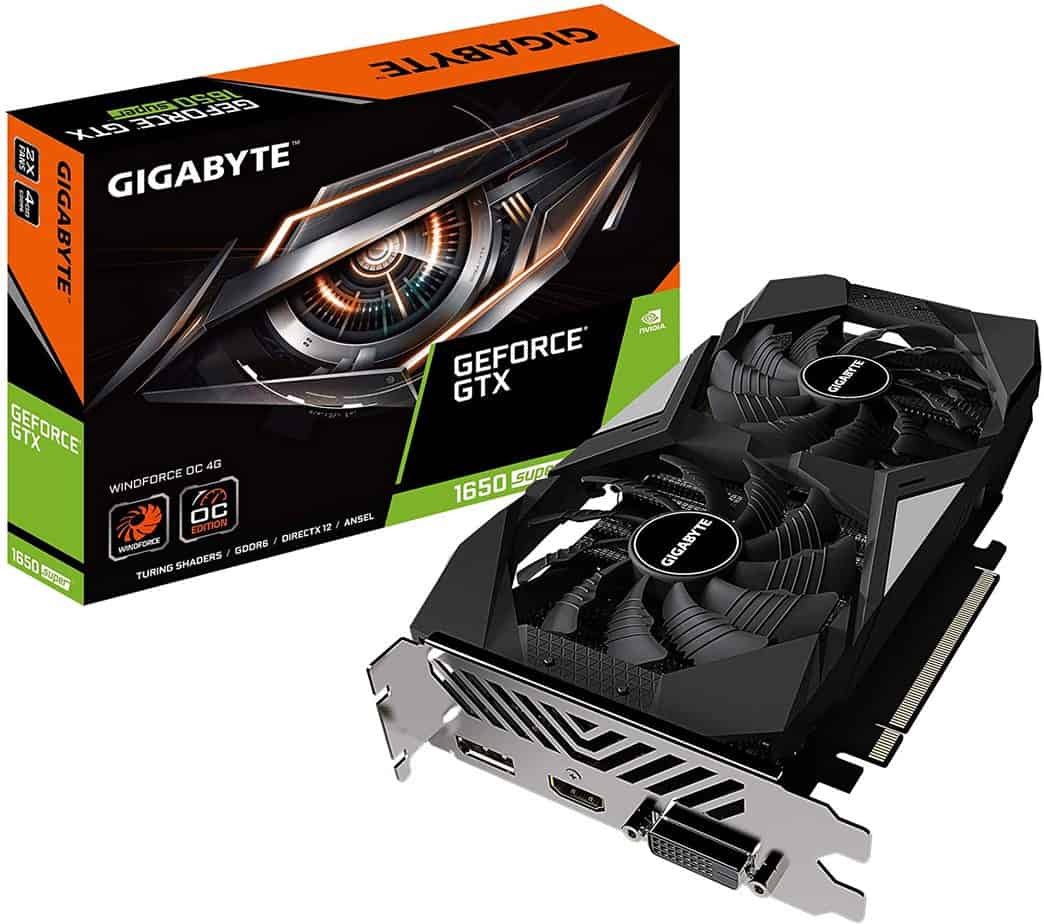
Gigabyte Windforce OC GTX 1650
- GPU: TU117-300-A1
- CUDA cores: 896
- VRAM: 4GB GDDR6
- Memory bus width: 128-bit
- Base clock speed: 1410 MHz
- Boost clock speed: 1710 MHz
How we selected the best GTX 1650
For this guide, we first listed several GTX 1650 variants available in the market, including those from major manufacturers like ASUS, Gigabyte, MSI, and EVGA. Then, we compared these side-by-side and shortlisted the best products from them. While selecting these GPUs, we factored in user reviews to gauge real-world experiences with factors like cooling efficiency, noise levels, and overclocking potential.
If you want to get the latest equipment for your PC build, we have also reviewed newer GPUs, like the RTX 50-series and RX 90-series. In fact, our experts at PC Guide conduct in-house testing for GPUs, CPUs, and other components to give you a better idea of how things work in real life.

- GPU: TU117-300-A1
- CUDA cores: 896
- VRAM: 4GB GDDR6
- Memory bus width: 128-bit
- Base clock speed: N/A
- Boost clock speed: 1710 MHz
- Overclocking-friendly for boosting speeds
- Dual-fan cooling system
- Clean aesthetics
- Slightly expensive
- Slower GDDR5 VRAM
If you want the best GTX 1650 GPU for your build, then we think that this EVGA XC Ultra Gaming model might be a good fit.
To start with, the GPU is fairly compact, which means it shouldn’t cause any clearance issues in a Mini ITX or Micro ATX PC build. However, this is a 3-slot card on a standard ITX or MATX case, which wouldn’t be an issue. But with, say, custom boards and chassis from Dell or HP, you may not have enough slots to spare. Additionally, you’ll need an available 6-pin power connector, which is out of reach for many prebuilt systems.
The GPU is fairly compact, which means it shouldn’t cause any clearance issues in a Mini ITX or Micro ATX PC build.
PC Guide
Much like some of the best GPUs, this card delivers high out-of-the-box factory overclock speed, which makes it attractive for people who want the best performance per dollar. And to keep performance and temperatures optimal, it comes with a dense heatsink and a dual-fan cooler design, which should enable great overclocking headroom.
With that said, if you aren’t sure that this card will fit in your PC, you’ll definitely want to triple-check beforehand. If you meet the prerequisites of a PSU at or above 400W, horizontal clearance of 202+ mm, and three available expansion slots in your chassis, you should be fine.

- GPU: TU117-300-A1
- GPU cores: 896
- VRAM: 4GB GDDR6
- Memory bus width: 128-bit
- Base clock speed: 1410 MHz
- Boost clock speed: 1620 MHz
- Budget-friendly pick
- Compact design, which is suitable for smaller builds
- Delivers slight boost clock speed
- Single fan design may not provider sufficient cooling
If you’re looking to get a budget variant of the GTX 1650, then we think this Zotac card is a good option. The highlight of this card is that it’s a small-but-powerful card for 1080p gaming. The ZOTAC Super Compact model does exactly that, with a length of only 151 mm and a 2-slot width that shouldn’t be an issue for most PCs. Even prebuilt desktops or office machines should be able to take this card, so long as they aren’t slimline or specifically small form factor.
Another thing that makes this card great for users who are reviving old desktops or office PCs is the fact that it’s powered completely by PCI Express power. This means that you won’t need to replace your power supply or run an additional 6-pin power cable, though it also means you shouldn’t and probably can’t overclock it very much.
The highlight of this Zotac GTX 1650 is that it’s a small-but-powerful card for 1080p gaming.
PC Guide
Speaking of clock speeds, this card does come in just a bit above the original reference clock, but not by much, and lower than the other cards on this list. That’s the price to pay for size and compatibility, though, but that’s a fair tradeoff in our book.
As far as thermal management is concerned, much like some of the best low profile GPUs, the Zotac card comes with only one fan. So, if you push the card too much, this cooling system may not be enough to cool the GPU down.

- GPU: TU117-300-A1
- CUDA cores: 896
- VRAM: 4GB GDDR6
- Memory bus width: 128-bit
- Base clock speed: N/A
- Boost clock speed: 1710 MHz
- Good for overclocking
- Great cooling system with TORX Fan 3.0 and Zero Frozr technology
- Customizable RGB lighting with Mystic Light system
- Reasonable price
- G5 model, which is older than G6
- Comes with the slower GDDR5 VRAM
If you want the best GTX 1650 graphics card for overclocking, then you should check out the MSI Gaming X 4G. Of course, the highlight of the GPU here is that it can be overclocked out-of-box. As per the official Amazon product description, the card can be upped to 1710 MHz, which is much higher than what the reference card offers.
The highlight of the GPU here is that it can be overclocked out-of-box.
PC Guide
Further, a GPU that overclocks needs a robust cooling system to maintain optimal temperatures. This MSI card features ‘Twin Frozr 7 Thermal Design’ which includes TORX Fan 3.0 that boosts airflow. Plus, you also get Zero Frozr technology where you can stop the fan when the GPU load is low.
Now, if you like RGB components, then you might be pleased to know that this card does have RGB lights. You can customize it with Mystic Lights system, along with other MSI components that you might have.
- GPU: TU117-300-A1
- CUDA cores: 896
- VRAM: 4GB GDDR6
- Memory bus width: 128-bit
- Base clock speed: 1410 MHz
- Boost clock speed: 1710 MHz
- Overclocking-friendly
- Windforce cooling system
- Two 80mm fans with alternating spin
- Expensive than other options on the list
If you don’t need a card with specific length restrictions, and you want a version of the GTX 1650 that’s just a little bit souped-up, the Gigabyte Windforce card is probably the right choice for you.
It is a bit longer than other cards on this list but fairly standard for full-size GPUs, especially higher-end ones. The width is your typical 2-slot, which means you shouldn’t have much trouble.
The larger dimensions pay off, though, because this card boasts two sizeable fans and a large heatsink.
PC Guide
The larger dimensions pay off, though, because this card boasts two sizeable fans and a large heatsink. That means better cooling and overclocking headroom, which is demonstrated by its very respectable factory overclock. We’d be surprised if you couldn’t push this one by at least a few hundred more MHz, though, since it doesn’t seem particularly stressed with its current clock speed.
Unlike our budget pick, this card is unlikely to fit inside smaller PCs. Its need for a 6-pin power connector also makes it a no-go for prebuilt PCs with weak (sub-400W) or proprietary (non-ATX) power supplies.
Considerations for the best GTX 1650 GPU
Before you go ahead and buy a new GTX 1650 GPU, here are a few things to consider.
Clock speed
You’ll notice that some of the cards on this list have higher clock speeds than others or have more overclocking headroom. While it’s true that a higher clock speed does equal more performance, it’s important to note that at the end of the day… these cards are all using functionally identical GPUs. Even with a great overclock, you’d be hard-pressed to push performance past a 10 percent improvement.
The main reason to buy a card with a higher clock speed is to save yourself the trouble of overclocking it yourself. The smaller cards with smaller coolers may not be quite as overclockable, though.
Dimensions
Length and width are the measurements that determine if a card will fit into your chassis of choice. (Provided it’s a standard ATX/MATX/MITX chassis– we couldn’t find any low-profile cards that would fit into, say, a slimline office PC build. Sorry, guys.)
The measurement that usually matters most is length, which is measured in millimeters. Especially in a prebuilt or an ITX PC build, this is the most likely to determine whether or not your GPU can fit inside your PC.
Width matters a bit less since few people are using non-GPU expansion cards or multi-GPU setups. Most PC cases will have at least two or three empty slots, which is more than enough for a GPU.
Connectivity
The most common ports you will see in a modern Nvidia GPU are DisplayPort, HDMI, USB-C (for VR), and DVI. The most common configuration is 3 DP and 1 HDMI, but this changes with the GTX 1650.
The cards in this roundup overwhelmingly limit you to 3 outputs overall. (The Windforce has one extra port.) USB-C is nowhere to be seen in any of these cards, and the ZOTAC is the only one with DVI support. Otherwise, expect 2+ HDMI or DisplayPort on these cards, but not both at once.
Written by
