
ASUS RTX 5080 Noctua OC Edition review: a behemoth in size, thermals, and acoustics


Table of Contents
Noctua and ASUS have teamed up again in their latest RTX 5080 OC collaboration, bringing Noctua’s premium cooling to one of the industry’s best graphics cards. That’s right, we’re talking about the ASUS RTX 5080 Noctua OC Edition, the latest arrival to feature Noctua’s premium cooling solution.
This card brings with it all the nostalgic design traits found in Noctua’s product line, giving it an eye-catching aesthetic that is certainly on the unique side. Pair that with the card’s massive size (quad slot and over 2600grams) and you have an extraordinary looking GPU with the performance to match.
Sadly, its size does lead to some build awkwardness, especially if you’re using a case that isn’t absolutely massive – and it’s price is notably eye-watering. However, if price is no issue, and you’re looking for a uniquely-designed, powerful GPU, then the latest 5080 Noctua OC Edition could be a perfect match for you.
Latest tech deals.
- AMD Ryzen™ 9 9900X 12-Core - was $499 now $328
- CORSAIR 4000D PC Case - was $124.99 now $75.99
- Hisense 65" Class E6SR - was $549 now $377.99
- Apple 2026 MacBook Air - was $1,999 now $1,799
- Skytech Gaming PC Desktop (9850X3d) - was $4,299 now $3,799
- Apple Magic Mouse - was $79 now $59
- MSI Prestige 16 Flip - was $2,149 now $1,899
- Kotin 9700X Gaming PC - was $2,399 now $2,199
Prices correct as of October 9th, 2026.
I put it to the test in our standard GPU review process to see what it is capable of.

- GPU: GB203
- CUDA cores: 10,752
- VRAM: 16GB GDDR7
- Memory bus width: 256-bit
- Base clock speed: 2,295MHz
- Boost clock speed: 2,700MHz
The ASUS x Noctua collaboration is an extremely impressive option in the RTX 5080 series. Delivering solid thermal performance, while not making much noise (thanks to the massive heatsinks and fans onboard), the RTX 5080 is a great all-round GPU.
As you can imagine, custom-designed cooling on an RTX 5080 doesn’t come cheap, and the Noctua collaboration currently retails for just north of $2,000 – making it one of the most expensive cards in today’s market.
That said, with excellent thermals, solid RTX 5080 performance, and a unique design, this will certainly please many custom PC builders looking for something a little different.
- Impressive thermal and sound performance
- Great performance across the board
- Plenty of video connectors
- Lots of overclocking headroom
- Fantastic build quality and design
- Quite expensive
- Bigger than even some 5090s, causing compatibility issues
- Colors are not to everyone’s tastes and hard to match
Pricing
The graphics card is fairly available at the time of writing, with it being in stock at a bunch of retailers. The pricing varies where you look, and it’s definitely far above any other models. As of writing, it comes in at $2,049 or £1,600, whereas the MSRP of the card is in fact $999/£909.
It doesn’t help that right now we’re in the middle of a parts shortage, and one of the reasons the Noctua RTX 5090 is unlikely to exist. Most, if not all, GPU prices are rising, and a part picker shows that even the cheapest RTX 5080 models are at a similar price. Such as the MSI Shadow 3X at $1,460, or the Gigabyte Windforce OC at $1,290.

ASUS RTX 5080 Noctua OC Edition box, Image by PC Guide
ASUS RTX 5080 Noctua OC Edition with box, Image by PC Guide

ASUS RTX 5080 Noctua OC Edition in box, Image by PC Guide
Design and specs
| Specifications | ASUS RTX 5080 Noctua OC | RTX 5080 FE |
|---|---|---|
| GPU | GB203-400 | GB203-400 |
| CUDA Cores | 10,752 | 10,752 |
| Base clock speed | 2,295 MHz | 2,295 MHz |
| Boost clock speed | 2,700 MHz | 2,617 MHz |
| Memory | 16 GB GDDR7 | 16 GB GDDR7 |
| Memory interface | 256-bit | 256-bit |
| Memory clock | 30 Gbps | 30 Gbps |
| Bandwidth | 960.0 GB/s | 960.0 GB/s |
| TBP | 360 W | 360 W |
| Power connector | 1x 16-pin | 1x 16-pin |
| PCIe Connector | PCIe 5.0 x16 | PCIe 5.0 x16 |
| Slot width | Quad-slot | Dual-slot |
| Video outputs | 2x HDMI 2.1b 3x DisplayPort 2.1b | 1x HDMI 2.1b 3x DisplayPort 2.1b |
| Weight | 2667 g | 1635 g |
Above, we’ve compared it against the RTX 5080 Founders Edition, where the fundamental specs of the GPU are the same, but the design differs. One of the key changes, as you can see, is the factory overclock. It’s a modest 3% increase over the Founders Edition, with a 2,700 MHz spec, but it comes with significantly more thermal headroom if you want to push it further.

ASUS RTX 5080 Noctua OC Edition standing, Image by PC Guide

ASUS RTX 5080 Noctua OC Edition end, Image by PC Guide

ASUS RTX 5080 Noctua OC Edition ports, Image by PC Guide

ASUS RTX 5080 Noctua OC Edition bottom edge, Image by PC Guide

ASUS RTX 5080 Noctua OC Edition side GeForce RTX, Image by PC Guide

ASUS RTX 5080 Noctua OC Edition side, Image by PC Guide

ASUS RTX 5080 Noctua OC Edition logo front, Image by PC Guide

ASUS RTX 5080 Noctua OC Edition right fan, Image by PC Guide

ASUS RTX 5080 Noctua OC Edition fans front, Image by PC Guide

ASUS RTX 5080 Noctua OC Edition power port, Image by PC Guide

ASUS RTX 5080 Noctua OC Edition backplate, Image by PC Guide

ASUS RTX 5080 Noctua OC Edition backplate logo and owl, Image by PC Guide

ASUS RTX 5080 Noctua OC Edition BIOS switch, Image by PC Guide

ASUS RTX 5080 Noctua OC Edition backplate RTX , Image by PC Guide

ASUS RTX 5080 Noctua OC Edition rear angled, Image by PC Guide

ASUS RTX 5080 Noctua OC Edition PCIe connector, Image by PC Guide
It achieves that thermal capacity thanks to the massive heatsink it packs onto the board. Increasing the weight to over 2.6 KG/ 5.8 Lbs (compared to the FE’s 1.64 KG/ 3.62 Lbs), it’s a great deal bigger in size. Measuring 385 x 151 x 80 mm, it really reduces the compatibility with many PC cases out there, so you have to pay closer attention to that if you’re considering this for your next purchase.
Even as it fills four slots, you have to be aware of how much space is being left for airflow to reach it. I did run into some issues when installing it in a vertical GPU mount, as it needed a bit of persuasion to fit into place. I even compared its size to the ROG Astral RTX 5090, and it’s surprisingly larger, thanks to the three NF-A12x25 G2 Noctua fans packed onto it.


ASUS RTX 5080 Noctua OC Edition next to Astral 5090 rear, Image by PC Guide

ASUS RTX 5080 Noctua OC Edition next to Astral 5090 laid down, Image by PC Guide

ASUS RTX 5080 Noctua OC Edition next to Astral 5090 stacked, Image by PC Guide

ASUS RTX 5080 Noctua OC Edition next to Astral 5090 standing, Image by PC Guide
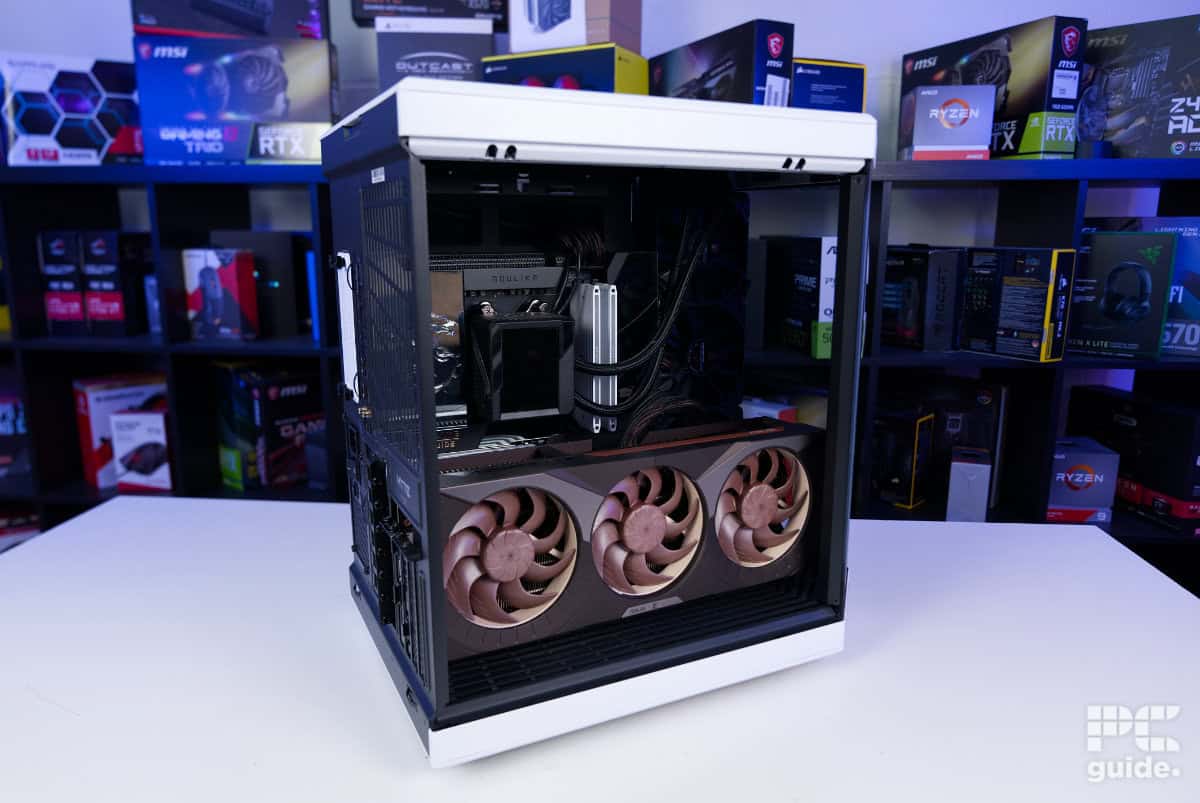
ASUS RTX 5080 Noctua OC Edition in PC, Image by PC Guide

ASUS RTX 5080 Noctua OC Edition PC straight on, Image by PC Guide
For other extras on the card, the Noctua version adds a second HDMI 2.1 connector to its video output, much like other ROG cards, to provide a total of five options. It also has a BIOS switch to choose between performance and an even quieter mode, which will lower the speed of the card even further – great for those who think the Noctua fans are too loud (which they aren’t). I’m surprised it doesn’t have onboard fan connectors to control case fans from the GPU temperature, but I suppose it’s not essential.
For the general design of the graphics card, it, of course, comes covered in Noctua colors. The front plate even resembles the owl from its logo, where the two outer fans kind of resemble the eye sockets – topped by silvery brows. The middle fan does kind of break that, but it’s there for a purpose, and those beige and light brown fans look aggressive with the edgy shaping.
The design philosophy continues on the backplate, too. The metal uniform plate contains channels across the rear, while at the end, after the PCB, it creates a hole through the passthrough for airflow. But it’s not just a gap; it sneaks in another half of its logo with the angry owl staring back at you, resulting in a cool aesthetic.
The rest of the card is a lot more minimalistic, mostly a half-and-half plastic cover and an open-air design that focuses on airflow. Overall, considering the size of this card, it looks fantastic in your build – as long as you have the space to accommodate it.
Performance
After unboxing and assessing the card, I then check its performance in our testing lab. Going through a mixture of gaming and synthetic performance, with comparisons to other cards, we get a great understanding of how this card’s performance on average. I also put it through a stress test to see how well the cooling design does.
Test bench components:
- Motherboard: MSI MEG X870E Godlike
- CPU: Ryzen 7 9800X3D
- RAM: Corsair Dominator Titanium RGB (64GB, 6600MT/s, CL32)
- CPU Cooler: ROG RYUJIN III 360
- PSU: Seasonic Prime TX-1600 Noctua Edition
- Case: Hyte X50

ASUS RTX 5080 Noctua OC Edition PC gaming, Image by PC Guide

ASUS RTX 5080 Noctua OC Edition PC gaming 2, Image by PC Guide
ASUS RTX 5080 Noctua OC Edition in PC, Image by PC Guide
Gaming
Since the ASUS x Noctua card is an RTX 5080, you can expect to see performance on the level of 4K gaming. Below are the results, just showing how exactly it compares with some other models.

ASUS RTX 5080 Noctua OC Indiana Jones, Image by PC Guide
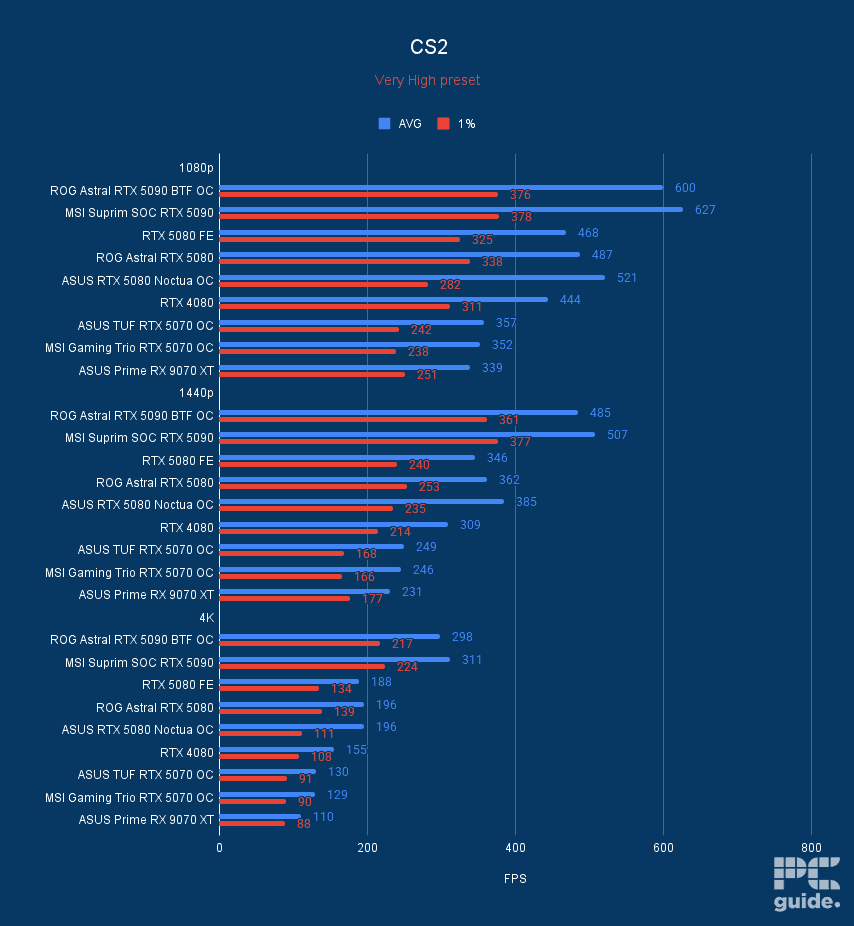
ASUS RTX 5080 Noctua OC CS2, Image by PC Guide

ASUS RTX 5080 Noctua OC Cyberpunk, Image by PC Guide

ASUS RTX 5080 Noctua OC Doom Eternal, Image by PC Guide

ASUS RTX 5080 Noctua OC Cyberpunk DLSS FG, Image by PC Guide

ASUS RTX 5080 Noctua OC Horizon Zero Dawn, Image by PC Guide

ASUS RTX 5080 Noctua OC AC Mirage, Image by PC Guide

ASUS RTX 5080 Noctua OC F1 24, Image by PC Guide
In CS2, it managed an average FPS of 521, 385, and 196 in 1080p, 1440p, and 4k, respectively. Although the 1% lows of the GPU averaged to 282, 213, and 111. In Assassin’s Creed Mirage, the card averaged 184, 161, and 108 FPS, with lows of 151, 136, and 93.
As for Cyberpunk 2077, the card averaged 211, 147, and 71 FPS in 1080p, 1440p, and 4k. With turning on ray tracing, that became 102, 65, and 34. Testing out the upscaling of DLSS 4 in the game, though I pushed it to the limits by using Ray Tracing overdrive to see what it could do. In that mode at 4k, the RTX 5080 averaged 19 FPS, enabling DLSS quality improved that to 39FPS, while in performance, that became 62 FPS, then enabling frame gen pushed that to 115 FPS, with 4x mode going all the way to 174 FPS.
Moving on to Doom Eternal at 1080p, 1440p, and 4K, the Noctua GPU averaged out 544, 438, and 250 FPS, respectively. Enabling ray tracing in the game, which becomes 272, 305, and 173 FPS.
As for Horizon Zero Dawn Remastered, the GPU averaged 173, 152, and 100 FPS at 1080p, 1440p, and 4K, respectively. Then, using DLSS quality at 1080p, it increased to 178, DLSS balanced at 1440p became 169 FPS, DLSS performance at 4k made it 145 FPS, while frame generation boosted it to 185 FPS.
In Indiana Jones, the GPU averaged at 268, 217, and 119 FPS at 1080p, 1440p, and 4k. Lastly, in F1 2024, it averaged frame rates of 168, 132, and 76. Using DLSS, those became 198, 186, and 155 with the addition of frame generation at 4k, pushing it to 197 FPS.
Synthetics
Checking out its rendering and processing power, I also checked out some of its synthetic performance. Being an Nvidia GPU gives it plenty of advantage in a load of cases, and the RTX 5080 tier goes strong but obviously falls behind the flagship 5090.

ASUS RTX 5080 Noctua OC Blender, Image by PC Guide

ASUS RTX 5080 Noctua OC 3DMark, Image by PC Guide

ASUS RTX 5080 Noctua OC Geekbench AI, Image by PC Guide

ASUS RTX 5080 Noctua OC Geekbench 6, Image by PC Guide
To start, in 3DMark and various rendering techniques, the Noctua model trades blows with the Astral. In Fire Strike Ultra, the card achieved a score of 21,665, Time Spy Extreme, gaining 16,062, Port Royal, getting 22,527, and in Steel Nomad, 8,536.
In Blender across the three benchmark scenes, monster, junkshop, and classroom, the GPU achieved average samples per minute of 4,467.43, 2,286.73, and 2,229.49.
Then, in Geekbench 6, as a benchmark use case, the card got a score of 280,756 in OpenCL and 262,202 in Vulkan. While in the AI test, single precision scored 40,048, half precision was 68,590, and quantized was 29,988.
Thermals
To test out the thermal performance, I loaded up FurMark. 2. Putting the CPU and GPU through a full load for 20 minutes, I tracked the power, temperature, and fan behavior of the graphics card during a 30-minute period (5 minutes on either side) with HWinfo. Here are the results of that test.

Before the load begins, a five-minute idle period shows the card’s baseline behaviour. Inside our office test system, the GPU temperature settled at around 27°C, while memory sat slightly higher at 36°C. During this time, the fans remained off, as they’re programmed to only spin up once temperatures hit 55°C.
Once the power virus is applied, power draw quickly jumps to around 340W, with temperatures gradually rising alongside it. It takes roughly three minutes to reach a steady state, where both the GPU die and memory stabilise at around 60°C for the remainder of the test. Fan speeds follow a slower curve, steadily ramping up over the 20-minute run.
Initially, the fans spike before settling at around 550 RPM, then gradually climb to roughly 1150 RPM—about 66% of their maximum speed. Once the load is removed, the fans shut off almost immediately, and within 30 seconds, the heatsink is left to dissipate the remaining heat passively.
That said, even after five minutes back at idle, temperatures don’t immediately return to their starting point and require a bit more time to fully settle. Still, acoustics are excellent. Even under load, the fans are barely noticeable, with most of what you hear being general airflow through the case rather than the fans themselves.
- GPU: GB203
- CUDA cores: 10,752
- VRAM: 16GB GDDR7
- Memory bus width: 256-bit
- Base clock speed: 2,295MHz
- Boost clock speed: 2,700MHz
Conclusion
Overall, the ASUS RTX 5080 Noctua OC Edition is an impressive card when it comes to design and performance. As expected, its focus is on the thermals and sound, so it does live up to it. But that comes at the cost of pricing and size, and even the colors may not be to everyone’s tastes. All in all, it’s still a great card to consider if price is no object – especially if you want a GPU that delivers quiet operation.
About the Author