


Table of Contents
HyperX has been part of the HP family for five years now, and it’s now expanding the brand into its selection of gaming laptops. This comes alongside the Omen branding it already uses, bringing us the HyperX Omen 15. This 15-inch laptop features an AMD Ryzen 7 processor paired with an Nvidia RTX 5060 graphics chip.
That puts it towards the lower end of the market, making it more of a budget or mid-range laptop. That is, at least, if it weren’t for the price rises across the board, which will inevitably make plenty of these machines more expensive. Nevertheless, I took it for a spin in this laptop review to see what it’s capable of.

- CPU: AMD Ryzen 7 260
- GPU: RTX 5060 8GB & Radeon 780M
- Memory: 16GB DDR5-5600 MT/s
- Storage: 1 TB PCIe Gen4 NVMe M.2 SSD
- Max refresh rate: 165Hz
- Resolution: 1920×1200
- Panel type: 15-inch IPS LED
The HyperX Omen 15 offers a rather simple entry-level laptop with some core components to make it effective at a range of tasks. Packed with a Ryzen 7 CPU and RTX 5060 GPU, it is surprisingly powerful in various gaming and processing tasks. It even offers upgradeability for the memory and storage but does come at a rather high cost compared to some of the competition with similar hardware. Its screen is a bit basic and not so great, but the fast refresh rate, range of connectivity, and extra features do offer a decent range.
- Solid performance for entry-level hardware
- Quiet and effective cooling
- Fast refresh rate
- Small and lightweight design
- Decent amount of connectivity
- Not the best value out there
- Screen color and response rate not great
- Middling battery life
Pricing and availability
The HyperX Omen 15 isn’t particularly widely available, and finding the specific configuration we’ve tested is even more difficult. The Ryzen 7 260 model paired with the RTX 5060 is a relatively unusual combination and is still fairly new. However, it can be found at some retailers for $1,529.99.
Latest tech deals.
- AMD Ryzen™ 9 9900X 12-Core - was $499 now $328
- CORSAIR 4000D PC Case - was $124.99 now $75.99
- Hisense 65" Class E6SR - was $549 now $377.99
- Apple 2026 MacBook Air - was $1,999 now $1,799
- Skytech Gaming PC Desktop (9850X3d) - was $4,299 now $3,799
- Apple Magic Mouse - was $79 now $59
- MSI Prestige 16 Flip - was $2,149 now $1,899
- Kotin 9700X Gaming PC - was $2,399 now $2,199
Prices correct as of October 9th, 2026.
That’s a little on the expensive side compared to other RTX 5060 laptops on the market. For example, the Acer Nitro V can be found for $1,299.99, while the Gigabyte Gaming A16 costs $1,249.99. The ASUS ROG Strix 16 is a little more expensive, coming in at $1,583.

HyperX Omen 15 box back, Image by PC Guide

HyperX Omen 15 box front, Image by PC Guide

HyperX Omen 15 with box, Image by PC Guide
Overall design
The laptop arrives in rather simple packaging. This may just be the media sample I received, but it’s essentially a plain cardboard box with very little imagery. Inside, the laptop is held in a clamshell-style cardboard insert and protected by a cloth covering. There’s also an envelope containing the paperwork, while the charger sits in its own separate compartment to the side.

HyperX Omen 15 box open top, Image by PC Guide

HyperX Omen 15 box contents, Image by PC Guide

HyperX Omen 15 in sleeve and cardboard, Image by PC Guide

HyperX Omen 15 with charger, Image by PC Guide
Taking the laptop out of its packaging, the lid presents a fairly simple design. It has a smooth matte finish, with the HyperX logo in the center providing the main visual highlight. The shiny finish helps it stand out against the rest of the chassis. The only other detail is a small white model logo printed towards the rear, just behind the screen hinge.

HyperX Omen 15 lid back, Image by PC Guide

HyperX Omen 15 back writing, Image by PC Guide

HyperX Omen 15 box contents unpacked, Image by PC Guide
Moving around to the back, the laptop has a rather square, straight-edged design. Two large vents sit either side of the central section, which houses just two ports: HDMI and USB-C. The remaining connections are found around the sides, leaving the rear relatively clean.

HyperX Omen 15 back vent, Image by PC Guide

HyperX Omen 15 back ports, Image by PC Guide

HyperX Omen 15 back edge, Image by PC Guide
The sides of the HyperX Omen 15 follow the same understated approach, with a matte black finish, a fairly thick bottom section, and a screen that slopes down over the chassis. On the left, you’ll find the power barrel jack towards the rear, next to a USB-A port, while the audio jack sits further down the side. The opposite side is relatively sparse, with another USB-A port and an Ethernet jack towards the back of the chassis.

HyperX Omen 15 left edge, Image by PC Guide

HyperX Omen 15 left ports, Image by PC Guide

HyperX Omen 15 audio jack, Image by PC Guide

HyperX Omen 15 right side, Image by PC Guide

HyperX Omen 15 right ports, Image by PC Guide
The front edge keeps things equally clean. The bottom of the chassis slopes away, leaving a small protruding section that makes it easier to get your fingers between the screen and base. It provides enough grip to lift the lid with just one finger, which is a nice touch.

Looking underneath, there’s a large vent covering much of the rear half of the chassis. This acts as the main intake and sits above the desk thanks to the laptop’s feet. These consist of one long rubber strip at the rear and two smaller feet towards the front edges. Just behind these are two diagonal speaker grilles. The speakers offer a decent range of volume, although, as you’d expect, they lack bass. Even so, they deliver clear audio without noticeable distortion, making them perfectly usable for everyday listening.
Removing the bottom panel gives you access to the internal components and a reasonable amount of upgradeability. There’s a spare NVMe slot for additional storage and, depending on the configuration, another DIMM slot for more RAM. The Wi-Fi module and battery are also easily accessible. You can even get to the cooling system without much trouble, although the fans and their fins will eventually need cleaning.

HyperX Omen 15 underside, Image by PC Guide

HyperX Omen 15 open with bottom, Image by PC Guide

HyperX Omen 15 insides, Image by PC Guide

HyperX Omen 15 memory, Image by PC Guide
Opening the laptop reveals the main input area. The keyboard stretches across most of the chassis and includes a numpad, although fitting everything in does make the layout feel a little cramped. Below it sits a fairly standard touchpad, positioned towards the centre, while the right-hand side of the deck is filled with stickers and the laptop’s branding.

HyperX Omen 15 lit keyboard, Image by PC Guide

HyperX Omen 15 stickers and name, Image by PC Guide

HyperX Omen 15 touchpad, Image by PC Guide

HyperX Omen 15 keyboard left, Image by PC Guide

HyperX Omen 15 keyboard right, Image by PC Guide
As for the screen, it’s a 15-inch panel with relatively slim bezels along the sides. The bottom bezel is considerably thicker, with a HyperX logo sitting in the centre. At the top, there’s a small webcam positioned between the microphone holes. Both are fairly simple, but they proved more effective than I expected given their size, capturing crisp visuals and clear audio.

HyperX Omen 15 screen, Image by PC Guide

HyperX Omen 15 webcam, Image by PC Guide

HyperX Omen 15 powered (1), Image by PC Guide
Screen
I then tested the screen to see how well it performs. Using our Datacolor SpyderX Elite colorimeter, I checked its colour reproduction and accuracy. It’s worth noting that our review sample arrived fully reset, so the results may not necessarily reflect how the display performs straight out of the factory.

The measured colour gamut was particularly limited. In our testing, the display covered just 66% of sRGB, 49% of AdobeRGB, and 49% of DCI-P3. That’s a fairly restricted range for colour reproduction. However, the display specifications claim 100% sRGB coverage, so performance could be considerably better with the correct factory settings.
| Whitepoint | Blackpoint | Contrast | Average deltaE*00 | Max deltaE*00 | Gamma | Max brightness | Min brightness | |
|---|---|---|---|---|---|---|---|---|
| IDEAL | 6500K | 0/m² | infinity:1 | 0 | 0 | 2.2 | ~ | ~ |
| Standard | 7900K | 0.21 | 1500:1 | 0.92 | 9.39 | 2.2 | 313 | 19 |
Looking at the rest of the display measurements, the whitepoint is considerably cooler and bluer than the ideal 6500K, sitting at 7900K. The black point is relatively low, while the contrast is nothing particularly impressive. Colour accuracy, on the other hand, was surprisingly good. The average deltaE stayed below 1, which is impressive for most displays. However, the maximum deltaE did spike above 9, suggesting that a handful of colours aren’t being reproduced particularly accurately.
Brightness is another area where the display falls a little short. It reached a maximum of just 313 nits in my testing, while the minimum was 19 nits. That means it can get reasonably dim, but doesn’t get particularly bright, potentially making it difficult to use in brightly lit environments.
HyperX Omen 15 powered (1), Image by PC Guide

HyperX Omen 15 powered (2), Image by PC Guide

HyperX Omen 15 powered (3), Image by PC Guide

HyperX Omen 15 powered (4), Image by PC Guide
HyperX Omen 15 powered (5), Image by PC Guide

HyperX Omen 15 powered (6), Image by PC Guide

HyperX Omen 15 powered (7), Image by PC Guide

HyperX Omen 15 powered (8), Image by PC Guide

HyperX Omen 15 powered (9), Image by PC Guide

HyperX Omen 15 powered (10), Image by PC Guide
Battery life
I then tested the laptop’s battery life, setting the display to 120 nits, enabling power-saving mode, and running our usual battery test. This starts with a two-hour HD video playback session, followed by casual web browsing until the battery runs out. We also track the remaining charge throughout the test to estimate the overall runtime.

In this case, the HyperX Omen 15 lasted around nine hours in total. It’s not the best result I’ve seen, but it sits comfortably in the middle of the pack. That’s still a decent amount of time away from the plug, giving the laptop good everyday usability when running on battery power.
Software
When it comes to software, the laptop comes with Omen Gaming Hub, which acts as the central control panel for its various features. This gives you access to system vitals, performance controls, overclocking options, lighting settings, and graphics switching, offering plenty of ways to adjust the machine to suit your needs.

HyperX Omen 15 software (1), Image by PC Guide

HyperX Omen 15 software (2), Image by PC Guide

HyperX Omen 15 software (3), Image by PC Guide

HyperX Omen 15 software (4), Image by PC Guide

HyperX Omen 15 software (5), Image by PC Guide

HyperX Omen 15 software (6), Image by PC Guide

HyperX Omen 15 software (7), Image by PC Guide
Performance
Of course, I then put the laptop to the test. I used a combination of everyday tasks, gaming, and synthetic benchmarks to get a better idea of what it can do and how its components perform.

HyperX Omen 15 in use (10), Image by PC Guide

HyperX Omen 15 in use (9), Image by PC Guide

HyperX Omen 15 in use (8), Image by PC Guide

HyperX Omen 15 in use (7), Image by PC Guide

HyperX Omen 15 in use (6), Image by PC Guide

HyperX Omen 15 in use (5), Image by PC Guide

HyperX Omen 15 in use (4), Image by PC Guide

HyperX Omen 15 in use (3), Image by PC Guide

HyperX Omen 15 in use (2), Image by PC Guide

HyperX Omen 15 in use (1), Image by PC Guide
Gaming
First up is gaming performance. I tested the laptop at both its native 1200p resolution and 1080p, allowing us to compare its results with other laptops we’ve reviewed. Here are the results from those benchmarks.

HyperX Omen 15 Cyberpunk 2077 1080p RT, Image by PC Guide

HyperX Omen 15 Doom Eternal 1080p, Image by PC Guide

HyperX Omen 15 CS2 1080p, Image by PC Guide

HyperX Omen 15 Cyberpunk 2077 1080p, Image by PC Guide

HyperX Omen 15 CS2 1200p, Image by PC Guide

HyperX Omen 15 Cyberpunk 2077 1200p, Image by PC Guide

HyperX Omen 15 Doom Eternal 1200p, Image by PC Guide
In Cyberpunk 2077, running at 1200p with the game set to Ultra, the laptop averaged 64 FPS. Dropping the settings to Medium increased this to 94 FPS, while Low reached 106 FPS. Enabling ray tracing had a much bigger impact. With RT Overdrive enabled, performance dropped to 25 FPS, while Medium averaged 42 FPS and Low reached 57 FPS.
Dropping the resolution to 1080p improved things slightly. At Ultra, the laptop averaged 70 FPS, rising to 99 FPS on Medium and 109 FPS on Low. With ray tracing enabled, Overdrive averaged 32 FPS, Medium reached 51 FPS, and Low managed 72 FPS. That puts it at a similar level to the Acer Predator Triton 14 AI, which is equipped with an RTX 5070 GPU.
Next up is Doom Eternal, which is a considerably less demanding title. At 1200p, the Omen 15 averaged 166 FPS on Ultra Nightmare, 170 FPS on High, and 190 FPS on Low. Switching to 1080p, those results came in at 162, 180, and 204 FPS, respectively.
Lastly, there’s Counter-Strike 2, an esports title that gives the laptop another opportunity to show what it can do. At 1200p on Very High settings, it averaged 118 FPS. Dropping to Medium increased this to 218 FPS, while Low reached 240 FPS. At 1080p, those averages came in at 130, 223, and 239 FPS, respectively.
Synthetics
Next, I tested the laptop across a range of other scenarios and workloads to get a broader overview of what the machine is capable of.

HyperX Omen 15 Geekbench AI CPU, Image by PC Guide

HyperX Omen 15 Geekbench AI GPU, Image by PC Guide

HyperX Omen 15 Geekbench 6 GPU, Image by PC Guide

HyperX Omen 15 Geekbench 6 CPU, Image by PC Guide

HyperX Omen 15 Blender GPU, Image by PC Guide

HyperX Omen 15 Blender 4.5 CPU, Image by PC Guide
HyperX Omen 15 3DMark, Image by PC Guide
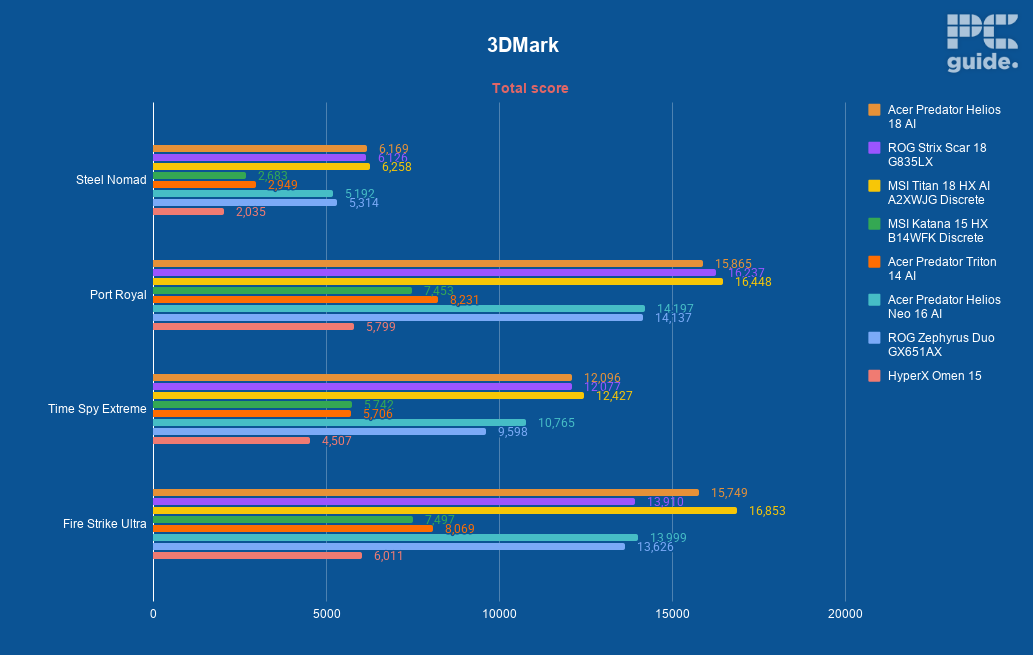
Starting with 3DMark, which tests its rendering and graphical performance, the Omen 15 achieved scores of 2,035 in Steel Nomad, 5,799 in [benchmark name to confirm], 4,507 in Time Spy Extreme, and 6,011 in Fire Strike Ultra.
Moving over to Blender’s rendering benchmark, the CPU achieved averages of 97.71, 66.83, and 53.33 samples per minute in Monster, Junkshop, and Classroom, respectively. The GPU managed 1,491.82, 942.98, and 834.64 samples per minute across the same tests.
Then there’s the Geekbench suite. In Geekbench 6, the CPU achieved a single-core score of 2,517 and a multi-core score of 9,823. The GPU scored 114,235 in OpenCL and 25,551 in Vulkan.
In the Geekbench AI benchmark, the CPU scored 3,020 in single precision, 1,481 in half precision, and 6,981 in quantised performance. The GPU, meanwhile, achieved 5,108, 29,428, and 12,363, respectively.
Thermals and noise levels
Lastly, I looked at the laptop’s thermals, running the FurMark 2 stress test on both the CPU and GPU to see how well the cooling system handles sustained workloads.

The two fans and multiple heat pipes do a decent job of keeping things under control. Once the load settled, the CPU and GPU were drawing 55W and 35W of power, respectively. Their frequencies sat at around 4.4GHz and 1GHz.
Temperatures gradually increased before settling after around 10 minutes under load. At that point, the CPU was sitting at a rather toasty 90°C, while the GPU reached 65°C. That’s fairly reasonable for a gaming laptop under sustained stress.
With both components running at full load, the fans naturally spin up considerably, but they aren’t unreasonably loud compared to some of the larger and more powerful machines we’ve tested. Overall, the cooling system does a decent job, and the top of the chassis doesn’t get excessively hot either. The main exception is the area above the keyboard, where the exhaust vent sits, which does become quite hot to the touch.
- CPU: AMD Ryzen 7 260
- GPU: RTX 5060 8GB & Radeon 780M
- Memory: 16GB DDR5-5600 MT/s
- Storage: 1 TB PCIe Gen4 NVMe M.2 SSD
- Max refresh rate: 165Hz
- Resolution: 1920×1200
- Panel type: 15-inch IPS LED
Conclusion
Overall, the HyperX Omen 15 is a reasonable entry-level gaming laptop, offering a sturdy build and decent performance for a machine in this category. However, its pricing is a little harder to justify, particularly when you consider the additional cost of higher RAM and storage configurations. It also comes in more expensive than some of its RTX 5060 competitors, making it harder to recommend when there are alternatives available for less.
Written by
