


Table of Contents
When it comes to choosing an office printer, you want a good selection of connectivity options, print quality, and useful features. An all-in-one model also needs the speed and capacity to handle more demanding workloads. That’s where Xerox shines, offering a broad range of printers designed around quality and productivity.
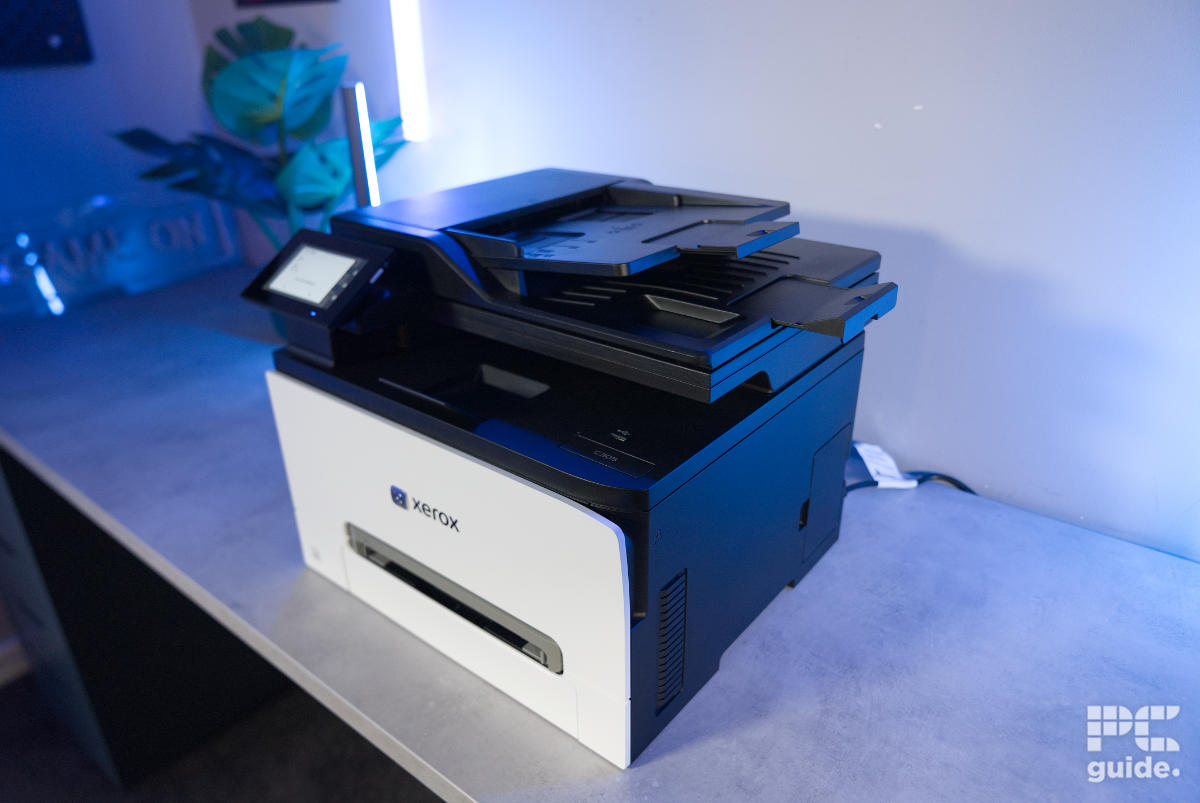
This time, I’ve got hands-on with the Xerox C305ae, a multifunction printer that combines printing, copying, scanning, and faxing in one machine. It’s a fairly heavy but compact design, aimed at small and medium-sized businesses, wherever their offices might be. So, here’s how it fares in our printer review.


- Printer output: Color
- Printer type: Laser
- Connectivity technology: Apple iBeacon, Gigabit Ethernet, Hi-Speed USB 2.0 (Type B rear; Type A front & rear), Wireless 802.11a/b/g/n/ac
- Duplex printing: Yes, automatic
The Xerox C305ae is a rather speedy and great-quality office printer. Quickly spitting out documents and forms, it gives them great clarity and finish too. Although it might fall behind in photos and some monochrome prints, it more generally has a lot going for it. That is, if you can afford it with the high initial and upkeep cost of the whole thing. But you do get a lot of connectivity and control for that, so it is still a consideration.
- Fast print speeds
- Lot of functionality and compact design
- Plenty of controls on screen and apps
- Good quality document printing
- Plenty of connectivity and printing options
- Very expensive to buy and resupply
- Photos do end up a bit flat and lack color range
- Lacks some depth and resolution in monochrome
Box contents and setup
The Xerox C305ae arrives in a fairly plain cardboard box, with a simple, professional design and basic product information printed around the outside. However, it’s no easy thing to move around. Weighing around 25 kg (55 lbs), the bulky packaging can be a bit of a chore to handle. But once I managed to get it into position, here’s what you can expect to find inside.
Latest tech deals.
- AMD Ryzen™ 9 9900X 12-Core - was $499 now $328
- CORSAIR 4000D PC Case - was $124.99 now $75.99
- Hisense 65" Class E6SR - was $549 now $377.99
- Apple 2026 MacBook Air - was $1,999 now $1,799
- Skytech Gaming PC Desktop (9850X3d) - was $4,299 now $3,799
- Apple Magic Mouse - was $79 now $59
- MSI Prestige 16 Flip - was $2,149 now $1,899
- Kotin 9700X Gaming PC - was $2,399 now $2,199
Prices correct as of October 9th, 2026.
- Xerox C305ae Color Multifunction Printer
- Power Cord
- Installation Guide
- Product Safety Sheet
- Quick Reference Guide
- Pre-installed Starter Capacity Print Cartridges—One of each (Cyan, Magenta, Yellow): 1,200 print capacity; Black cartridge: 2,000 print capacity

Xerox C305ae box front, Image by PC Guide

Xerox C305ae box side, Image by PC Guide

Xerox C305ae extras, Image by PC Guide
Once I’d heaved the box onto the table, I started unpacking it to see how everything was protected. Opening the flaps reveals instructions on how to remove the printer safely. First, there’s a top tray containing the various manuals and power cord, which sits in a recessed compartment. Below that, the printer is wrapped in plastic and surrounded by cardboard and foam.

Xerox C305ae box open top, Image by PC Guide

Xerox C305ae box packaging, Image by PC Guide
Even after removing the printer from its packaging and protective film, there’s still a little work to do before it’s ready to use. The setup guide shows you where to check for protective packaging, although most of it is fairly obvious. For example, there’s a red plastic tab sticking out from the front and over the top, which needs to be removed to release the toner protection. Alongside the foam and tape around the sides, there’s not a huge amount to remove, largely because most of the components are already installed.

Xerox C305ae unboxed, Image by PC Guide

Xerox C305ae unboxed top, Image by PC Guide

Xerox C305ae unboxed cartridge tray, Image by PC Guide

Xerox C305ae unboxed cartridge bay, Image by PC Guide
Actually setting up the printer is a relatively straightforward process. You don’t need to use a phone, but it does make things more convenient. Downloading the app and scanning the QR code displayed on the screen makes for a simple setup, with clear instructions to follow.
From there, you can connect the printer to your network and configure the relevant information and settings to suit your requirements. There’s no need to create an online account either, as you can simply set up a local administrator account to manage the device. The accompanying app also provides plenty of control and functionality from your phone.

Xerox C305ae phone set up (1), Image by PC Guide

Xerox C305ae phone set up (2), Image by PC Guide

Xerox C305ae phone set up (3), Image by PC Guide

Xerox C305ae phone set up (4), Image by PC Guide

Xerox C305ae phone set up (5), Image by PC Guide

Xerox C305ae phone set up (6), Image by PC Guide

Xerox C305ae phone set up (7), Image by PC Guide

Xerox C305ae phone set up (8), Image by PC Guide

Xerox C305ae phone set up (9), Image by PC Guide

Xerox C305ae phone set up (10), Image by PC Guide

Xerox C305ae phone set up (11), Image by PC Guide
The PC software is similarly straightforward. With the printer connected via USB, it is detected almost immediately and offers the relevant installation and setup options. Interestingly, it also continued to show the previously reviewed C255a. Once installed, the main dashboard provides plenty of control over your printing options. It’s also a much quicker way to manage print jobs than sending them directly from a document window.
There are plenty of settings to adjust, and you can save your preferred configurations as presets for quicker access. This is particularly useful if you regularly switch between different print methods, such as colour single-sided or monochrome double-sided printing. You also get a handy overview of the toner supply and device status, making it easy to see when a replacement might be needed.

Xerox C305ae PC set up (1), Image by PC Guide

Xerox C305ae PC set up (2), Image by PC Guide

Xerox C305ae PC set up (3), Image by PC Guide

Xerox C305ae PC set up (4), Image by PC Guide

Xerox C305ae PC set up (5), Image by PC Guide

Xerox C305ae PC set up (6), Image by PC Guide

Xerox C305ae PC set up (7), Image by PC Guide

Xerox C305ae PC set up (8), Image by PC Guide
Design
Looking at the design, the front of the Xerox is where most of the visual attention is drawn. The bottom half features a white faceplate that stands out against the darker top section. In the middle, there’s a grey slot for the second paper tray, which provides an additional input option for different media types. This sits above the main paper tray, which holds up to 250 sheets.
Right in the centre is the Xerox logo, with a silver X-shaped detail sitting over it. It’s a small addition, but gives the printer a slightly more premium appearance.

Xerox C305ae front, Image by PC Guide

Xerox C305ae logo, Image by PC Guide

Xerox C305ae paper tray, Image by PC Guide

Xerox C305ae cartridge bay, Image by PC Guide

Xerox C305ae cartridge tray, Image by PC Guide
Above the main body sits the rest of the machine. There’s an automatic document feeder at the top, with the scanner bed tucked underneath its hinged cover and the paper output tray positioned below. Each of these sections also features hidden fold-out extensions to provide additional support when needed.
Across the front, you’ll find a USB port on the right-hand side for printing directly from portable storage, alongside a large 4.3-inch hinged touchscreen. This provides a fairly ergonomic way to control the printer. Interestingly, there’s also a 3.5mm audio jack beside the display. From what I can gather, this is part of Lexmark’s accessibility and voice-guidance integration, allowing users to listen to audio instructions without relying on a built-in speaker. The power button also gets its own prominent position along the edge.

Xerox C305ae top half, Image by PC Guide

Xerox C305ae document feeder, Image by PC Guide

Xerox C305ae document feeder unfolded, Image by PC Guide

Xerox C305ae output tray, Image by PC Guide

Xerox C305ae scanner bed, Image by PC Guide

Xerox C305ae screen (1), Image by PC Guide

Xerox C305ae screen (2), Image by PC Guide

Xerox C305ae screen (3), Image by PC Guide
Moving around the sides, the printer is considerably more understated. The black panels have only a few features worth mentioning, including several ventilation openings, handholds along the bottom for easier carrying and positioning, and a waste toner bottle. The latter collects excess toner so it can be safely disposed of when needed.

Xerox C305ae right side, Image by PC Guide

Xerox C305ae left side, Image by PC Guide

Xerox C305ae waste toner bottle, Image by PC Guide

Xerox C305ae audio port, Image by PC Guide
Around the back is where you’ll find the rest of the connectivity options. The bottom-right section houses various USB ports, an Ethernet connection, and a Kensington lock slot. There are also two telephone connections just below the hinges, consisting of a line-in and an extension. Over on the left is the power input, with a small cooling fan positioned above it.
In the centre, there’s a large access door that opens up to reveal the internal rollers and printer mechanism. You can get a good look at the hardware inside, including the rather hot 180°C laser and the rollers underneath. More importantly, this panel also provides access to the internals when you need to clear a paper jam.

Xerox C305ae back, Image by PC Guide

Xerox C305ae back power, Image by PC Guide

Xerox C305ae back ports, Image by PC Guide

Xerox C305ae back fan, Image by PC Guide

Xerox C305ae open back, Image by PC Guide

Xerox C305ae phone ports, Image by PC Guide
Print results and speed
After getting through the setup and taking a closer look at the printer, I moved on to testing its print speed and quality. I used a selection of colour and monochrome print jobs to see what the Xerox C305ae is capable of.
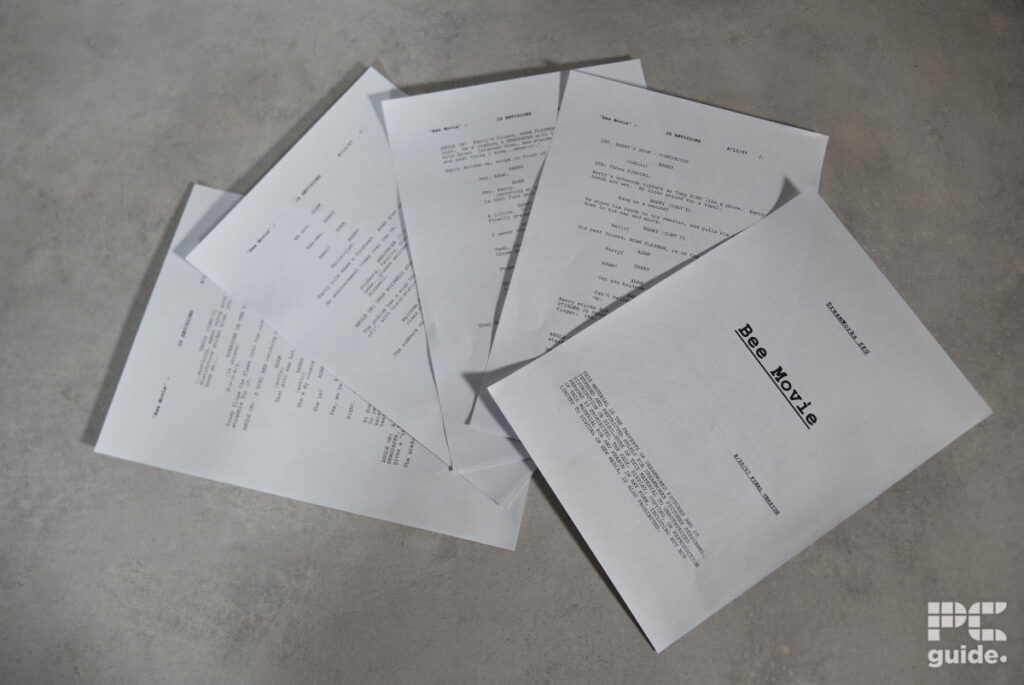
Starting with the Bee Movie script, I ran a 10-page black-and-white print job using double-sided printing, resulting in five sheets in total. The entire job took just 54.8 seconds to complete, with the initial warm-up and first page taking 24.6 seconds. Each subsequent page then took around seven to eight seconds. The print quality was excellent, too, with no noticeable smudging, clear text, and bold sections that stood out nicely across the pages.
Next, I ran a mixed job consisting of three colour pages and three monochrome pages. This took just 30 seconds in total. The first page took 15 seconds to print, while the next came through in just two seconds. The sixth page needed a brief warm-up before printing, taking around eight seconds.
Looking at the quality of these prints, the monochrome pages were generally good. Text was clear, toner coverage was consistent, and diagrams came through well. However, there were a few areas where the lower DPI had an impact on the final result. The alignment wheel and radial gradients, for example, showed some fuzziness, while larger sheets containing boxes and lines also displayed occasional banding.
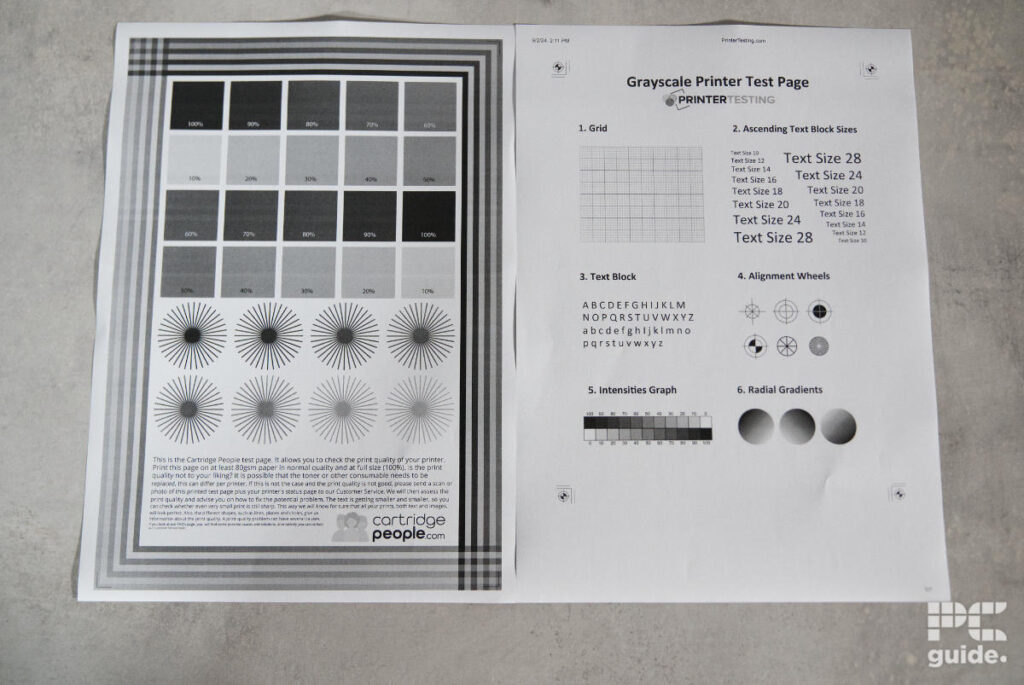
Those issues were much less noticeable on the colour pages, which came out looking pretty much spot on. The results were genuinely impressive. I also tried copying one of these pages, although the results weren’t quite as good. Some of the lighter areas lost definition, with more noticeable dotting and fading compared to the original.

Xerox C305ae print results (4), Image by PC Guide

Xerox C305ae print results (3), Image by PC Guide
Images also came out looking rather impressive. The black-and-white image was clear, with no noticeable bleeding between different shades. The colour image was similarly clean, with a good overall finish that looked as it should.
I then tried printing a photograph on glossy paper to see how well the printer handled more demanding image work. The results were OK, but this is where the limitations of laser printing become a little more apparent. Not only does it leave a border around the photograph, but the colours also look a little flat. Some shades don’t quite match their intended appearance, although the results are perfectly usable for most everyday purposes. That’s where the additional media input comes in handy.

Xerox C305ae print results (5), Image by PC Guide

Xerox C305ae print results (1), Image by PC Guide
Specifications and price
| Printing Technology | Color laser |
| Maximum Print Resolution | 2400 x 600 dpi, 4800 color quality |
| Ink Type | Toner cartridges |
| Scanner resolution and type | 600 x 600 dpi |
| Operating Systems | Microsoft Universal Print with Print Support Application, Windows Server 2016, Windows Server 2019, Windows Server 2022, Windows Server 2025, Windows 10, Windows 11, macOS 14, macOS 15, macOS 26 |
| Dimensions (W x D x H) | 411 x 400 x 345 mm |
| Weight | 20.2 kg |
| Connectivity | Apple iBeacon, Gigabit Ethernet, Hi-Speed USB 2.0 (Type B rear; Type A front & rear), Wireless 802.11a/b/g/n/ac |
| Mobile and cloud printing | Apple AirPrint, Chromebook Printing, Mopria Print Service, Mopria Scan, and Wi-Fi Direct |
| Paper Sizes | Tray (Main tray): Custom sizes: 98 x 148 mm to 216 x 356 mm Tray (Manual feed slot): Custom sizes: 98 x 148 mm to 216 x 356 mm Tray (optional): Custom sizes: 98 x 148 mm to 216 x 356 mm |
| Media Types | Light Paper, Plain Paper, Heavy Paper, Cardstock, Envelopes, Labels, Recycled, Glossy, Heavy Glossy, Bond, Rough Envelope, Letterhead, Preprinted, Colored Paper, Rough/Cotton, Custom Type |
| Input Paper Capacity | Tray (Main tray): 250 sheets Tray (Manual feed slot): 1 sheet Tray (optional): 250 sheets |
| Display | 4.3-inch touchscreen |
Looking over the specifications, the Xerox C305ae appears to be a well-rounded option, particularly considering its relatively compact footprint for an office printer. It still has plenty of weight to it, but offers a good range of connectivity options and features to support larger print jobs and regular office use.

Xerox C305ae setup (5), Image by PC Guide

Xerox C305ae setup (4), Image by PC Guide
Xerox C305ae setup (3), Image by PC Guide

Xerox C305ae setup (2), Image by PC Guide

Xerox C305ae setup (1), Image by PC Guide
As for pricing, the Xerox is certainly a more expensive option. With a price tag of $639.00/£399.11, it sits above plenty of other colour laser printers. However, it does offer a high-quality build and finish, alongside plenty of features to make use of.
The cost of replacing the cartridges is another area worth considering. The standard-capacity bundle costs $344.96/£299.96 and offers a yield of 1,200 pages. Moving up to the high-capacity bundle increases the price to $489.96/£438.81, with a yield of 2,500–3,000 pages. There’s also an extra-high-capacity option, costing $1,053.96/£861.58 for a much larger yield of 6,500 pages.
That works out at approximately $0.29/£0.25, $0.18/£0.16, and $0.16/£0.13 per page, depending on which cartridge bundle you choose. There’s also the waste toner bottle to consider, which has a 15,000-page yield and costs $19.99/£20.47 to replace.
- Printer output: Color
- Printer type: Laser
- Connectivity technology: Apple iBeacon, Gigabit Ethernet, Hi-Speed USB 2.0 (Type B rear; Type A front & rear), Wireless 802.11a/b/g/n/ac
- Duplex printing: Yes, automatic
Conclusion
Overall, the Xerox C305ae is an impressive office printer, offering fast print speeds and consistently good print quality across most of the jobs I tested. It’s also well equipped, with plenty of connectivity options and useful features that make it a good fit for busy offices handling larger print jobs and high volumes of documents. It can even produce some decent-looking images, although glossy photo printing isn’t quite its strongest area.
The biggest drawback is the cost. The initial $639 price tag is already on the expensive side, and replacement toner cartridges make it a fairly costly printer to run over time. However, if you prioritise build quality, connectivity, and productivity, the C305ae has plenty going for it. Just be prepared to pay a premium for both the printer and its ongoing running costs.
Written by
