


Table of Contents
When it comes to the handheld market, there’s an ever-expanding selection of options out there. Varying in design, functionality and hardware, the choice has grown considerably since the seismic release of the Steam Deck a few years back. Now Acer has added another product to its lineup: the Predator Atlas 8.
Packing an Intel Arc G3 or G3 Extreme processor alongside Intel Arc B390 graphics, the Atlas 8 features an 8-inch touchscreen. It’s based on Windows, but streamlined for gaming handhelds with an Xbox mode rather than relying on a standard Windows installation. So, how does it perform? We put it to the test to find out.

- CPU: Intel Arc G3 Extreme
- GPU: Intel Arc B390
- Memory: Up to 24GB LPDDR5X
- Storage: Up to 1TB SSD
- Screen: 8-inch 1080p 16:10 120Hz touchscreen
- Battery: Up to 80Whrs
The Atlas 8 being a Windows handheld does make for a seamless handheld experience, with the OS being very universally supported by games and apps. Now, with a lighter Xbox gaming mode, it should give you more processing power for those games too. All while in a quality build with great controls on it. Of course, it doesn’t come cheap and is a bit heavy, yet it is versatile and useful, considering it can be used as a mini PC and a rather great machine for it too, with the Intel hardware inside.
- Hall effect joysticks and TMR buttons
- Great controls and touchscreen
- Full Windows 11 with lighter Xbox gaming mode
- Great ergonomics and control customizability
- Fingerprint sensor unlock on power button
- Not so great battery life in intense games
- Quite expensive
- Windows still not a perfect experience
Pricing and availability
Starting with pricing and availability, it’s been a somewhat scattered release. Originally scheduled to launch in October 2026, the Atlas 8 has arrived early here in the UK, with some retailers already offering it, while the rest of the world has to wait for it to become more widely available.
Latest tech deals.
- AMD Ryzen™ 9 9900X 12-Core - was $499 now $331
- Sony INZONE M10S 27” - was $899 now $748
- Thermaltake LCGS View i1470S-170 - was $2,399 now $2,099
- Apple 2026 MacBook Air - was $1,999 now $1,891
- Bose QuietComfort Headphones - was $359 now $169
- LG 77-inch OLED C6 - was $2,499 now $1,999
- MSI Prestige 16 Flip - was $2,149 now $1,870
-
Hisense 85" U6 Pro Series-
Prices correct as of November 5th, 2026.
There are a number of models available to buy or pre-order from various retailers. The base Atlas 8 model with 512GB of storage is available for £999 with 16GB of RAM, while the US version costs $1,099 and comes with 24GB. The Extreme models, meanwhile, come with 1TB of storage and are priced at £1,299 with 24GB of RAM, or £1,499 with 32GB.

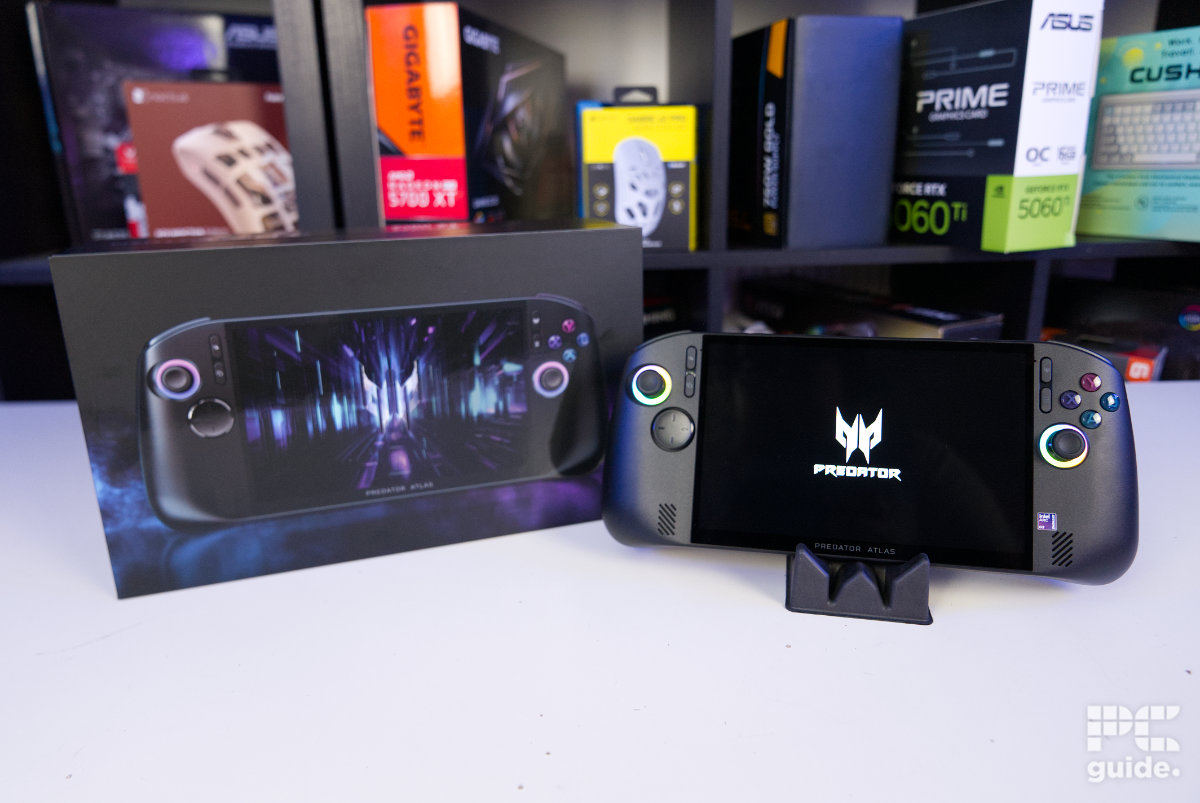
Acer Predator Atlas 8 outer box and charger, Image by PC Guide

Acer Predator Atlas 8 outer box, Image by PC Guide

Acer Predator Atlas 8 outer box side, Image by PC Guide

Acer Predator Atlas 8 outer box back, Image by PC Guide
Overall design
Starting with the packaging of the Atlas 8, there’s a lot of it. Well, at least with the version we were sent, which was something of a Russian doll of cardboard boxes. The outer brown box holds two black boxes inside: one for the handheld and another for the premium hard case that comes with it. Both have stylish designs, with shiny writing and logos across them.

Acer Predator Atlas 8 inner box back, Image by PC Guide

Acer Predator Atlas 8 inner box front, Image by PC Guide

Acer Predator Atlas 8 inner box top, Image by PC Guide

Acer Predator Atlas 8 hard case box front, Image by PC Guide

Acer Predator Atlas 8 hard case box top, Image by PC Guide

Acer Predator Atlas 8 two boxes, Image by PC Guide

Acer Predator Atlas 8 box back, Image by PC Guide

Acer Predator Atlas 8 box back, Image by PC Guide

Acer Predator Atlas 8 box top, Image by PC Guide
The included case is very solidly built. It has a hard shell with cutouts for the joysticks and buttons, providing a protective and thoughtful design. There’s also a strap to hold the handheld in place, along with a compartment underneath for the charger and other accessories.

Acer Predator Atlas 8 hard case front, Image by PC Guide

Acer Predator Atlas 8 hard case top, Image by PC Guide

Acer Predator Atlas 8 hard case open unfurled, Image by PC Guide

Acer Predator Atlas 8 hard case open, Image by PC Guide
As for the Atlas 8 itself, it comes in a larger, bulkier box with all the essentials included. Opening it up, you’re immediately presented with a compartment in the lid containing booklets, alongside an envelope laid out on top with a screen protector. Underneath that, the Atlas 8 is finally revealed, wrapped in a protective cloth.

Acer Predator Atlas 8 open box, Image by PC Guide

Acer Predator Atlas 8 wrapped in box, Image by PC Guide
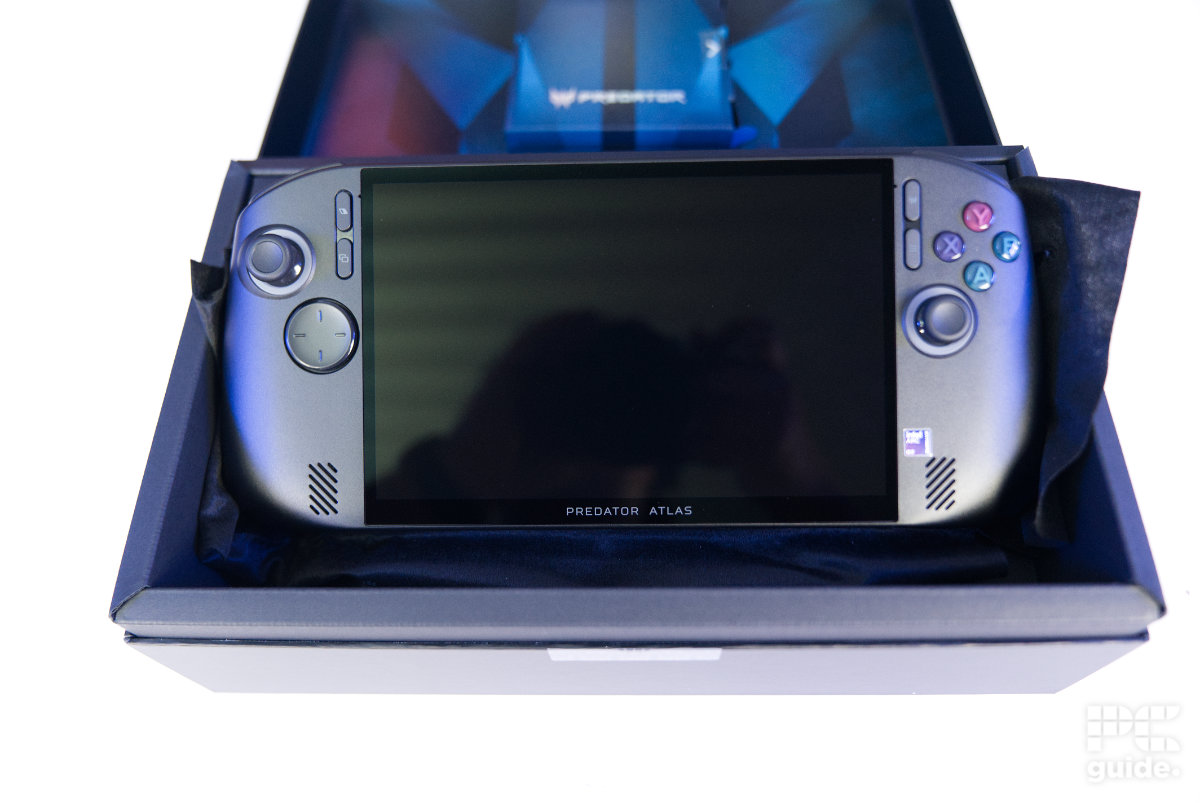
Acer Predator Atlas 8 in box, Image by PC Guide

Acer Predator Atlas 8 box bottom, Image by PC Guide
The accessories include a convenient screen protector to keep the display extra secure, along with a 65W charger and a cardboard stand. The latter is a bizarre inclusion. Perhaps it’s a way to keep costs down while still providing some utility, but I do feel a proper dock would have been a better addition.

Acer Predator Atlas 8 screen protector, Image by PC Guide

Acer Predator Atlas 8 accessories, Image by PC Guide
Taking a closer look at the Atlas 8 from the front, it’s a rather chunky-looking handheld. The large 8-inch diagonal display takes up most of the space, with a slightly wider 1920 x 1200 resolution giving it a 16:10 aspect ratio. The buttons surrounding it follow a layout similar to that of the ROG Xbox Ally.
Four slim, tall buttons flank the screen at the top, with the primary A, B, X and Y buttons on the top right. Below these is one of the TMR joysticks, complete with a halo LED ring around it. Its counterpart sits on the opposite side, slightly higher up, as is standard on Xbox controllers. Below that is a circular D-pad, positioned above the speaker grilles along the bottom front edge.

Acer Predator Atlas 8 front on, Image by PC Guide

Acer Predator Atlas 8 left joystick, Image by PC Guide

Acer Predator Atlas 8 right joystick and buttons, Image by PC Guide
Looking around the sides of the machine, you can see the ergonomic design. It reminds me of my Xbox Elite controller, with the bottom half thickening out to create a bump for your fingers and provide a comfortable grip. There’s also a change in material between the front and back, with the rear using a grippier, textured finish to help keep it secure in your hands.

Acer Predator Atlas 8 right side, Image by PC Guide

Acer Predator Atlas 8 left side, Image by PC Guide
As for the edges of the Acer handheld, the rather thick bottom edge houses three of the screws holding the case together. The top has a lot more going on, with the controls and ports positioned closer to the front edge. These include the power button on the right, which has an inbuilt fingerprint sensor, a headphone port beside it, a microSD slot, two status lights, volume buttons and two USB-C Thunderbolt 4 ports.
Behind these are the exhausts for the two cooling fans inside, which push hot air away from the console. The top is also flanked by the bumpers and triggers, which sit at the sides just above the other controls.

Acer Predator Atlas 8 bottom, Image by PC Guide

Acer Predator Atlas 8 top, Image by PC Guide

Acer Predator Atlas 8 power button, Image by PC Guide

Acer Predator Atlas 8 volume and ports, Image by PC Guide
At the back of the Atlas 8, things are a lot more minimal. The centre is taken up by the RGB Predator logo, which lights up when the handheld is powered on. Underneath it is a sticker spanning the width of the device. On either side of the logo are the two intakes for the flat cooling fans inside. There are also two macro buttons on the centre sides, which are easy to reach while holding the grips. Above those are the trigger adjustments, allowing you to alter their stop points. This gives you the choice between full travel for something like driving games or shorter stops for greater responsiveness in shooters.

Acer Predator Atlas 8 back, Image by PC Guide

Acer Predator Atlas 8 M1 & trigger lock, Image by PC Guide
Taking a quick peek inside also gives you access to some of the components. The bottom is filled by the battery, with an NVMe drive sitting just above it. This makes the storage accessible, but not particularly easy to swap out, as cables and cooling components surrounding it make the process a little more awkward. The fans beside it are much more exposed, making them easy to clean, and are surrounded by foam to create a better connection with the rear casing.
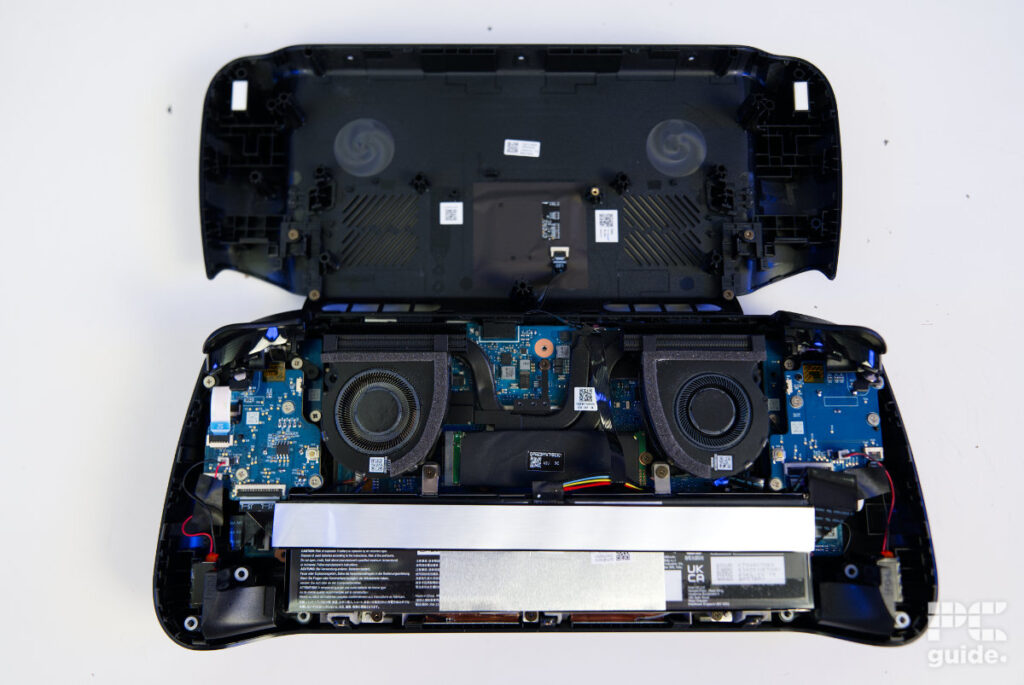
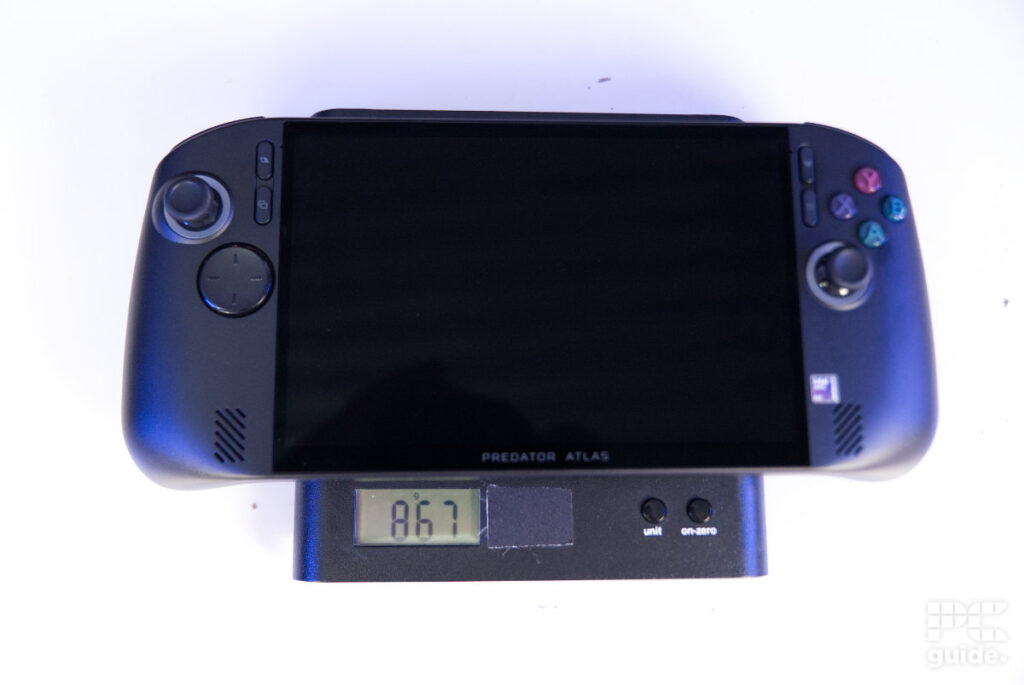
All of that build comes in at a weight of around 867g (1.91lbs) on our scales. In comparison, the Steam Deck came in at around 666g (1.47lbs).
Battery life
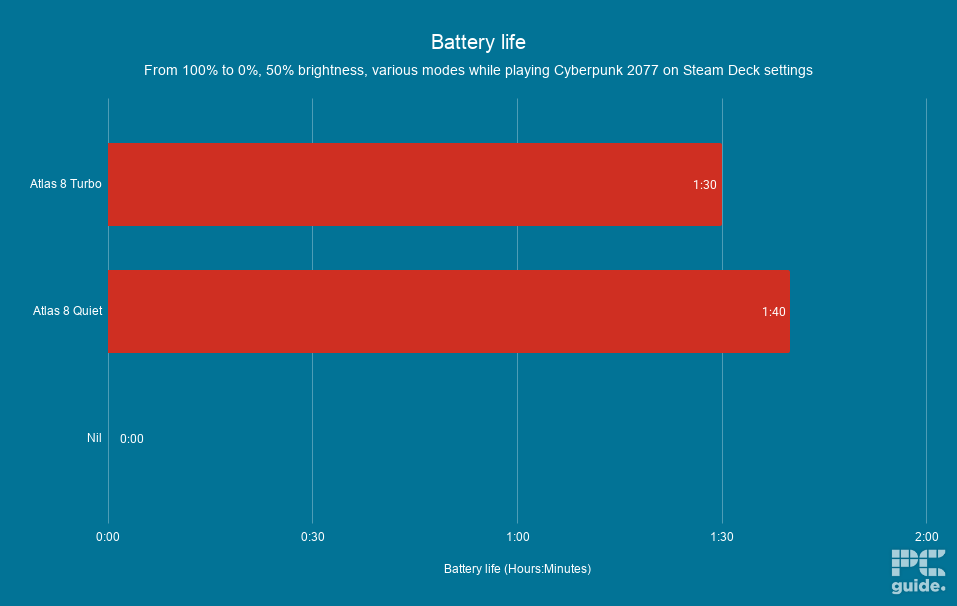
Checking out the battery life of the Atlas 8, I tested both Turbo and Quiet modes to compare how long each would last. I ran Cyberpunk 2077 using Steam Deck settings, starting at 100% battery and running it down to practically empty, with the screen set to 50% brightness.
In those modes, the Atlas 8 lasted around 1 hour and 30 minutes in Turbo, and 1 hour and 40 minutes in Quiet. That’s not particularly long to go without plugging it in, although Cyberpunk 2077 is an intensive game, so battery life could be better elsewhere. However, if you’re playing a demanding game, you’re going to need to stay plugged in for longer sessions.
Software
Unlike the Steam Deck and other Linux-based handhelds, the Atlas 8 is a Windows-based machine, but with Xbox mode enabled by default. Setup is therefore very much like any other Windows 11 experience, with plenty of menus to work through and a lot of updates to install before you’re ready to go.
Once that’s all done, however, things are a little different. You’re presented with the Xbox app instead, providing a lighter OS experience. You can also open the screen selection menu and switch to desktop mode whenever you want the full PC experience.

Acer Predator Atlas 8 powered, Image by PC Guide

Acer Predator Atlas 8 Xbox Home screen, Image by PC Guide

Acer Predator Atlas 8 Xbox library, Image by PC Guide

Acer Predator Atlas 8 Xbox cloud gaming, Image by PC Guide

Acer Predator Atlas 8 tab switcher, Image by PC Guide
Alongside the standard Windows and Intel software and features, Acer has its PredatorSense app, which, together with the overlay, is used to control the handheld and adjust its settings. There are plenty of options to work through, allowing you to customise things to your liking and check the status of your hardware. It’s all just a click away using the dedicated button, which also lets you change control modes.

Acer Predator Atlas 8 PredatorSense home screen, Image by PC Guide

Acer Predator Atlas 8 PredatorSense fan control, Image by PC Guide

Acer Predator Atlas 8 PredatorSense control mode, Image by PC Guide

Acer Predator Atlas 8 PredatorSense gamepad controls, Image by PC Guide

Acer Predator Atlas 8 PredatorSense gamepad hotkeys, Image by PC Guide

Acer Predator Atlas 8 PredatorSense general settings, Image by PC Guide

Acer Predator Atlas 8 PredatorSense performance, Image by PC Guide

Acer Predator Atlas 8 PredatorSense performance stats, Image by PC Guide

Acer Predator Atlas 8 PredatorSense graphics settings, Image by PC Guide

Acer Predator Atlas 8 PredatorSense live update, Image by PC Guide

Acer Predator Atlas 8 PredatorSense light effect, Image by PC Guide

Acer Predator Atlas 8 PredatorSense audio effect, Image by PC Guide

Acer Predator Atlas 8 PredatorSense battery, Image by PC Guide
Performance
Of course, I then tested the performance using our usual suite of games and applications to benchmark the handheld. This gives us an idea of the framerates you can achieve and what else the Atlas 8 is capable of.

Acer Atlas 8 desktop browsing, Image by PC Guide

Acer Atlas 8 desktop Steam, Image by PC Guide

Acer Atlas 8 desktop Doom TDA (7), Image by PC Guide

Acer Atlas 8 desktop setup (6), Image by PC Guide
General usage
Firstly, I wanted to cover the day-to-day experience of using the machine and what it’s like to play on. It was slow to get going, as it’s running Windows. Many of the functions feel disjointed, with Windows, the Store and Acer Live Updates all sitting in different applications. It took multiple boots before everything was up to date and the handheld finally offered the complete experience.
The lack of a quick tour of the controls on first boot also meant I had to work my way through the settings and learn the shortcuts to get to grips with everything. However, being a Windows device did make it quite easy to install my own programs, and I was still able to add them to Xbox mode without compromising performance.
That allows you to launch Steam and other programs quickly from the home screen. Some applications, such as Geekbench, did struggle to display properly, though. I had to reduce the screen zoom to see the entire interface, while the touchscreen made things a little easier to adjust and control.

Acer Atlas 8 handheld overlay, Image by PC Guide

Acer Atlas 8 handheld FH6 (1), Image by PC Guide

Acer Atlas 8 handheld FH6 (3), Image by PC Guide

Acer Atlas 8 handheld Doom TDA (1), Image by PC Guide

Acer Atlas 8 handheld Doom TDA (4), Image by PC Guide

Acer Atlas 8 handheld Predator Sense, Image by PC Guide

Acer Atlas 8 handheld browsing, Image by PC Guide
As for the buttons, they felt premium and were nice to use. The TMR joysticks had good travel and should offer great longevity compared with older technologies. The triggers also have a nice feel, with their adjustable stop points providing an extra level of control. The face and macro buttons are easy to reach, too, with good feedback and a satisfying feel.
Gaming
Starting with the gaming benchmarks, I ran them at the native 1200p resolution, varying the settings to see how the framerates changed. I also compared the Turbo and Quiet modes, which represent the two extremes of the available options beyond Balanced and Custom. There’s a 10W difference between them, with Turbo running at 35W and Quiet at 25W.

Acer Predator Atlas 8 Doom Eternal, Image by PC Guide

Acer Predator Atlas 8 Cyberpunk 2077, Image by PC Guide

Acer Predator Atlas 8 CS2, Image by PC Guide
Starting with Counter-Strike 2, it was quite an experience playing the game with a controller. I’ve put nearly 3,000 hours into it normally, using a mouse and keyboard, but was surprised by how well its controls had been adapted for a handheld.
In terms of performance, at Very High settings, it averaged 56 FPS, with 1% and 0.1% lows of 40 and 35 FPS respectively. These results were the same in both Turbo and Quiet modes. Dropping to Medium improved the average to 167 FPS in Turbo and 147 FPS in Quiet, while Low increased those figures to 201 and 197 FPS respectively.
Similarly, in Doom Eternal at Ultra Nightmare settings, the Atlas 8 averaged around 95 FPS in both modes. Dropping to High increased that to 103 FPS in Turbo and 99 FPS in Quiet, while Low pushed the averages to 133 and 130 FPS respectively. Across these settings, the 1% lows also improved in Turbo mode, offering a better baseline and fewer severe frame drops, although the difference wasn’t particularly noticeable in practice.
As for Cyberpunk 2077, at the standard Ultra preset, the average dropped just below 60 FPS, reaching 56 in Turbo and 53 in Quiet. At Medium, that increased to 80 and 73 FPS, with Low pushing things further to 89 and 82 FPS respectively.
Running ray tracing had a much bigger impact on performance. Framerates dropped to 16 and 15 FPS in Overdrive, and 37 and 35 FPS in Medium. Low managed 51 and 49 FPS. I then switched to the Steam Deck preset, which is designed with handheld gaming in mind, and achieved averages of 78 and 74 FPS.
Synthetics
I then checked out how the Atlas 8 performed in other use cases, looking at the processing power of the machine and how capable it is beyond gaming.

Acer Predator Atlas 8 Geekbench 7 GPU, Image by PC Guide

Acer Predator Atlas 8 Blender 5.2 CPU, Image by PC Guide
Acer Predator Atlas 8 3DMark, Image by PC Guide

Acer Predator Atlas 8 Geekbench AI CPU, Image by PC Guide

Acer Predator Atlas 8 Geekbench 7 CPU, Image by PC Guide

Acer Predator Atlas 8 Blender 5.2 GPU, Image by PC Guide

Acer Predator Atlas 8 Geekbench AI GPU, Image by PC Guide
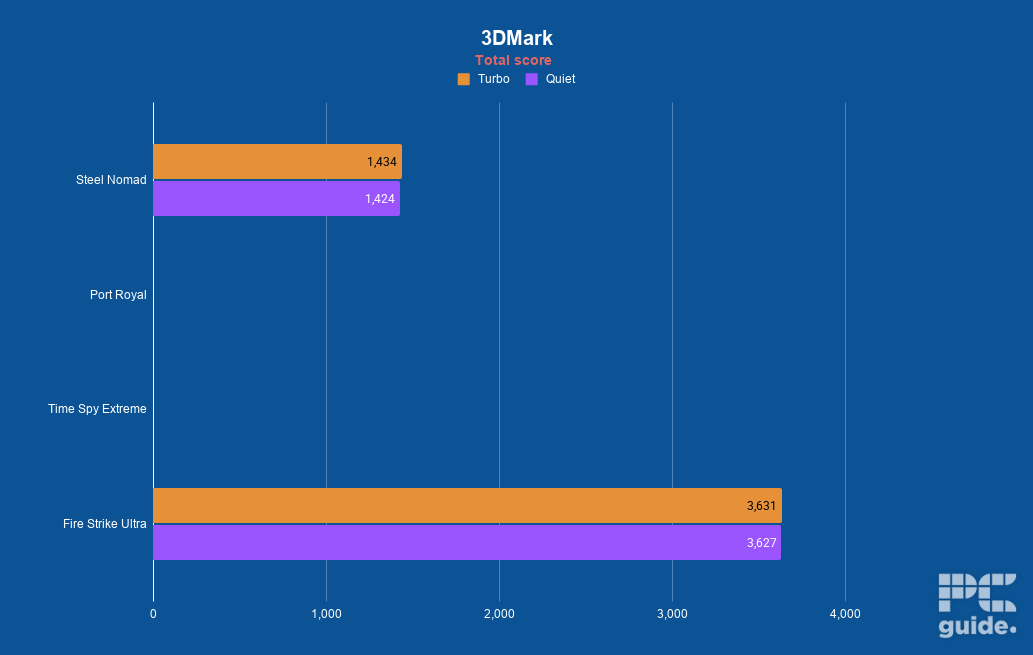
Starting with 3DMark, in the tests that actually ran, it achieved a score of around 1,430 in Steel Nomad and 3,600 in Fire Strike Ultra. Port Royal and Time Spy Extreme failed to complete.
In Blender, the CPU achieved scores of 99 and 85 in Monster, 73 and 71 in Junkshop, and 51 and 47 in Classroom. The GPU scores were considerably higher, reaching 490 and 498, 392 and 339, and 363 and 364 respectively across the two modes and various scenarios.
Then, in the Geekbench suite, the CPU achieved scores of around 2,300 in single-core and 14,000 in multi-core tests. The GPU scored around 50,000 in OpenCL and 44,000 in Vulkan.
In Geekbench’s AI counterpart, the CPU achieved a single-precision score of 3,800, a half-precision score of 1,600 and a quantised score of around 7,000. The GPU scored 11,000, 19,000 and 7,000 respectively.
Thermals and noise levels
I then put the cooling of the Atlas 8 to the test, running FurMark 2 and stress-testing the CPU and GPU to their limits for 20 minutes in Turbo mode. This gave me an idea of how hot and loud the handheld gets under sustained load.
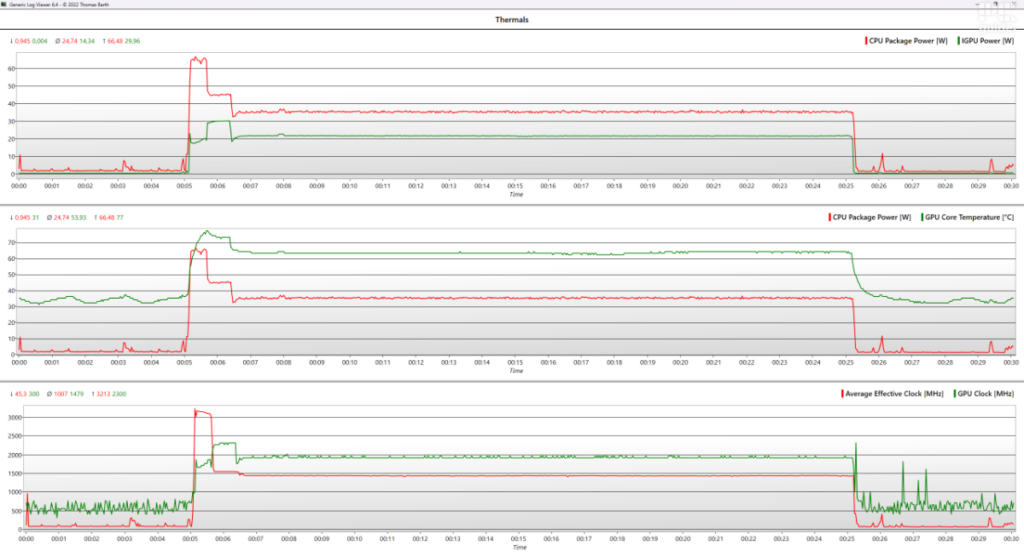
Starting the stress test, the CPU immediately spiked to around 66W of power, with its clock rate jumping to 3.2GHz. At the same time, the GPU was a little behind at 20W, running at 1.8GHz and reaching a temperature of 77°C.
After a couple of minutes, the system reached an equilibrium. The CPU settled at 35W and the GPU at 22W, with the processor temperatures sitting at 62°C and clock rates of 1.5GHz and 2GHz respectively. After turning off FurMark 2, power consumption quickly dropped, while the CPU temperature gradually fell to around 35°C.
Below, you can hear samples of the two modes, Turbo and Quiet. These were recorded at full gain, just above the handheld, and increased by 20dB. So, they won’t sound exactly as they would in person, but they should give you a good comparison of the two modes and the difference between them.
In actual use, the difference in noise between the two extreme modes is surprisingly noticeable, despite there not being a huge performance gap. This means you can have a quieter console without sacrificing too much performance. It doesn’t get too hot either, at least around the areas where you hold it. It’s really only the rear casing and top vents that get particularly hot.
- CPU: Intel Arc G3 Extreme
- GPU: Intel Arc B390
- Memory: Up to 24GB LPDDR5X
- Storage: Up to 1TB SSD
- Screen: 8-inch 1080p 16:10 120Hz touchscreen
- Battery: Up to 80Whrs
Conclusion
Overall, the Atlas 8 is a rather capable handheld. It’s not a cheap option, but it has a good form factor and a quality, well-thought-out design that feels built to last. The touchscreen, TMR controls and ergonomic design make for a great overall package, while the Intel Arc G3 hardware delivers some impressive performance for a handheld. It also doubles as a dockable Windows PC, which might be one of the best ways to use it.
There are still some frustrations, particularly with the Windows experience, which can feel disjointed and take a while to get set up. However, the Xbox mode makes things much more manageable, and the software experience is already a significant improvement on a standard Windows installation. Battery life is another limitation, especially when playing demanding games, and the weight makes it a fairly hefty handheld to carry around. Even so, there’s plenty to like here, particularly if you’re after a powerful handheld that can also serve as a full Windows PC.
Written by
