
Netgear Nighthawk M7 Pro review: fast and compact, but a big dent to the wallet

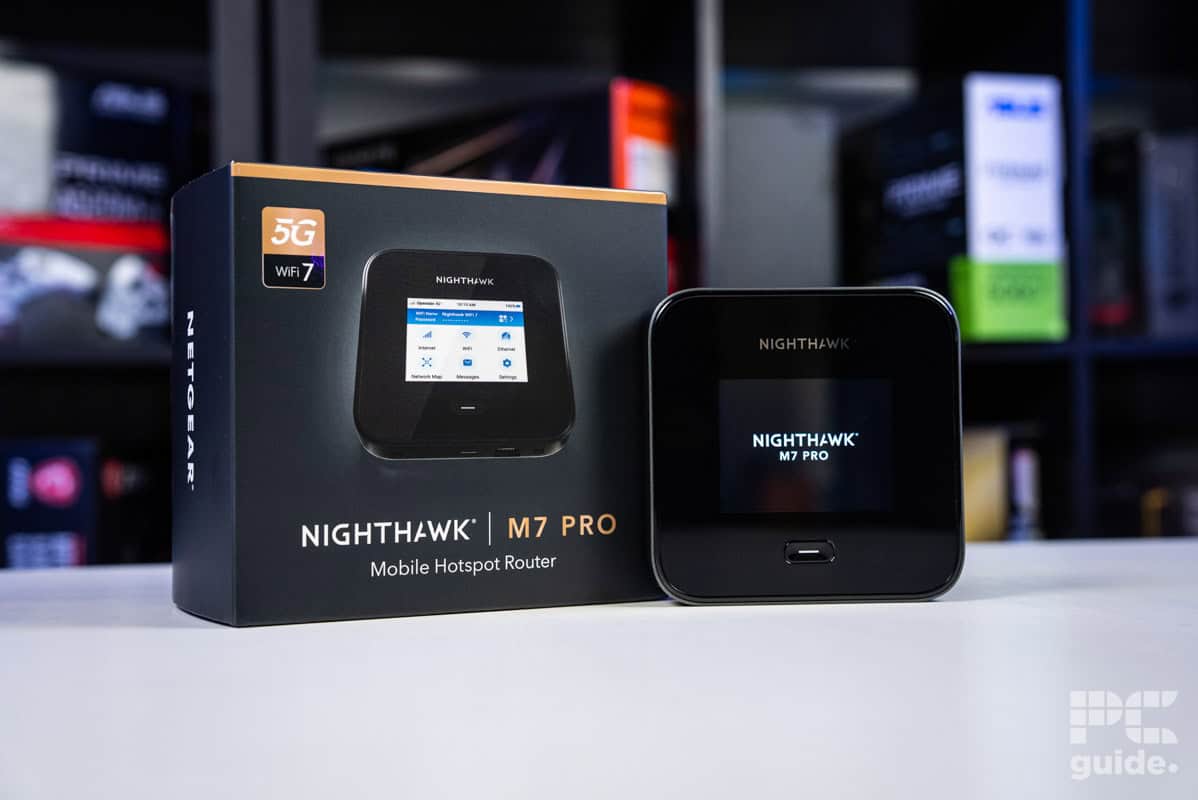
Table of Contents
If you’re looking for the best travel routers, there are a variety of options to pick from, depending on what connection types you’re looking for. If you often find yourself in situations where you have to rely on a mobile network or public WiFi, and want to add a layer of security to your connect, these portable devices have a great deal to offer. This newer Netgear router, the Nighthawk M7 Pro, brings WiFi 7 connectivity, along with an inbuilt long-lasting battery. With the option to run dual band, including 6GHz, you can experience great speeds with this router, although generally you will be capped by the speed of the mobile internet connection or whatever other source you are using.
A puck-sized device measuring 105mm (4.13 inches) in height and width, and with a thickness of just 21.5mm (0.85in) – the Nighthawk M7 Pro is particularly easy to carry, even compared to other travel routers. It’s particularly portable for all the frequencies and features it offers. That being said, it’s definitely not cheap – coming in at over $400, and with the additional cost of another SIM plan if you want it working standalone.
Is the high asking price a worthy cost for those who get to enjoy its functionality though? Read below for our verdict after we put this tiny router through our suite of tests and evaluated its performance.
Latest PC & Tech deals
- AMD Ryzen™ 9 9900X 12-Core - was $499 now $337
- iBUYPOWER Element Gaming PC - was $1,999 now $1,699
- LG 27GX700A-B 27-inch Ultragear- was $599 now $485
- Samsung SSD 9100 PRO 1TB - was $339 now $249
- HP OmniBook 5 16 inch - was $961 now $799
Prices correct as of September 21st, 2026.

- Standard: WiFi 7
- Frequency Bands: 2.4GHz, 5GHz, and 6GHz
- Max Speed: 5.8Gbps
- LAN Ports: 1x 2.5Gbps
- WAN/LAN: Shared 2.5Gbps Ethernet
- CPU: Qualcomm Snapdragon X75
- USB: USB Type-C
- Dimensions (HxWxD): 105x105x21.5mm (4.13×4.13×0.85 in)
- Weight: 280g (0.62 lb) with battery
The Nighthawk M7 Pro is an impressive mobile router, combining the availability of mobile SIM data with WiFi 7 to create a fast and portable hotspot. Offloading that job from your phone, it gives you plenty of control and power to create a hotspot for plenty of devices at the highest speeds, depending on your network, or you can utilize a wired plan too with ethernet ports.
That all comes at a rather steep cost however, not only for the unit itself, but then having to run another SIM and data plan unless you use your existing phone one. That said, it has a great use case for that niche of users who need to get a network set up in the more remote places. It also comes with great build quality and design.
- Enables plenty of devices to connect to one hotspot
- Small and compact design
- Portable and long-lasting battery
- Easy to use and set up with plenty of customization
- Expensive standalone router
- Requires a secondary data plan
- Doesn’t come with antennae
Design
Netgear’s Nighthawk M7 Pro continues the trend of its travel routers coming in a very compact form factor. Even though the WiFi 7 router packs in an extra frequency band, compared to the preceding M3 or even the M6 Pro, it doesn’t increase the size.
The general design of the router is a rounded square, which measures 105mm (4.13 inches) on the sides and has a depth of 21.5mm (0.85 inches). With a relatively large face, we would ideally like to have seen the screen be a bit bigger than the 2.8-inch touch screen it comes with. That being said, it’s still big enough to provide a great deal of utilization, without any real issues from the UI layout and with the size of the icons being sufficient. The rest of the top face is taken up with a lot of blank space, a logo on top, and the one multifunctional button underneath: a handy and satisfying one-stop option for controlling the power on the router and going back to the home screen.
Netgear Nighthawk M7 Pro router and box, Image by PC Guide

Netgear Nighthawk M7 Pro box contents, Image by PC Guide

Netgear Nighthawk M7 Pro top end, Image by PC Guide

Netgear Nighthawk M7 Pro ports end, Image by PC Guide

Netgear Nighthawk M7 Pro box front, Image by PC Guide

Netgear Nighthawk M7 Pro bottom cover, Image by PC Guide

Netgear Nighthawk M7 Pro box angled, Image by PC Guide
Other than on the main front side, the bottom edge of the router is where the rest of the features are based. In the middle, there is the USB-C power port that doubles as a 10Gbps wired connection. To the right of that is the 2.5Gbps Ethernet port, and then on either end, there are covered TS9 antenna connectors that allow you to add extensions to improve your signal range; those aren’t included with the router.
Then, on the rear, there is a plastic cover adorned with a Netgear logo in the middle and bumps in the corners that act as feet, lifting up the router ever so slightly. With one corner indented, you can pull the cover off and access the battery compartment as well as the SIM compartment.

Netgear Nighthawk M7 Pro screen, Image by PC Guide

Netgear Nighthawk M7 Pro button, Image by PC Guide

Netgear Nighthawk M7 Pro battery and sim compartment, Image by PC Guide

Netgear Nighthawk M7 Pro front on, Image by PC Guide

Netgear Nighthawk M7 Pro installed battery, Image by PC Guide

Netgear Nighthawk M7 Pro SIM port, Image by PC Guide
Other features and setup
Installing the SIM and battery is rather simple, as you just slide them in, close up the cover, and then switch the router on via the single button on the front. Once that is on, the screen takes you through the set-up process, which is easy to follow step by step, pressing the prompts on screen.
Part of this setup entails setting up the WiFi network and the admin password, ensuring security on the router (although annoyingly, it does display the network and password on the home screen, so be careful who might be looking at the screen). Once set up, it also prompts you to update your software to improve security, along with the size of the update if you need to monitor your mobile data usage.
After this is complete, the home screen should allow easy access to the quick settings and information on the router features. Including the option to change the WiFi bands, as you are limited to two or one at a time. 6GHz is the standard band that is available when the device is plugged in, which is the one that’s recommended in most cases to get dual mode to work.
Some other standout features on the router include the ability to set up a guest network if something needs temporary, limited access; you also get access to messages received by the SIM, and a network map that shows off all the connected devices.

Netgear Nighthawk M7 Pro web UI messages, Image by PC Guide

Netgear Nighthawk M7 Pro web UI network status, Image by PC Guide

Netgear Nighthawk M7 Pro WiFi setup, Image by PC Guide

Netgear Nighthawk M7 Pro guest network, Image by PC Guide

Netgear Nighthawk M7 Pro web UI network map, Image by PC Guide

Netgear Nighthawk M7 Pro web UI menu, Image by PC Guide
Pricing
Even for a WiFi 7 router, the pricing is certainly on the higher end of things. Available standalone in the UK for £899.99 or in the US from AT&T for $449.99. Certainly a high price for a router, but might not be so bad for those that are after a compact mobile-capable router with support for 6GHz and plenty of devices connected to it.
Although the inclusion of 5G does increase the pricing over usual travel routers, there are cheaper available options that also have this feature. There is the GL.iNet GL-X3000 (Spitz AX), which is available for $359.99, or a more basic Slate 7 can be acquired for $169.99 and can be paired with tethering instead.
Performance
After setting up the router and going over it, I put it through the testing lab to see how well it fared. In the case of the M7 Pro means checking both the SIM mobile base performance and wired performance via our office ethernet – comparing the various frequencies in both these modes against some other mobile routers. We tested the Nighthawk M7 Pro with a Pixel 9 Pro and the WiFiMan and Speed Test apps.

Netgear Nighthawk M7 Pro LAN internet speed, Image by PC Guide

Netgear Nighthawk M7 Pro latency 2.4GHz, Image by PC Guide

Netgear Nighthawk M7 Pro latency 5GHz, Image by PC Guide

Netgear Nighthawk M7 Pro latency 6GHz, Image by PC Guide

Netgear Nighthawk M7 Pro PHY download 2.4GHz, Image by PC Guide

Netgear Nighthawk M7 Pro PHY download 5GHz, Image by PC Guide

Netgear Nighthawk M7 Pro PHY download 6GHz, Image by PC Guide

Netgear Nighthawk M7 Pro PHY upload 2.4GHz, Image by PC Guide

Netgear Nighthawk M7 Pro PHY upload 5GHz, Image by PC Guide

Netgear Nighthawk M7 Pro PHY upload 6GHz, Image by PC Guide

Netgear Nighthawk M7 Pro signal 2.4GHz, Image by PC Guide

Netgear Nighthawk M7 Pro signal 5GHz, Image by PC Guide

Netgear Nighthawk M7 Pro signal 6GHz, Image by PC Guide

Netgear Nighthawk M7 Pro upload 2.4GHz, Image by PC Guide

Netgear Nighthawk M7 Pro upload 5GHz, Image by PC Guide

Netgear Nighthawk M7 Pro upload 6GHz, Image by PC Guide

Netgear Nighthawk M7 Pro download 2.4GHz, Image by PC Guide

Netgear Nighthawk M7 Pro download 5GHz, Image by PC Guide

Netgear Nighthawk M7 Pro download 6GHz, Image by PC Guide
Signal strength
First off, I tested the strength of the signal at varying distances away from the router. Measured in negative decibels per meter, the closer to zero, the stronger the signal and communication to the router.
In the case of the M6 Pro, it had a rather weak signal. In the standard mode, it ranges from -60 to -77 dBm in 2.4GHz for the mobile data connection between 10ft and 60ft, while the wired test only managed -69 and -70 dBm at 10 and 30 ft, respectively.
Similarly, at 5GHz, in mobile mode, the M6 Pro has a strength from -66 to -86 dBm, and then the wired test increases its connection to 60ft as it ranges from -65 to -84 dBm. At 6GHz frequency, only the mobile connection would work and it also had a weaker signal in comparison to some other mobile routers we’ve tested.
Speed
When testing the speed of the router, we look at both the physical speed (PHY) between the phone and router, and then the actual internet speed.
In the case of the PHY speed, 2.4GHz ranged between 229-32 Mbps download and 86-34 Mbps upload on mobile, maintaining 206Mbps download and 114-77 Mbps upload up to 30ft. At 5GHz, the download ranges between 325-130 Mbps and the upload of 260-32Mbps for mobile, and then 1,297-136 Mbps and 864-144 Mbps for wired. Lastly, at 6GHz, the mobile connectivity showed 1441-408 Mbps download and 1,225-136 Mbps upload.
When it came to the actual speed test, the numbers, of course, dropped when connecting to the internet as opposed to standalone connectivity. At 2.4Ghz, on mobile, we saw 28.8-4 Mbps download and 36.4-2.17 Mbps upload, as the wired connection reached speeds of 4.69-0.17 Mbps download, and 34.8-8.8 Mbps upload. At 5Ghz, these increased to 74.8-39.7 Mbps and 290-97.8 Mbps downloads, and 15-12.5 and 290-97.8 Mbps uploads. With 6GHz achieving speeds of 74.9-45.4 Mbps download and 35-33.5 Mbps upload on mobile.
Latency
Looking at the latency to the router, it’s a fairly reasonable level of delay to the mobile router – falling roughly in the middle ground of the range of routers we have tested. With the 2.4GHz spanning 14-19ms, 5GHz spanning 13-17ms on mobile and 7-9ms on wired. Then at 6GHz, the mobile ranges between just 7-9ms.
Conclusion
- Standard: WiFi 7
- Frequency Bands: 2.4GHz, 5GHz, and 6GHz
- Max Speed: 5.8Gbps
- LAN Ports: 1x 2.5Gbps
- WAN/LAN: Shared 2.5Gbps Ethernet
- CPU: Qualcomm Snapdragon X75
- USB: USB Type-C
- Dimensions (HxWxD): 105x105x21.5mm (4.13×4.13×0.85 in)
- Weight: 280g (0.62 lb) with battery
Much like the M6 Pro and M3, the M7 Pro is another effective mobile router, but this time adding an extra frequency band on top and the latest WiFi generation for the best speeds and features. Unfortunately, it is extremely costly, particularly when you factor in the cost of having to pay for a second data plan. However, this portable device does certainly have a strong use case when you need to access the internet on multiple devices without a hardline internet connection, providing a great access point when all you can rely on is a mobile signal.
About the Author