


Table of Contents
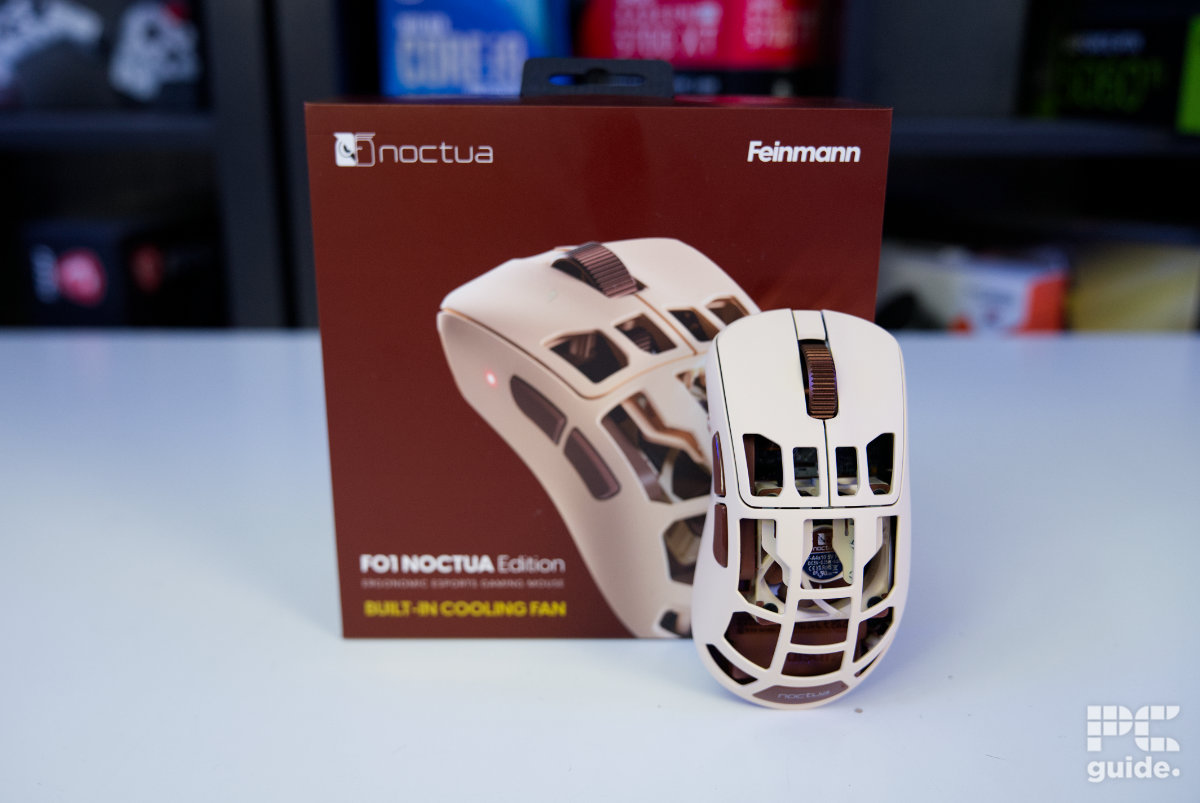
It was over a year ago that Pulsar and Noctua showed off their collaboration mouse at Computex. Combining the South Korean peripheral maker’s expertise in gaming mice with the Austrian cooling experts’ knowledge, they’ve created the Pulsar Feinmann F01 Noctua Edition.
Not only does it take on Noctua’s iconic beige and brown colorway, but it also adds a 40 mm fan inside the mouse. The honeycomb design isn’t just about keeping the mouse lightweight, as it also allows the fan to provide cooling for your hand, helping to reduce sweat and maintain your grip during hot conditions and crucial moments.
Now it’s finally been released, and I’ve got my hands on one to put it to the test. I’m finding out just how good the mouse is, and whether that fan offers any real benefit beyond being a cool gimmick.
Latest tech deals.
- AMD Ryzen™ 9 9900X 12-Core - was $499 now $331
- Sony INZONE M10S 27” - was $899 now $748
- Thermaltake LCGS View i1470S-170 - was $2,399 now $2,099
- Apple 2026 MacBook Air - was $1,999 now $1,891
- Bose QuietComfort Headphones - was $359 now $169
- LG 77-inch OLED C6 - was $2,499 now $1,999
- MSI Prestige 16 Flip - was $2,149 now $1,870
-
Hisense 85" U6 Pro Series-
Prices correct as of November 5th, 2026.


- Sensor: XS-2 Flagship Sensor
- DPI: 42,000 DPI
- Weight: 73 g (2.57 oz)
- Size (LxWxH): 121.7 x 66.5 x 43.3 mm (4.79 x 2.62 x 1.7 inch)
- Buttons: 5
- Battery life: 500 mAh: Max – 392h (125Hz, fan off), Typical office – 42.5h (125Hz, 50% fan), Typical gaming – 10.5h (1,000Hz, 75% fan), Minimum – 5.5h (8,000Hz, 100% fan)
- Fan: NF-A4x10 5V PWM
- Fan size: 40 x 40 x 10 mm
- Fan speed: 0 – 5000 rpm
- Fan airflow: 8.9 m³/h (5.24 CFM)
- Fan noise: 19.6 dB(A)
- Great build quality and ergonomic design
- Top-level specs in its sensor and buttons
- High-quality scroll wheel and components
- Plenty of customizability with the browser driver
- Fast 8kHz sensor and plenty of DPI to choose between
- Still lightweight even with a fan inside
- Much more expensive than any of the competition
- Battery life much shorter with the fan running
- Colorway and holed design not to everyone’s taste
- No extra skates or grips provided
Design and features
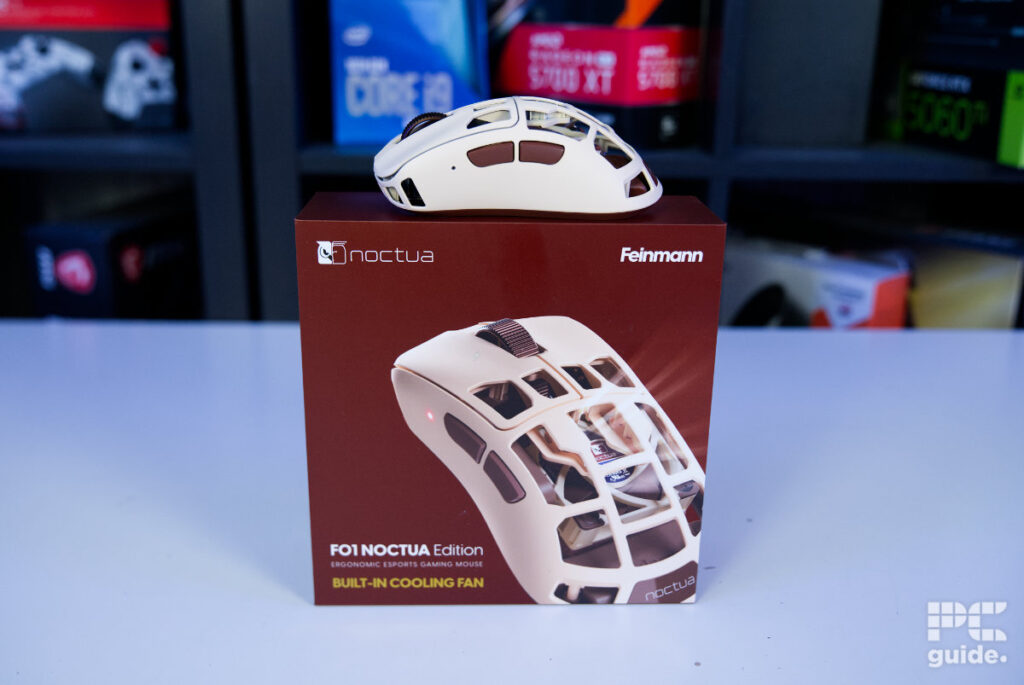
The Pulsar mouse comes in a rather strong and sturdy box. Styled in Noctua’s colors, it has a prominent image of the mouse on the front, with the rest of the packaging providing general information about it. The box then simply slides apart, revealing a very elegantly presented Feinmann F01. It’s sitting in hard foam padding on the right, while the left side is covered by a doorway that hides the included accessories.

Pulsar Feinmann F01 Noctua Edition mouse and mat box, Image by PC Guide

Pulsar Feinmann F01 Noctua Edition mouse box, Image by PC Guide

Pulsar Feinmann F01 Noctua Edition box side (2), Image by PC Guide

Pulsar Feinmann F01 Noctua Edition box side (1), Image by PC Guide

Pulsar Feinmann F01 Noctua Edition box back, Image by PC Guide

Pulsar Feinmann F01 Noctua Edition box edge, Image by PC Guide

Pulsar Feinmann F01 Noctua Edition in box, Image by PC Guide
Opening the door reveals the Pulsar Noctua dongle at the top, an updated version of what the original Feinmann came with. Instead of having a stand charger and dock, it now has a dongle with a DPI and function button for quick control. Underneath, the box hides the beige and brown flexible and nicely textured cable, along with an included sticker, collector card, and manual.

Pulsar Feinmann F01 Noctua Edition in box with accessories, Image by PC Guide

Pulsar Feinmann F01 Noctua Edition cable and dongle, Image by PC Guide

Pulsar Feinmann F01 Noctua Edition dongle, Image by PC Guide

Pulsar Feinmann F01 Noctua Edition box and contents, Image by PC Guide

Pulsar Feinmann F01 Noctua Edition box contents, Image by PC Guide
Taking out the mouse, it’s very unusual at first. I don’t have much experience with honeycomb or partial-chassis mice, and they aren’t immediately appealing to me, but I suppose the Pulsar Feinmann has a reason for the design beyond making it lightweight. That was certainly the case with the original, which weighed around 46g. The Noctua Edition increases that to 73g on our scale, while the cable brings it to 121g, and the total reaches 137g with the dongle.

Pulsar Feinmann F01 Noctua Edition weight, Image by PC Guide

Pulsar Feinmann F01 Noctua Edition weight with cable, Image by PC Guide

Pulsar Feinmann F01 Noctua Edition weight with cable and dongle, Image by PC Guide
As for the design, the majority of the main top of the body is cut out, starting right from the back of the left and right buttons and continuing all the way down to the bottom rear. There’s only a Noctua badge filling one of the gaps in the middle. This leaves a rather thin skeleton structure made from a carbon composite exoskeleton, providing plenty of strength while keeping the weight down.
A surprisingly large part of the mouse is missing in this design, giving you an impressive look inside at all the workings, including a glimpse of the PCB and the NF-A4x10 fan. Continuing the colorway, it provides a cool look at the internals while also making it easier to clean out the inside of the mouse down the line.

Pulsar Feinmann F01 Noctua Edition fan from top, Image by PC Guide

Pulsar Feinmann F01 Noctua Edition powered fan top, Image by PC Guide

Pulsar Feinmann F01 Noctua Edition back, Image by PC Guide
At the front of the mouse, the buttons have a concave dip in the middle. As the whole mouse is ergonomic and skewed for right-handed use, this provides a good position for your fingers to rest on. Between them, you find a premium alloy scroll wheel, which also has plenty of material removed from its core while still providing a premium and sturdy build.
Looking from the front, the USB-C port is recessed right in the center. Besides that, I was surprised to see holes around the front. However, I realized these might be used as an air intake for the fan, as they could be more accessible than gaps placed underneath. From this angle, you can also really see the slope of the whole mouse, which is tilted to the right.

Pulsar Feinmann F01 Noctua Edition scroll wheel, Image by PC Guide

Pulsar Feinmann F01 Noctua Edition front, Image by PC Guide

Pulsar Feinmann F01 Noctua Edition top, Image by PC Guide
On the sides, the mouse keeps things On the sides, the mouse keeps things rather basic, particularly on the right side, which is left blank with plenty of space for your fingers. On the left, though, the taller wall is topped with forward and back buttons in a highlighted brown against the beige. To the side, there’s also a DPI light showing the current status.basic, particularly the right side, which is left blank with space for your fingers and without anything else there. On the left, though, the taller wall is topped with the forward and back buttons with highlighted brown colors on the beige, and then to the side there is a DPI light showcasing the status.

Pulsar Feinmann F01 Noctua Edition right side, Image by PC Guide

Pulsar Feinmann F01 Noctua Edition left side, Image by PC Guide

Pulsar Feinmann F01 Noctua Edition power light, Image by PC Guide
On the underside, it has prominent skates placed at the top and bottom of the body, with an outline around the XS-2 flagship sensor. Around the middle, it also has a radial cut-out pattern, with the bottom half directing air straight into the fan while the top half is covered by the black Feinmann PCB.

Pulsar Feinmann F01 Noctua Edition powered fan bottom, Image by PC Guide

Pulsar Feinmann F01 Noctua Edition fan frrom bottom, Image by PC Guide

Pulsar Feinmann F01 Noctua Edition bottom, Image by PC Guide

Pulsar Feinmann F01 Noctua Edition bottom with stickers, Image by PC Guide
I also got sent the Noctua NP-DM3, the 20th anniversary desk mat. With a nicely white-stitched edge and anti-slip rubber underneath, it’s also a rather well-built mousepad. On top, it has a brown background and white writing showing the timeline of Noctua’s 20 years, highlighting its products along the way. It’s a great addition to the brown and beige build, and it pairs nicely with the Antec Flux Pro case, ASUS RTX 5080 GPU, and more. Soon, it will amount to a whole setup.

Noctua NP-DM3 desk mat box front, Image by PC Guide

Noctua NP-DM3 desk mat box back, Image by PC Guide

Pulsar Feinmann F01 Noctua Edition on NP-DM3 desk mat, Image by PC Guide

Noctua NP-DM3 desk mat top, Image by PC Guide

Noctua NP-DM3 desk mat left side, Image by PC Guide

Noctua NP-DM3 desk mat center, Image by PC Guide

Noctua NP-DM3 desk mat right side, Image by PC Guide

Noctua NP-DM3 desk mat name, Image by PC Guide

Noctua NP-DM3 desk mat logo, Image by PC Guide
Pricing
When it comes to pricing, the mouse is very much on the expensive side. The quality and innovation do increase how much you have to pay for it, though. The Noctua Edition Feinmann F01 has a suggested retail price of $179.95/€199.90. It also has rather limited availability, with nowhere else to buy it at the time of writing other than Pulsar’s own site, where it can be preordered. It should soon be available from its resellers, though.
That puts it above the likes of the Logitech G PRO X Superlight 2 at $159.99, the Razer Viper V4 Pro at $159.99, or the Razer Naga V3 Pro at $179.99. So, it is firmly on the premium side, but does it justify that price with its performance? Let’s find out.
Performance
Putting the mouse to use, it’s a fairly easy setup. Turning on the mouse comes with quite a show of light, while the dongle also lights up to show its status. Those two colored lights provide a great indicator of the DPI setting you’re using and which profile it’s in by default. It also has a rather satisfying clicking feel and sound, and I found myself just playing with it for a minute or two at a time.
As for using the mouse, it has a good ergonomic size and design for my hand, at least. With my palm sitting across the whole back, I could fit it comfortably, but putting pressure on it meant I could feel each of the ribs across the back. They weren’t uncomfortable, though. With a chamfered edge on those ribs, they don’t catch my skin and allow my palm to smoothly run across them.

Pulsar Feinmann F01 Noctua Edition setup (8), Image by PC Guide

Pulsar Feinmann F01 Noctua Edition setup (7), Image by PC Guide

Pulsar Feinmann F01 Noctua Edition setup (6), Image by PC Guide

Pulsar Feinmann F01 Noctua Edition setup (5), Image by PC Guide

Pulsar Feinmann F01 Noctua Edition setup (4), Image by PC Guide

Pulsar Feinmann F01 Noctua Edition setup (3), Image by PC Guide

Pulsar Feinmann F01 Noctua Edition setup (2), Image by PC Guide

Pulsar Feinmann F01 Noctua Edition setup (1), Image by PC Guide
There’s also plenty of space around the sides for the rest of my fingers. Not going for a small design, the mouse has plenty of room to comfortably position all my digits, even if it does mean my thumb has quite a bit of travel to the buttons above. Those have optical switches inside, as do the main buttons. They have a great-sounding click behind them, along with a rather swift actuation.
The metal scroll wheel has a great feel to it, with the ridges across it offering excellent grip. Alongside that, it provides great tactility, with each scroll delivering good responsiveness. Similarly, the mouse in general is fast and responsive too. With a polling rate ranging from 125Hz all the way to 8KHz, and a DPI range from 50 up to 42,000, it has a vast range of speeds to jump between, and every movement comes through right to the PC.
As for the fan, it has a preconfigured control, so even without going through the software, I could hold the side buttons and scroll to immediately feel the airflow. At first, it starts fairly light, with four levels to choose from. I found the middle setting already provided a nice breeze, while the maximum level four gave a strong flow that really made an impact, although it also made the fan much more audible.
Although I started testing the mouse after our heatwave had passed, it was still a nice sensation to have. However, it does have a rather big impact on battery life, as you might expect. Noctua suggests a 10.5-hour battery life when running the fan at 75% speed with a 1KHz polling rate.

Pulsar Feinmann F01 Noctua Edition in use (1), Image by PC Guide

Pulsar Feinmann F01 Noctua Edition in use (2), Image by PC Guide

Pulsar Feinmann F01 Noctua Edition in use (3), Image by PC Guide

Pulsar Feinmann F01 Noctua Edition in use (4), Image by PC Guide

Pulsar Feinmann F01 Noctua Edition in use (5), Image by PC Guide

Pulsar Feinmann F01 Noctua Edition in use (6), Image by PC Guide

Pulsar Feinmann F01 Noctua Edition in use (7), Image by PC Guide
As for actually going into the depths of the web driver, it’s fairly simple with the Pulsar Bibimbap web driver, which I was initially confused about because I thought it might be a food site. On the first home screen, it shows the status of the mouse and quick information about its settings.
Then it goes into customization, with full key rebinding and a warning about changing the left click before reassigning it first. The next tab has a performance section with the various speeds, lighting, and features to use, along with the option to set up to four profiles. It also has an option for macros, with plenty of depth and programming options available.
The last tab to alter is power & dongle, where you can toggle the lighting and change the function button, while the DPI button is kept the same. For the function button, you can choose between profile, polling, LOD, debounce, motion sync, turbo mode, or fan mode.
So, it does have a handy feature set. I did initially set the function button to the fan before realizing the on-device control it has, but having profiles on it gives you a quick way to change depending on your use case. Whether it’s gaming, work, or day-to-day use, you can set each profile accordingly and change between them quickly. That’s especially handy for managing battery life.

Pulsar Feinmann F01 Noctua Edition Bibimbap driver (1), Image by PC Guide

Pulsar Feinmann F01 Noctua Edition Bibimbap driver (2), Image by PC Guide

Pulsar Feinmann F01 Noctua Edition Bibimbap driver (3), Image by PC Guide

Pulsar Feinmann F01 Noctua Edition Bibimbap driver (4), Image by PC Guide

Pulsar Feinmann F01 Noctua Edition Bibimbap driver (5), Image by PC Guide

Pulsar Feinmann F01 Noctua Edition Bibimbap driver (6), Image by PC Guide
- Sensor: XS-2 Flagship Sensor
- DPI: 42,000 DPI
- Weight: 73 g (2.57 oz)
- Size (LxWxH): 121.7 x 66.5 x 43.3 mm (4.79 x 2.62 x 1.7 inch)
- Buttons: 5
- Battery life: 500 mAh: Max – 392h (125Hz, fan off), Typical office – 42.5h (125Hz, 50% fan), Typical gaming – 10.5h (1,000Hz, 75% fan), Minimum – 5.5h (8,000Hz, 100% fan)
- Fan: NF-A4x10 5V PWM
- Fan size: 40 x 40 x 10 mm
- Fan speed: 0 – 5000 rpm
- Fan airflow: 8.9 m³/h (5.24 CFM)
- Fan noise: 19.6 dB(A)
Conclusion
Overall, the Pulsar Feinmann F01 Noctua Edition is a rather impressive mouse. Pairing a high-end gaming peripheral with active cooling makes for a genuinely unusual creation. It offers impressive performance and plenty of customization, allowing you to make it your own while keeping those very divisive Noctua colors.
It also costs quite a lot, sitting above some of the most premium mice on the market. Yet it’s the only one with a fan built into it to keep those sweaty palms cool, and that alone makes it a particularly interesting addition to the gaming mouse market.
Written by
