

Antec Flux Pro Noctua Edition review: high-end design, high-end price


Table of Contents
Continuing its ongoing collaborations, Noctua has partnered with another major hardware brand to expand its range of products featuring its cooling technology. This time, the focus is on a full-size PC case developed with Antec, resulting in the Flux Pro Noctua Edition.
Designed as a high-airflow full tower, the case offers extensive internal space and strong airflow potential straight out of the box. It’s built to accommodate high-end components, including the ASUS Noctua RTX 5080 OC and the Seasonic Prime TX-1600 Noctua PSU, giving builders plenty of flexibility for powerful, thermally demanding systems.
At its core, this collaboration is about combining Antec’s established case design expertise with Noctua’s reputation for premium, high-performance fans. The result is a case aimed at delivering strong airflow and low noise, so we put it to the test to see how well this partnership performs in practice.
Latest tech deals.
- AMD Ryzen™ 9 9900X 12-Core - was $499 now $328
- CORSAIR 4000D PC Case - was $124.99 now $75.99
- Hisense 65" Class E6SR - was $549 now $377.99
- Apple 2026 MacBook Air - was $1,999 now $1,799
- Skytech Gaming PC Desktop (9850X3d) - was $4,299 now $3,799
- Apple Magic Mouse - was $79 now $59
- MSI Prestige 16 Flip - was $2,149 now $1,899
- Kotin 9700X Gaming PC - was $2,399 now $2,199
Prices correct as of October 9th, 2026.


- Type: Full tower
- Motherboard support: E-ATX (≤285mm), ATX, Micro-ATX, ITX
- Included fans: 4x 140mm NF-A14x25 G2 PWM, 2x NF-A12x25 G2 PWM
- Fan support: 12x 120mm / 9x 140mm
- Radiator compatibility: Up to 420mm
- Storage bays: 4x 2.5″ SSD/3.5″ HDD, 2x 2.5″ SSD
- CPU cooler clearance: 190 mm / 7.48 inches
- GPU clearance: 455 mm / 17.9 inches
- Expansion slots: 8
- PSU support: 300mm (with HDD cage), 470mm (without HDD cage), 180mm (side mount)
- Dimensions (LxWxH): 530x245x545 mm / 20.9×9.6×21.5 inches
- Weight: 13.75kg / 30.3lbs (w/ fans)
- Materials: Steel + plastic + glass + wood
- Top front I/O: 2x USB 3.0, 1x type-C 10Gbps, 1x headphone/mic combo jack, Power, reset, temperature display switch
The Antec Flux Pro Noctua Edition brings the latest generation of Noctua fans into the case, significantly improving cooling performance while maintaining impressively low noise levels. It’s a well-engineered piece of hardware with strong attention to both build quality and design, but it comes at a considerable premium.
The focus on balancing performance and acoustics is clear throughout, though the high price point stands out – especially given that the system still requires full user installation. However, for those prioritising near-silent operation and excellent air-cooling thermals, it delivers exceptional results.
- Impressive design & quality with a great look to it
- iShift PSU mount makes for easier building and upgrading
- Display and IO are just some of the great features of the case
- Plenty of space and expansion capability inside
- Excellent cooling, and with barely any noise doing so
- Lots of mounting areas and free space for cooling and building in
- An expensive upgrade over the standard case
- Fans aren’t preinstalled
- Colors might not be to everyone’s tastes
- Anti-vibration mounts do poke out a lot and ruin aesthetics
Main features and specifications
From the get-go, the Antec case is a rather unique-looking one. Towering in size, it offers a premium wooden trim, plenty of mesh coverings, and more Noctua-themed design accents over the default model. Below you can find the specs of the case and a comparison to the standard and non-Pro version of the Flux.
| Specification | Antec Flux | Antec Flux Pro | Antec Flux Pro Noctua Edition |
|---|---|---|---|
| Type | Mid Tower | Full Tower | Full tower |
| Motherboard support | E-ATX (≤330mm), ATX, Micro-ATX, ITX | E-ATX (≤285mm), ATX, Micro-ATX, ITX | E-ATX (≤285mm), ATX, Micro-ATX, ITX |
| Included fans | 3x 120mm PWM fans in front 1x 120mm PWM Reverse fan on PSU shroud 1x 140mm PWM fan in rear | 3 x 140mm Tranquil PWM fans in front 2 x 120mm P12R PWM reverse fans on PSU shroud 1 x 140mm Tranquil PWM fan in rear | 4 x 140mm NF-A14x25 G2 PWM 2x NF-A12x25 G2 PWM |
| Fan support | 9x 120mm / 8x 140mm | 12x 120mm / 9x 140mm | 12x 120mm / 9x 140mm |
| Radiator compatibility | Up to 420mm | Up to 420mm | Up to 420mm |
| Case drive bays | 2x 2.5″ SSD/3.5″ HDD 1x 2.5″ SSD | 4x 2.5″ SSD/3.5″ HDD 2x 2.5″ SSD | 4x 2.5″ SSD/3.5″ HDD 2x 2.5″ SSD |
| CPU cooler clearance | 180mm | 190mm | 190 mm / 7.48 inches |
| GPU clearance | 408mm | 455mm | 455 mm / 17.9 inches |
| Expansion slots | 7 | 8 | 8 |
| PSU support | 235mm (with HDD) | 300mm (with HDD cage), 470mm (without HDD cage), 180mm (side mount) | 300mm (with HDD cage), 470mm (without HDD cage), 180mm (side mount) |
| Dimensions | 484 x 239 x 502 mm | 530 x 245 x 545 mm | 530x245x545 mm / 20.9×9.6×21.5 inches |
| Weight | 9.27kg | 13.60kg | 13.75kg / 30.3lbs (w/ fans) |
| Materials | Steel + Plastic + Wood | Steel + Plastic + Glass + Wood | Steel + plastic + glass + wood |
| Front I/O | Power, Reset, 2x USB 3.0, 1x Type-C 10Gbps, Headphone/Mic Combo Jack | 2x USB 3.0, 1x type-C 10Gbps, 1x headphone/mic combo jack, Power, reset, temperature display switch | 2x USB 3.0, 1x type-C 10Gbps, 1x headphone/mic combo jack, Power, reset, temperature display switch |
Pricing & availability
The original case from Antec was already a well-established product that was released some time ago. That one (the Antex Flux) can be found widely available at $179.99/£177.82. Now the Noctua Edition certainly adds a lot more on top of that; in fact, it more than doubles the price (in the US, at least) – with that version retailing for $399.90/£348.90.
That’s a rather steep price for the case, but it is a very premium option that is fully equipped with a complete range of Noctua fans. These are, in fact, the new range of G2s of the NF-A12 and NF-14s, which themselves cost $34/$42 each per fan. That said, the bundled collaboration does offer some savings compared to purchasing the components separately, making the overall package slightly more attractive despite its premium price.
That’s on par with the ASUS ROG Strix Helios II at $399.99. Of course, there are plenty of cheaper options available that deliver similar specs, such as the Corsair 7000D at $269.99, or the Lian Li Lancool III for $189.99.

Antec Flux Pro Noctua Edition case, Image by PC Guide

Antec Flux Pro Noctua Edition box top, Image by PC Guide

Antec Flux Pro Noctua Edition packaged extras, Image by PC Guide

Antec Flux Pro Noctua Edition packaging, Image by PC Guide
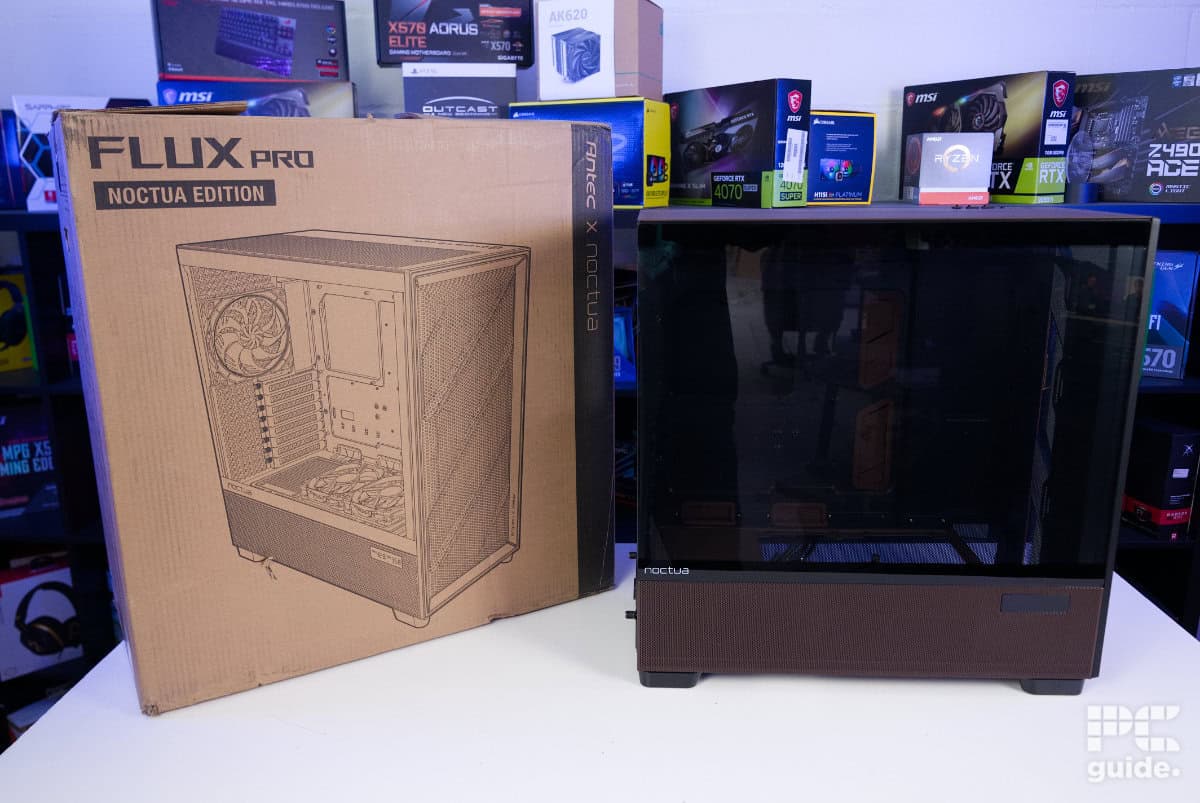
Antec Flux Pro Noctua Edition with box side, Image by PC Guide
Outside look
After looking over the specs and pricing of the case, it’s finally time to see what its design has to offer. Let’s start with the exterior.
Front
Looking at the front of the case, you can immediately see the walnut trim that outlines the front panel, which itself is engraved with Antec x Noctua in the bottom right. In between the trim, you’ll find the mesh dust cover, which has been designed using a wavey finish that is not only stylish but also seems to guide air through more efficiently.

With a simple latch and magnets, the front panel allows for quick and easy removal without the need for unfastening anything or tools. Behind it is the recessed fan mount that supports up to three 140/120mm fans and even a 420mm radiator for quite a good range of cooling options. It can also be removed for easier installation and provides holes on the side to make cable management easier, too.

Antec Flux Pro Noctua Edition open front, Image by PC Guide

Antec Flux Pro Noctua Edition front cable routing, Image by PC Guide

Antec Flux Pro Noctua Edition front, Image by PC Guide
Rear
At the rear of the Antec case, the layout is fairly straightforward, as you might expect. It’s heavily perforated to allow the escape of hot air, with a flexible fan mount and a motherboard cut-out positioned at the top.
Between the recesses for removing the side panels, there’s a clean, solid spine running down the left side. This also features protruding cable management mounts, helping keep wiring neatly routed and ensuring that even the exterior layout avoids cable clutter.

Down the bottom half, there are the PCIe mounts, which extend into the case rather than out. This does mean the cables coming out are less obtrusive, and you have to take off the panel to unscrew the cards in those slots. Then, at the bottom, there is already a preinstalled PSU plate cover for the ishift mount on the case.

Antec Flux Pro Noctua Edition rear, Image by PC Guide

Antec Flux Pro Noctua Edition PSU extension cover, Image by PC Guide

Antec Flux Pro Noctua Edition expansion slots rear, Image by PC Guide
Sides
Both sides of the Flux Pro go beyond that of a normal panel. Starting on the left side, we were met with a solid piece of metal, for the most part. Except at the bottom, where it does in fact open up into a mesh, giving the bottom even more airflow and making it a flexible choice for cooling intake.
Now, onto the right-hand side: the main side panel that showcases the internal components of your build. A large glass panel covers more than three-quarters of the surface, with Noctua branding positioned in the bottom-left corner. It features relatively thick bezels at the top and bottom, giving it a more pronounced frame.
Like the opposite panel, the lower section includes a mesh opening to support airflow. This version also features Noctua’s signature brown colour scheme, along with a small temperature display in the top-right corner that can show real-time CPU and GPU temperatures.

Antec Flux Pro Noctua Edition left metal side, Image by PC Guide

Antec Flux Pro Noctua Edition glass right side, Image by PC Guide

Antec Flux Pro Noctua Edition mesh and display side, Image by PC Guide

Antec Flux Pro Noctua Edition side display, Image by PC Guide
Top
Looking at the top of the case, the Noctua colors continue to be a design feature. With the whole panel now in a darker brown, and the Noctua name beside the IO. The IO consists of a good range of options, including two USB-A, a USB-C, a combo jack, and three buttons for power, reset, and the temperature display. Conveniently, the ports are covered with rubber covers to stop them from getting damaged and filled.

That section is positioned towards the rear, closer to the front, with the remainder of the side panel finished in a solid design. Moving toward the right side, much of it transitions into a mesh area that opens up to the mounting points beneath.
Removing the panel is also straightforward, thanks to multiple ball-and-socket connectors, along with a rear indent that makes it easy to lift away.
Underneath, there’s a substantial mounting area for fans and radiators. It supports up to three 140mm or 120mm fans, as well as a 420mm radiator, matching the flexibility found at the front. This allows the Antec case to accommodate a wide range of high-performance cooling setups, with plenty of headroom for airflow-heavy builds.

Antec Flux Pro Noctua Edition top side, Image by PC Guide

Antec Flux Pro Noctua Edition uncovered top, Image by PC Guide

Antec Flux Pro Noctua Edition uncovered top IO, Image by PC Guide

Antec Flux Pro Noctua Edition top mount, Image by PC Guide
Bottom
The bottom of the case is also filled with a load of holes for airflow. Along with a whole mesh filter that covers the whole thing and can be pulled out from the front. It also includes additional fan mounting options, supporting either two 120mm or 140mm fans, or up to a 240mm radiator.

That’s if you remove the storage bay there, too. The modular hard drive cage can be adjusted, with plenty of flexibility. Firstly, the mounting system can be repositioned across the case’s base or removed entirely and installed wherever additional fan support is needed. Most sensibly, this would sit on top of the PSU shroud, but the flexibility also allows for more unconventional placements, such as toward the front of the chassis.
Elsewhere, there are additional mounting points around the PSU rubber stands, along with rails that secure the mesh filter in place. At each of the four corners sit tall, sturdy feet, rounded off for stability, with rubber bases finished in Noctua’s signature brown accent.

Antec Flux Pro Noctua Edition storage bay mount, Image by PC Guide

Antec Flux Pro Noctua Edition foot, Image by PC Guide
Inside
After looking over the exterior of the case, I quickly took off the side panel to take a look at the internal design.
Main chamber
Looking in from the side, the main chamber opens up into a spacious interior, accented with plenty of brown highlights in this model. At the rear, the motherboard tray supports a wide range of form factors, featuring a large cut-out behind the socket area and multiple routing gaps around it for clean cable management. Both the side and bottom cut-outs are fitted with Noctua’s signature brown rubber grommets, adding a cohesive finish while helping to keep cables tidy.

From the front, the fan bracket does protrude slightly into the main chamber, but there’s still ample clearance for large graphics cards, with support for GPUs up to 455m. It also leaves a gap behind it down to the PSU shroud, which itself is removable. Finished in the signature brown, the bracket supports up to three 120mm fans or a 360mm radiator. There are also modular covers included, with one preinstalled and additional panels provided for the remaining positions.
Lower down along the side, the Flux Pro offers more than just a simple shroud. On the left, there’s a PSU mounting point featuring the iShift design, allowing you to rotate the power supply by 90 degrees. A built-in power extension enables compatibility with side-mounted connectors, similar in concept to units like the Corsair Shift PSU series, supporting PSUs up to 180mm in length.
Alongside this, there’s another cut-out providing access to the hard drive bay, as well as improved airflow if bottom-mounted fans are installed. Toward the right-hand side, the integrated temperature display is also clearly visible.

Antec Flux Pro Noctua Edition PSU bay right side, Image by PC Guide

Antec Flux Pro Noctua Edition top PSU shroud, Image by PC Guide

Antec Flux Pro Noctua Edition expansion slots, Image by PC Guide

Antec Flux Pro Noctua Edition motherboard tray, Image by PC Guide

Antec Flux Pro Noctua Edition bottom grommets, Image by PC Guide

Antec Flux Pro Noctua Edition right grommets, Image by PC Guide

Antec Flux Pro Noctua Edition top cable routing, Image by PC Guide

Antec Flux Pro Noctua Edition top mounts, Image by PC Guide
Back panel
At the rear of the case, once you take off the panel, there’s plenty to be found. Firstly, in the top-left corner sits the Noctua fan controller. It’s magnetically mounted, making it easy to reposition, though it already comes in a convenient spot. This is helped by the included fan extension cables, which are routed effectively to ensure everything can be connected without issue – something that would be more difficult given the otherwise limited cable lengths.

Above that are the rather prominent connections from the front IO, which are then funnelled into a cable channel and held down by velcro straps. Below the hub, there are two rather large storage units for both HDDs and SSDs.
There are even more places for mounting your storage, though. With another two SSD sleds behind the motherboard tray under the main cut-out, and of course, the storage bay that can fit two HDDs or SSDs. Next to which there is plenty of empty space enough for fitting a large PSU with either 300mm or 470mm if you remove the tray.
Around the back, there are plenty of tie-down points too, with prelaid channels that give you a good idea of where to route the cables easily.

Antec Flux Pro Noctua Edition fan controller, Image by PC Guide

Antec Flux Pro Noctua Edition hard drive bays, Image by PC Guide

Antec Flux Pro Noctua Edition cable routing, Image by PC Guide

Antec Flux Pro Noctua Edition SSD sleds, Image by PC Guide

Antec Flux Pro Noctua Edition left side top channel, Image by PC Guide

Antec Flux Pro Noctua Edition storage cage, Image by PC Guide

Antec Flux Pro Noctua Edition PSU bay, Image by PC Guide

Antec Flux Pro Noctua Edition power cord extension, Image by PC Guide

Antec Flux Pro Noctua Edition front IO connectors, Image by PC Guide

Antec Flux Pro Noctua Edition cable tie downs, Image by PC Guide
All the extras
When unpacking the case, the main accessory box is immediately visible on top, making it easy to remove. It wasn’t until I tipped the case out of the packaging that I discovered a second Noctua box. That’s when it suddenly fell out and caught me off guard, as it had been sitting loosely between the foam inserts rather than being secured in place.

Antec Flux Pro Noctua Edition accessory box, Image by PC Guide

Antec Flux Pro Noctua Edition accessory box contents, Image by PC Guide
The first, smaller box contains the essentials. Inside are the user manual for the case, a sample, and certification for the walnut wood used in its construction. There’s also a dedicated screw box – an especially useful inclusion from Antec – helping keep all the hardware organised for installation. Alongside this are two additional PSU shroud panels (including the PSU cover, depending on your preferred configuration) and a small Noctua fan keyring as a nice finishing touch.
The larger box houses the fan kit, which is not pre-installed to protect it during transport and to give users flexibility in how they choose to mount it. Inside, you’ll find four NF-A14x25 G2 fans and two NF-A12x25 G2 fans, along with all the necessary mounting hardware.
There are also two mounting options included: standard self-tapping screws or anti-vibration rubber mounts. This gives you the choice between a more secure, transport-friendly installation or a quieter setup with additional vibration damping. The rubber mounts are a bit more noticeable due to their length, but they prioritise reduced noise over visual subtlety.

Antec Flux Pro Noctua Edition fan kit, Image by PC Guide

Antec Flux Pro Noctua Edition fan kit contents, Image by PC Guide

Antec Flux Pro Noctua Edition mounting kit & fans, Image by PC Guide

Antec Flux Pro Noctua Edition 120mm & 140mm fans front, Image by PC Guide

Antec Flux Pro Noctua Edition fans rear, Image by PC Guide

Antec Flux Pro Noctua Edition fan logo, Image by PC Guide

Antec Flux Pro Noctua Edition fan direction arrows, Image by PC Guide
Build experience
Even straight out of the box, the case arrives as a well-packaged and thoughtfully designed piece of hardware. Once everything is unpacked and set up, I move on to testing the build process itself, transferring my test bench into the case to see how it handles a full system installation.

Antec Flux Pro Noctua Edition built front, Image by PC Guide

Antec Flux Pro Noctua Edition built main chamber, Image by PC Guide

Antec Flux Pro Noctua Edition built rear, Image by PC Guide

Antec Flux Pro Noctua Edition built left side, Image by PC Guide
Once in use, the case makes the building process fairly straightforward. With so much internal space, it’s easy to work inside and access all key areas. However, weighing over 13kg, it quickly becomes quite heavy to move around, so it’s best positioned early and left in place during assembly.
To start, the clearly organised screw box makes installation much easier, helping keep track of which fasteners are used for each section, such as the motherboard and other components.
During the build, I installed all of the fans included with the Noctua Edition. Following the manufacturer’s recommended airflow layout, this setup includes three front intake fans, two intake fans from the PSU shroud area, and a rear exhaust, with the AIO mounted on the top for exhaust.
Using the anti-vibration mounts provided a slightly different installation experience. After fitting them first, aligning the fans required a bit more precision, and they took noticeably more force to secure in place compared to standard screws.

Antec Flux Pro Noctua Edition built front covered, Image by PC Guide

Antec Flux Pro Noctua Edition built angled, Image by PC Guide

Antec Flux Pro Noctua Edition built left side covered, Image by PC Guide
Going to the back, the power supply was fairly simple to fit as well. Although I wanted to try the ishift feature, the TX-1600 is a bit too long for that, so I had to replace the plate with a standard mount and place it on the rubber feet. I should have removed the drive bay, but even without doing so, I had plenty of space for moving the cables around, and even adding one later on, since I needed to fit another SATA when I realised the one I had was not reaching everything I needed.
Routing the cables was made fairly easy thanks to the built-in channels and cable ties. That said, I didn’t do myself any favours by placing the AIO fan hub at the furthest point from where it needed to connect, while the motherboard’s CPU power header sits closer to the centre, which did add a bit of clutter to the main cable routing path.
Even so, the system still makes it simple to keep everything under control. Despite the volume of cables I had running through it, closing the side panel was no issue – something that isn’t always the case with tighter, more compact chassis designs.

Antec Flux Pro Noctua Edition built desk set up, Image by PC Guide

Antec Flux Pro Noctua Edition built open side, Image by PC Guide

Antec Flux Pro Noctua Edition built turned on, Image by PC Guide

Antec Flux Pro Noctua Edition built setup desk, Image by PC Guide

Antec Flux Pro Noctua Edition built Cyberpunk 2077, Image by PC Guide

Antec Flux Pro Noctua Edition built temperature display, Image by PC Guide
Lastly, mounting the GPU was no problem either. It would have paired nicely with one of the Noctua collab GPUs we’ve reviewed in the past, but unfortunately, I sent those back before doing this build. But still, there’s plenty of space for that or any card right now. Antec does have a vertical mount and riser cable, but it doesn’t come with the case by default, but it is a good contender for the job.
Once it’s all set up, there’s not much extra you need. Plugging in the fan hub into the motherboard, you can easily set the speeds of all of the fans with no issue. The only other thing you need is the iUnity software if you want to make use of the temperature sensors on the side of the case.
Performance
After putting it all together, I then ran an intense Furmark 2 power load on both the 9800X3D CPU and the ROG Astral RTX 5090. Loading up to the max, it should put the temperatures up to the max.

During the 20-minute load, the temperature and clock rates spiked and levelled off at a decently high point. With the CPU reaching 95°C, it got to 5,212MHz, then leveled off at around 5,100MHz. But that might be more down to the AIO I used on there rather than on the case itself.
As for the graphics card, it got to a clock rate of around 2,400MHz with a temp of around 66°C. Sufficiently keeping the levels of these to keep the temperatures in check. As the motherboard MOS temperatures got near 55°C.
During this time, the noise from the PC was barely perceptible. The fans set to default were keeping temps down, but at a whisper essentially. Particularly with the rubber mounts, I couldn’t make out the noise behind all else.
That is thanks to Noctua’s claims of how it reduces the noise of the case by a further 8dB(A) with the new fans in it that run significantly quieter at the same flow rates. It even offsets the speed of the front and shroud fans, which means no weird harmonics between them that might cause periodic interference. So they even account for the small details like that.
- Type: Full tower
- Motherboard support: E-ATX (≤285mm), ATX, Micro-ATX, ITX
- Included fans: 4x 140mm NF-A14x25 G2 PWM, 2x NF-A12x25 G2 PWM
- Fan support: 12x 120mm / 9x 140mm
- Radiator compatibility: Up to 420mm
- Storage bays: 4x 2.5″ SSD/3.5″ HDD, 2x 2.5″ SSD
- CPU cooler clearance: 190 mm / 7.48 inches
- GPU clearance: 455 mm / 17.9 inches
- Expansion slots: 8
- PSU support: 300mm (with HDD cage), 470mm (without HDD cage), 180mm (side mount)
- Dimensions (LxWxH): 530x245x545 mm / 20.9×9.6×21.5 inches
- Weight: 13.75kg / 30.3lbs (w/ fans)
- Materials: Steel + plastic + glass + wood
- Top front I/O: 2x USB 3.0, 1x type-C 10Gbps, 1x headphone/mic combo jack, Power, reset, temperature display switch
Conclusion
Overall, the Antec Flux Pro Noctua Edition is an impressive chassis that prioritises airflow, silence, and build quality in equal measure. It’s undeniably large and heavy, weighing over 13kg, but that size works in its favour, offering excellent internal space and strong hardware compatibility, including support for large GPUs and multiple radiator configurations.
The collaboration really shows in the cooling setup, with a full suite of Noctua fans included and a recommended airflow layout that delivers strong thermals while keeping noise levels impressively low. Cable management is also well thought out, with generous routing channels, tie points, and enough clearance to avoid issues even with a more complex build.
For those who prioritise silence, thermal performance, and a distinctive design, it delivers exactly what it sets out to do. It’s not a subtle or budget-friendly case, but for the right kind of high-end build, it’s an excellent showcase of what a tightly integrated cooling-focused collaboration can achieve.
About the Author