
MSI Raider A18 HX A9WJG review: top-tier performance with a price to match


Table of Contents
MSI offers a wide range of hardware – from PC components and networking gear to complete systems. Among them is its lineup of powerful laptops, with the Raider series serving as one of its premium high-end gaming ranges. The MSI Raider A18 HX is one of the newest models, packing top-tier hardware into an impressively large chassis, delivering high-end performance that makes it one of the best gaming laptops on offer right now.
The A9WJG unit we tested features AMD’s Ryzen 9 9955HX3D and Nvidia’s RTX 5090 as headline components. These are paired with 62GB of DDR5 RAM, a 2TB NVMe SSD, and an 18-inch 4K MiniLED display with a 120Hz refresh rate. It’s a top-end configuration designed to showcase the platform’s full potential, though more modest variants are also available.
There’s a lot packed into this chassis, and despite its hefty weight and large footprint, the laptop delivered impressive performance in our testing – if you’re happy to deal with the temps and price point. We put it through rigorous benchmarks to determine whether it’s worth the investment, including gaming, synthetic, and thermal testing.
Latest PC & Tech deals
- ASUS ROG Strix 34” QD-OLED XG34WCDG - was $7499 now $629
- Hisense 75" U8 Series ULED Mini-LED 4K TV - was $1,499 now $1,354
- ASUS ROG XG27AQNGV- was $999 now $649
- TCL 98 Inch Class QM8L - was $2,499 now $2,309
- CyberPowerPC Gaming PC (RTX 5060) - was $599 now $459
Prices correct as of August 20th, 2026.

- CPU: Up to AMD Ryzen 9 9955HX3D
- GPU: Up to Nvidia GeForce RTX 5090
- Memory: Up to 64GB DDR5 6400MHz RAM
- Storage: Up to 2TB SSD
- Max Refresh Rate: 240Hz
- Resolution: 3840 x 2400
- Panel Type: Mini-LED (100% DCI-P3, G-SYNC, ACR)
MSI packs cutting-edge hardware into a chassis that’s as large as it is powerful – an impressive feat when all things are considered. With its bulky design and premium pricing, the Raider isn’t built for everyone. Still, it’s a no-compromise gaming machine, complete with a brilliant 4K display. It also offers a flexible platform that can be customized to your needs, especially if you’d rather not spend thousands on the flagship configuration.
- Massive and impressive 4K display
- Top-end hardware in a capable chassis
- Fast RAM and storage
- Great connectivity onboard
- Extremely high price
- Small trackpad for the dimensions
- Too big and heavy for normal carrying
- It could have more storage for the price
Pricing and availability
Considering this version of the laptop features an RTX 5090 GPU chip and some top-of-the-line specs, the MSI Raider A18 HX is not a cheap machine to buy. Alongside the flagship graphics card chip, this model has a Ryzen 9 9955HX3D processor, 2TB of storage, and 64GB of DDR5 RAM, so you can expect quite a premium price for it.
Currently, you can find it backordered on Newegg with a price tag of $5,099.99, as Amazon is out of stock of this model. While in the UK, I couldn’t even find the same version; instead, there is an RTX 5080 version for £3,999.98.
It’s certainly not the cheapest option for getting an RTX 5090 laptop, but it does have plenty of other parts to it that make it more expensive compared to the others. One of which is the rather enticing X3D processor from AMD that’s now on mobile and should pair really nicely with the top-end GPU.
Featuring Nvidia’s flagship RTX 5090 GPU and top-tier specs, the MSI Raider A18 HX doesn’t come cheap. This model includes AMD’s Ryzen 9 9955HX3D processor, 2TB of NVMe storage, and 64GB of DDR5 RAM – making its premium price unsurprising.
At the time of writing, it’s backordered on Newegg for $5,099.99, while Amazon currently has no stock. In the UK, this exact configuration isn’t available; instead, a slightly lower-end version with an RTX 5080 is listed for £3,999.98.
While it’s far from the most affordable way to get an RTX 5090 laptop, the price reflects more than just the GPU. The inclusion of AMD’s mobile X3D processor, in particular, adds considerable performance potential – and helps justify the premium.
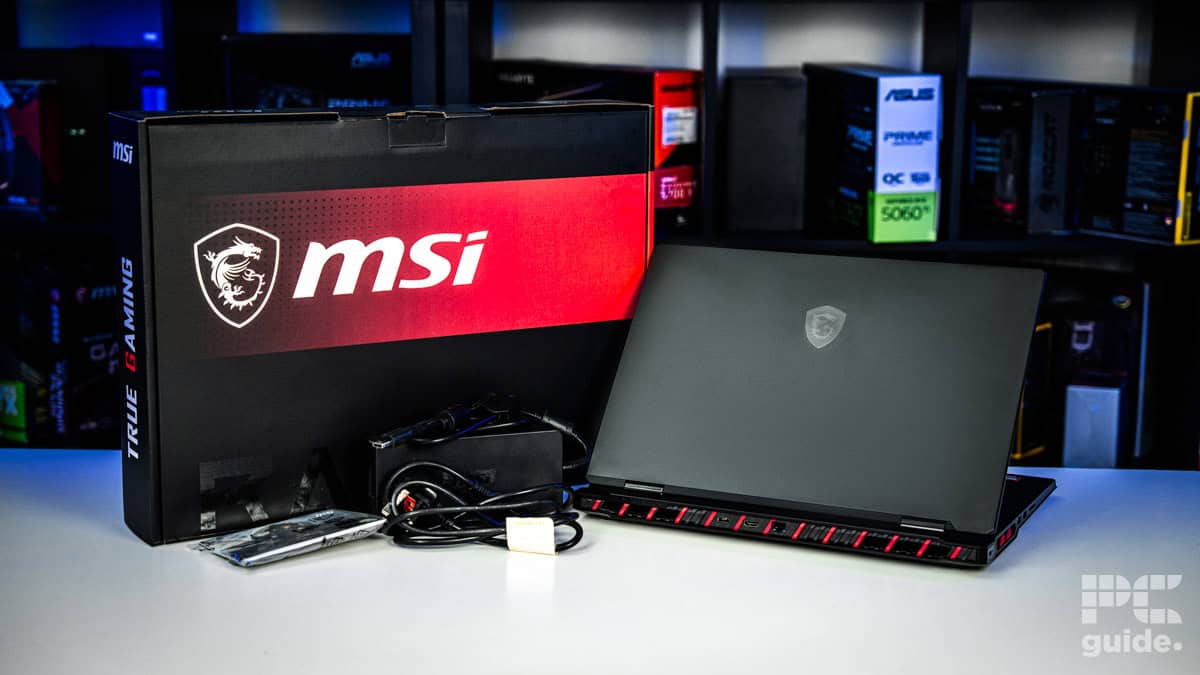
MSI Raider A18 HX A9WJG box contents, Image by PC Guide

MSI Raider A18 HX A9WJG box, Image by PC Guide

MSI Raider A18 HX A9WJG in front of box, Image by PC Guide
Overall design
Much like the Acer Predator Helios I reviewed just recently, the MSI Raider packs down into massive dimensions with a heavy weight to match. As an 18-inch laptop, it is definitely not easy to carry around, barely fitting into my massive backpack. I definitely noticed it was there, with just how much weight it packs into it.
I wasn’t expecting such a big and powerful build from the Raider series, but rather the Titan range from MSI, which would be the top-end option to go for. Although I suppose the raider is the gaming range, and the design it goes for really makes it look the part.
The outside design, apart from being thick and opening up its vents, adds slashes of red accents at the back and sides, immediately clocking it as a gaming laptop. It also lights up in RGB, but a lot less than I expected. There is a light bar at the front, which is noticeable yet subtle and smaller than the previous generation, as well as a logo on the lid that lights up.
Even on the inside, the keyboard only had some of its keys light up. Apart from the indicator lights on the locks, the WASD and power keys were made see-through instead of the black simple caps. The clear ones are a bit odd and jarring in relation to the rest of the keyboard, but they sort of match the general gaming design of it.
Much like the Acer Predator Helios I reviewed recently, the MSI Raider is a massive laptop – both in size and weight. As an 18-inch machine, it’s far from portable, barely fitting into my oversized backpack. Its weight was impossible to ignore during transport, so keep that in mind if you plan to commute with this regularly.
I wasn’t expecting such a large and powerful build from the Raider series. That kind of bulk is usually reserved for MSI’s Titan range, which sits at the top end of the company’s lineup. Still, the Raider is positioned as a high-performance gaming machine, and its design clearly reflects that.
The exterior is thick, aggressively styled, and ventilated, with sharp red accents along the back and sides that immediately mark it as a gaming laptop. There’s also RGB lighting, though it’s subtler than we would have expected. A front-facing light bar provides a soft glow, and the MSI logo on the lid also lights up – though both are more understated than in the previous generation.
Inside, RGB is similarly restrained. Only certain keys on the keyboard are illuminated. The WASD and power keys feature transparent caps, unlike the rest of the keyboard’s standard black keys. These clear keys look somewhat out of place, but they align with the overall gamer-focused design. That said, it feels more of a novelty than a functional design choice.

MSI Raider A18 HX A9WJG camera, Image by PC Guide

MSI Raider A18 HX A9WJG front edge, Image by PC Guide

MSI Raider A18 HX A9WJG front light bar, Image by PC Guide

MSI Raider A18 HX A9WJG keyboard, Image by PC Guide

MSI Raider A18 HX A9WJG left side, Image by PC Guide

MSI Raider A18 HX A9WJG rear IO, Image by PC Guide

MSI Raider A18 HX A9WJG right side, Image by PC Guide

MSI Raider A18 HX A9WJG spec stickers, Image by PC Guide

MSI Raider A18 HX A9WJG top left of keyboard, Image by PC Guide

MSI Raider A18 HX A9WJG top right, Image by PC Guide

MSI Raider A18 HX A9WJG touchpad, Image by PC Guide

MSI Raider A18 HX A9WJG WASD keys, Image by PC Guide

MSI Raider A18 HX A9WJG arrow keys, Image by PC Guide

MSI Raider A18 HX A9WJG back lid, Image by PC Guide

MSI Raider A18 HX A9WJG back, Image by PC Guide

MSI Raider A18 HX A9WJG bottom screen logo, Image by PC Guide

MSI Raider A18 HX A9WJG lid logo, Image by PC Guide
Despite its 18-inch screen and large chassis (404 x 307mm), the laptop’s trackpad is surprisingly small. I expected a larger surface area, but its size suggests MSI anticipates users will rely primarily on an external mouse. As a result, the trackpad feels more like a required inclusion than a design priority.
The keyboard is functional, though nothing to get too excited about. That said, the large keycaps are a welcome feature, and the spacious layout allows for a full-sized keyboard with a dedicated numpad – ideal for productivity tasks like writing and data entry.
The Raider also includes several useful features, including a fingerprint reader compatible with Windows Hello, offering a secure and convenient login option. It’s complemented by a 1080p webcam that captures 30fps video with surprisingly good image quality. A physical privacy shutter is also included, rounding out a solid set of built-in security features.

MSI Raider A18 HX A9WJG dandelions, Image by PC Guide

MSI Raider A18 HX A9WJG Indiana Jones, Image by PC Guide

MSI Raider A18 HX A9WJG Indy boat, Image by PC Guide

MSI Raider A18 HX A9WJG Indy fishing, Image by PC Guide

MSI Raider A18 HX A9WJG olives, Image by PC Guide

MSI Raider A18 HX A9WJG roses, Image by PC Guide
MSI Raider A18 HX A9WJG screen on, Image by PC Guide

MSI Raider A18 HX A9WJG veggies, Image by PC Guide
The MSI Raider features an impressive audio setup with four 2W speakers and two 2W woofers, delivering rich and clear sound straight out of the box. Even at maximum volume – which is surprisingly loud – the audio remains clean and free from distortion. Like most laptops, it lacks the low-end depth that a dedicated subwoofer would offer, but the clarity and volume are more than sufficient for enjoying music, movies, or games.
In terms of connectivity, the Raider includes an extensive selection of ports. With five USB ports, an SD card reader, HDMI, Ethernet, and a microphone jack, it makes excellent use of its large chassis to offer strong expandability for peripherals and accessories.
| Spec | Value |
|---|---|
| Combined weight: | 3.6kg/7.94 lbs |
| Dimensions WxDxH: | 404 x 307 x 32.05 mm/ 15.9 x 12.1 x 1.26 inches |
| Power Supply Wattage | 400W |
Screen
With top-tier CPU and GPU offerings inside, MSI has equipped the Raider with a display to match. The 18-inch screen features a 4K resolution, a smooth 120Hz refresh rate, and a taller 16:10 aspect ratio that provides extra vertical space – ideal for productivity and immersive gaming.
While the panel uses IPS technology, it’s enhanced by a Mini-LED backlight, allowing for improved contrast and localized dimming. Although it’s not the brightest display we’ve tested, its anti-glare coating and fluid refresh rate contribute to an overall excellent viewing experience.

We put the screen to the test with our Datacolor SpyderX Elite, and managed to achieve full coverage of the sRGB spectrum. But even with per-unit calibration and having a custom profile, our model didn’t manage the DCI-P3 coverage to the same level, with 96% instead. We tested the AdobeRGB spectrum next, which managed to reach 92% coverage overall – making it a fairly decent screen, but one that probably isn’t the best for color-accurate work outside of the sRGB space.
When it comes to color accuracy, however, the laptop struggles to produce industry-leading results – with a high average deltaE of 3 (which peaks at around 7). With the white point reaching 7000K, it’s also a rather warm comparison to the 6500K ideal level you’d want to have it at.
We also measured the contrast to be at 22,280:1, which ideally should be as close to infinity:1 as possible, along with a black depth measurement of 0.03m². It does have the ideal gamma level of 2.2 at least.
At 100% brightness on Windows, it reaches 708.4 candela, and a low of 62.1 with 0% brightness. That is without HDR on, though, which is rated for 1,000 nits. However, within the standard range, we tested the following levels of brightness.

Battery life
To test battery life, I configured the laptop with its most power-efficient settings: using integrated graphics, enabling battery saver mode, reducing screen brightness to 122.5 nits (33% on this unit), and disabling all RGB lighting—though the lid logo remained illuminated despite changes made in MSI’s Mystic Light software.
I began the test by streaming a two-hour YouTube video, after which the Raider had 36% battery remaining. I then continued with light tasks such as web browsing and working on documents, which drained the remaining battery over the next 1 hour and 6 minutes. That brings the total runtime to 3 hours and 6 minutes.
While far from the most efficient system, the Raider’s battery life is respectable for a high-end gaming laptop. Compared to the Acer Helios, which lasted just over two hours in similar conditions, the Raider offers a bit more flexibility for light, unplugged use. However, under these settings, you won’t be tapping into the full power of the RTX 5090.
Software
Out of the box, the A9WJG comes with a variety of preinstalled software, including two MSI applications, three audio-related programs, and an antivirus suite. It’s a modest amount for a gaming machine, though Norton Antivirus can feel somewhat intrusive at times.
The centerpiece is MSI Center, the main control hub for system management. From here, users can monitor hardware performance and system usage, tweak RGB lighting, and adjust component behavior.
Within the User Scenario section, a MUX switch allows for easy toggling between discrete (RTX 5090), integrated, or hybrid GPU modes. Users can also choose between different fan and power profiles — ranging from full performance to unlock the system’s peak potential, to more balanced or eco-friendly modes for quieter, more efficient operation.
Mystic Light manages the system’s modest RGB lighting zones, while Live Update simplifies driver updates by consolidating them into a single interface. Despite a few unnecessary extras, MSI Center itself is a robust and intuitive control suite that gives users meaningful control over their hardware.

MSI Raider A18 HX A9WJG MSI Center hardware monitoring, Image by PC Guide

MSI Raider A18 HX A9WJG MSI Center general settings, Image by PC Guide

MSI Raider A18 HX A9WJG MSI Center user scenario, Image by PC Guide

MSI Raider A18 HX A9WJG MSI Center mystic light, Image by PC Guide

MSI Raider A18 HX A9WJG MSI Center live update, Image by PC Guide
Performance and noise levels
Lastly, I put the laptop to the test, with both gaming and synthetic benchmarks, and we can see what the machine is capable of across the board. With both the 9955HX3D and RTX 5090, you’d only expect the top level of performance from them, that’s if the cooling and power design of the mobile versions allow for it.
Benchmarks
Below are the results of the tests from our PC Guide testing lab, with the laptop in ultra performance mode, and both discrete and hybrid modes to measure the difference. Testing in both native 2400p and 1080p as a baseline, it should give us a good look at what it can do, as well as being able to compare against the Acer Predator Helios 18 AI, which features the Intel Core Ultra 9 275HX and RTX 5090 as well.

MSI Raider A18 HX A9WJG Geekbench AI, Image by PC Guide

MSI Raider A18 HX A9WJG Geekebench 6, Image by PC Guide

MSI Raider A18 HX A9WJG Doom Eternal, Image by PC Guide

MSI Raider A18 HX A9WJG Cyberpunk 2077 1080p, Image by PC Guide

MSI Raider A18 HX A9WJG Cyberpunk 2077 2400p, Image by PC Guide

MSI Raider A18 HX A9WJG CS2, Image by PC Guide

MSI Raider A18 HX A9WJG 3DMark, Image by PC Guide

MSI Raider A18 HX A9WJG Blender 4.5, Image by PC Guide
Counter-Strike 2 was tested at 4K resolution using various presets. At very high settings, the MSI Raider achieved an average of 146 FPS in hybrid mode and 139 FPS in discrete mode, outperforming the Acer Predator, which averaged 137 FPS (see table above for comparison). When set to medium, the Raider pushed 303 FPS (hybrid) and 366 FPS (discrete), while the Acer averaged 311 FPS. At low settings, the FPS rose further to 372 (hybrid), 495 (discrete), and 405 FPS for the Acer.
In Cyberpunk 2077, known for its demanding graphics and extensive configuration options, performance remained consistent across systems at the Ultra 4K preset, with all three laptops averaging around 60 FPS. This may suggest that the game’s presets include some form of internal frame target optimization. At medium settings, the Raider achieved 147 FPS (discrete) and 135 FPS (hybrid), with the Acer close behind at 139 FPS. On low, the Raider hit 175 FPS (discrete) and 158 FPS (hybrid), with the Acer at 157 FPS.
Ray tracing performance in Cyberpunk was also evaluated:
- RT Overdrive: Raider – 42 FPS (discrete), 41 FPS (hybrid); Acer – 40 FPS
- RT Medium: Raider – 63 FPS (discrete), 59 FPS (hybrid); Acer – 59 FPS
- RT Low: Raider – 82 FPS (discrete), 77 FPS (hybrid); Acer – 77 FPS
In Doom Eternal, which is known for its high frame rates, the Raider averaged 178 FPS on discrete and 170 FPS on hybrid mode using the Ultra Nightmare preset. The Acer slightly edged it out at 181 FPS. On High, performance increased to 186 FPS (Raider discrete), 179 FPS (hybrid), and 188 FPS (Acer). On Low, frame rates reached 201 (Raider discrete), 191 (hybrid), and 197 FPS (Acer).
Synthetic Benchmarks
3DMark results show strong synthetic performance across both machines:
| Benchmark | Raider (Hybrid) | Raider (Discrete) | Acer |
|---|---|---|---|
| Steel Nomad | 6,226 | 6,307 | 6,169 |
| Port Royal | 16,398 | 16,637 | 15,865 |
| Time Spy Extreme | 11,751 | 11,970 | 12,096 |
| Fire Strike Ultra | 16,432 | 16,752 | 15,749 |
Geekbench 6 – CPU:
| Mode | Raider Single | Raider Multi | Acer Single | Acer Multi |
|---|---|---|---|---|
| Discrete | 3,163 | 20,156 | 2,843 | 17,208 |
| Hybrid | 3,110 | 18,858 | — | — |
Geekbench 6 – GPU (OpenCL & Vulkan):
| Mode | Raider (OpenCL) | Raider (Vulkan) | Acer (OpenCL) | Acer (Vulkan) |
|---|---|---|---|---|
| Discrete | 224,900 | 217,018 | 236,274 | 214,376 |
| Hybrid | 229,946 | 223,059 | — | — |
Geekbench 6 – AI (CPU):
| Mode | Single Precision | Half Precision | Quantized |
|---|---|---|---|
| Raider Discrete | 6,423 | 2,657 | 11,880 |
| Raider Hybrid | 6,648 | 2,607 | 12,138 |
| Acer | 6,527 | 2,273 | 10,572 |
Geekbench 6 – AI (GPU):
| Mode | Single Precision | Half Precision | Quantized |
|---|---|---|---|
| Raider Discrete | 32,730 | 56,745 | 25,117 |
| Raider Hybrid | 33,092 | 57,268 | 25,303 |
| Acer | 30,193 | 50,473 | 23,572 |
Thermals
At the end of it all, I checked out the thermal performance of the laptop. Checking out what temperatures its components can achieve while keeping up its performance. I did so by running Furmark 2 CPU and GPU stress tests for over 20 minutes and tracking the behavior with HWInfo.

Before any workloads were applied, both the CPU and GPU ran warm. Within the first five minutes, power draw averaged around 19W for the CPU and 15W for the GPU, with respective temperatures at 53°C and 43°C. At this stage, clock speeds remained low, averaging under 200MHz.
Once Furmark 2 was initiated, both components ramped up significantly. The CPU reached an average power draw of 85W, while the GPU pulled approximately 175W. Under this load, temperatures climbed to 90°C for the CPU and 81°C for the GPU. During sustained stress, the CPU averaged a clock speed of 3,300MHz, while the GPU held around 1,500MHz.
When the load was removed, both components quickly downclocked, and power draw dropped accordingly. Temperatures decreased gradually, and the fans slowed down, reducing noise to a more tolerable level.
Even in maximum performance mode, fan noise remained within reasonable bounds – more akin to a vacuum cleaner than a jet engine. However, under extended load, the exhaust produced a noticeable amount of heat. During testing, heat expelled to the right side of the chassis made using a mouse uncomfortable. For long sessions, reducing power levels might be necessary to maintain comfort.
- CPU: Up to AMD Ryzen 9 9955HX3D
- GPU: Up to Nvidia GeForce RTX 5090
- Memory: Up to 64GB DDR5 6400MHz RAM
- Storage: Up to 2TB SSD
- Max Refresh Rate: 240Hz
- Resolution: 3840 x 2400
- Panel Type: Mini-LED (100% DCI-P3, G-SYNC, ACR)
Conclusion
The MSI Raider delivers a powerful desktop-replacement experience in a familiar, unapologetically gamer-focused chassis. Across gaming benchmarks, the RTX 5090 and Intel CPU combo consistently pushes out top-tier frame rates, especially in titles like Doom Eternal and Cyberpunk 2077, even at 4K and with ray tracing enabled. Compared to competitors like the Acer Predator Helios, the Raider consistently matches or outperforms across synthetic and real-world tests, particularly in high-power configurations.
However, this performance comes at a steep price – over $5,000 – placing it in Titan-level territory without quite matching the premium build quality and refined design of that higher-end series. Still, if you value aggressive gaming aesthetics, a high-resolution display, and powerhouse performance, the Raider A18 HX is a solid choice.
About the Author