


Table of Contents
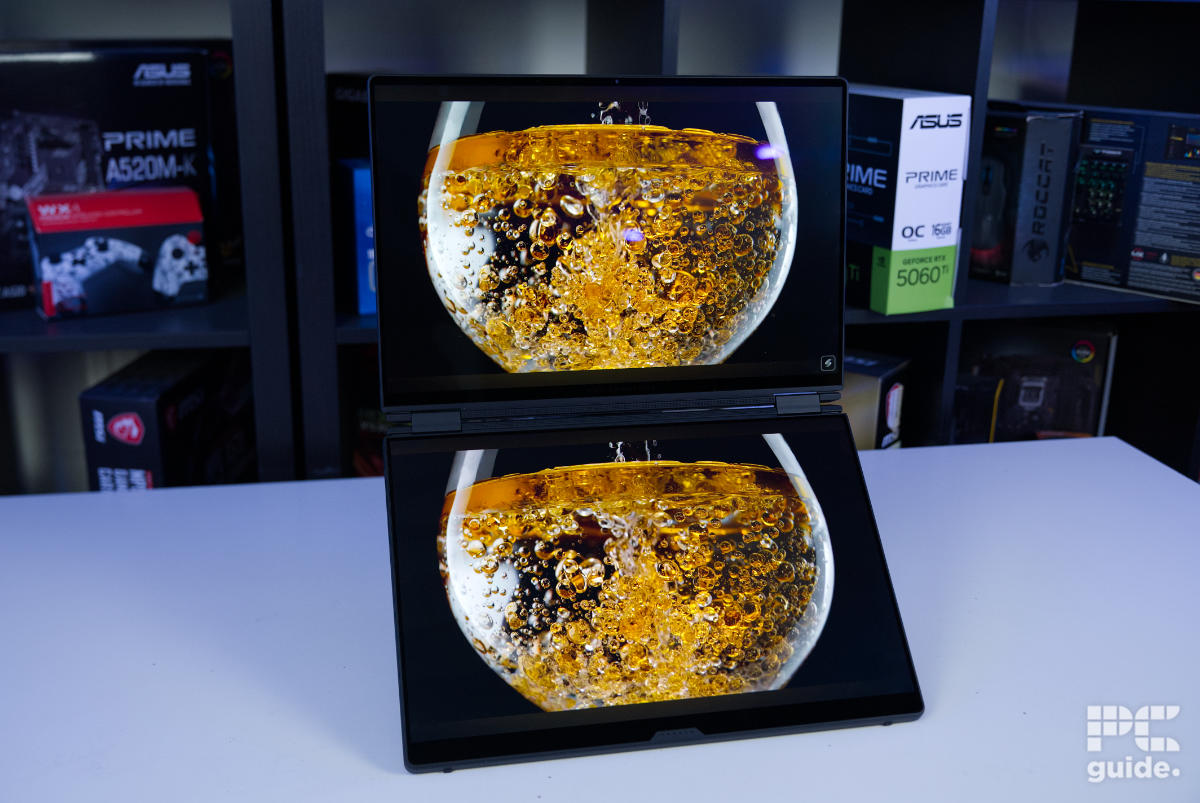
When it comes to using a gaming laptop, you may sometimes find your available screen space a little limiting. Even with a large display, such as an 18-inch screen, a single panel can quickly feel restrictive when multitasking. However, ASUS ROG may have the solution. Much like the rise of folding phones, the ROG Zephyrus Duo GX651AX doubles your available screen space by replacing the traditional keyboard area with an additional display.
It comes equipped with two 16-inch, 1800p OLED displays, both featuring a 120Hz refresh rate and a reported wide color gamut. It also packs some powerful hardware, including an Intel Core Ultra 9 Processor 386H and the option of either an RTX 5070 Ti or RTX 5090 GPU. So, how does all of this come together in practice? I put it through its paces to find out.


- CPU: Intel Core Ultra 9 Processor 386H
- GPU: Up to NVIDIA GeForce RTX 5090
- Memory: Up to 64GB LPDDR5X-8533 MT/s
- Storage: Up to 2TB PCIe 5.0 NVMe SSD
- Max refresh rate: 120 Hz
- Resolution: 2880 x 1800
- Panel type: 16-inch OLED
The ROG Zephyrus Duo GX651AX is a powerhouse of a machine. It’s not a lightweight or portable laptop, weighing in at nearly 3kg (6.5lbs), so it isn’t the easiest device to transport or carry around. The price is also a significant consideration, coming in at over $5,000. However, for that price, you get two impressive OLED touchscreens, a satisfying wireless keyboard, excellent sound quality, and plenty of additional features built into the design.
If you can afford it, it is certainly a top-tier option for those looking for a unique and highly capable workstation-style laptop.
- Two very impressive OLED screens
- Lots of memory to take advantage of
- Surprisingly good speakers onboard
- Webcam, microphone, and IR sensor offer a decent setup
- Very versatile with a big hinge and stand
- Great feeling and usable wireless keyboard
- Lots of connectivity, yet lacks Ethernet
- Eye-wateringly expensive
- Very heavy for a laptop
- Performance does fall behind for a 5090 model
Pricing and availability
With all that high-end hardware and premium build quality, the Zephyrus Duo is certainly not a budget laptop. This is only further amplified by rising RAM and SSD prices, with this laptop packing a significant amount of both. As a result, a model with specifications similar to the one I had hands-on with can be found for around $5,499/£5,799.
Latest tech deals.
- AMD Ryzen™ 9 9900X 12-Core - was $499 now $328
- CORSAIR 4000D PC Case - was $124.99 now $75.99
- Hisense 65" Class E6SR - was $549 now $377.99
- Apple 2026 MacBook Air - was $1,999 now $1,799
- Skytech Gaming PC Desktop (9850X3d) - was $4,299 now $3,799
- Apple Magic Mouse - was $79 now $59
- MSI Prestige 16 Flip - was $2,149 now $1,899
- Kotin 9700X Gaming PC - was $2,399 now $2,199
Prices correct as of October 9th, 2026.
That said, many RTX 5090 OLED laptops are already expensive, so it is the addition of the second display that really pushes the cost even higher. For comparison, the Lenovo Legion Pro 7i is priced at $4,285.55/£3,769.51, the Razer Blade 16 costs $5,599.99/£5,040.97, and the Dell Alienware 18 comes in at $4,279.99/£4,249.00.

ROG Zephyrus Duo GX651AX box front, Image by PC Guide

ROG Zephyrus Duo GX651AX box back, Image by PC Guide
Overall design
Immediately picking up the large outer box, I noticed just how heavy it was. Weighing in at nearly 3kg, it certainly isn’t a lightweight or portable machine. I can’t see myself travelling with it regularly, despite how useful the additional screen can be.
The packaging itself is well organised, with silver boxes and separate cardboard sections keeping everything neatly arranged, while also helping to protect the laptop from damage during transit.

ROG Zephyrus Duo GX651AX top opening, Image by PC Guide

ROG Zephyrus Duo GX651AX boxes, Image by PC Guide

ROG Zephyrus Duo GX651AX wrapped in box, Image by PC Guide
Sliding out the inner packaging, the laptop comes in a tight-fitting, silvery-gray box that opens up to reveal the covered device inside. Underneath, you’ll find the included documentation and booklets for the laptop. As for the power cable and adapter, they are housed in their own large box beside the laptop, taking up a considerable amount of space and adding to the overall weight of the package.
ROG Zephyrus Duo GX651AX boxes, Image by PC Guide
ROG Zephyrus Duo GX651AX wrapped in box, Image by PC Guide

ROG Zephyrus Duo GX651AX box contents, Image by PC Guide
On top of the laptop lid, there is a diagonal streak of LEDs running across the surface, with the Slash Lighting array adding a level of customization. It is essentially a slimmed-down version of the AniMe Vision display found on the ROG Strix Scar 18 G835LX, although it lacks the same level of detail and personalization options. The lid also features a Republic of Gamers logo in the corner, adding to the overall gaming aesthetic.

ROG Zephyrus Duo GX651AX lid with sticker, Image by PC Guide

ROG Zephyrus Duo GX651AX lid, Image by PC Guide
On the underside of the GX651AX, things are a little different compared to a traditional laptop. A massive triangular stand takes up the center of the base, covering the majority of the underside. Hinged at the top, it lifts up to reveal the large ventilation area across the upper section and the long plate cover below. This gives you access to the two expansion slots for NVMe SSDs, making storage upgrades relatively straightforward.
There are also ribbon cables that need to be disconnected to remove the rest of the cover, although accessing this section is more difficult and there isn’t much else available for upgrades.
Around the edges, there are plenty of rubberized feet that help lift the laptop and keep it level with the stand when placed on a surface. It also features two speaker grilles, although the audio system extends far beyond these alone. The laptop uses four 2W woofers and two 2W tweeters, combined with Dolby Atmos and additional calibration. The result is surprisingly rich and detailed sound, with impressive volume, clarity, and even some noticeable bass for a laptop.
The only downside is that, at higher volumes, the increased vibration can be felt through the secondary display and keyboard area.

ROG Zephyrus Duo GX651AX underside, Image by PC Guide

ROG Zephyrus Duo GX651AX underside stand, Image by PC Guide

ROG Zephyrus Duo GX651AX stand, Image by PC Guide

ROG Zephyrus Duo GX651AX underside open, Image by PC Guide
As for the back edge, the bottom half sports plenty of exhaust vents. Above it, there are two full hinges with the space in between sporting a stylized raised edge with Zephyrus Duo branding in the middle. As for the front, that has a rather thick edge as the screen plus keyboard give it all that extra.

ROG Zephyrus Duo GX651AX back edge, Image by PC Guide

ROG Zephyrus Duo GX651AX front edge, Image by PC Guide
As for the sides of the laptop, it also carries through that thickness. On the left side, it features a square power input from the charger, an HDMI 2.1 output, a USB 3.2 Gen 2 Type-A, a Thunderbolt 4, and a 3.5mm audio combo port. On the right side, it has another Type-C and Type-A, along with a high-speed card reader and the power button, too, with no place for it in the usual place on the wireless keyboard.

ROG Zephyrus Duo GX651AX left side, Image by PC Guide

ROG Zephyrus Duo GX651AX right edge, Image by PC Guide
Opening up the laptop reveals a unique design that differs significantly from the usual layout. The most notable feature is the bottom half, which houses the magnetic wireless keyboard and touchpad. While it may not be a full-sized gaming keyboard, it comes close. The fact that it connects via Bluetooth and can be used separately from the laptop provides excellent flexibility and usability. Despite this, it doesn’t compromise on build quality, as it feels sturdy and premium, with a satisfying mechanical feel from both the switches and touchpad buttons.
On the underside, it features a felt lining and magnetic metal contact points for connecting to the laptop. Along the side, there is also a power switch and USB-C port for charging.

ROG Zephyrus Duo GX651AX lifted on stand, Image by PC Guide

ROG Zephyrus Duo GX651AX keyboard, Image by PC Guide

ROG Zephyrus Duo GX651AX keyboard underside, Image by PC Guide

ROG Zephyrus Duo GX651AX lifted on stand without keyboard, Image by PC Guide

ROG Zephyrus Duo GX651AX keyboard installed, Image by PC Guide

ROG Zephyrus Duo GX651AX front on powered, Image by PC Guide

ROG Zephyrus Duo GX651AX bottom pogo pins, Image by PC Guide
Taking off the keyboard, there are two rather impressive-looking screens left behind. The OLED screens shine bright, and the touchscreen makes them both great utilities. Especially with the optimization of the screens rotating and working well together, as it offers easy window management between the two. Or even with the attachment to the screen, it turns off and returns to just the one display.

ROG Zephyrus Duo GX651AX screens powered, Image by PC Guide

ROG Zephyrus Duo GX651AX hinge, Image by PC Guide

ROG Zephyrus Duo GX651AX bottom screen, Image by PC Guide

ROG Zephyrus Duo GX651AX screen powered on, Image by PC Guide
Then there is the webcam at the top of the screen and the infrared sensor that comes with it. Providing access to Windows Hello and a surprisingly good quality sensor, even though it’s 1080p, the look of the images and videos is impressive. So is the microphone in there, which comes with multiple modes that really let you control the input and give a great sound no matter your environment.

Generally, though, the laptop has impressive build quality. Even if it does come in at a rather hefty size, measuring 355 x 247 x 24.9 mm (13.98″ x 9.72″ x 0.98″), it is still a substantial device to carry around. The entire package weighs in at 3.566kg/7.86lbs, including the laptop itself (2,301g), the keyboard (513g), and the charger (752g).

ROG Zephyrus Duo GX651AX screen video (4), Image by PC Guide

ROG Zephyrus Duo GX651AX screen video (12), Image by PC Guide
Screen
Next up, the first part of testing the laptop is checking out the screen. Using our Datacolor SpyderX Elite and its software, I tested both screens and what they are capable of in standard and HDR modes.

ROG Zephyrus Duo GX651AX gamut, Image by PC Guide

ROG Zephyrus Duo GX651AX gamut bottom hdr, Image by PC Guide

ROG Zephyrus Duo GX651AX gamut bottom, Image by PC Guide

ROG Zephyrus Duo GX651AX gamut hdr, Image by PC Guide
Overall, the OLED screens on the ROG Zephyrus Duo GX651AX do cover a wide range of the color spectrum – as you’d expect. Both the top and bottom screens come with the same results in our test. That results in 100% coverage of sRGB, 94% of AdobeRGB, and 97% of DCI-P3. Turning on HDR does drop the results, though, as the top becomes 95%, 72%, and 71%, respectively – with the bottom screen achieving 93%, 69%, and 69%.
| Whitepoint | Blackpoint | Contrast | Average deltaE*00 | Max deltaE*00 | Gamma | Max brightness | Min brightness | |
|---|---|---|---|---|---|---|---|---|
| IDEAL | 6500K | 0/m² | infinity:1 | 0 | 0 | 2.2 | ~ | ~ |
| Default top (OOB) | 6800K | 0/m² | infinity:1 | 0.81 | 1.89 | 2.2 | 472.5cd/m² | 4.5cd/m² |
| HDR top | 6800K | 0/m² | infinity:1 | 1.06 | 6.43 | 2.2 | 490.8cd/m² | 4.8cd/m² |
| Default bottom (OOB) | 6900K | 0/m² | infinity:1 | 0.81 | 2.33 | 2.2 | 474.6cd/m² | 4.7cd/m² |
| HDR bottom | 6800K | 0/m² | infinity:1 | 1.61 | 6.73 | 2.2 | N/A (can’t adjust) | N/A (can’t adjust) |
| Racing | 6800K | 0/m² | infinity:1 | 3.57 | 5.81 | 2.1 | 474cd/m² | |
| Scenery | 6800K | 0/m² | infinity:1 | 8.42 | 13.61 | 2 | 475cd/m² | |
| RTS/RPG | 7700K | 0/m² | infinity:1 | 3.55 | 5.9 | 2.3 | 455cd/m² | |
| FPS | 6800K | 0/m² | infinity:1 | 6.78 | 14.41 | 2.1 | 474cd/m² | |
| Cinema | 7300K | 0/m² | infinity:1 | 3.66 | 7.93 | 2 | 405cd/m² | |
| Eyecare | 4400K | 0/m² | infinity:1 | 1.69 | 3.55 | 2.2 | 401cd/m² | |
| Vivid | 6800K | 0/m² | infinity:1 | 6.67 | 10.84 | 2.1 | 475cd/m² | |
| E-Reading | 6800K | 0/m² | infinity:1 | 38.59 | 68.96 | 2.2 | 475cd/m² |
As for how accurately the displays cover their advertised color ranges, they do an excellent job. In the default mode (the out-of-box setting), the top display achieved an average DeltaE deviation of 0.81, with a maximum deviation of 1.89. The bottom display delivered the same average result, although its maximum DeltaE reached 2.33.
HDR performance is less accurate, however, with the average DeltaE rising above 1 and the maximum deviation exceeding 6 on both screens.
When it comes to white point and screen temperature, both displays tend to run slightly cooler than ideal. My testing measured them at around 6800K, approximately 300K above the optimal 6500K target.
In terms of brightness, both screens reached over 470 nits in their default mode, while the minimum brightness sat just above 4 nits. This provides an excellent range, making the displays suitable for brighter environments while also allowing for comfortable viewing in darker conditions. HDR provides a slight boost, taking brightness to just below 500 nits.
There are also plenty of additional display modes available through Armoury Crate, offering a range of options depending on your use case. These include Eye Care mode for reducing blue light, E-Reading mode for switching to a black-and-white display to reduce eye strain, Cinema mode for more vibrant colors, and various gaming profiles designed to enhance specific features. The results for these modes can be seen above, although they are generally focused more on enhancing the viewing experience rather than maintaining strict color accuracy or ideal calibration levels.
Battery life
The GX651AX features a 90Wh battery onboard, and the two screens can be rather taxing. That said, I tested the battery life it offers. Turning on eco mode, charging the battery to full beforehand, and turning the brightness to around 120 nits, I then left it running to time how long it takes to discharge. Firstly, with an HD video for two hours, after which I just browsed some content to finish.

There is quite a difference in the longevity of the laptop depending on which mode you run it in. With the single screen lasting around 17 hours in my test, turning on the second screen drops it to around 10 hours. With the 7-hour difference, it is still a long-lasting laptop, just falling behind some of the Acer netbooks we’ve reviewed, like the Acer Swift 14 AI. As for the two-screen mode, that is on par with the Acer Predator Triton 14 AI and not far behind the HP OmniBook X Flip.
Software
Looking over the range of preinstalled software that comes with the laptop, there are a bunch of apps that come with the laptop. A combination of ASUS and Microsoft programs that vary in how useful they are in running the laptop and being able to use it.

ROG Zephyrus Duo GX651A Cirrus Audio, Image by PC Guide

ROG Zephyrus Duo GX651A MyASUS device settings, Image by PC Guide

ROG Zephyrus Duo GX651A MyASUS diagnosis, Image by PC Guide

ROG Zephyrus Duo GX651A MyASUS update, Image by PC Guide

ROG Zephyrus Duo GX651A MyASUS, Image by PC Guide

ROG Zephyrus Duo GX651A tutorial, Image by PC Guide

ROG Zephyrus Duo GX651A AC Aura Sync, Image by PC Guide

ROG Zephyrus Duo GX651A AC Home, Image by PC Guide

ROG Zephyrus Duo GX651A AC OLED settings, Image by PC Guide

ROG Zephyrus Duo GX651A AC profiles, Image by PC Guide

ROG Zephyrus Duo GX651A AC system settings, Image by PC Guide
There are about 8 or so ASUS-affiliated apps that range in usability for controlling the laptop, like Armoury Crate, ScreenXpert, and MyAsus – to stuff like Virtual Assistant and Adobe Promotions that are more gimmicks or even promotions. While Microsoft adds a great deal more, too, including many of its AI features such as Copilot and Recall, it can be handy to go through and uninstall some of those.

With the novelty of the second screen, there are several different ways to make use of the additional touchscreen. After the initial setup process, which involves working through the Windows and ASUS prompts before reaching the desktop, the ScreenXpert pop-up appears. This guides you through the various gestures and features available across both displays, including activating the virtual keyboard, moving windows between screens, and accessing additional controls.
The ScreenXpert icon remains floating on the side of the display, providing quick access to various settings and tools. This makes it useful for everyday use and helps you get the most out of the dual-screen setup. ASUS has done a surprisingly good job of making the two displays work together effectively, allowing for improved window management compared to the standard Windows snapping tools and making it easier to organize applications across both screens.
After trying the on-screen keyboard, however, it is clear that it isn’t a direct replacement for the impressive detachable keyboard. Since it is displayed on the screen, it lacks the physical feedback and tactile feel of a traditional keyboard, while also requiring you to hover your hands above the display rather than resting them naturally. The lack of raised bumps on the F and J keys also made it more difficult to position my fingers correctly.
As a result, my typing speed dropped significantly, going from 82 words per minute with 99% accuracy on the separate keyboard during first-time use, to just 26 words per minute with 81% accuracy when tested on Monkeytype.
Performance
Of course, after setting it all up and having gone over the GX651AX, I did put it to the test with our selection of benchmarks. Consisting of a mix of gaming and synthetic tests, it should give a general look at what the machine can do. For which I put it in the powerful turbo mode that puts the CPU and GPU power to around 35 W and 115 W, with a target noise level of 48 dBA. There is a manual mode that can give an extra 15 W in total, but that requires a lot more hands-on unlocking, so turbo is more representative of what it can do out of the box.
Gaming
With a 1800p native resolution, the screen sits with a pixel count between 1440p and 4K, but in a greater 16:10 aspect ratio on the 16-inch screens. Yet with the RTX 5090 onboard, I would expect great results anyway, even if the TGP is 440W lower than the desktop version of the GPU. I also ran the games at 1080p as an option to compare it to other laptops, too, as that puts them in the same settings to be directly comparable.

ROG Zephyrus Duo GX651AX Cyberpunk 2077 1800p, Image by PC Guide

ROG Zephyrus Duo GX651AX Cyberpunk 2077 1080p, Image by PC Guide

ROG Zephyrus Duo GX651AX Cyberpunk 2077 1080p RT, Image by PC Guide

ROG Zephyrus Duo GX651AX CS2 1080p, Image by PC Guide

ROG Zephyrus Duo GX651AX CS2 1800p, Image by PC Guide

ROG Zephyrus Duo GX651AX Doom Eternal 1800p, Image by PC Guide

ROG Zephyrus Duo GX651AX Doom Eternal 1080p, Image by PC Guide
Starting with Cyberpunk 2077, I used various preset settings and built-in benchmarks to measure performance. At 1800p Ultra settings, the GX651AX averaged 87 fps, while Medium settings increased this to 139 fps and Low settings reached 144 fps. Enabling ray tracing caused performance to drop, with RT Overdrive averaging 63 fps, RT Medium reaching 86 fps, and RT Low delivering 113 fps.
Running the same tests at 1080p improved performance further, with pure rasterization results reaching 127, 142, and 143 fps across Ultra, Medium, and Low settings, respectively. Enabling ray tracing resulted in averages of 63, 95, and 125 fps.
Moving on to Doom Eternal, the laptop performed exceptionally well at 1800p, averaging 237 fps on Ultra Nightmare, 240 fps on High, and 277 fps on Low settings. Dropping the resolution to 1080p increased these averages to 297, 313, and 374 fps, respectively.
Lastly, Counter-Strike 2 delivered strong results at native resolution, averaging 318 fps on Very High settings, 308 fps on Medium, and 337 fps on Low. Reducing the resolution to 1080p resulted in averages of 361, 306, and 337 fps across the same settings.
Synthetics
Next up are the non-gaming benchmarks. Expanding on the other processing and work that you might want to do on the laptop, including some of its AI capabilities.

ROG Zephyrus Duo GX651AX 3DMark, Image by PC Guide

ROG Zephyrus Duo GX651AX Blender GPU, Image by PC Guide

ROG Zephyrus Duo GX651AX Blender CPU, Image by PC Guide

ROG Zephyrus Duo GX651AX Geekbench 6 CPU, Image by PC Guide

ROG Zephyrus Duo GX651AX Geekbench 6 GPU, Image by PC Guide

ROG Zephyrus Duo GX651AX Geekbench AI CPU, Image by PC Guide

ROG Zephyrus Duo GX651AX Geekbench AI GPU, Image by PC Guide
First up is 3DMark and the capabilities of the laptop across various APIs and features in its benchmarks. In that, it achieved scores of 13,626 in Fire Strike Ultra, 9,598 in Time Spy Extreme, 14,137 in Port Royal, and 5,314 in Steel Nomad. That puts it below the other RTX 5090 machines we put it up against.
Next up is Blender and the rendering capability of the CPU and GPU. In that the former achieves 124.93, 84.51, and 62.49 samples per minute in monster, junkshop, and classroom scenes, respectively. While using the GPU instead boosts those numbers to 3,498.09, 1,988.10, and 1,787.95 samples per minute instead.
Then there is Geekbench 6, a testing platform for many systems. In that the CPU achieved scores of 2,781 in single-core tasks and 15,864 in multi-core scenarios. While the GPU benchmark scored it 190,796 in the OpenCL API and 169,156 in Vulkan.
Whereas in the AI Geekbench tests, the CPU scored 4,734 in single precision, 1,835 in half precision, and 8,385 in quantized precision. While the GPU runs scores of 25,429, 42,055, and 20,183, respectively.
Response time
I then measured the response time of the screen with our OSRTT (Open Source Response Time Tool), which measures the responsiveness of the display. With this one, I focused on the main display to get an idea of its performance.


Generally, the screen has a fast response time, except when switching from 0 or the lowest intensity. Most of the time, the perceived response time is under 1ms, but from 0 to 153, it takes over 8, with the overshoot in the low to high teens. That isn’t ideal, but it’s definitely not bad and still very playable and usable.
Thermals and noise levels
Lastly, I put the thermals of the laptop to the test. Running the Furmark 2 stress test for 20 minutes, it would max out the CPU and GPU and thermally load the machine to its max. That lets me evaluate its throttling and sound at that level.

During the 20-minute load test, both the CPU and GPU were pushed to their limits. The CPU peaked at 25.6W, while the GPU reached 125W, although their average power consumption settled lower at around 35W and 115W, respectively. During this period, the processors reached temperatures of 84°C and 76°C.
The CPU’s effective clock speed peaked at 3.5GHz but quickly dropped to around 2.6GHz once temperatures and power levels stabilized. The GPU, meanwhile, reached and maintained a clock speed of around 1.3GHz.
During the test, the fans reached speeds of 5,400 RPM, which naturally resulted in a fairly loud overall experience. Like many high-performance gaming laptops, the cooling system can sound like a jet taking off under heavy load, but it is necessary to maintain these performance levels.
As a result, it isn’t ideal for use in quieter environments. However, when gaming with a good pair of headphones, the noise becomes far less noticeable. The temperatures are also manageable, although the keyboard deck and lower display area do become warm during extended sessions. It isn’t uncomfortably hot, but after prolonged use, the heat can become noticeable.
- CPU: Intel Core Ultra 9 Processor 386H
- GPU: Up to NVIDIA GeForce RTX 5090
- Memory: Up to 64GB LPDDR5X-8533 MT/s
- Storage: Up to 2TB PCIe 5.0 NVMe SSD
- Max refresh rate: 120 Hz
- Resolution: 2880 x 1800
- Panel type: 16-inch OLED
Conclusion
Overall, the ROG Zephyrus Duo GX651AX is an incredibly impressive laptop. Its high-end build quality, powerful hardware, and extensive feature set make it a truly capable machine. However, it does come at a significant cost, both financially and in terms of weight.
For that premium, you get a unique dual-screen setup and a detachable Bluetooth keyboard, creating a complete and ambitious design that stands out from more traditional laptops.
Written by
