
Acer Swift 14 AI review: low level power with excellent visuals

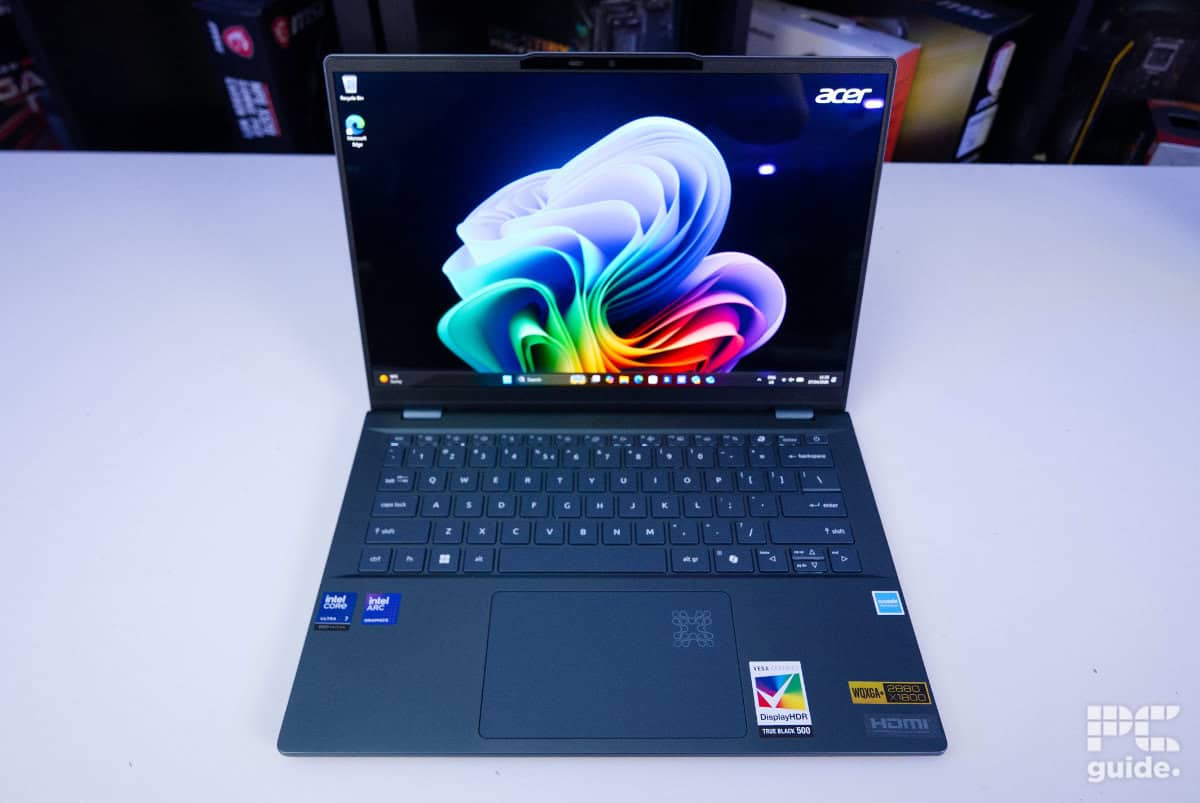
Table of Contents
In the midst of Copilot+ PCs taking the forefront of new launches, it’s no surprise that Acer’s laptop lineup is part of that too. That includes some of the brands’ hottest new tech, including the Acer Swift 14 AI that we’ll be reviewing today. It might be the lightest option they have – that goes to their impressive Swift Air16 – but it does provide the market with an impressively affordable everyday carry that is filled with potential.
The Acer Swift 14 AI combines a slim and premium-looking design with strong everyday performance, impressive battery life, and a vibrant OLED display. Powered by Intel’s Core Ultra hardware, it handles productivity, media consumption, and lighter creative workloads with ease, while still offering enough graphical performance for casual gaming at lower settings. But how does all this stack up against the market’s leading alternatives? Well that’s what we’re here to find out – putting it to the test in our full review roundup.


- CPU: Intel Core Ultra 7 258V
- GPU: Intel Arc 140V
- Memory: 32GB LPDDR5X – 8533MT/s
- Storage: 1TB NVMe 4.0 SSD
- Max refresh rate: 90Hz
- Resolution: 2880 x 1800
- Panel type: 14-inch OLED
The Acer Swift 14 AI brings with it a great-looking screen, strong design, and well-built chassis. With plenty of RAM and a strong CPU, it does deliver good performance in a number of use cases. That said, it falls behind more powerful models when it comes to things like gaming and workstation tasks. That said, with a strong battery life, clear speakers, a microphone, and a decent webcam, it’s a decent everyday laptop with a small power brick, too.
- Bright and strong OLED screen
- Nice built-in camera and mic
- Useful, easy sign-in features
- Good range of connectivity in the strong chassis
- Long battery life
- Lots of bloatware
- Lacks graphical and multi-core power
- Copilot+ features oversold and gimmicky
Pricing and availability
Like a lot of Acer’s new releases, finding the Swift 14 AI is easier said than done right now. The closest version we could find was priced at $1,861.99.
Latest PC & Tech deals
- AMD Ryzen™ 9 9900X 12-Core - was $499 now $337
- iBUYPOWER Element Gaming PC - was $1,999 now $1,699
- LG 27GX700A-B 27-inch Ultragear- was $599 now $485
- Samsung SSD 9100 PRO 1TB - was $339 now $249
- HP OmniBook 5 16 inch - was $961 now $799
Prices correct as of September 21st, 2026.
Similar models to the Swift 14 AI with a Core 7 256V and without a touchscreen are currently listed for £789.99 – or a renewed version in the US for $774.99.

Overall design
Starting with the unboxing, the box opens from the side to reveal the laptop neatly nestled inside. It’s wrapped for protection and secured within an inner cardboard insert to keep it firmly in place. Alongside it is the charging brick, housed in its own cardboard compartment. It doesn’t take up much space, as the plug is integrated into the brick itself – unlike many chargers that have a separate “brick and cable” design.

Removing the laptop exposes the chassis’s sleek and stylish finish. The main body utilizes a dark-blue color theme, and the lid features a shiny Acer logo in the top corner. Plus, the 14-inch model is quite bespoke in size – with dimensions of 312 x 221 x 16mm, it’s still on the thinner side of things.

Acer Swift 14 AI laptop and charger, Image by PC Guide

Acer Swift 14 AI front edge, Image by PC Guide
Taking a closer look inside (and looking over the specs) shows me why this laptop is so slender. Although there are no hidden or hard-to-get-to screws, it did take a bit of force to pry open the bottom part of the shell. Beneath it has just a single fan with two heat pipes connected to the processor. As for any upgrades you might want to do, you’re limited to just the NVMe that sits just to the side next to the battery, which is easy to get to. The RAM and such are soldered on, so not much there.

Acer Swift 14 AI underside, Image by PC Guide

Acer Swift 14 AI inner, Image by PC Guide
With its compact cooling design, venting is fairly limited, with just a few exhaust points at the rear and intake gaps positioned along the rear underside. In terms of connectivity, though, it offers a solid selection across both sides.
You get four USB ports in total, split between two USB 3.2 Type-A and two USB 4.0 Type-C ports. These are complemented by an HDMI output and a 3.5mm audio jack, giving you plenty of flexibility for everyday use. The only real omissions are an Ethernet port and an SD card slot, though given the tight internal space, it’s understandable why they’ve been left out.

Acer Swift 14 AI left edge, Image by PC Guide

Acer Swift 14 AI right edge, Image by PC Guide
Moving forward from the side connections, the chassis gently slopes inward, revealing the speakers while also creating a more comfortable grip area. At the rear, the design features rounded edges and a pair of hinges at either end, giving it a clean, refined look. These hinges also allow the screen to fold completely flat, adding a bit more versatility to the overall design.

Opening up the laptop – which takes some effort as there is a magnet holding it in place at the front – we find a fairly standard-looking keyboard and screen. The bottom is covered with stickers highlighting the laptop’s key specs and features, while a centrally positioned touchpad sits just above. In the corner, there’s a distinctive AI logo that lights up intermittently when AI features are in use.
The keyboard delivers a solid typing experience, with well-sized keys and only a small amount of flex when pressured. The power button also doubles as a fingerprint sensor, adding a convenient layer of security.

Acer Swift 14 AI open on table, Image by PC Guide

Acer Swift 14 AI keyboard, Image by PC Guide
Along with the fingerprint sensor, there is a 1440p webcam with an integrated infrared sensor, both allowing for quick and easy sign-in to Windows. Being a higher-resolution camera, it provided a clear and high-res-looking image, not grainy or blown out at all. It also comes with a privacy shutter as an extra layer of protection. The microphone isn’t at the same level as the camera, meaning audio can sometimes be a little distorted or fuzzy. That said, for more general use, it’s perfectly acceptable.
As for the screen, we find a glossy finish to the panel, resulting in a large amount of reflection during usage. That said, the clear and small bezel provides a decent-sized screen for the chassis.

Acer Swift 14 AI webcam covered, Image by PC Guide

Acer Swift 14 AI webcam, Image by PC Guide

Acer Swift 14 AI screen, Image by PC Guide
Then there are two downward-firing speakers beneath the chassis by the edge. With DTS X branding on them, they do provide a surprisingly clear and loud audio experience. Music and voices are easy to hear and don’t distort even when cranked to the max, which, to our surprise, was incredibly loud. At that point, though, the chassis does start to vibrate slightly, but it’s still a good listening experience.
Screen
After going over the laptop itself, I put the screen to the test with our DataColor colorimeter. Testing its out-of-the-factory calibration and how good a screen it is. Considering it’s an OLED display, I’d expect to see some pretty good results.


First up is the color gamut – this refers to how much of the overall color space the display can reproduce. In the Swift 14 AI, we recorded a coverage of 100% in sRGB, 95% of AdobeRGB, and 96% of DCI-P3 in standard mode. In HDR mode, those figures shift to 93%, 70%, and 70%, respectively. Overall, that still points to a strong range of color coverage, making it suitable for color-sensitive work and editing.
That said, the display may benefit from some calibration to really get the most out of it. As the accompanying data shows, it can deviate from the ‘ideal’ color accuracy out of the box. In standard mode, it records an average delta above 6 with peaks exceeding 9, which indicates noticeable inaccuracies. HDR mode improves things significantly, bringing the average delta down to around 1.4 with a much lower peak as well, resulting in far more accurate colour reproduction.
| Whitepoint | Blackpoint | Contrast | Average deltaE*00 | Max deltaE*00 | Gamma | Max brightness | |
|---|---|---|---|---|---|---|---|
| IDEAL | 6500K | 0/m² | infinity:1 | 0 | 0 | 2.2 | |
| Standard | 6900K | 0/m² | infinity:1 | 6.14 | 9.16 | 2.1 | 541.8 |
| HDR | 7000K | 0/m² | infinity:1 | 1.43 | 5.5 | 2.2 | 545.8 |
The screen is also on the warmer side, jumping above the 6500K mark and coming in around 7000K instead. That said, gamma performance is well-tuned, and thanks to the OLED panel, the display delivers excellent black levels and strong contrast. That combination helps produce vibrant colours and rich-looking images throughout use.
Brightness is solid too, with both display modes exceeding 540 nits, making the screen comfortable to use even in fairly bright environments. At the opposite end of the scale, it can also drop down to just 23 nits – great for dark room viewing.
Acer Swift 14 AI turned on, Image by PC Guide

Acer Swift 14 AI setup (10), Image by PC Guide
Battery life
Putting the battery life to the test in our testing lab consists of setting the brightness to around 120 nits, turning on energy saver mode, and turning the performance level to the lowest possible. Once that’s all set, we run a 2-hour HD YouTube video before doing light browsing until the battery runs out – or extrapolate the remaining battery from there.

For the Swift 14 AI, after the video, it had dropped to just 82%, with each subsequent hour reducing the percentage by 5%. That means that in total it results in a battery life of 19 hours. That is a fairly decent amount of time for the 65Wh battery, so it should last a long time without recharging.
Software
When it comes to the software on the laptop, there are a lot of pre-installed programs – which seems to be the default for Acer right now. A combination of handy features, to some; not so much for others. Ultimately, this leads to some bloat and plenty of pop-ups asking for subscriptions – resulting in the annoying task of hand-picking which programs to keep and which to uninstall.

Acer Swift 14 AI software (4), Image by PC Guide

Acer Swift 14 AI software (3), Image by PC Guide

Acer Swift 14 AI software (2), Image by PC Guide

Acer Swift 14 AI software (1), Image by PC Guide

Acer Swift 14 AI software (5), Image by PC Guide
Performance
Next up, the actual performance of the laptop. Putting it through a variety of benchmarks, in both gaming and synthetics, to see what it is capable of. Despite this laptop being on the lighter side when it comes to gaming (not equipped with a dedicated GPU processor), we’re still going to put it through some less-intensive titles to see how it performs.

Acer Swift 14 AI setup (7), Image by PC Guide

Acer Swift 14 AI setup (6), Image by PC Guide

Acer Swift 14 AI setup (5), Image by PC Guide

Acer Swift 14 AI setup (4), Image by PC Guide

Acer Swift 14 AI setup (3), Image by PC Guide

Acer Swift 14 AI setup (2), Image by PC Guide

Acer Swift 14 AI setup (1), Image by PC Guide
Gaming
First up is the gaming, and to keep it light, I just ran a Counter-Strike 2 workshop benchmark map. Running it both at its native 1800p and at a comparative 1080p standard resolution. Changing up the settings to various presets, it gave us a good idea of what the integrated graphics this laptop comes equipped with can do.


At 1800p, and on very high settings, the laptop averaged a framerate of just 16, with medium improving that to 38, while low boosted that to 99 – with upscaling doing a lot of heavy lifting. At 1080p, those averages became 57, 104, and 132 fps, respectively, a lot more playable, but still no gaming machine.
Synthetics
Next up were a variety of synthetic tasks and benchmarks. Checking out what else the CPU and GPU were capable of in other processes.

Acer Laptops 3DMark, Image by PC Guide

Acer Laptops Geekbench AI, Image by PC Guide

Acer Laptops Geekbench 6, Image by PC Guide

Acer Laptops Blender 4.5, Image by PC Guide
Firstly, in 3DMark, which offers a look at rendering performance across a variety of API’s, the laptop achieved scores of 814 in Steel Nomad, 2,077 in Port Royal, 2,205 in Time Spy Extreme, and 2,391 in Fire Strike Ultra. Then, in Blender and rendering 3D scenes, the CPU achieves 65.93 samples per minute in monster, 39.23 in junkshop, and 31.07 in classroom. With the GPU boosting those slightly to 329.01, 184.56, and 172.36.
Next up is the suite of Geekbench benchmarks. First up in the standard tests, the CPU scored 2,697 in single-core tasks and 11,159 in multi-core tasks. While the GPU achieves 29,408 in OpenCL and 35,634 in Vulkan. Whereas in AI tasks, the CPU gets 3,223 in single precision, 1,403 in half precision, and 6,461 in quantized. While the GPU in the same order scores 8,407, 16,241, and 5,640.
Thermals and noise levels
After that, I put it through even more stress testing to check out what its cooling was capable of. I achieved this through running the Furmark 2 stress tests for over 20 minutes on both the CPU and GPU. With 5-minute idle periods on either side, it should give a good look at what it’s capable of.

At idle, the laptop does very little by itself. With the CPU sitting around 2W, but with spikes as background processes arise, the temperature fluctuates between 37°C and around 50°C here and there. It manages that well, though, and it’s very intermittent.
With the power load starting, though, the power spikes straight away. With the CPU rising to nearly 40W as the clock rate of the processor rises to 3,600MHz, and the iGPU goes to just under 2,000MHz. Neither of them stays there for long, though, as before a minute passes, they drop in power and clock rates.
For a few minutes, they go to around 1,600MHz, with a power of 40W as the temperatures drop to 62°C and slowly rise to 65°C. Then they drop again and settle closer to 58°C with a power falling to 20W.
So the laptop drops in performance and power over time to avoid getting too hot. Instead, it keeps cool for the most part for a better user experience. It translates to a better sound, too, as the fans don’t create a whiny noise, but mostly just create that ‘whoosh’ from the air that’s not too loud.
- CPU: Intel Core Ultra 7 258V
- GPU: Intel Arc 140V
- Memory: 32GB LPDDR5X – 8533MT/s
- Storage: 1TB NVMe 4.0 SSD
- Max refresh rate: 90Hz
- Resolution: 2880 x 1800
- Panel type: 14-inch OLED
Conclusion
Overall, the laptop is a decently built and robust unit – with only basic components at its core. Despite that being the case, it still features a stunning screen, giving out mixed messages for what its true use case is. Despite being a less powerful carry, and featuring some pretty gimmicky AI tools, the laptop still offers good performance for students or small business owners. Even the high-quality webcam and microphone make it a solid choice for everyday tasks.
About the Author