



Table of Contents
Last year, we got our hands on the new Acer Predator Neo range of gaming laptops. A more affordable version of their full Helios range, they aim to offer great value by bringing the specs down to something a bit less overkill for a portable machine. So, we now have the Acer Predator Helios Neo 16 AI to see just what it can do.
This model comes with a top-end Intel Core Ultra 9 290HX, along with an RTX 5080 laptop GPU. The full Helios 18 AI can feature the flagship RTX 5090, so this model makes some cutbacks in the memory and storage. However, it still features a 1600p OLED display with a 240Hz refresh rate. With that in mind, how does it hold up in our tests?



- CPU: Up to Intel Core Ultra 9 290HX
- GPU: Up to Nvidia GeForce RTX 5080
- Memory: 32GB (max 64GB) DDR5 SDRAM 6400MHz
- Storage: 1/2TB SSD
- Max refresh rate: 240Hz
- Resolution: 2560 x 1600
- Panel type: OLED/IPS
- Great looking and fast OLED screen
- Robust and sleek design
- Great range of connectivity
- Strong performance
- Rather heavy package
- Touchpad not the greatest
- Exhaust can be hot on the hand
Pricing and availability
For the availability of the laptop, the RTX 5080 model we have is less readily available in the US, but more so in the UK. Here you can pick it up for an eye-watering £3,947.81 (~$5,301.65 with 20% VAT), which is quite a lot for an RTX 5080 laptop even if it does have 32GB of RAM and a 1TB SSD.
Latest tech deals.
- AMD Ryzen™ 9 9900X 12-Core - was $499 now $331
- Sony INZONE M10S 27” - was $899 now $748
- Thermaltake LCGS View i1470S-170 - was $2,399 now $2,099
- Apple 2026 MacBook Air - was $1,999 now $1,891
- Bose QuietComfort Headphones - was $359 now $169
- LG 77-inch OLED C6 - was $2,499 now $1,999
- MSI Prestige 16 Flip - was $2,149 now $1,870
-
Hisense 85" U6 Pro Series-
Prices correct as of November 5th, 2026.
In the US, you can get a slightly lower Helios Neo 16 AI, which has an RTX 5070 Ti and 275HX instead, and half the RAM too. That is listed on Amazon US for $2,199.99, with the UK equivalent listed for a more reasonable £1,899.99.
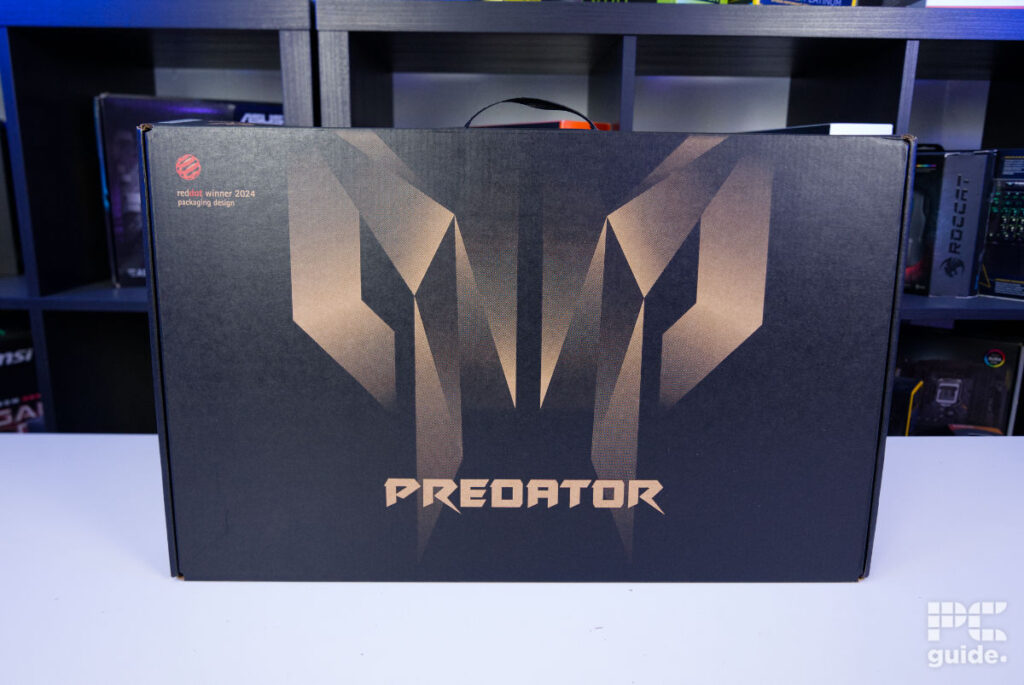
Overall design
From the box itself, you can already see the fierce gaming design of the Predator Helios Neo. The edgy Predator logo prominently features on the front of the box in a golden hue on a black background. Lying it flat on a table, I could unbox the laptop quite easily, as it’s the side that opens up, and I don’t have to slide it out. Filled with cardboard and a sleeve for protection, there aren’t many accessories that are included, bar the charger.

Acer Predator Helios Neo 16 AI box open, Image by PC Guide

Acer Predator Helios Neo 16 AI box contents, Image by PC Guide

Acer Predator Helios Neo 16 AI box side, Image by PC Guide
On top of the lid, it has the Predator logo prominently displayed towards the top, which, when powered, lights up with 6 simple lines that make it recognizable in an instant without a lot of complexity. The rear edge features a Helios Neo artsy design with a plastic covering over it.

Acer Predator Helios Neo 16 AI lid on, Image by PC Guide

Acer Predator Helios Neo 16 AI lid top, Image by PC Guide

Acer Predator Helios Neo 16 AI back top edge, Image by PC Guide
Around the back of the laptop, it has two huge vents on either end, adorned with silver edging that funnels air away from the laptop. In between those, it does have the start of its large selection of connectivity, with the power, HDMI, and two USB-C ports found there.
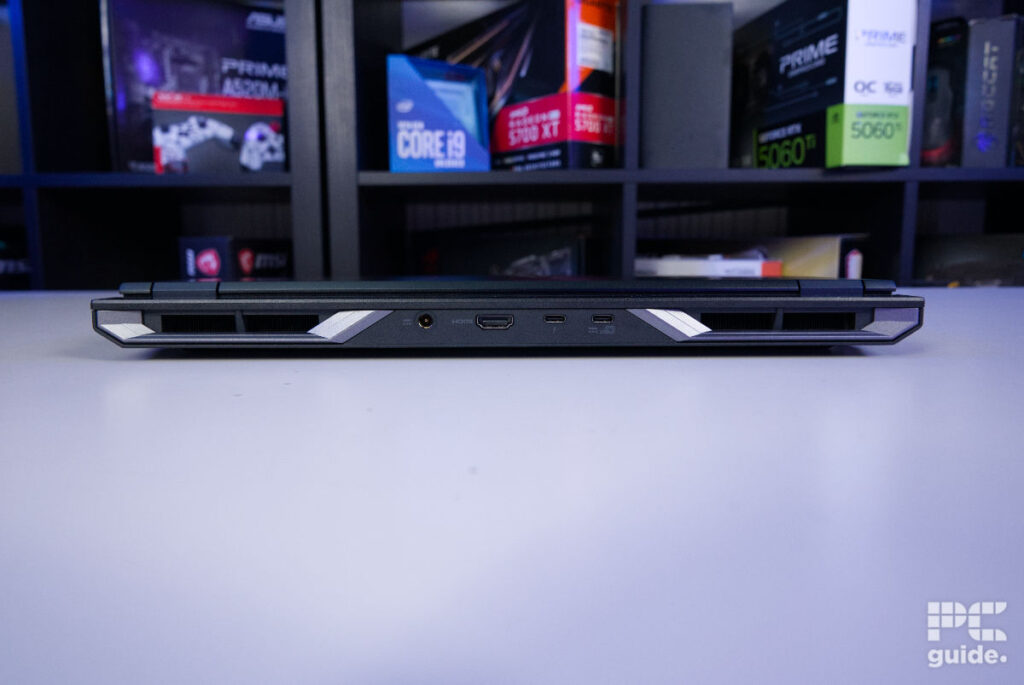
On the left side, we find a rather prominent heatsink output, with the front edge having a sloped grill. In between those, there is a folding Ethernet port, a USB-A, a micro SD slot, and a 3.5mm port. On the opposite side, the design is reflected in the heat exhaust, but IO is limited to USB-A, with status lights also placed beside those, and a Kensington lock placed towards the back.

Acer Predator Helios Neo 16 AI right edge, Image by PC Guide

Acer Predator Helios Neo 16 AI left edge, Image by PC Guide
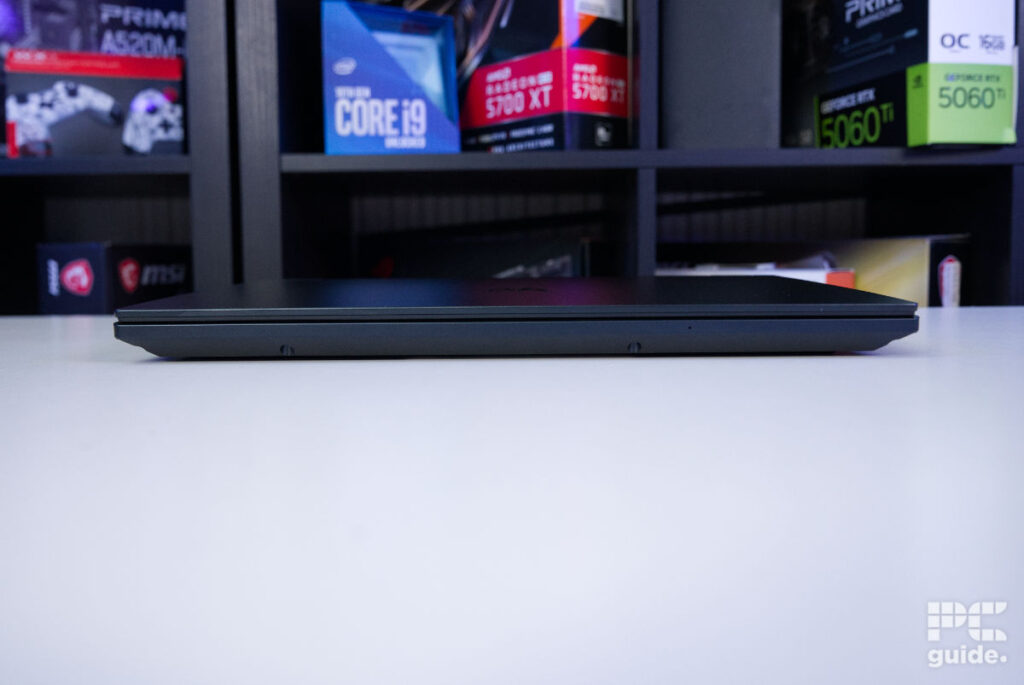
At the front of the laptop, the edge gives you a good idea of just how thick and large the laptop is, with some deep screw holes and a microphone hole also visible. Measuring 356.8 x 275.5 x 26.75 mm (WxDxH) and weighing 2.4 kg, it’s certainly not a small or lightweight machine to take anywhere. Even the charger is fairly hefty, weighing in at around 1.2 kg.
What that weight and size do give the laptop is a sturdy build. Robust and high-quality, the keyboard provides a great typing experience. There is a decisive actuation point, and the chassis doesn’t flex a lot at all – an overall great finish to it. While the touchpad is a bit basic and nothing too exciting, it is still perfectly acceptable considering I spent more time using a separate mouse instead.
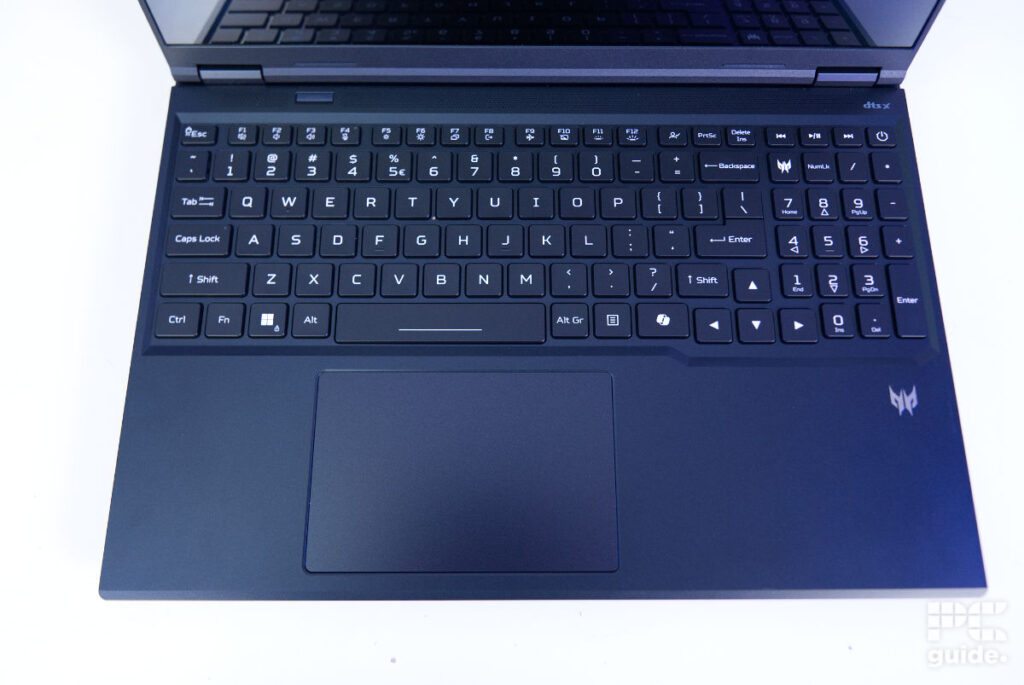
The keyboard is full-sized too; even with the numpad squeezed in, it still provides an effective typing experience. Above the keyboard is the screen, which has a small bezel, and above it is a webcam and microphone. Both are good quality and definitely usable from the get-go, provided there is a clear picture and voice.

Acer Predator Helios Neo 16 AI open, Image by PC Guide

Acer Predator Helios Neo 16 AI webcam, Image by PC Guide

Acer Predator Helios Neo 16 AI screen on (1), Image by PC Guide

Acer Predator Helios Neo 16 AI open & on (1), Image by PC Guide
Similarly, the two speakers provide a great listening experience. Alongside the Acer TrueHarmony, they do provide a surprisingly good listening experience. Even at full volume, audio comes out clear and at a high level, even offering good depth to the sound without clipping, with a good range in both trebles and lows. The PredatorSense app also allows you to change the mode and levels of the sound, which does help in various scenarios, such as the movie and voice mode that brings out the vocals and adjusts the levels around it.
Underneath the Neo 16 AI, the majority of the space is taken up by grilles for the air intakes, as the laptop requires plenty of cooling for the hardware inside. Once you take the lid off, the internal design itself is quite intricate to help with that, while the components are also fairly accessible. Whether it’s cleaning out the system, upgrading the SSD or RAM, or simply admiring the heat pipes, it’s a relatively straightforward task to do.

Acer Predator Helios Neo 16 AI bottom, Image by PC Guide

Acer Predator Helios Neo 16 AI inside and cover, Image by PC Guide

Screen
Next up, I tested the screen of the laptop with our Datacolor SpyderX Elite colorimeter. Checking it reproduces a high color range and to what level of accuracy is key in understanding the laptop’s use cases. With it being an OLED panel, you can pretty much expect ideal contrast and black points, so it comes down to how bright it can get, the white point it reaches, and how accurately it is calibrated.
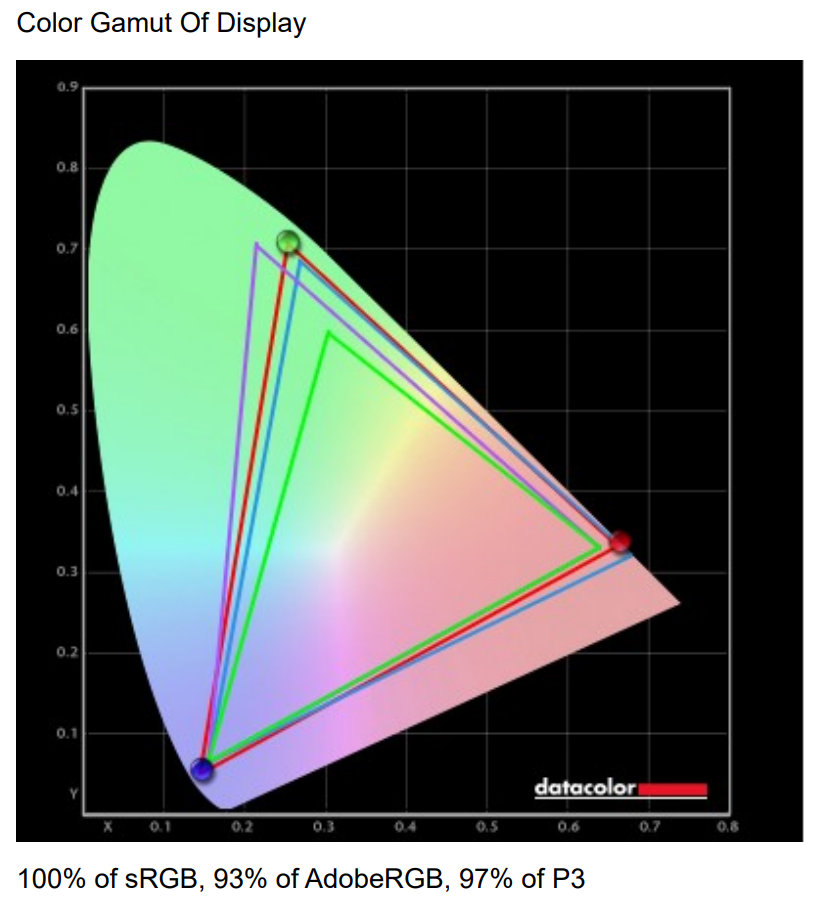
Out of the box, the display covers a good range of the color spectrum. With 100% of the sRGB, 97% of the DCI-P3, and 93% of the AdobeRGB spectrum. So, if it can produce good accuracy, it is an effective screen for color-accurate work.
| White point | Black point | Contrast | Average deltaE | Max deltaE | Gamma | Brightness | |
|---|---|---|---|---|---|---|---|
| IDEAL | 6500K | 0/m² | infinity:1 | 0 | 0 | 2.2 | |
| Out-of-the-box settings | 6700K | 0 | infinity:1 | 0.61 | 1.75 | 2.2 | 502.5 |
Measuring accuracy, it does, in fact, come with a solid representation of the colors. On average, the colors stay within 0.61 points of where they should be, with the maximum deltaE at just 1.75. Overall, the laptop is solid in its color reproduction, lending itself to color-accurate work.
Where it does fall behind slightly is the white levels, where it’s a bit cooler than ideal. I measured it 200K above the ideal point, so it’s not wildly different, but still a bit off. As for the brightness the panel can reach, it has a maximum of 502.5 nits on its base level, with HDR mode increasing that to 540 nits, while the minimum level is a rather dark 19 nits. That gives it a good range of being able to be used outside and well into the darkness.
Acer Predator Helios Neo 16 AI open & on (2), Image by PC Guide

Acer Predator Helios Neo 16 AI open & on (3), Image by PC Guide

Acer Predator Helios Neo 16 AI open & on (4), Image by PC Guide

Acer Predator Helios Neo 16 AI open & on (5), Image by PC Guide

Acer Predator Helios Neo 16 AI open & on (6), Image by PC Guide
Battery life
I also put the laptop through our battery life test, which consists of running a 2-hour HD video and then leaving the laptop on, browsing the internet until it runs out of charge. This is also done with the laptop on eco and power-saving mode, with RGB off, and at 120 nit brightness.
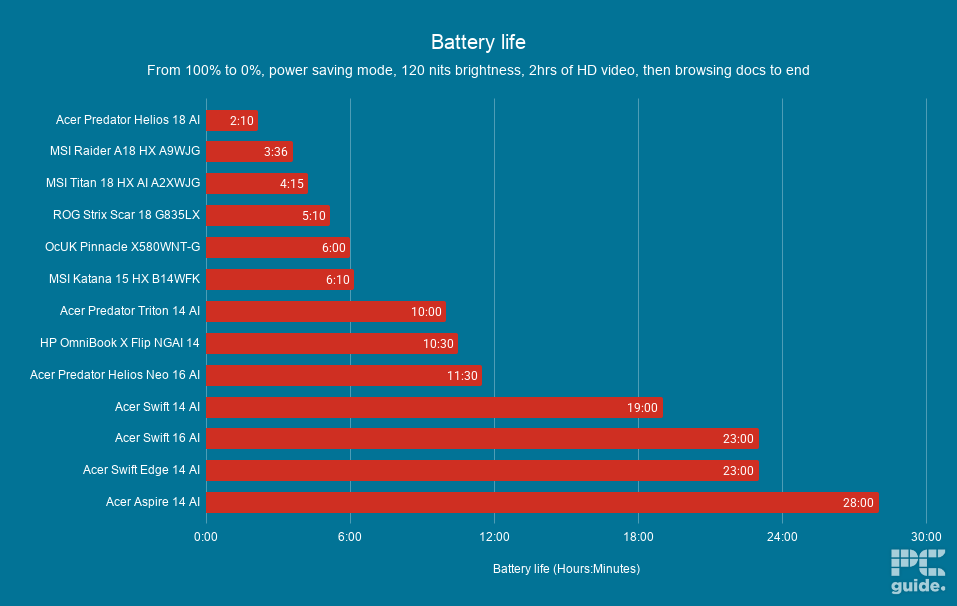
With that setup, the laptop had a total battery time of around 11 hours 30 minutes, slightly longer than the HP OmniBook X Flip and Acer Predator Triton 14 AI. It does fall behind the Acer Swifts and Aspires that easily reached the 20-hour mark, but this Acer Predator does have an Nvidia GPU processor and more powerful parts inside.
This makes the Predator Helios 16 AI a solid travel companion – lasting most of the day in your bag. But then, if you want to do gaming and more process-intensive tasks, you will want to bring your charger with you, not just for prolonging how long it lasts but also for unlocking its full power.
Software
When it comes to the software on the laptop, as usual, there is a whole suite of Acer applications and more preinstalled on the machine. The most useful of those is PredatorSense, which lets you tune and control the laptop’s behavior and sound with a range of scenarios and settings. Being able to adjust the fans and system performance is all very handy for the user experience. Like being able to turn down the noise of the fans at the cost of power, which might make it more usable for some.
Then there is everything else included, with a range of settings and features like Chroma and QuickPanel that let you change the display calibration and webcam options, respectively. There are other applications too, like the suite of Intel and Nvidia apps, but also extras that come with Windows.
Of course, being an AI-labeled laptop, there are some included options for that, too. Such as Acer’s own intelligence suite with its own image-making model that you could take advantage of if you wanted.
Performance
Now, one of the more important features of the gaming laptop is its actual performance. So I put it through our laptop tests to find out just how good it is. Running both a suite of games and synthetics to get an idea of the range of its ability.

Acer Predator Helios Neo 16 AI in use (10), Image by PC Guide

Acer Predator Helios Neo 16 AI in use (8), Image by PC Guide

Acer Predator Helios Neo 16 AI in use (6), Image by PC Guide

Acer Predator Helios Neo 16 AI in use (11), Image by PC Guide

Acer Predator Helios Neo 16 AI in use (1), Image by PC Guide

Acer Predator Helios Neo 16 AI in use (2), Image by PC Guide

Acer Predator Helios Neo 16 AI in use (3), Image by PC Guide

Acer Predator Helios Neo 16 AI in use (4), Image by PC Guide

Acer Predator Helios Neo 16 AI in use (5), Image by PC Guide
Gaming
For the gaming benchmarks, I tested at both the native 1600p resolution and 1080p. That way, we get to see what kind of performance you can expect by standard, but also how it compares to some other laptops I’ve had through this range of games. Here’s how it compares.

Acer Predator Helios Neo 16 AI Cyberpunk 2077 1080p, Image by PC Guide

Acer Predator Helios Neo 16 AI Cyberpunk 2077 1600p, Image by PC Guide

Acer Predator Helios Neo 16 AI CS2 1600p, Image by PC Guide

Acer Predator Helios Neo 16 AI Doom Eternal 1600p, Image by PC Guide

Acer Predator Helios Neo 16 AI CS2 1080p, Image by PC Guide

Acer Predator Helios Neo 16 AI Cyberpunk 2077 RT 1080p, Image by PC Guide

Acer Predator Helios Neo 16 AI Doom Eternal 1080p, Image by PC Guide
Firstly, in Cyberpunk 2077, the rather intensive game runs a little on the slower side. It’s certainly still playable, and adjusting the graphics settings can significantly improve performance. At 1600p, it averaged 89, 134, and 140 fps at Ultra, Medium, and Low settings respectively. Turning ray tracing on to Overdrive, Medium, and Low resulted in 45, 67, and 91 fps instead. It’s definitely a setup that requires some tweaking, but with frame generation and DLSS 4 enabled, it can get there.
Dropping the resolution down to 1080p instead improves things further, with rasterised performance reaching 124, 157, and 166 fps at Ultra, Medium, and Low settings. With ray tracing enabled, those numbers become 60, 79, and 118 fps. This puts it somewhere between more affordable machines and higher-end RTX 5090-equipped laptops, with the improved upscaling helping it gain an advantage at lower settings.
Moving on to Doom Eternal, a much easier game to run, those framerates shoot up significantly. At 1600p Ultra Nightmare, the laptop averaged 267 fps, rising slightly to 269 fps at High and 312 fps on Low. At 1080p, that becomes 345, 362, and 397 fps respectively, making for an excellent gaming experience on the 240Hz display. Doom Eternal feels incredibly fast and smooth, even on the smaller laptop screen.
The same is true for Counter-Strike 2, where at native resolution on Very High settings, it averaged 227 fps, 467 fps on Medium, and 525 fps on Low. Dropping down to 1080p, those averages increase to 332, 553, and 632 fps respectively. That’s more than enough to maintain a competitive advantage while keeping gameplay feeling incredibly responsive and smooth.
Synthetics
For the synthetics, I started with 3DMark, a benchmark to check its rendering capability across various APIs, and used it as a benchmark for different hardware. In the case of the Predator Helios Neo 16 AI, it got scores of 5,192 in Steel Nomad, 14,197 in Port Royal, 10,765 in Time Spy Extreme, and 13,999 in Fire Strike Ultra. Once again giving it very strong scores, only falling to the 5090-fitted machines.

Acer Predator Helios Neo 16 AI Blender GPU, Image by PC Guide

Acer Predator Helios Neo 16 AI Geekbench AI CPU, Image by PC Guide

Acer Predator Helios Neo 16 AI Geekbench 6 CPU, Image by PC Guide

Acer Predator Helios Neo 16 AI Blender CPU, Image by PC Guide

Acer Predator Helios Neo 16 AI 3DMark, Image by PC Guide

Acer Predator Helios Neo 16 AI Geekbench AI GPU, Image by PC Guide

Acer Predator Helios Neo 16 AI Geekbench 6 GPU, Image by PC Guide
In Blender and its 3D rendering and scenes, it also has a powerful performance. Achieving samples per minute of 246.47 in monster, 170.22 in junkshop, and 124.41 in classroom on the CPU, but then 2,814.95, 2,233.76, and 1,766.19 for those on the GPU. Showing that both are highly capable and powerful parts.
Then there are the two Geekbench benchmarks; the first is 6, the standard one for hardware. In that, the 290HX onboard achieved 3,231 points in single-core and 21,707 points in multi-core. The GPU got 207,775 in OpenCL and 210,634 in Vulkan. The AI benchmarks show similar strengths of the machine, as the CPU achieves 7155 in single precision, 2543 in half precision, and 11742 in quantized. While the GPU gets 28,101, 48,684, and 21,946
Thermal and noise levels
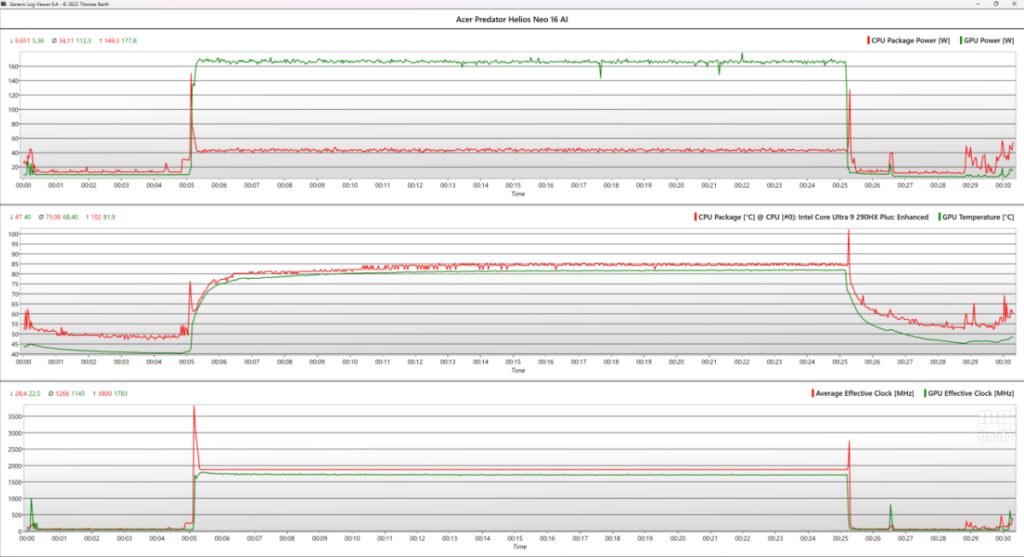
To end the testing on the laptop, I then put it through a stress test, putting it to the limits to see just how loud and hot it gets. Doing so with a 20-minute Furmark 2 load on the CPU and GPU, it should certainly get it up to temperature.
Putting the laptop into turbo mode and fans on auto, it does get rather loud, as expected from a gaming laptop. It’s not overly unpleasant with whining or anything, and it’s tuned for it; it’s just the amount of hot air going through it that means it’s very audible.
In that time, the CPU draws around 45W, with the GPU jumping to 175W, with their clock speeds of around 1750 and 1900 MHz, respectively. That is while they sit at a toasty 85°C and 82°C, so it keeps itself in check and does not overcook the hardware inside, hopefully prolonging its life.
As for the chassis during that time, it’s only really the top row above the keyboard that gets hot, nowhere that you’re going to be touching and using, so it is still comfortable. I did find it does warm up above ambient over hours of usage, but not to an uncomfortable level. The only other parts are those exhausts around the sides that blow hot air right on a mouse and my hand beside it, so it might require some adjusting where you actually use a mouse.
- CPU: Up to Intel Core Ultra 9 290HX
- GPU: Up to Nvidia GeForce RTX 5080
- Memory: 32GB (max 64GB) DDR5 SDRAM 6400MHz
- Storage: 1/2TB SSD
- Max refresh rate: 240Hz
- Resolution: 2560 x 1600
- Panel type: OLED/IPS
Conclusion
The Acer Predator Helios Neo 16 AI has a whole lot going for it. A powerful and fast CPU and GPU, packed in a high-quality and robust chassis. Even if that comes in at quite a heavy weight and thick size, the 16-inch size doesn’t go as far as an 18-incher might. Along with the fast refresh rate and great screen, it is a premium-feeling laptop that can be expensive, but it also has cheaper options.
Written by
