
Best WiFi routers 2026: our top tested models including WiFi 6, 6E, 7, and portable picks

Reviewed By: Kevin Pocock

Table of Contents
If you’re in the market for a new router, there are a bunch of options to choose from. It can be a rather difficult choice, and we’ve aimed to make it all the easier by picking out our best WiFi routers from the ones we’ve tested and reviewed.
With selections that offer fast speeds like WiFi 7, those that prioritize gaming performance, or even those small enough to take away in your travels. We’ve got a whole range of the top picks for you to select from, those that have gained some top marks from us.
With that in mind, you should be able to find the right router for your needs and your budget with a couple of handy tips below.
Prime Day may have ended, but that hasn't stopped major retailers slashing prices on popular tech hardware. Below, we've listed some of the best deals available today.
- AMD Ryzen™ 9 9900X 12-Core - was $499 now $328
- CORSAIR 4000D PC Case - was $124.99 now $75.99
- Hisense 65" Class E6SR - was $549 now $377.99
- Apple 2026 MacBook Air - was $1,999 now $1,799
- Skytech Gaming PC Desktop (9850X3d) - was $4,299 now $3,799
- Apple Magic Mouse - was $79 now $59
- MSI Prestige 16 Flip - was $2,149 now $1,899
- Kotin 9700X Gaming PC - was $2,399 now $2,199
Prices correct as of October 9th, 2026.
-
Best router for anyone
TP-Link Archer AX12 (AX1500)
- Standard: Wi-Fi 6
- Frequency band: 2.4GHz, 5GHz
- Max speed: 1500Mbps
- LAN ports: 3x 1Gbps

-
Best WiFi 6 mesh router
ASUS ROG Rapture GT6 – 1 Pack, White
- Standard: WiFi 6
- Frequency Bands: 2.4GHz, 5GHz x2
- Max Speed: 10Gbps
- LAN Ports: 3x 1Gbps

-
Best WiFi 6E router
ASUS ROG Rapture Wifi 6E Router (GT-AXE16000)
- Standard: WiFi 6E
- Frequency bands: 2.4 GHz, 5 GHz-1, 5 GHz-2, 6 GHz
- Max speed: 16000 Mbps
- LAN ports: 2x 10Gbps (WAN/LAN), 4x 1Gbps
-
Best WiFi 6E mesh router
Netgear Orbi RBKE963B WiFi 6E Mesh Black
- Standard: WiFi 6E
- Frequency Bands: 2.4GHz, 2x 5GHz, 6GHz
- Max Speed: 10.8Gbps
- LAN Ports: 1x 2.5Gbps, 3x 1Gbps (Router & Satellites)
-
Best WiFi 7 router
Netgear Nighthawk RS700S WiFi 7 (BE19000)
- Standard: WiFi 7
- Frequency Bands: 2.4GHz, 5GHz, 6GHz
- Max Speed: 19Gbps
- LAN Ports: 1x 10Gbps, 4x 1Gbps
-
Best WiFi 7 mesh router
NETGEAR Orbi 770 WiFi 7 – 3-pack
- Standard: WiFi 7
- Frequency Bands: 6GHz, 5GHz, 2.4GHz
- Max Speed: 11Gbps
- LAN Ports: 3x 2.5Gbps (Router), 2x 2.5Gbps (Satellites)
-
Best WiFi travel router
GL.iNet GL-AXT1800 (Slate AX)
- Standard: WiFI 6
- Frequency Bnads: 2.4GHz, 5GHz
- Max Speed: 1800Mbps
- LAN Ports: 2x Gigabit


How we picked
To select the top router options, we reviewed our hands-on experience with various models. Having gone through our testing lab, we know what they have to offer and how they perform. Putting them to the test, we know how they operate and how they function, ensuring we only suggest the top options across the board.
Utilizing our primary knowledge along with plentiful research and years of experience, we picked out what we believe to be the best routers out there. Hitting a range of categories, it should be a rather extensive list of options for you to choose from.
Our top picks


- Standard: Wi-Fi 6
- Frequency band: 2.4GHz, 5GHz
- Max speed: 1500Mbps
- LAN ports: 3x 1Gbps
- WAN: 1x 1Gbps
- CPU: 1.8GHz quad-core
- Memory:
- USB: N/A
- Dimensions: 215x117x32mm (8.5×4.6×1.3in)
- Weight:
- Fairly inexpensive and a usable WiFi standard
- Quick and simple to set up with little waste inside
- Lots of control and in-depth settings are available, including separating and choosing frequencies
- Great parental controls and guest network availability
- No high-speed LAN ports for fast interconnectivity
- Light and lacking some range performance
The TP-Link Archer AX12 is a budget-friendly WiFi 6 router that offers solid performance and a good range of features for everyday home use. Its design is practical and straightforward, arriving in eco-friendly, mostly recyclable packaging. The router itself is lightweight, flat, and wide, with a subtle black finish. While its four large antennas make it stand out a bit, the overall look is relatively discreet. Included in the box are the router, a power adapter, a short Ethernet cable, and some basic setup guides.
Despite its modest appearance, the AX12 supports dual-band WiFi 6 with both 2.4 GHz and 5 GHz frequencies. It includes a Smart Connect feature that automatically selects the best band for devices, and it can also be configured with a separate guest network for added security. On the hardware side, it offers three Gigabit LAN ports and one Gigabit WAN port, sufficient for most home setups, although more speed and connectivity options would have been welcome.
The router is powered by a 1.8GHz quad-core processor, which ensures consistent performance without slowdowns. It has effective passive cooling, with vents on the underside and sides, and it can also be wall-mounted if needed. Power usage is low at just 12W. While it lacks USB ports, limiting its use for file sharing or media server tasks, it’s designed primarily as a straightforward router for gigabit internet connections.
Software-wise, the AX12 provides a decent set of controls via its app or web interface. Users can manage parental controls, set up port forwarding, and create device profiles. It also supports mesh networking with other TP-Link devices, making it easy to expand coverage throughout a home. VPN functionality is included (OpenVPN and PPTP), though security could be tighter—firmware updates aren’t automatic unless manually enabled through settings.

TP-Link Archer AX12 2.4GHz PHY down, Image by PC Guide

TP-Link Archer AX12 5GHz Latency, Image by PC Guide

TP-Link Archer AX12 2.4GHz PHY Upload speed, Image by PC Guide

TP-Link Archer AX12 2.4GHz download speed, Image by PC Guide

TP-Link Archer AX12 LAN speed, Image by PC Guide

TP-Link Archer AX12 5GHz signal strength, Image by PC Guide

TP-Link Archer AX12 2.4GHz signal strength, Image by PC Guide

TP-Link Archer AX12 2.4GHz Upload speed, Image by PC Guide

TP-Link Archer AX12 5GHz Upload Speed, Image by PC Guide

TP-Link Archer AX12 5GHz PHY down, Image by PC Guide

TP-Link Archer AX12 5GHz download, Image by PC Guide

TP-Link Archer AX12 2.4GHz latency, Image by PC Guide

TP-Link Archer AX12 5GHz PHY upload, Image by PC Guide
In terms of performance, as we found in our AX12 review, the AX12 handles both wired and wireless tasks well. Signal strength is decent on both 2.4GHz and 5GHz bands, though range drops off with distance and obstacles like walls. In speed tests, the 2.4GHz band achieved download speeds of between 52–117 Mbps and upload speeds of between 13–117 Mbps.
The 5GHz band performed significantly better, achieving download speeds of 216–1080 Mbps and upload speeds of up to 313 Mbps. Internet speed was variable due to fluctuations in the ISP, but generally remained within expected limits. Latency was low at short distances, especially on 2.4 GHz (around 9 ms), although it increased with range and interference.
Pricing varies by region. In the UK, the AX12 is a great deal at around £50–£53, while in the US, it’s priced at $120, making it a less competitive option. Still, for its price, especially in the UK, the AX12 is a strong choice. It doesn’t offer the advanced features or top-tier performance of higher-end routers, but it’s a capable, reliable upgrade over most ISP-provided models. For users looking for better speeds, stronger connectivity, and greater control at a reasonable price, the AX12 is a smart pick.




- Standard: WiFi 6
- Frequency Bands: 2.4GHz, 5GHz x2
- Max Speed: 10Gbps
- LAN Ports: 3x 1Gbps
- WAN: 1x 2.5Gbps
- CPU: 1.7GHz tri-core
- Memory: 256MB Flash, 512MB DDR4 RAM
- USB: 1x 3.2Gen A-type
- Dimensions: 172.3 x 78.1 x 176.75 mm
- Weight: 880g
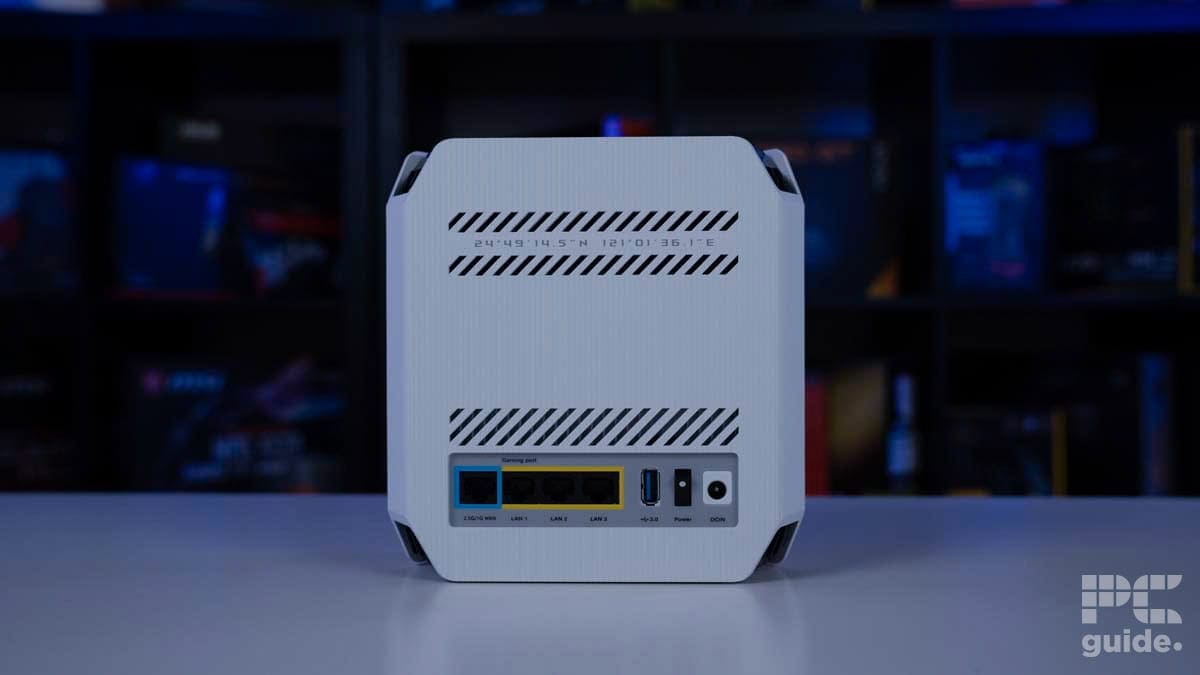
The ASUS ROG Rapture GT6 is a powerful and stylish mesh-capable router designed with gamers in mind. Unlike some of ASUS’s more extravagant offerings, the GT6 takes a subtler approach with no external antennas, instead using nine internal ones. Its design still leans into the gaming aesthetic, featuring aggressive angles, diagonal cutouts, and an RGB logo matrix front and center. Despite its relatively compact dimensions (172.3 x 78.1 x 176.75 mm), the GT6 stands out visually thanks to its bold design, abundant ventilation, and prominent lighting.
While the GT6 supports WiFi 6, it does not include the newer WiFi 6E or WiFi 7 standards, which may be a limitation for those seeking future-proof features. However, it still offers dual 5GHz bands along with a 2.4GHz band, providing strong connection flexibility. For most users, especially those without WiFi 6E-compatible devices, this will be more than adequate for current needs.
In terms of wired connectivity, the GT6 offers a 2.5Gbps WAN port for high-speed internet input. However, its three LAN ports are limited to Gigabit speeds, which may bottleneck ultra-fast connections for wired devices. Additionally, the router includes a USB 3.2 Type-A port for connecting external storage, enabling basic file sharing over the network.
Internally, the GT6 is powered by a 1.7GHz tri-core processor with 256MB of flash and 512MB DDR4 RAM, which provides solid multitasking performance for handling a modern smart home or gaming setup. The router setup process is smooth, especially when using the ASUS app, which unlocks access to an extensive suite of features like mesh networking, parental controls, QoS, VPN support, and real-time traffic monitoring. Users can manage individual device settings and network behavior with a high degree of control through both the app and the web portal.
The GT6 is available as a standalone unit or in a two-pack mesh configuration, with the single unit (white version) priced at $249.99. While this may seem steep for a WiFi 6 router, the pricing is more reasonable when compared to newer WiFi 7 options that cost significantly more. For users who don’t need the latest standard, the GT6 offers strong value with its performance and feature set.
In performance testing for our GT6 review, the GT6 held up well across various distances and obstacles. Signal strength was solid, with 2.4GHz readings ranging from -36dBm to -68dBm and 5GHz from -48dBm to -89dBm, demonstrating good coverage even without external antennas. ASUS claims 5,800 square feet of coverage, which appeared to be realistic based on testing.
Speed tests showed strong results in close range, with physical connection speeds for 2.4GHz downloads starting at 172Mbps and dropping to 8Mbps at the furthest point. Uploads ranged from 286Mbps down to 51Mbps. On 5GHz, download speeds started at 1080Mbps and dropped to 17Mbps, while uploads ranged from 1020Mbps to 48Mbps.
Internet speed performance followed a similar trend, with 2.4GHz starting at 59.4Mbps before dropping out completely at long distances. 5GHz downloads ranged from 213Mbps to 51.8Mbps, while uploads ranged from 290Mbps to 12.9Mbps. Latency remained fairly low throughout, rising from 14ms to 32ms on 2.4GHz, and from 7ms to 17ms on 5GHz. Wired LAN connections topped out around 260Mbps for downloads and 280Mbps for uploads.
A file transfer test using an external SSD via the USB 3.2 port showed more limited performance. CrystalDiskMark results indicated sequential read speeds of around 66MB/s and write speeds of about 55MB/s, with random reads and writes falling into single digits, adequate for basic file sharing, but underwhelming for heavier data loads.




- Standard: WiFi 6E
- Frequency bands: 2.4 GHz, 5 GHz-1, 5 GHz-2, 6 GHz
- Max speed: 16000 Mbps
- LAN ports: 2x 10Gbps (WAN/LAN), 4x 1Gbps
- WAN: 1x 2.5Gbps, 2x 10Gbps (WAN/LAN)
- CPU: 2.0GHz quad-core processor
- Memory: 256MB NAND flash and 2GB DDR4 RAM
- USB: 1x USB 3.2 Gen 1, 1x USB 2.0 Port
- Dimensions: 354 x 354 x 193mm
- Weight: 2425g
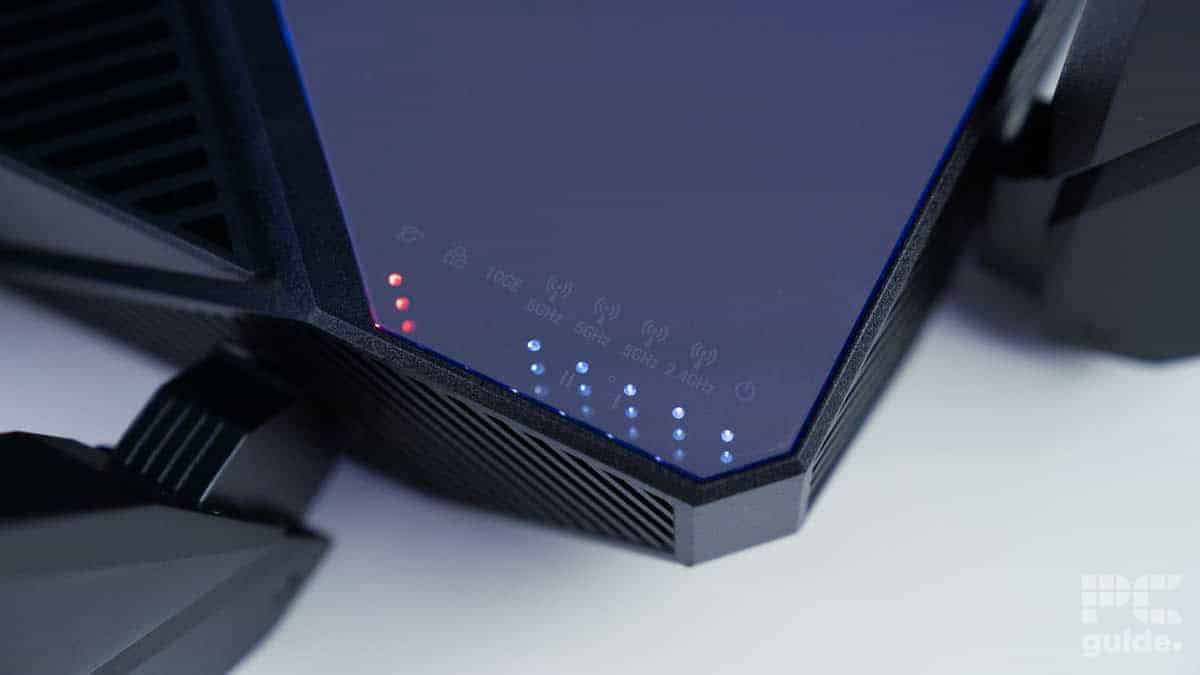
The ASUS ROG Rapture GT-AXE16000 is an unmistakably bold and aggressive router, both in appearance and performance. With a substantial footprint of 354 x 354 x 193 mm and eight prominent external antennas (plus four internal ones), it commands attention wherever it’s placed. Its spider-like structure might look intimidating, but it’s built for serious performance, supporting a wide array of connectivity options and features.
On top, a glossy mirrored surface surrounded by RGB lighting and a large ROG logo adds to its gamer-centric aesthetic, though it is prone to collecting fingerprints. Multiple status LEDs help keep users informed about the router’s activity, and ample cooling vents around the top and sides ensure thermal efficiency for its high-powered internals.
As a WiFi 6E router, the GT-AXE16000 offers four separate wireless bands: a 2.4GHz band, two 5GHz bands, and a 6GHz band, giving it extensive wireless flexibility. Users can either combine these into a unified SSID for seamless connectivity or separate them for greater control. While it doesn’t support WiFi 7, WiFi 6E is still a significant leap for most households and remains relevant, especially considering the limited number of devices that support WiFi 7 at present.
Wired connectivity is another strength. The router includes a powerful array of Ethernet ports, starting with a 10Gbps port that can serve as either WAN or LAN, offering top-tier wired speeds for users with fast ISPs or local servers. It also includes a 2.5Gbps WAN port and four Gigabit LAN ports, making it well-suited for high-performance networking setups, such as connecting to a NAS or a dedicated gaming rig.
Under the hood, the router runs on a 2.0GHz quad-core processor with 2GB of DDR4 RAM and 256MB NAND flash, providing it with ample processing power for multitasking and advanced networking functions. ASUS also ensures that the router remains cool and stable under heavy loads thanks to its robust ventilation and cooling design. The setup process, particularly through the ASUS app, is intuitive and quick. The app offers access to a wide variety of features, including VPN setup, mesh networking, traffic analysis, and device prioritization (QoS). Users can also configure detailed parental controls, create usage schedules, and monitor bandwidth per device.
Externally, the router provides even more flexibility with two USB ports: one USB 3.2 Gen 1 and one USB 2.0. These can be used to connect external storage devices for media sharing or backups across the network. It also features WPS and LED control buttons for easy pairing and lighting management.
Given its advanced features, the ROG Rapture GT-AXE16000 is priced accordingly. At $599.99 / £499.99, it is positioned at the high end of the market. However, when considering its 10Gbps networking capability, which alone could cost hundreds of dollars with a separate switch—and its multi-band WiFi 6E support, the price becomes more justifiable for tech enthusiasts, gamers, and power users who need a future-ready solution.
In testing for our review, the router delivered strong, though not always top-of-the-line, signal strength. At 2.4GHz, signal strength ranged from -48dBm at close range to -79dBm at long distances (up to 90 ft with multiple walls in between). The 5GHz band performed slightly better, holding a range from -38dBm to -78dBm. While it wasn’t the strongest in every frequency, it still held solid connections over longer distances.
Speed testing showed excellent results, especially at close ranges. For physical connection speeds, 2.4GHz downloads ranged from 258Mbps near the router to just 8Mbps at 90 ft, with uploads dropping similarly from 258Mbps to just 1Mbps. On 5GHz, download speeds reached up to 1200Mbps close by and dropped to 34Mbps at distance, while uploads started at 1200Mbps and decreased to 64Mbps. Internet speed tests mirrored this trend, with 2.4GHz downloads decreasing from 71.4 Mbps to 0 Mbps and uploads from 66.3 Mbps to 0 Mbps.
In contrast, the 5GHz band maintained more stable internet performance, with downloads from 244Mbps down to 47.9Mbps, and uploads ranging from 280Mbps to 9.8Mbps. Latency remained low across the board, between 13 and 22ms on 2.4GHz and 10 and 16ms on 5GHz. A wired LAN-connected PC saw stable and fast speeds, with 262.4Mbps download and 266.5Mbps upload speeds.
The router also delivered impressive results in file transfer testing. Using a Samsung SSD connected via the USB 3.2 Gen 1 port, CrystalDiskMark tests showed sequential read speeds over 195MB/s and write speeds around 150MB/s. While not the absolute fastest available (falling just behind newer models like the Netgear RS700), these numbers make the GT-AXE16000 a strong performer for network-attached storage, especially for home media sharing or local backups.


- Standard: WiFi 6E
- Frequency Bands: 2.4GHz, 2x 5GHz, 6GHz
- Max Speed: 10.8Gbps
- LAN Ports: 1x 2.5Gbps, 3x 1Gbps (Router & Satellites)
- WAN: 1x 10Gbps (Router)
- CPU: Quad-Core 2.2GHz (Router & Satellites)
- Memory: 512MB NAND Flash and 1GB RAM (Router & Satellites)
- USB: None
- Dimensions: 279.4 x 190.5 x 76.2mm (11 x 7.5 x 3in)
- Weight: 1.36kg (3.0lbs)
The Orbi 960 router and satellites share an identical tall, oval design that narrows toward the top. Only the backports differ, specifically, the router includes a 2.5Gbps WAN port. Each unit features a three-part design with black front and back panels that vent heat, and a silver-gray center that’s visually subtle and easy to place. Mounting points on the base allow for optional wall or ceiling installation.
The router supports WiFi 6E, offering 2.4GHz, two 5GHz, and one 6GHz bands, though only the 6GHz can be split off; 2.4 and 5GHz use Smart Connect. There’s a dedicated IoT network to offload smart devices and an optional guest network, all powered by 12 internal antennas covering up to 3,000 sq. ft. per unit.
Wired connections include one 2.5Gbps WAN and one 2.5Gbps LAN on the router, plus another 2.5Gbps port on each satellite and three 1Gbps ports per unit. However, it lacks USB ports, so network storage would require a NAS.
Inside, each unit runs on a quad-core 2.2GHz CPU with 1GB of RAM and 512MB of NAND flash, offering strong processing for high throughput. Security includes 128-bit AES encryption with PSK and a 30-day trial of Netgear Armor for enhanced protection. Parental Controls and network management are handled through a user-friendly app, though setup requires creating an account, which also activates the trial and warranty.
The Orbi 960 three-pack retails at $1,000 but is often discounted on Netgear’s store. Prices can vary by color and retailer, with the black version sometimes being harder to find. This system is best suited for large homes or users needing top-tier wireless performance, though more affordable WiFi 6E options exist for those with lighter needs.
In our tests for the review, signal strength was solid across the board. At 2.4GHz, readings ranged from -41dBm to -70dBm, and 5GHz ranged from -48dBm to -89dBm. The 12 internal antennas helped maintain coverage even at 90 feet through multiple walls.
Latency stayed low, with 2.4GHz ranging from 13ms to 26ms and 5GHz between 10ms and 20ms. This ensures smooth performance for streaming, gaming, and video calls.
Speed tests showed that 2.4GHz physical speeds ranged from 229Mbps down to 8Mbps as distance and interference increased. 5GHz started at 1080Mbps and dropped to 25Mbps. Uploads followed similar patterns. Internet speeds on 2.4GHz reached up to 65.3Mbps download and 67.9Mbps upload, while 5GHz peaked at 197Mbps and 227Mbps, respectively. The wired LAN delivered consistent speeds of 254.8 Mbps down and 275.5 Mbps up.


- Standard: WiFi 7
- Frequency Bands: 2.4GHz, 5GHz, 6GHz
- Max Speed: 19Gbps
- LAN Ports: 1x 10Gbps, 4x 1Gbps
- WAN: 10Gbps
- CPU: Quad-core 2.6GHz
- Memory: 512MB NAND Flash and 2GB RAM
- USB: 1x USB 3.0 Type-A
- Dimensions: 281.7 x 124.0 x 142mm (11.1 x 4.9 x 5.6in)
- Weight: 1.635kg (3.61lb)
The Netgear Nighthawk RS700S is a tall, sleek, and stealthy router that fits easily into most spaces without drawing attention. Standing at over 11 inches tall, it features a minimalist front with status LEDs and buttons, while the back houses its ports and controls. Its six-sided, elongated design includes angled vents at the top and bottom, giving it flexibility in placement and efficient cooling.
As a WiFi 7 router, the RS700S supports 2.4GHz, 5GHz, and 6GHz bands, with automatic band steering or manual selection available. Eight internal antennas deliver wide coverage and fast speeds. On the wired side, it includes a 10Gbps WAN port, one 10Gbps LAN port, four 1Gbps LAN ports, and a USB 3.0 Type-A port for fast local storage.
The router is powered by a 2.6GHz quad-core processor, 2GB of RAM, and 512MB of NAND flash, plenty of horsepower for demanding tasks. It supports port aggregation for up to 2Gbps and allows VPN setup across the whole network. Guest networking, auto firmware updates, and robust controls through the app round out the feature set.
Security includes Netgear Armor (1-year subscription included), smart parental controls, and automatic updates. However, the app experience can be frustrating with required account registration and persistent upsell popups.
At $599.99 (or £799.99 in the UK), the RS700S is firmly in enthusiast territory. Though expensive, it includes premium hardware and features. Still, for the price, one could build a budget gaming PC and buy a mid-tier router, so it’s best suited for users who want cutting-edge performance and future-proofing.
Once again, in our tests for the RS700S review, we could see what it could achieve. It excelled in maintaining a strong signal across distances. At 2.4GHz, signal strength ranged from -41dBm to -62dBm up to 60ft. At 5GHz, it ranged from -31dBm to -76dBm, even maintaining a usable connection at 90ft. It’s advertised 3,500 sq. ft. coverage seems realistic, though 90ft with walls is near its limit.
For pure LAN speeds, the router achieved 262Mbps downloads and 254Mbps uploads. In the wireless realm, it spanned downloads of 103 / 78.4 / 5.6 Mbps (10 / 30 / 60 ft) and uploads of 62 / 50 / 22 Mbps at 2.4 GHz. At 5GHz, that becomes download speeds of 273 / 269 / 117 / 25.5 Mbps (10 to 90ft) and uploads of 239 / 227 / 131 / 8 Mbps.
The actual physical speeds ranged 206 / 206 / 137 Mbps for 2.4GHz down, and 1200 / 864 / 288 / 8 Mbps for 5GHz down. At 2.4GHz, uploads ranged 286 / 258 / 149 Mbps, and 5GHz ranged 1080 / 1080 / 576 / 17 Mbps. With the latency ranging from 13–20ms (2.4GHz) and 11–13ms (5GHz), jumping to 36ms at 90ft.
Using an SSD via USB 3.0, we tested local file transfer speeds with CrystalDiskMark. The RS700S led all routers tested, hitting 260MB/s sequential read and 159MB/s write. Random performance dropped to 75MB/s read and 66MB/s write, but still solid for direct-attached storage. While not a NAS replacement, it’s a great option for simple shared storage across a network.


- Standard: WiFi 7
- Frequency Bands: 6GHz, 5GHz, 2.4GHz
- Max Speed: 11Gbps
- LAN Ports: 3x 2.5Gbps (Router), 2x 2.5Gbps (Satellites)
- WAN: 1x 2.5Gbps (Router)
- CPU: Quad-core 1.5GHz processor
- Memory: 4GB flash and 2GB RAM
- USB: N/A
- Dimensions: 251.2 x 134.2 x 100.4mm (9.88 x 5.28 x 3.95 in) each
- Weight: 0.916 kg (2.02 lb) each
The Orbi 770 three-pack system includes a main router and two satellites, each designed as tall white triangular pillars with a clean, modern aesthetic. A subtle light at the base and branding on the front keep things minimal, while a handy QR code on top of the main unit simplifies setup. Each unit stands 251.2mm tall but takes up minimal surface space, making it easy to place discreetly in most environments.
The main router features four 2.5Gbps RJ45 ports (one for WAN), while the satellites include two 2.5Gbps LAN ports. Both have a sync and reset button, power port, and status LED. Venting along the top and bottom edges aids passive cooling. Setup is user-friendly with clear instructions and a guided mobile app experience. Identifying the router vs satellites is straightforward out of the box.
Powered by a 1.5GHz quad-core processor, 2GB of RAM, and 4GB of flash storage, the Orbi 770 has plenty of headroom for demanding workloads. Each unit uses a 360° antenna array to broadcast strong coverage across up to 6,720 sq. ft. when all three are in use.
The system creates a 6-stream WiFi network that automatically connects devices to the best band. Separating guest and IoT networks helps isolate traffic and improve security.
Netgear emphasizes safety, offering automatic firmware updates, WPA3, firewall protection, and Armor Security. The upgraded Armor includes AI-based traffic monitoring and live patching, but it’s locked behind a subscription (only a one-month trial is included). Unfortunately, parental controls also require a subscription to function.
The Orbi 770 is priced at $999.99 / £899.99, positioning it at the premium end of consumer mesh systems. While it offers strong specs and wide coverage, Armor Security is extra, costing $99 / £85 annually, which could be a drawback for some buyers.

Netgear Orbi 770 PHY Download 5GHz, Image by PC Guide

Netgear Orbi 770 Upload Speed 5GHz, Image by PC Guide

Netgear Orbi 770 Signal Strength 5GHz, Image by PC Guide

Netgear Orbi 770 Signal Strength 2.4GHz, Image by PC Guide

Netgear Orbi 770 LAN Speeds, Image by PC Guide

Netgear Orbi 770 Download Speed 5GHz, Image by PC Guide

Netgear Orbi 770 Download Speed 2.4GHz, Image by PC Guide

Netgear Orbi 770 Upload 2.4GHz, Image by PC Guide

Netgear Orbi 770 Latency 2.4GHz, Image by PC Guide

Netgear Orbi 770 Latency 5GHz, Image by PC Guide

Netgear Orbi 770 PHY Upload 5GHz, Image by PC Guide

Netgear Orbi 770 PHY Upload 2.4GHz, Image by PC Guide

Netgear Orbi 770 PHY Download 2.4GHz, Image by PC Guide
In our Netgear Orbi 770 review we found it delivers decent signal strength, though it slightly trails behind some higher-end models like the Orbi RBKE963. On the 2.4GHz band, signal strength ranges from -46 to -75dBm, while on the 5GHz band it spans from -46 to -69dBm. However, it struggles to maintain a connection at the furthest tested distances when obstacles are present, which is why the system relies on its satellites to extend coverage effectively.
Latency performance is solid, with response times generally within acceptable limits for everyday use. On the 2.4GHz band, latency ranges from 13 to 30 milliseconds, and on the 5GHz band, it performs slightly better with 12 to 17 milliseconds. While not the fastest among the routers tested, these results still ensure smooth and responsive connectivity for typical tasks.
In terms of speed, the PHY connection between the router and a device shows a wide range depending on distance and interference. On the 2.4GHz band, download speeds vary from 229 Mbps down to 25 Mbps, while upload speeds range from 258 Mbps to 34 Mbps. The 5GHz band performs significantly better, with download speeds ranging from 960 Mbps to 216 Mbps and uploads from 1200 Mbps to 432 Mbps.
When looking at actual internet speeds, which depend on the broadband connection, the 2.4GHz band achieves downloads between 50 and 15 Mbps, with uploads ranging from 62 Mbps to 3.5 Mbps. The 5GHz band shows a more consistent performance, with download speeds between 237 and 198 Mbps and uploads from 264 to 110 Mbps.
For wired connections, the Orbi 770 performs admirably. Using the 2.5Gbps LAN ports, the system delivers download speeds just under 280 Mbps and uploads around 285 Mbps, confirming that its wired throughput is strong and reliable, as expected for ports of this speed.


- Standard: WiFI 6
- Frequency Bnads: 2.4GHz, 5GHz
- Max Speed: 1800Mbps
- LAN Ports: 2x Gigabit
- WAN: 1x Gigabit
- CPU: IPQ6000 1.2GHz Quad-core Processor
- Memory: DDR3L 512MB / NAND Flash 128MB
- USB: 1x USB 3.0
- Dimensions: 125 x 82 x 36mm
- Weight: 245g
The GL-AXT1800 features a simple, compact design, an elongated, rounded box with two swivel antennas and a dark finish, making it discreet and easy to carry. Measuring 125 x 82 x 36mm, it’s ideal for travel and includes vents and a cooler underneath to manage heat, though it can get warm under heavy use or in hotter environments. As a WiFi 6 router, it supports 2.4GHz and 5GHz bands but lacks the newer 6GHz band, keeping costs lower while still delivering impressive speeds.
Connectivity options are solid, with three Gigabit RJ45 ports, one WAN, and two LAN ports for wired devices and network storage. Inside, it runs on a 1.2GHz quad-core IPQ6000 processor with 512MB DDR3L RAM and 128MB flash, paired with a lightweight OpenWRT OS offering extensive customization. The router supports multiple internet sources, including Ethernet, WiFi repeater mode, phone tethering, and cellular USB modems, plus robust VPN options such as OpenVPN and Tor. Additional features like AdGuard and parental controls enhance network security and management.
Physical ports include a USB 3.0 for external storage, a USB-C power input (consuming up to 8.75W), and a MicroSD slot supporting up to 512GB. Two programmable buttons add extra functionality.
Priced at $149 MSRP and often found on sale around $113, the GL-AXT1800 offers strong value compared to more expensive alternatives like the ROG Rapture GT6 ($250) or Netgear M6 Pro ($900).
Performance testing in our office setting showed the Gl AX1800 strong signal strength, with 2.4GHz maintaining good connection quality from 10 to 90 feet, and 5GHz delivering excellent speeds up to 60 feet before range limitations appeared. Physical download speeds on 5GHz reached up to 960Mbps nearby, dropping to 288Mbps at distance, while 2.4GHz maxed around 206Mbps. Internet speeds varied with bandwidth but remained stable, with downloads on 5GHz between 271 and 197Mbps. Latency was low across both bands, ranging from 6 to 14 milliseconds.
Wired LAN speeds held up well, nearly maxing out at 279Mbps down and 286Mbps up. Storage performance via USB 3.0 was solid, with read speeds around 100MB/s and writes near 115MB/s, good for a portable router.
Overall, the GL-AXT1800 balances portability, performance, and features at a competitive price, making it a versatile choice for travelers or as a capable home router.
How to select the best router for you
There is a range of options that can influence your decision on which router to choose. These should be influenced by how you plan to use your router and the features you need from it. To help with your decision, we’ve outlined some of the top considerations below.
WiFi standard and speeds
One of the main differences you can find between various routers is the WiFi standards they support. These can offer different speeds and frequencies that can open up different channels and lanes for your devices to utilize. You, of course, need compatible hardware that can actually connect up to these.
The various generations you can expect to find these days range from WiFi 6, 6E, and WiFi 7. The last of which is the latest and some of the fastest available WiFi speeds. The first offers only 5GHz channels, but 6E and seven open up 6GHz, and with plenty more channels to minimize the traffic and congestion on each.
As much as WiFi 7 is a great future-proofing option, it is also rather expensive and has not yet been supported by many devices. It might be a waste of money for your setup to grab one up before anything else you have can even utilize the frequencies it has to offer.
Range and meshing
Another factor in trying to decide on a router is the range it covers. They’ll usually write out their coverage in the specs, but there are other factors that can influence this. Like how many walls or various materials the signals have to penetrate to get a good connection to the far reaches of your place.
If just one router doesn’t quite reach, mesh routers are the way to go instead. They can be used to extend the reach of your network a lot more easily than any other method, as they work together to get rid of those signal black holes.
Connectivity
When it comes to connecting up to the router, it’s not just the wireless options available to it. It has physical ports as well that you might use. The number of Ethernet ports and their speed can influence your decision. Some might have a greater number of them for you to connect more devices on the LAN.
The maximum speed of these and their specification can vary as well. With Gigabit or faster ports available, a more stable and reliable connection can thrive, allowing for the connection of up to more devices. That includes any NAS or numerous other network-attached devices to take full advantage of connecting to your network or the internet.
Usability
The interface and general usability of a router during setup are key considerations, at least depending on how much tinkering you do with your network. The ease of setting up and changing the settings can be a significant influence on working through it, especially depending on how many extra features are tried to be upsold or how open it is to change.
Extra features and controls
There are plenty of features that are desirable or extras that can be included on the router. In the other growing connected world with more devices, a secure router is of great importance. Including guest networks can be a great way of creating a barrier and a separate network for your smart devices or even guests visiting your home.
Even the access to the port forwarding and its ease can be a consideration, as when you’re gaming and setting up various ports, it can be quite difficult to do otherwise. Even the range of parental controls each has to offer tcan vary, as some may even lock them behind subscriptions.
About the Author