
Best GPU for AMD Ryzen 7 7800X3D: our top pairings for your new card


Table of Contents
AMD’s Ryzen 7 7800X3D may not be the AM5 top dog anymore, but it remains one of the best gaming CPUs you can buy. Thanks to its excellent gaming performance and continued support for the AM5 platform, it’s still an outstanding choice for new builds and upgrades alike. Choosing the best GPU is key to getting the most from this chip. Whether you’re targeting high refresh rate 1440p gaming, native 4K performance, or the best value for your budget, we’ve selected the perfect pairings for your build.
Our top recommendation is the RTX 5080, a GPU that can play every game in any settings. More affordable than the flagship, this card will work perfectly with the powerful Ryzen 7. If that’s beyond your budget and 4K gaming is not your forte, the RTX 5070 remains a fantastic alternative that pairs brilliantly with the 7800X3D.
Products at a glance
-
Best GPU For Ryzen 7 7800X3D
Nvidia GeForce RTX 5080 Founders Edition
- GPU: GB203
- CUDA Cores: 10752
- VRAM: 16GB GDDR7
- Memory Bus width: 256 bit
- Base Clock speed: 2295 MHz
- Boost Clock speed: 2617 MHz

-
Best 1440P GPU For Ryzen 7 7800X3D
ASUS Prime RX 9070 XT OC
- GPU: Navi 48 XT
- Stream Processors: 4,096
- VRAM: 16GB GDDR6
- Memory Bus Width: 256-bit
- Base/Game/Boost clock speed: 1,660/2,400/2,970 MHz
- TBP: 304W
-
Best mid-range GPU for Ryzen 7 7800X3D
MSI GeForce RTX 5070 GAMING TRIO OC
- GPU: GB205-300
- CUDA Cores: 6,144
- VRAM: 12GB GDDR7
- Memory bus width: 192-bit
- Base/Boost clock speed: 2,330/2,610MHz
- TBP: 250W
-
Best budget GPU for Ryzen 7 7800X3D
SPARKLE Intel Arc B580 TITAN OC
- GPU: BGM-G21
- Shading units: 2,560
- VRAM: 12GB GDDR6
- Memory bus width: 192-bit
- Bandwidth: 456GB/s
- Base/Boost clock speed: 2,670/2,740 MHz
-
Best top-end GPU for Ryzen 7 7800X3D
MSI GeForce RTX 5090 SUPRIM SOC
- GPU: GB202
- CUDA cores: 21,760
- VRAM: 32GB GDDR7
- Memory Bus width: 512-bit
- Base clock speed: 2,010MHz
- Boost clock speed: 2,565MHz


How PC Guide tests GPUs
At PC Guide, put graphics cards to the test using a range of modern games, synthetic benchmarks, and creative workloads to evaluate gaming performance, thermals, power consumption, and overall value. We also compare cards across different resolutions to understand where each GPU performs best and who it’s best suited for.
Latest PC & Tech deals
- AMD Ryzen™ 9 9900X 12-Core - was $499 now $337
- iBUYPOWER Element Gaming PC - was $1,999 now $1,699
- LG 27GX700A-B 27-inch Ultragear- was $599 now $485
- Samsung SSD 9100 PRO 1TB - was $339 now $249
- HP OmniBook 5 16 inch - was $961 now $799
Prices correct as of September 21st, 2026.
The best GPUs for the AMD Ryzen 7 7800X3D
Whether you’re looking for the best overall match, a capable 4K card, or a more affordable option, each GPU has been chosen for a specific reason to help you get the most performance for your dollar.
1. RTX 5080


- GPU: GB203
- CUDA Cores: 10752
- VRAM: 16GB GDDR7
- Memory Bus width: 256 bit
- Base Clock speed: 2295 MHz
- Boost Clock speed: 2617 MHz
- Transformer DLSS 4 technology
- Fast connectivity generations
- Excellent performance outside of gaming tasks
- Not a massive generational improvement
- Price and availability a struggle
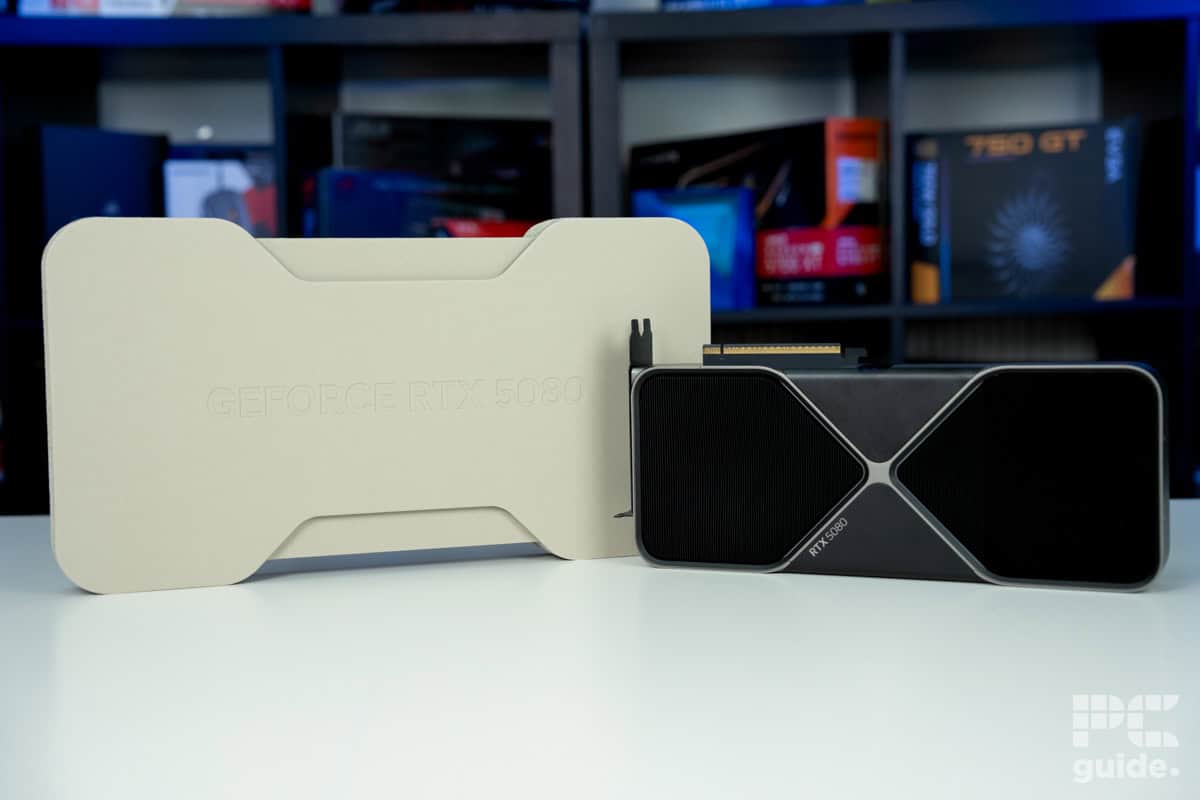
The top option that we’d recommend for the 7800X3D is the RTX 5080. The graphics card is from the Blackwell generation and is the newest consumer option. It offers some of the latest hardware and features, but it also doesn’t come with quite the price tag and extravagance that the 5090 has to offer.
The GPU comes with the GB203-400 processor, which has 10,752 CUDA cores onboard, 84 RT cores, 336 Tensors, and 84 SMs. It also has 16GB of GDDR7 memory, which is clocked at an impressive 30Gbps. When combined with the 256-bit bus, this means you get a total bandwidth of 960GB/s.
The Nvidia RTX 5080 FE is an impressive graphics card from the get-go.
PC Guide
The card’s price and availability are rather more questionable. It has an MSRP of $999, but the stock and actual market price, especially for custom models like the ROG Astral, tend to go way above that. At least for that, you get a card with the latest additions, such as PCIe Gen 5, DLSS 4, DP 2.1, and HDMI 2.1, for some incredible speed and future usability.
In our review of the card, we tested it to see how well it performs and what it can achieve, including testing out the DLSS 4 capability. To start, the Cyberpunk benchmark, the 5080, averages 213, 151, and 72 FPS across 1080p, 1440p, and 4K resolutions. While turning on ray tracing, FPS drops to 107, 68, and 35, with the ability to utilize upscaling and frame gen to boost it higher.
That performance continues with the workload, AI, and rendering performance. Boosting is an all-around great use, no matter what you need it for. So it might be a better option than an AMD card that is a lot more gaming-focused, but does offer a lot more value.

ASUS Prime RX 9070 XT OC F1 24, Image by PC Guide

ASUS Prime RX 9070 XT OC Cyberpunk 2077, Image by PC Guide

ASUS Prime RX 9070 XT OC Indiana Jones The Great Circle, Image by PC Guide
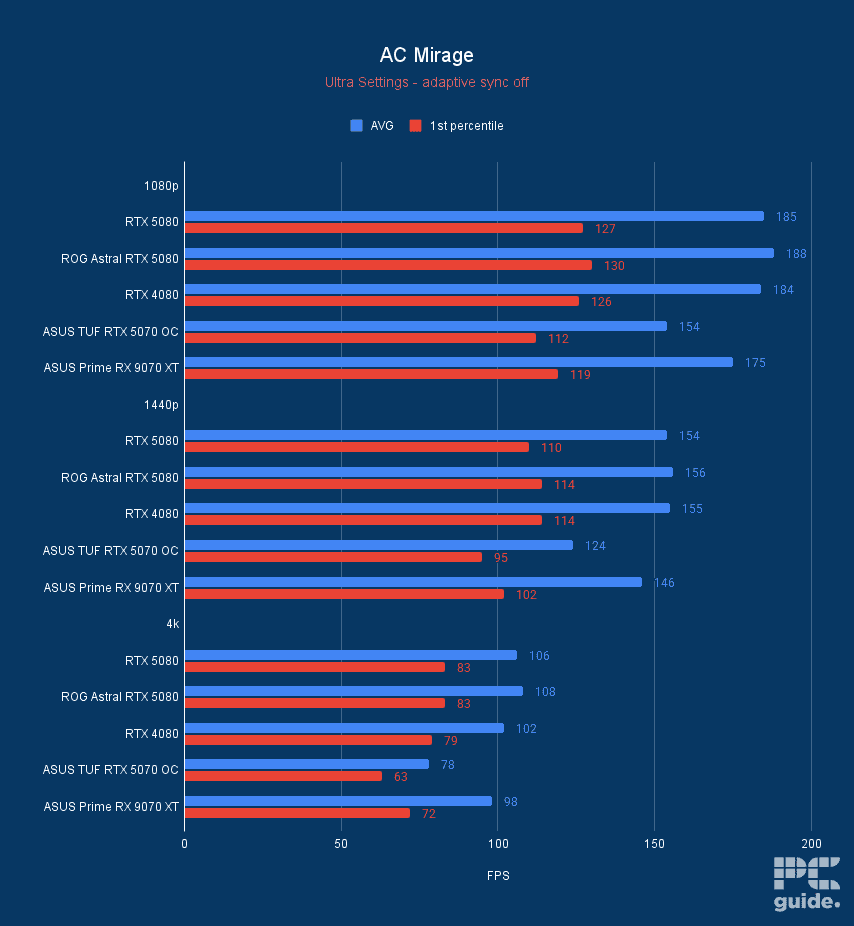
ASUS Prime RX 9070 XT OC AC Mirage, Image by PC Guide

ASUS Prime RX 9070 XT OC Horizon Zero Dawn Remastered, Image by PC Guide

ASUS Prime RX 9070 XT OC Cyberpunk 2077 DLSS FSR, Image by PC Guide

ASUS Prime RX 9070 XT OC Doom Eternal, Image by PC Guide

ASUS Prime RX 9070 XT OC 3DMark, Image by PC Guide

ASUS Prime RX 9070 XT OC CS2, Image by PC Guide

ASUS Prime RX 9070 XT OC Geekbench AI, Image by PC Guide

ASUS Prime RX 9070 XT OC Geekbench 6, Image by PC Guide
2. ASUS Prime RX 9070 XT OC


- GPU: Navi 48 XT
- Stream Processors: 4,096
- VRAM: 16GB GDDR6
- Memory Bus Width: 256-bit
- Base/Game/Boost clock speed: 1,660/2,400/2,970 MHz
- TBP: 304W
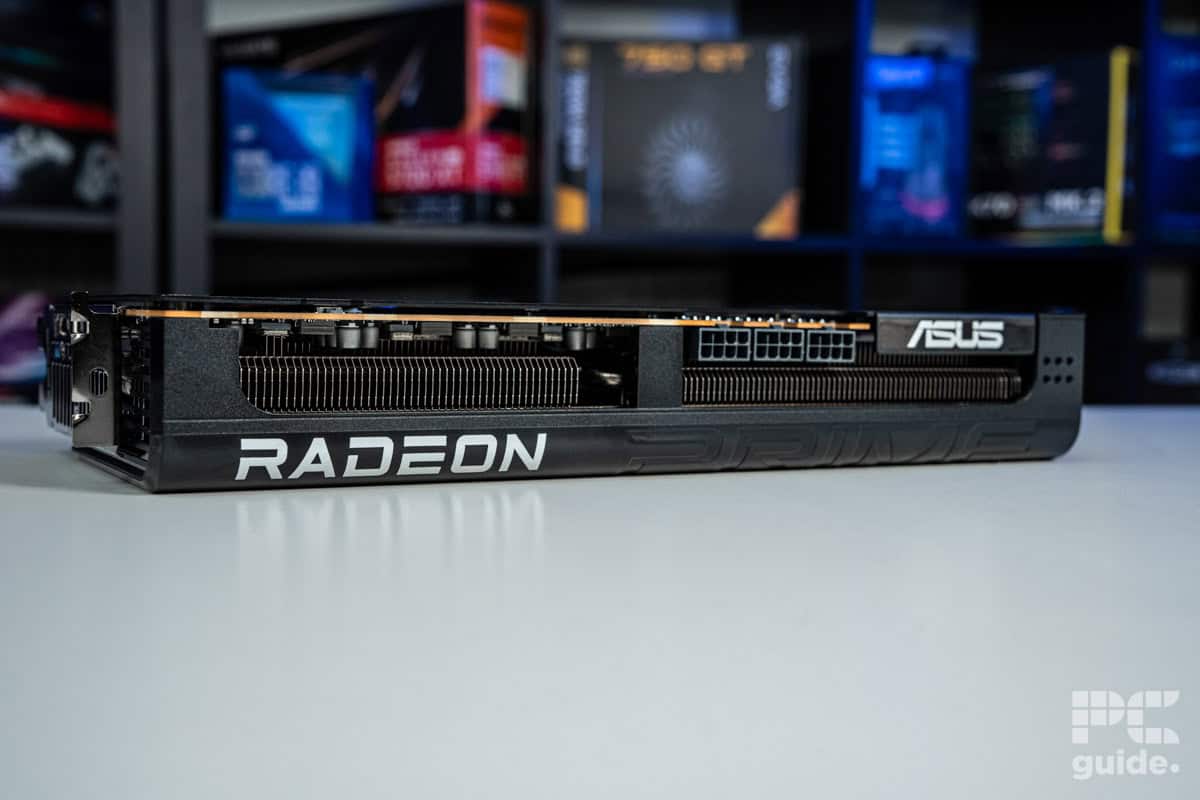
On the other hand, you may want to pair up your AMD CPU with an AMD GPU and get that synergy going. For that, you may consider the RX 9070 XT, as it is the current best GPU from AMD cores based on the new and powerful RDNA 4 architecture that brings plenty of improvements over the previous generation, as well as FSR 4.
For the card, you get a Navi 48 XTX processor with 4,096 streaming processors, 64 RT cores, 128 ROPs, and 128 Tensor cores, creating the graphics machine it is. It also comes with 16GB of GDDR6 memory, a bit slower than the competition, but with plenty of capacity. Clocking in at 20 Gbps, it offers 640 GB/s of bandwidth, making it a strong pick at any resolution.
After keeping us waiting a few months, AMD’s RX 9070 XT seems worth the wait.
PC Guide
All of that comes with a TBP of 304W and some incredible frequencies on the dies, as the boost clock by default clocks to 2.97GHz, and the game clock achieves 2.4GHz. Custom cards offer an overclocked solution that can boost it above 3GHz. Those do come above the $599 MSRP, though.
In our RX 9070 XT review, we put it to the test to see what it was capable of. That’s where it runs at an average of 193, 129, and 61FPS at 1080p, 1440p, and 4k, respectively. With ray tracing, that turns to 80, 51, and 25, which is a bit lower, but considering the price, it’s pretty decent on Ultra settings in Cyberpunk. It has also improved the ray tracing capability of the hardware, so it doesn’t fall as far behind Nvidia GPUs.
However, it doesn’t improve as much in non-gaming workloads, with the rendering and similar scenarios just not as effective as Nvidia and the like. So it’s a great gaming GPU, but not so much elsewhere, as we’ve seen with the Geekbench benchmark scores. That being said, the AI performance was significantly better compared to previous offerings, as we saw it blazing past the RTX 5070 with little to no effort.
ASUS Prime RX 9070 XT OC Cyberpunk 2077, Image by PC Guide
ASUS Prime RX 9070 XT OC Cyberpunk 2077 DLSS FSR, Image by PC Guide
ASUS Prime RX 9070 XT OC F1 24, Image by PC Guide
ASUS Prime RX 9070 XT OC CS2, Image by PC Guide
ASUS Prime RX 9070 XT OC 3DMark, Image by PC Guide
ASUS Prime RX 9070 XT OC Geekbench 6, Image by PC Guide
ASUS Prime RX 9070 XT OC Geekbench AI, Image by PC Guide
3. MSI GeForce RTX 5070 GAMING TRIO OC


- GPU: GB205-300
- CUDA Cores: 6,144
- VRAM: 12GB GDDR7
- Memory bus width: 192-bit
- Base/Boost clock speed: 2,330/2,610MHz
- TBP: 250W
- Excellent thermal performance keeps temperatures in check
- Sturdy and great looking design
- Inclusion of DLSS 4 and general Blackwell improvements
- Model adds a lot to the MSRP of the RTX 5070
- Still a limited VRAM capacity for the GPU
- AMD’s RDNA 4 hot on its heels takes away the spotlight
Mid-range products generally have excellent value for money and performance. So, if you wanted a capable GPU that could even push 4K in the right circumstances, paired with the 7800X3D, we’d recommend the RTX 5070. This is the latest mid-range GPU, and we’ve reviewed the MSI Trio Gaming RTX 5070 OC variant in-house. It’s perfect for 1440p gaming and productivity.
This is a triple-fan variant with dimensions of 338x140x50mm, giving it a thickness slightly over two slots. However, measure the space inside your PC case or go through its manual to ensure there’ll be plenty of space for adequate airflow. We put this GPU through its paces, and our test bench consisted of the Ryzen 7 9800X3D, the current best gaming processor, ASUS ProArt X670E-Creator WiFi, 64GB of Corsair Dominator Titanium RGB running at 6600MT/s, CL32, and a 1000W Phanteks PSU.
The MSI Gaming Trio RTX 5070 OC brings a high-quality build and design to the table, along with a performance that matches
PC Guide
We started off with a range of titles, playing them at 1080p, 1440p, and 4K. Unsurprisingly, it blew through everything at 1080p and 1440p, which is the sweet spot for it, but at 4K, we saw it struggle. In Cyberpunk 2077, it could only manage 48 FPS at 4K, and in F1 24, it churned out 52 FPS.
However, if we move to less graphically demanding titles like AC Mirage and Indiana Jones, it easily pushed 78 and 89 FPS, respectively, meaning that it is more than capable of running games at UHD, but in very demanding titles, you’ll need to turn on DLSS 4 and MFG, which we did.
Pushing the graphics settings in Cyberpunk 2077 to 4K ray tracing overdrive, the FPS dropped to 1, which is abysmal. However, with the help of DLSS 4 (Performance) and MFG set to 4X, this shot up to 120 FPS, which is outstanding and a whopping 196% increase in performance.

MSI Gaming Trio RTX 5070 OC Cyberpunk 2077, Image by PC Guide

MSI Gaming Trio RTX 5070 OC Cyberpunk 2077 Upscaling, Image by PC Guide

MSI Gaming Trio RTX 5070 OC F1 24, Image by PC Guide

MSI Gaming Trio RTX 5070 OC Horizon Zero Dawn Remastered, Image by PC Guide

MSI Gaming Trio RTX 5070 OC CS2, Image by PC Guide

MSI Gaming Trio RTX 5070 OC 3DMark, Image by PC Guide

MSI Gaming Trio RTX 5070 OC Blender, Image by PC Guide
4. SPARKLE Intel Arc B580 TITAN OC


- GPU: BGM-G21
- Shading units: 2,560
- VRAM: 12GB GDDR6
- Memory bus width: 192-bit
- Bandwidth: 456GB/s
- Base/Boost clock speed: 2,670/2,740 MHz
- Great price to performance
- Plenty of VRAM in comparison to the competition
- HDMI 2.1 and DP 2.1 are available
- Only Gen 4 x8 PCIe – may be an issue for older motherboards
- Slightly more expensive than reference card
- Still occasional troubles in older games specifically
If you’re looking for a GPU that doesn’t cost a lot but delivers excellent gaming performance paired with the Ryzen 7 7800X3D, then we recommend you check out the Intel Arc B580. This GPU has made massive waves in the budget GPU market, offering better performance than the competition while costing much less.
In our Sparkle Intel Arc B580 Titan OC review, it has excellent in-game and synthetic performance, which is much better than the RTX 4060 and even the RX 7600 XT, which has 4GB extra VRAM. That being said, this graphics card features 20 Xe cores that run at 1,700 MHz base and 2,740 MHz boost clock speed. However, this card has custom OC settings that allow it to push that to 2,800 MHz, but at the cost of a higher TDP of 210W.
Intel recommends a 600W PSU for the Intel Arc B580, which should be fine even if you’ve overclocked the GPU, as the 7800X3D has a 120W TDP, so that totals 330W, leaving you with 270W overhead for other components.
The Intel Arc B580 is a great budget graphics card with an MSRP of $250; it provides competition and an entry-level solution where it seems to be lacking.
PC Guide
Regarding its gaming performance, we paired it with the Ryzen 7 7800X3D and ran various graphically varying games. For example, in Doom Eternal, this pairing delivered 225 FPS at 1080p, 166 FPS at 1440p, and 90 FPS at 4K. With Ray Tracing enabled, this FPS dropped but remained very impressive, with 161, 126, and 72 FPS in the same three resolutions.
In Cyberpunk 2077, we got 94 and 62 FPS at 1080p and 1440p, respectively. On the other hand, the RTX 4060 managed 80 and 47 FPS, which shows how much better the B580 is at handling graphically demanding titles. The RTX 4060 was also unable to push 4K in Doom Eternal, so the B580 offering better performance and more VRAM at a lower price point really puts the odds in its favor.

Acer Nitro Intel Arc B580 Blender, Image by PC Guide

Acer Nitro Intel Arc B580 Geekbench, Image by PC Guide

Acer Nitro Intel Arc B580 Geekbench AI, Image by PC Guide

Acer Nitro Intel Arc B580 HandBrake Time Taken, Image by PC Guide

Acer Nitro Intel Arc B580 3DMark, Image by PC Guide

Acer Nitro Intel Arc B580 HandBrake Average FPS, Image by PC Guide

Acer Nitro Intel Arc B580 CS2, Image by PC Guide

Acer Nitro Intel Arc B580 Cyberpunk 2077, Image by PC Guide

Acer Nitro Intel Arc B580 Shadow of the Tomb Raider, Image by PC Guide

Acer Nitro Intel Arc B580 Doom Eternal, Image by PC Guide

Acer Nitro Intel Arc B580 Indiana Jones The Great Circle, Image by PC Guide

Acer Nitro Intel Arc B580 AC Mirage, Image by PC Guide

Acer Nitro Intel Arc B580 F1 24, Image by PC Guide

Acer Nitro Intel Arc B580 Horizon Zero Dawn, Image by PC Guide
5. MSI GeForce RTX 5090 SUPRIM SOC


- GPU: GB202
- CUDA cores: 21,760
- VRAM: 32GB GDDR7
- Memory Bus width: 512-bit
- Base clock speed: 2,010MHz
- Boost clock speed: 2,565MHz
- Outstanding performance across the board
- Excellent thermals and sound levels
- Great overclock out of the box
- Plenty of VRAM to utilize
- Access to DLSS 4 and the transformer model
- Eye-watering price tag
- Very high power requirement for a single GPU
- Jaw-droppingly massive size
Now, if you have a bit more of an unlimited budget, then the flagship GPU from Nvidia, the RTX 5090, is the one that might be of interest to you. Having reviewed the MSI Suprim SOC model of the card, we can see why that’s the case.
In our testing, the card performed admirably across the board, in both gaming and creative workloads, showcasing the flexibility it has to offer. One of the games we checked is Cyberpunk 2077, where the card averaged 231, 212, and 110fps in 1080p, 1440p, and 4k on ultra settings.
But even turning on ray tracing and getting some incredible graphics, it ran at a decent level even without upscaling. In numbers, that translates to 153, 112, and 60FPS, respectively. Even then, the access to DLSS 4 gives it an extra boost to what it can do.
Sitting as the flagship card, the RTX 5090 is no doubt a spectacular graphics card. Shredding through any task you throw at it and playing games with great framerates, no matter the resolution.
PC Guide
In Blender, we see the rendering capability of the card. There, it gains 61% over the RTX 5080, averaging 7,404.84 samples per minute in the monster benchmark scene, compared to around 4,500.
The card comes with 21,760 CUDA cores in the GB202-300 GPU chip. Supported by 32GB of GDDR7, with a 512-bit memory bus, it boasts an incredible speed of 1.79TB/s. That does come with an astounding 575W of total board power, and recommends a 1000W power supply to keep it going.
That’s not the only high cost to the card; considering the MSRP of it is $1,999, it’s really not for most builders, considering plenty of us build a whole system for that price. Even worse, custom models cost more; this MSI is priced over $3,000, which is a significant barrier to buying it.

MSI Suprim SOC RTX 5090 Geekbench 6, Image by PC Guide

MSI Suprim SOC RTX 5090 AC Mirage, Image by PC Guide

MSI Suprim SOC RTX 5090 Cyberpunk 2077, Image by PC Guide

MSI Suprim SOC RTX 5090 Doom Eternal, Image by PC Guide

MSI Suprim SOC RTX 5090 Geekbench AI, Image by PC Guide

MSI Suprim SOC RTX 5090 3DMark, Image by PC Guide

MSI Suprim SOC RTX 5090 Blender 4.3, Image by PC Guide

MSI Suprim SOC RTX 5090 Indiana Jones Great Circle, Image by PC Guide

MSI Suprim SOC RTX 5090 CS2, Image by PC Guide

MSI Suprim SOC RTX 5090 F1 24, Image by PC Guide

MSI Suprim SOC RTX 5090 Horizon Zero Dawn Remastered, Image by PC Guide

MSI Suprim SOC RTX 5090 Cyberpunk 2077 DLSS 4, Image by PC Guide

MSI Suprim SOC RTX 5090 Thermals, Image by PC Guide
Considerations for the best GPU for Ryzen 7 7800X3D
While the seasoned pros out there will be able to have a quick glance at a GPU’s specs and know whether it’s going to be the best pairing for the Ryzen 7 7800X3D, most people can find it understandably confusing. If that sounds like you, we’ve put together a few tips and focus areas below that’ll make purchasing the right GPU a breeze.
Compatibility
Compatibility, in most cases, shouldn’t be an issue with a GPU and CPU. Where it can cause an issue is with the CPU and the motherboard. We’ve got a guide on the best motherboards for Ryzen 7 7800X3D to help you make your decision, all of which are fully compatible with the CPU.
Budget
The Ryzen 7 7800X3D pairs well with a wide range of graphics cards, so there’s no need to buy the most expensive GPU available unless you’re targeting uncompromising 4K gaming. Spending within your budget while matching the card to your preferred resolution will usually deliver the best overall value.
Will the Ryzen 7 7800X3D bottleneck modern GPUs?
No. The Ryzen 7 7800X3D is still one of the fastest gaming processors available and is more than capable of keeping up with today’s high-end graphics cards. Whether you pair it with an RTX 5070, RTX 5080, RX 9070 XT, or even an RTX 5090, the CPU is unlikely to become a limiting factor in most gaming scenarios. As always, performance will depend on the resolution and games you play, with higher resolutions placing more of the workload on the GPU.
Is the Ryzen 7 7800X3D still worth buying?
Yes. Although AMD has since released newer X3D processors, the Ryzen 7 7800X3D remains an excellent choice for gaming thanks to its strong performance and support for the AM5 platform. If you can find it at a good price, it still offers outstanding value and pairs well with a wide range of modern graphics cards, making it a great option for both new builds and upgrades.
Final word
The RTX 5080 is our top overall recommendation for the Ryzen 7 7800X3D, offering outstanding gaming performance alongside excellent productivity capabilities and access to NVIDIA’s latest features. That said, the 7800X3D is versatile enough to pair well with a wide range of graphics cards, so whether you’re building a high-end 4K gaming PC or a more budget-conscious 1440p system, there’s an option here to suit your needs.
About the Author