


Table of Contents
The RX 5700 XT range of graphics cards offers a great price-to-performance ratio, making them one of the best graphics cards for enthusiasts looking to get great bang for their buck. The competition between AMD and Nvidia to provide the best value GPU is in full swing, and with this release, AMD seems to have ticked all the right boxes. Below, we’ll cover our best RX 5700 XT graphics card picks.
Products at a glance
-

XFX Radeon RX 5700 XT
- Clock Speed: 1905 MHz
- VRAM: 8GB GDDR6
- Width: 2-Slot
- Length: 267 mm
- Ports: 3 DP, 1 HDMI
-
Gigabyte Radeon RX 5700 XT Gaming OC
- Clock Speed: 1905 MHz
- VRAM: 8GB GDDR6
- Width: 3-Slot
- Length: 280 mm
- Ports: 3 DP, 1 HDMI
-
MSI Gaming Evoke OC RX 5700 XT
- Clock Speed: 1945 MHz
- VRAM: 8GB GDDR6
- Width: 3-Slot
- Length: 254 mm
- Ports: 3 DP, 1 HDMI
-
PowerColor RED DEVIL RX 5700 XT
- Clock Speed: 2010 MHz
- VRAM: 8GB GDDR6
- Width: 3-Slot
- Length: 300mm
- Ports: 3 DP, 1 HDMI
-

XFX RX 5700 XT Thicc III Ultra 8GB
- Clock Speed: 2025 MHz
- VRAM: 8GB GDDR6
- Width: 2.7-Slot
- Length: 315mm
- Ports: 3 DP, 1 HDMI

How We Picked
If you’re searching for the best AMD Radeon RX 5700 XT available on the market, congratulations: you’ve come to the right place. In this article, we’ll be providing a roundup of our top RX 5700 XT choices, as well as a detailed buying guide afterward.
Our buying guide will help you choose which 5700 XT is right for you, as well as provide general information about how these cards will perform and how they compare to their closest competition: Nvidia’s RTX 2070 Super.
Latest tech deals.
- AMD Ryzen™ 9 9900X 12-Core - was $499 now $331
- Sony INZONE M10S 27-inch - was $899 now $748
- Thermaltake LCGS View i1470S-170 - was $2,399 now $2,099
- Apple 2026 MacBook Air - was $1,999 now $1,891
- Bose QuietComfort Headphones - was $359 now $169
- LG 77-inch OLED C6 - was $2,499 now $1,999
- MSI Prestige 16 Flip - was $2,149 now $1,870
- Hisense 85-inch U6 Pro Series - was $1,999 now $997
Prices correct as of November 5th, 2026.
Our top picks

- Clock Speed: 1905 MHz
- VRAM: 8GB GDDR6
- Width: 2-Slot
- Length: 267 mm
- Ports: 3 DP, 1 HDMI
- Lowest price
- Best availability
- Best for custom cooler installation
- Stock cooler leaves a lot to be desired
The XFX Radeon RX 5700 XT is the highest-rated and most popular RX 5700 XT using the reference design. This is because of XFX’s stellar build quality and strong factory overclock, despite the blower-style cooler.
We’ll be honest: blower-style coolers are kind of… bad, especially when used in a chassis that already has good airflow. For cases with bad airflow, they do provide better cooling performance, but this benefit doesn’t really apply to most enthusiasts who are buying and installing their own discrete GPUs. However, this doesn’t mean that the reference design is useless.
For one, reference cards will be cheaper and have better availability than partner designs. Secondly, reference cards are actually an ideal starting point for those who want to buy, say, a GPU waterblock, and make their GPU part of a custom loop liquid cooling system because many partner cards may change the layout or length of the card beneath the cooler, which isn’t ideal for waterblocks.
If you want a 5700 XT for as cheap as possible, or you plan to install a waterblock, this is the card for you.

- Clock Speed: 1905 MHz
- VRAM: 8GB GDDR6
- Width: 3-Slot
- Length: 280 mm
- Ports: 3 DP, 1 HDMI
- Low price
- Fairly solid cooler design
- RGB!
- 2.5 slot
Next up is the Gigabyte Radeon RX 5700 XT Gaming OC, which uses their excellent triple-fan Windforce cooler. This card is priced just above our #1 pick. Despite only a modest price hike, it sees a pretty massive boost in cooling performance, especially in a chassis with good airflow. The factory OC of 1905 MHz here matches our reference design pick, but the improved cooling performance means that this card should have much more user-end overclocking headroom, provided you’re comfortable with overclocking.
There are a few nice extras here, too. There’s RGB on the logo, which can be synced with other RGB components in your system, should you wish. There’s also a nice metal backplate, which helps prevent GPU sag and protects your card from dust.
The only real downside is that this is one of the longer cards on this list, which may make it difficult to fit in ITX builds. It also has a 2.5 slot cooler design, which is still effectively 3 slots.

- Clock Speed: 1945 MHz
- VRAM: 8GB GDDR6
- Width: 3-Slot
- Length: 254 mm
- Ports: 3 DP, 1 HDMI
- The best performance, cooling or otherwise
- RGB!
- High price for a 5700 XT
- Unreasonably large for many builds
One of the nicer-looking cards on this list is the MSI Gaming Evoke OC RX 5700 XT. We consider this our balanced pick, since it’s one of the two shortest RX 5700 XT cards currently available… but it doesn’t sacrifice cooling performance or anything else to pull it off. This card actually has the second-best factory overclock of all RX 5700 XT cards available on the market, if only by a thin margin over most others on this list.
The big reason you may want to buy this card is its aesthetic, though. The Evoke OC has a pearly-white, almost light-gold coloring over its face and backplate. This means it matches well with light-colored builds and serves as a great contrast in dark-colored builds. If you like your cards to look a little bit “fashionable”, the Evoke OC may just be the right pick for you.
The only real issue we have with it is the 2.5 slot cooler design, which is still effectively 3 slots. For some reason, manufacturers continue to put out these weird in-between cards that still take up more slots than they should, and we won’t stop being irritated by it until they stop doing it. Use 2 slots or use 3, guys. It’s not that hard.
- Good price
- Slightly higher factory OC
- One of the smaller 5700 XTs
- 2.5 slot
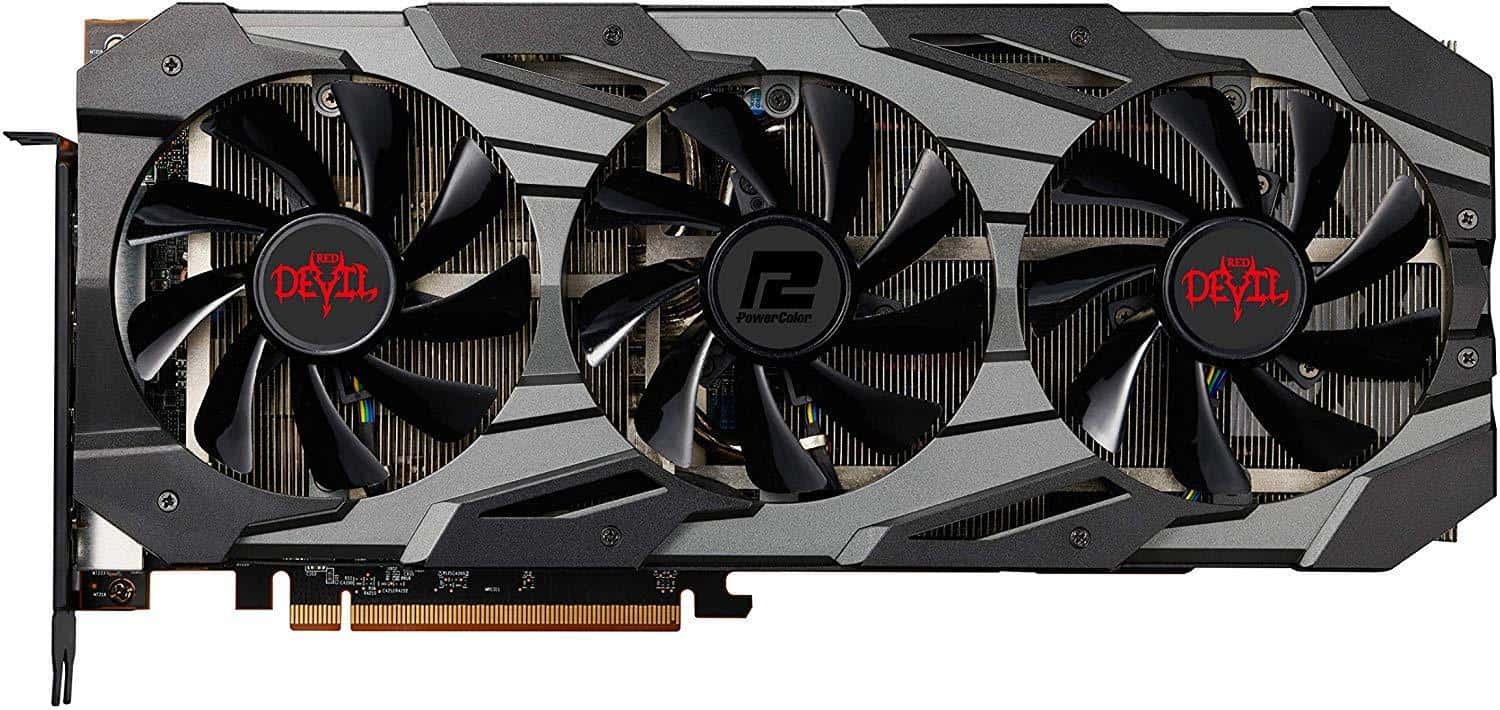
Next up we have the PowerColor RED DEVIL RX 5700 XT.
This is a behemoth of a card. 3 full slots occupied, 3 fans, 300 mm…this is a card meant for raw thermal performance above all else, and it shows. PowerColor’s RED DEVIL series has always been known for providing the best performance you can get out of an AMD graphics card, and their 5700 XT is no different in this regard. Their factory OC trounces everyone else’s, and that’s before you start doing your own user overclocking.
If you want the best RX 5700 XT out there…no question, this is the card for you.
Unfortunately, it will cost you more than the other cards on this list…and it may well be too large for your PC, especially if you’re using Mini ITX or Micro ATX. Even if it technically fits in an ITX PC build, for instance, it may not have enough clearance for proper airflow. If you get a card like this, make sure it has plenty of room to breathe.

- Clock Speed: 2025 MHz
- VRAM: 8GB GDDR6
- Width: 2.7-Slot
- Length: 315mm
- Ports: 3 DP, 1 HDMI
- Gorgeous
- Good cooling
- Same price at Thicc II with better fans
- The sheer size of the thing
- Slightly ridiculous name
It’s time for round three of XFX’s Thicc RX 5700, and they certainly aren’t getting any smaller. Measuring up at 315mm long, you are going to need to get your tape measure out before plumping for this one, but if your case can handle it, and if you are in a position to fit one in, then you are on solid ground in terms of the specs.
It’s packing 8GB of GDDR6 alongside side it’s triple fan arrangement. The two end fans are 90mm with the middle one measuring up to 100mm – it all adds to the design, which, as mentioned, is lovely.
On its max settings, the clock speed is 2025 Mhz which is comparable to the other cards out there. It’s a nice card, and if you have a decent case to show it off, it can certainly be a focal point of your build.
Things To Consider
Whether you’ve already been through our 5700 XT options or skipped down here to peruse the buying guide first, we’re here for you. We’re going to answer all the common questions you may have about buying a graphics card like this one, as well as specific questions like the difference between a 5700 XT and a 5700. (Despite the similar names: quite a lot, actually!)
Width, length, and compatibility
Width and length are the fundamental specifications that determine compatibility. Without knowing these specifications and how they relate to your PC build, you won’t be able to confidently upgrade your PC with a new graphics card- so listen up!
Width is measured in PCI Express slots. Most GPUs on the market use 2 slots, but others may use “2.5” or “3.5” slots. Since there are no .5 slot expansion cards available on the market, we’ve opted to round up our numbers here. So any 2.5 slot card is going to be referred to as a 3 slot card in our RX 5700 XT guide, since that’s the real number of available slots that you’ll need for installation.
Length is measured in millimeters. One inch is equivalent to roughly 25 millimeters. Standard full-size GPU length is roughly ~250 mm, or 10 inches, but many cards may exceed this length, especially the ones with beefy cooler designs. Be sure to check the card’s length spec against the available space inside your chassis, either by measuring it yourself or consulting your PC case specs online.
The ports on your graphics card, and what they’re for?
Finally, let’s discuss the ports on the back of your graphics card. If you aren’t familiar with current PC display technology and standards, these are the ports you can expect to see and what they’re for:
- DisplayPort – The most popular standard for PC monitors, providing the widest variety of resolution and refresh rate combinations. Also enables support for technologies like FreeSync and G-Sync, where most versions of HDMI and corresponding HDMI displays do not.
- HDMI – The most popular standard for displays in general, but especially TVs. There will usually only be one or two of these ports present on the back of your card, intended for the rare occasion where you hook up your PC to a television instead of a gaming monitor.
- USB-C – If by some miracle you stumble across this connector, it isn’t for your phone. USB-C on a graphics card is used for VirtualLink connectors, enabling a less convoluted experience when connecting a VR headset to your graphics card.
DVI, VGA, and other standards – Pretty much all obsolete, and if you’re buying this card for a monitor that only supports these… that’s a little bit questionable. Regardless, you can still get a DisplayPort to DVI adapter off Amazon if you really need one.
What is the RX 5700 XT? How is it different from the RX 5700?
The RX 5700 XT graphics card, alongside its non-XT cousin, is one of the first cards introduced to the market using AMD’s 7nm manufacturing process and Navi architecture. It’s made to provide a cheaper alternative to Nvidia’s high-end RTX series of graphics cards by prioritizing performance-per-dollar and skipping out on features like the AI-powered DLSS or real-time ray-tracing.
The 5700 XT is differentiated from its non-XT variant by a roughly 10% performance difference. This may sound like a small change, but it puts the two cards in entirely different price ranges and performance tiers thanks to diminishing gains in performance once you breach the high-end GPU market.
What are its competitors?
The RX 5700 XT is mainly billed as a far cheaper alternative to Nvidia’s RTX 2070 Super, but also isn’t much more expensive than a 2060 Super. In pure performance, it beats the latter card with ease, and trades blows frequently enough with the former card that it becomes the go-to high-end value pick for this price range… as long as you don’t need ray-tracing.
Do clock speed differences matter?
Yes, but no.
A higher clock speed will provide higher out-of-the-box performance, but not by a whole lot. Fundamentally, every RX 5700 XT on the market is using the exact same RX 5700 XT GPU chip with the exact same capabilities.
However, higher factory overclocks can save you, the user, the trouble of dealing with the OC process yourself. Additionally, higher factory OCs also tend to show some confidence on the manufacturer’s part in their cooler design.
Verdict
Whichever 5700 XT card you choose, you can’t really go wrong with this architecture. Our choice here, though, is the PowerColor Red Devil as we think it hits that sweet spot between price and performance. It’s difficult to make a bad choice with these cards, though, and the Thicc III is a great looker to show off in your nice case as well.
Written by
