

Acer Swift Edge 14 AI: small and light with a great looking screen


Table of Contents
Acer’s latest Swift Edge 14 AI aims to combine portability, premium design, and next-generation AI-focused hardware into one ultra-light package. Weighing in at under 1kg, it stands out as a highly portable machine, while the sharp 3K OLED display and long-lasting battery life help justify its high price point. Equipped with Intel’s Core Ultra platform, the laptop also promises enough performance for productivity, creative workloads, and light gaming without compromising efficiency.
That said, its lightweight construction can occasionally feel less premium than its appearance suggests – and the integrated graphics limit heavier workloads and gaming. But is that enough to dampen the overall value that this notebook brings to the table? Well, that’s what we’re here to find out – putting it through our extensive array of tests to see how it stacks up against similarly priced alternatives.


- CPU: Intel Core Ultra 7 258V
- GPU: Intel Arc Graphics 140V
- Memory: 32GB LPDDR5X – 8533MT/s
- Storage: 1TB NVMe 4.0 SSD
- Max refresh rate: 120Hz
- Resolution: 2880 x 1800
- Panel type: 14-inch OLED touchscreen
Sporting quite an impressive-looking OLED touchscreen, the Acer Swift Edge 14 AI is a great-looking machine. With an elegant finish and build, the laptop is very light and portable. But don’t expect impressive performance; for the most part, the Intel CPU is good enough, but multi-core performance is lacking, and graphics aren’t anything astounding for the most part. But otherwise, this simple laptop is rather impressive for everything else it can do in such a small size.
- A great-looking matte OLED touchscreen with good calibration
- Very small dimensions and lightweight
- Long-lasting battery life
- Solid performance for the single processor
- Good range of connectivity
- Rather expensive
- Multi-core performance is not as good as other AMD machines
- Disappointing webcam and microphone
Pricing and availability
Generally, the Acer Swift Edge 14 AI is available in various places, with a fairly strong price point. On Amazon US, you can find it for $1,499.99, with Amazon UK coming in at £1,220.
Latest tech deals.
- AMD Ryzen™ 9 9900X 12-Core - was $499 now $328
- CORSAIR 4000D PC Case - was $124.99 now $75.99
- Hisense 65" Class E6SR - was $549 now $377.99
- Apple 2026 MacBook Air - was $1,999 now $1,799
- Skytech Gaming PC Desktop (9850X3d) - was $4,299 now $3,799
- Apple Magic Mouse - was $79 now $59
- MSI Prestige 16 Flip - was $2,149 now $1,899
- Kotin 9700X Gaming PC - was $2,399 now $2,199
Prices correct as of October 9th, 2026.
For that, you do get a 3K OLED touchscreen display. Powered by an Intel Core Ultra 7 258V processor, with 32GB of RAM and a 1TB SSD for storage, along with the latest WiFi 7 connectivity. That’s a pretty solid configuration for most use cases, even if it does lack a dedicated GPU for more intensive workflows and gaming.

Acer Swift Edge 14 AI box front, Image by PC Guide

Acer Swift Edge 14 AI box side, Image by PC Guide
Overall design
Unboxing the laptop requires the removal of several layers of packaging, similar to that of a Russian nesting doll. With each ‘layer’ of unboxing, another one remains – until you finally get to the laptop itself. The final layer uses the same white color theme as the laptop – which is set inside a thin layer of protective material. The charging cable can be found in its own separate box, alongside the side of the laptop.

Acer Swift Edge 14 AI box top edge, Image by PC Guide

Acer Swift Edge 14 AI in box, Image by PC Guide
Removing the laptop from the packaging reveals its impressive, all-white color theme. With a white lid fashioned with golden stripes and lettering, it certainly feels more on the premium side. With angular geometrics across the lid, alongside both Acer’s branding and the AI name (comprised of the dots), the laptop offers a stylish aesthetic that is perfect for office environments.

Acer Swift Edge 14 AI setup (7), Image by PC Guide
Flipping the laptop onto its front, the back reveals a similar – yet albeit featureless – design. Keeping things simple with a plain white colorway, the laptop features a range of stickers towards the bottom, a rather large vent above those for cooling, and a long set of rubber feet for both stability and ventilation. An additional vent can be found at the rear of the laptop that is used as an exhaust.

Taking off the bottom isn’t too much of an ordeal if you have a Torx bit and a spudger, although the latter does take a bit of effort and prying to get it removed. Once inside, there isn’t much in the way of upgradability – the most accessible parts are the NVMe and wireless adapter; the RAM itself is soldered and inaccessible. That said, you do have access to the cooling fan – where you can extract and clean it for efficient operation.

Around the edges of the laptop, there is a range of ports to use. Those consist of one HDMI, two USB-A (3.2 Gen 2 and Gen 1), two USB 4 Type-C, and a 3.5mm combo jack – not to mention a Kensington lock slot. That said, there is no SD reader or Ethernet options with this device.
At the front and back of the laptop, the edges taper into a smooth finish – making for a sleek and smooth finish.

Acer Swift Edge 14 AI back edge, Image by PC Guide

Acer Swift Edge 14 AI front edge, Image by PC Guide

Acer Swift Edge 14 AI left side, Image by PC Guide

Acer Swift Edge 14 AI right side, Image by PC Guide
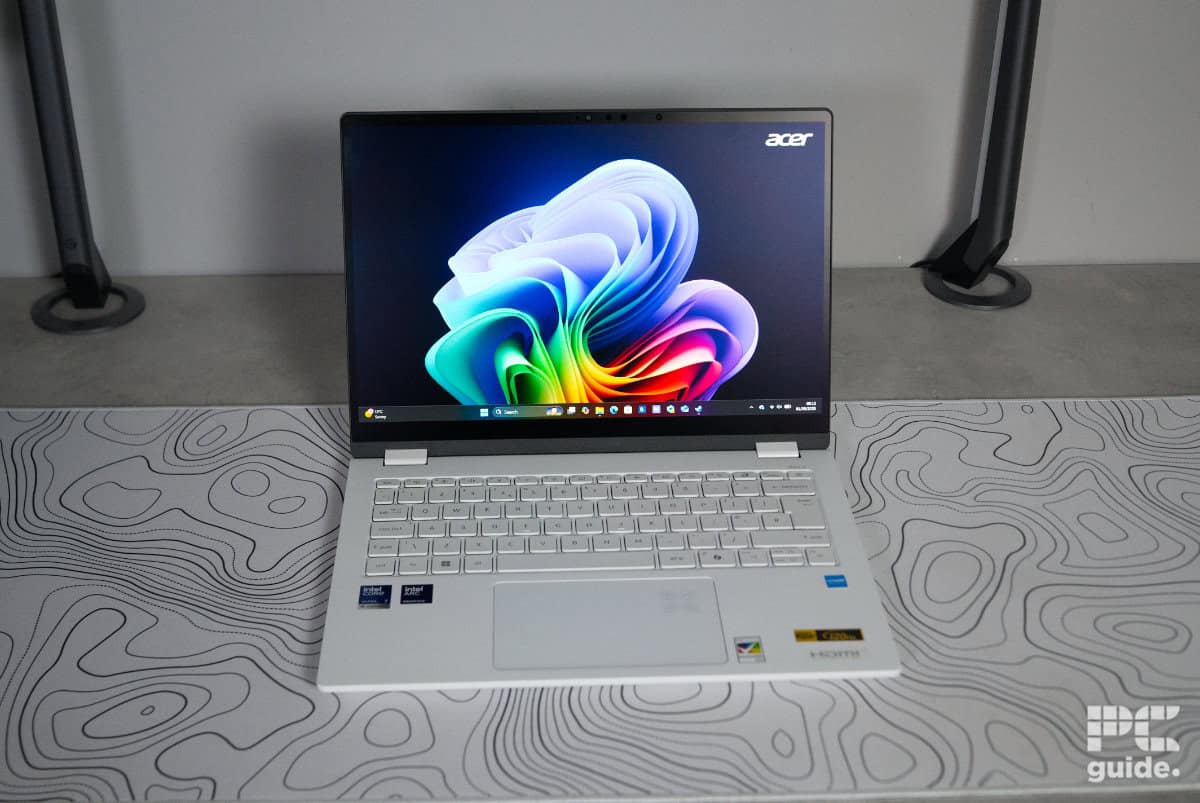
Lifting the lid and opening the laptop reveals a stark contrast within. Above the white chassis and keyboard sits the dark black screen and bezel. Finished in matte black, it feels like an abyss of darkness against the bright lower half.

There is a fairly large bezel on the top and bottom of the screen. The top bezel houses the built-in 1080p webcam, which doesn’t offer the greatest picture quality, nor does it have a privacy shutter. With a grainy finish, it at least has good colors; it just doesn’t have a great resolution. What it does offer is infrared sensors, which means you can use it as a Windows Hello sign-in method that makes logging into your PC more secure and quite a bit quicker. The Edge 14 AI also offers a built-in microphone that, despite not offering the best quality out there, is more than passable for everyday use.

Acer Swift Edge 14 AI screen, Image by PC Guide

Acer Swift Edge 14 AI webcam, Image by PC Guide
Windows Hello isn’t the only method of entry into this laptop, either. The power button features a fingerprint reader, so you can also use that to log in, giving you a bunch of flexibility when it comes to logging in. The rest of the keyboard is well-built, too – offering mostly full-size keys on the TKL layout, it has some squeezed-in arrow keys and a shortened left shift.
Still, it does make for a good typing experience; with only a bit of board flex when typing – not really noticeable at all. The rest of the chassis is rather sturdy and doesn’t easily bend or twist. The touchpad is decently sized without being overly imposing, but I did occasionally catch it when clicking. It also has the AI symbol in the corner that lights up when any AI is being used.

One of the drawbacks of the white keyboard, though, is the backlight. When it was sunny and bright, I had to turn it completely off, as it made it very hard to actually read the keys on the board; there was a better contrast with the darker keys when they were lit. At least there is a shortcut function key that can toggle the backlight.
The laptop also has a slightly grainy plastic feel to it, kind of making it feel a bit cheap. That said, the material used ensures the laptop is light and portable – and also leans into the brand’s recyclable mission. The Acer Swift Edge 14 AI comes in at just below 1kg (~990g). The dimensions of the laptop are 313 x 229 x 9 mm, making it very easy to pack up and transport around – that includes the 100W charger.

The laptop also features two downward-firing speakers on either side of the base. These aren’t exactly fantastic soundscapes, but are rather clear and loud – decent for everyday browsing or communications via video calls. Even cranking to full volume means a clear and strong listening experience when it comes to music and podcasts. With the limited speaker setup, the laptop does lack the depth of bass – offering a flatter, tinier sound.
Screen
Now that the aesthetics and build quality are out of the way, I put the screen to the test in colors, contrast, and uniformity. Using our Datcolor colorimeter, I tested out its color range, accuracy, brightness, and more just to see what it could do. With it being a 14-inch, 1800p, 120Hz, touchscreen OLED, I do expect some impressive results.


Firstly, the color gamut of the display and the colors it can reproduce. In the standard mode, it achieves 100% of the sRGB spectrum, 93% of Adobe RGB, and 97% of DCI-P3. Turning on HDR sees that color coverage falls by some margin, resulting in 90%, 68%, and 68% instead.
| Whitepoint | Blackpoint | Contrast | Average deltaE*00 | Max deltaE*00 | Gamma | Max brightness | |
|---|---|---|---|---|---|---|---|
| IDEAL | 6500K | 0/m² | infinity:1 | 0 | 0 | 2.2 | |
| Standard | 7000K | 0/m² | infinity:1 | 1.49 | 2.41 | 2.3 | 407 |
| HDR | 7200K | 0/m² | infinity:1 | 1.02 | 7.18 | 2.2 | 430.3 |
The rest of the results highlight a few drawbacks compared to ideal values. One of the main ones is the panel’s warmer color temperature, sitting around 500K above the target, with HDR pushing it even higher. However, thanks to the OLED display, you still get near-perfect black and white levels, delivering impressive vibrancy and contrast that help the image quality stand out.
Color accuracy is also fairly strong overall. The average Delta E remains below 1.5 in standard mode and around 1.1 on average, which is solid for color-sensitive work. Peak variance in standard mode is also well controlled, topping out at 2.4. HDR is less consistent, though, with some readings climbing above 7 Delta E.
HDR does bring an advantage elsewhere, however, boosting peak brightness to around 430 nits compared to just over 400 nits in standard mode. Combined with the matte coating, the display remains comfortable to use in brighter environments, keeping reflections to a minimum while still reaching brightness levels that make the screen easy to view in most conditions.
Overall, it’s still a strong display for color-accurate work, especially when paired with the deep contrast and vibrant image quality OLED panels are known for.
Acer Swift Edge 14 AI turned on, Image by PC Guide

Acer Swift Edge 14 AI setup (6), Image by PC Guide
Acer Swift Edge 14 AI setup (9), Image by PC Guide
Battery life
Looking at the battery life of the laptop, I put it through our standard test. That includes setting the brightness to as close to 120 nits as possible, turning on all the energy saving modes available, and turning down the performance mode. I started off with a 2-hour YouTube video, and then ran it on casual browsing until depletion, or extrapolating the time till it would have.

In the case of the Acer Swift Edge 14 AI, it performed as well as the Swift 16 AI. Totalling up to 23 hours in total through our test. After the first two hours, it had dropped to just 85%, then each subsequent hour it fell by a further 4%, leading to a total battery life of around 23 hours. It’s quite a low-powered machine considering it is just a single processor onboard without a powerful GPU next to it like a gaming laptop might have.
Software
As with many of the Acer laptops we’ve tested, this one is also full of pre-installed software. With a load of Acer programs and a bunch of others too, there’s a mix of useful and not-so-useful programs on setup. That results in the annoying arrival of ads for the likes of Booking websites and so on, and brings with it pop-ups for antivirus and other subscriptions – so it’s a good idea to remove some of those first.

Acer Swift Edge 14 AI software (1), Image by PC Guide

Acer Swift Edge 14 AI software (2), Image by PC Guide

Acer Swift Edge 14 AI software (3), Image by PC Guide

Acer Swift Edge 14 AI software (4), Image by PC Guide
Performance
Next, I checked the performance of the laptop in a variety of software tests. Combining some light gaming with processing power, too. Here’s how it performed.
Gaming
As the Acer Swift Edge 14 AI is a notebook and not a gaming laptop, I decided to anecdotally run CS2 – just to see how the integrated graphics would perform.


At its native resolution, the laptop averaged fps of 20 at very high settings, 50 at medium, and 90 on low. When lowering the resolution to 1080p, those frame rates become 50, 117, and 160 fps, respectively. So it’s not a gaming machine, but with lighter games and a bit of upscaling, it can get the job done. But with it using Intel graphics, there can also be compatibility problems.
Synthetics
The rest of the benchmarks are for rendering and similar tests, checking out the CPU’s performance.

Acer Laptops 3DMark, Image by PC Guide

Acer Laptops Geekbench AI, Image by PC Guide

Acer Laptops Geekbench 6, Image by PC Guide

Acer Laptops Blender 4.5, Image by PC Guide
Starting with 3DMark and the rendering capabilities across various API’s. There, the laptop achieved total scores of 747 in Steel Nomad, 2,078 in Port Royal, 2,071 in Time Spy Extreme, and 2,259 in Fire Strike Ultra. That’s an improvement over some other machines that use AMD Radeon iGPUs.
Then, in Blender and 3D modelling, the CPU was capable of achieving 64.07 samples per minute in monster, 40.43 in junkshop, and 30.37 in classroom. Moving to the GPU test, that then becomes 325.28, 173.66, and 173.47, respectively.
Then, for the Geekbench 6 suite of benchmarks, it scored 2,672 in single and 10,915 in multicore performance on the CPU. With scores of 29,720 in OpenCL and 36,863 in Vulkan on the GPU. Then, in the Geekbench AI version, it manages to score 3,092 in single precision, 1,405 in half precision, and 6,371 in quantized CPU performance. With the GPU achieving 8,467, 16,257, and 5,614, respectively.
Thermals and noise levels
Putting the laptop through its paces in thermal loads was our next test. Running Furmark 2 CPU and GPU stress test for 20 minutes, in between two 5-minute idle periods, I tracked its temperatures and behavior with HWinfo. The results of that test can be found in the graph below.

For the Acer Swift Edge 14 AI, it sips on power at idle. The CPU was sitting at around 3W with occasional spikes before the test began. With a minimum frequency of 400Hz, it does sit fairly warm at around 38°C, with the iGPU over 42°C.
Turning on the stress test, the system quickly ramps up. With it reaching 38W, as the temperature reaches 77°C and 64°C, with frequencies of 3,600 and 1,100MHz. After just a minute, though, that levels out and reaches equilibrium as the two power down slightly.
There, the Processor sits at 30W, with a frequency of 1,600MHz on the CPU and 1,400MHz for the iGPU. During that the temperature sits at 65°C and 64°C. Which isn’t extremely warm, and the fans don’t reach an obnoxious noise level, with it just being a gentle hum in the background, with the air whooshing through it. Neither does the chassis get too warm, just the edge above the keyboard above the vent, but it’s not unreasonable and not like it’s in a place you’ll feel.
Once the power dies off, it’s quick to cool down, too. The laptop is getting back down to idle levels after just a minute or so of cooldown.
- CPU: Intel Core Ultra 7 258V
- GPU: Intel Arc Graphics 140V
- Memory: 32GB LPDDR5X – 8533MT/s
- Storage: 1TB NVMe 4.0 SSD
- Max refresh rate: 120Hz
- Resolution: 2880 x 1800
- Panel type: 14-inch OLED touchscreen
Conclusion
Overall, the laptop is a very light and well-designed machine. With a rather impressive screen and some lightweight processing power, it still offers a lot for its size. Even if it falls in the higher end of the price spectrum – while lacking a dedicated GPU – it still manages to offer decent value for money. Even if it also means plenty of pre-installed software and the lack of multi-core performance, the long battery life and good connectivity still make it an attractive option.
About the Author