
HP LaserJet M209dw review: a cheap and crisp printer for small businesses

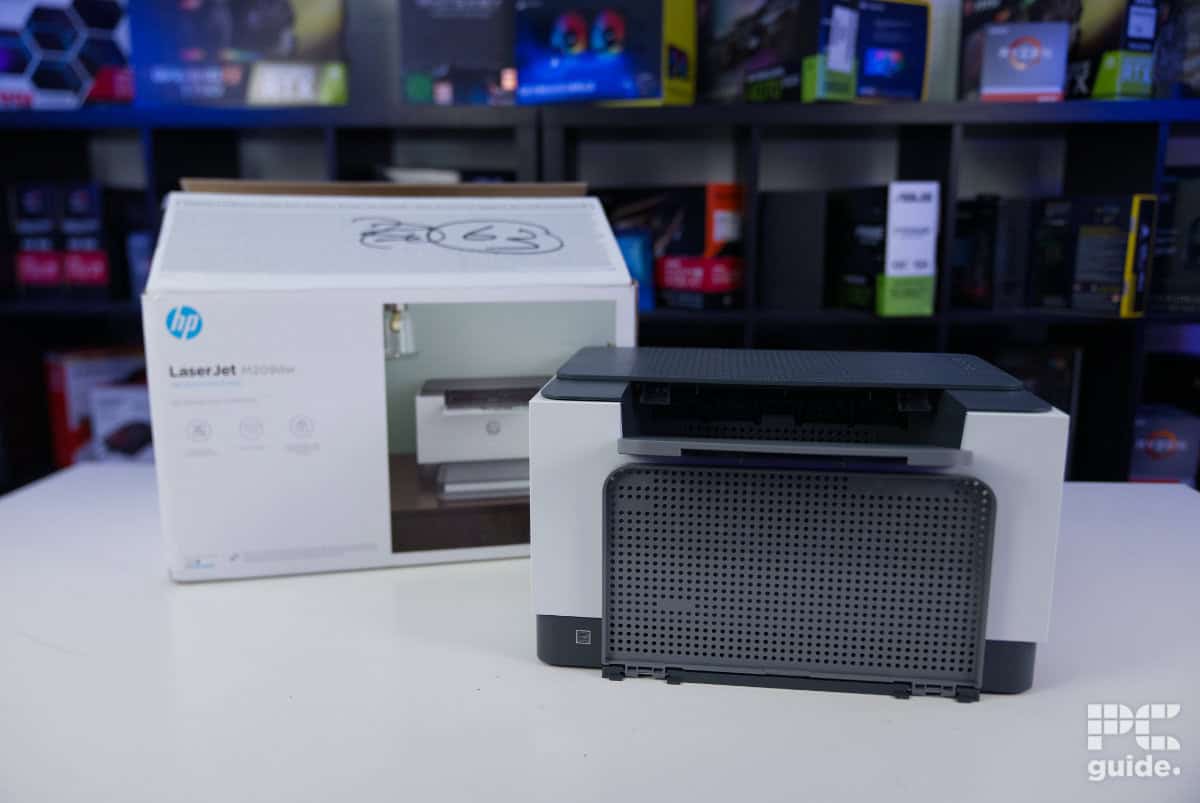
Table of Contents
HP offers a wide range of printers for both home and office use, and the LaserJet M209dw is a compact, budget-friendly option designed for monochrome printing. With a simple, cube-like design and a focus on functionality over extras, this printer is aimed at small and medium businesses that need reliable, high-speed black-and-white document output.
While it doesn’t include a scanner or color printing, it excels at crisp text, clean lines, and duplex printing, making it a practical choice for offices that primarily handle standard documents, forms, and envelopes. Lightweight, easy to set up, and competitively priced, the M209dw promises efficient printing without unnecessary complexity.

- Printer Output: Monochrome
- Printer Type: Laser
- Connectivity Technology: USB 2.0, 100Mbps Ethernet, WiFi 2.4/5GHz, Wi-Fi Direct, Mobile printing
- Duplex Printing: Yes, automatic
The HP LaserJet M209dw is a budget-friendly printer that’s laser-focused on one thing: producing sharp text and clean lines. It handles documents with crisp clarity and even supports duplex printing, making it a reliable workhorse for long print jobs. Beyond that, however, its capabilities are limited – there’s no scanner, no color printing, and graphics or gradients come out with low contrast and poor intensity. If your needs are strictly black-and-white documents or envelopes, however, the HP M209dw is a solid choice.
- Inexpensive to buy
- Automatic double-sided printing
- Word and line print quality very high
- Easy and lightweight setup process
- Access to plenty of the insides for clearing jams
- Good connectivity options
- Only one paper feed
- Images lack contrast
- Doesn’t have smooth gradient intensities
- Included toner is low capacity, and replacements are expensive
- Lack of scanner and color very limiting in usefulness
Box contents and setup
Unboxing the printer is straightforward. At 7.3 kg (16.1 lbs), the box is manageable enough to handle alone, and removing the 5.6 kg (12.3 lbs) printer inside is even easier. The package also includes several accessories and extras. Here’s what’s inside.
Prime Day is here! We've found all the biggest and best deals from this year's event below.
- AMD Ryzen™ 9 9900X 12-Core - was $499 now $337
- CORSAIR 4000D PC Case - was $124.99 now $75.99
- Hisense 65" Class E6SR - was $549 now $377.99
- Apple 2026 MacBook Air - was $1,999 now $1,799
- Skytech Gaming PC Desktop (9850X3d) - was $3,699 now $3,199
- Apple Magic Mouse - was $79 now $59
- Samsung Galaxy Z Fold8 Ultra - was $2,099 now $1,699
- Amazon Fire HD 10 tablet - was $154 now $72
Prices correct as of October 6th, 2026.
- HP LaserJet Pro M209dw Printer
- HP Black LaserJet Toner Cartridge(~700 pages)
- Dust Cover
- Reference Guide, Setup Poster, Warranty Guide & Flyer in some countries
- Power cord
The HP LaserJet M209dw is securely packaged, with brown cardboard inserts cradling it on either side. Additional accessories are held in a cardboard tray at the top, while the printer itself is wrapped in protective foil and further secured with multiple pieces of tape – including on the underside, which was a bit unexpected.
Once the printer is fully unboxed, the setup process begins. Without a built-in screen to guide you, you’ll need a separate device to connect it. Using a phone or PC, you download the HP Smart App, which detects nearby printers and walks you through the connection process.

HP LaserJet M209dw box, Image by PC Guide
HP LaserJet M209dw printer & box, Image by PC Guide

HP LaserJet M209dw box contents, Image by PC Guide

HP LaserJet M209dw box & contents, Image by PC Guide
HP’s setup process is very intuitive, and while it frequently prompts you to sign into an account, it isn’t actually required and won’t block you from using the printer. Connecting the device to your network is straightforward, with minimal upselling – no push for cartridge subscriptions, which is pleasantly surprising.
During setup, the printer also asks you to press a button to confirm your presence, a simple security measure. You can further ensure safety by enabling automatic firmware updates to keep the printer current.
Once configured, the HP Smart App lets you monitor the printer, check its status, and view estimated toner levels. A small status light on the front also indicates connectivity or alerts you to issues that need attention.
Alternatively, you can skip the app entirely and set up the printer using drivers alone, allowing for a direct installation without any extra software.

HP LaserJet M209dw HP Smart account, Image by PC Guide

HP LaserJet M209dw HP Smart print others, Image by PC Guide

HP LaserJet M209dw HP Smart sign in, Image by PC Guide

HP LaserJet M209dw HP Smart firmware, Image by PC Guide

HP LaserJet M209dw HP Smart dashboard, Image by PC Guide

HP LaserJet M209dw HP Smart printer connect, Image by PC Guide

HP LaserJet M209dw HP Smart setup finish, Image by PC Guide

HP LaserJet M209dw HP Smart printer setup proximity, Image by PC Guide

HP LaserJet M209dw HP Smart set up printers, Image by PC Guide

HP LaserJet M209dw HP Smart data, Image by PC Guide
Design
The M209dw is very similar to the M234dw, just a bit more compact. Its white cube-like design with gray accents gives it a professional office look. From the front, the top features a protruding gray tray that slightly overshadows the circular HP logo, with an LED status bar just below. At the bottom, the gray skirt houses the paper tray, which has a perforated design – not ideal for those sensitive to patterns – though a translucent dust cover is included.
The sides are mostly plain white, with the gray skirt continuing around the edges. The back is where the connections are located. On the right side, you’ll find a USB-B port, an Ethernet port, and the power port at the bottom. On the left side, there’s a Kensington security slot for physically securing the printer.
A removable panel in the center of the back provides access to the printer’s interior and paper feeder, making it easy to clear any jams that may occur.

HP LaserJet M209dw front on, Image by PC Guide

HP LaserJet M209dw top edge, Image by PC Guide

HP LaserJet M209dw left side, Image by PC Guide

HP LaserJet M209dw rear, Image by PC Guide

HP LaserJet M209dw open back, Image by PC Guide

HP LaserJet M209dw right side, Image by PC Guide

HP LaserJet M209dw front unfolded, Image by PC Guide

HP LaserJet M209dw angled front, Image by PC Guide

HP LaserJet M209dw front unfolded and cover, Image by PC Guide
The top of the printer houses the remaining controls, which are minimal. All buttons and indicators are located in the top-right corner, including an information button that prints a status page, resume, cancel, and power buttons. There’s also a wireless button to toggle Wi-Fi, with a corresponding status light just below it.
The plastic panel above the output tray features a series of perforations and gently slopes upward, ending in a single solid piece with an extendable flap that unfolds from the center to support printed pages.
The top panel also opens to provide access to the toner cartridge. The long cartridge is easy to replace, thanks to a built-in handle that allows it to be pulled out smoothly.

HP LaserJet M209dw connections, Image by PC Guide

HP LaserJet M209dw power port, Image by PC Guide

HP LaserJet M209dw control buttons, Image by PC Guide

HP LaserJet M209dw front tray, Image by PC Guide

HP LaserJet M209dw open top, Image by PC Guide

HP LaserJet M209dw front logo, Image by PC Guide

HP LaserJet M209dw installed cartridge, Image by PC Guide

HP LaserJet M209dw bottom, Image by PC Guide

HP LaserJet M209dw front turned on, Image by PC Guide

HP LaserJet M209dw controls on, Image by PC Guide

HP LaserJet M209dw set up on desk, Image by PC Guide
Print results and speed
Next up, I tested the printer to see how well it does in real-world situations. Using our testing lab, we printed out a few black and white pages, and then, testing the double-sided script, I timed the speed of the HP and the quality of what it produced. These were done with the printer plugged in, as with previous printer tests, so wireless performance may vary.

HP LaserJet M209dw script, Image by PC Guide

HP LaserJet M209dw prints, Image by PC Guide
As for timings, I queued three consecutive monochrome pages. The first page printed in just 6 seconds after hitting the print button. The second, a gray-scale page, took 12 seconds after a brief pause, and the final page printed in 3 seconds, for a total of 21 seconds. By comparison, a 10-page double-sided script took 20 seconds to spool and print the first page, with each subsequent page taking 6–7 seconds, totaling 46 seconds.
In terms of print quality, the monochrome laser handles text flawlessly. Even the smallest font sizes are crisp and clearly legible, with no smudging around the edges. Lines, grids, and alignment are all precise, with everything sitting exactly where it should.
Where it falls short is in gradients and contrast. Being monochrome, the printer struggles with smooth intensity transitions. Lighter shades don’t appear gradual – the first 30–40% of a gradient look almost identical, with differences only becoming noticeable below 60%. The same limitation applies to image prints, where darker areas tend to blend together rather than showing subtle variation.
Specifications and cost
| Printing Technology | Monochrome laser |
| Maximum Print Resolution | Up to 600 x 600 dpi |
| Ink Type | Black LaserJet Toner Cartridge |
| Operating Systems | Windows 11 Windows 10 Windows 8 Windows 8.1 Windows Server macOS 10.14 Mojave macOS 10.15 Catalina macOS 11 Big Sur macOS 12 Monterey macOS 15 Sequoia Linux |
| Dimensions (W x D x H) | 355 x 279.5 x 205 mm |
| Weight | 5.6kg (12.3lbs) |
| Connectivity | Hi-Speed USB 2.0 Ethernet 10/100 Base-T Wireless 802.11a/b/g/n, Dual band 2.4GHz/5GHz |
| Mobile and Cloud printing | Apple AirPrint Mopria certified HP app Wi-Fi Direct printing |
| Paper Sizes | A4 A5 A6 B5 (JIS) envelopes letter legal executive 102 x 152 to 216 x 356 mm |
| Input Paper Capacity | 100 sheets, 10 envelopes |
Looking at the specs, there isn’t much to the HP LaserJet M209dw. As a monochrome printer without the extras of an all-in-one, it’s a simple, budget-friendly option. The DPI isn’t particularly high, but it handles standard office printing effectively. Its tray holds up to 100 sheets and 10 envelopes, which is adequate for small to medium workloads.
The wireless version is available for $199 or £139.99 – not expensive, though toner replacement adds to the ongoing cost. Standard cartridges yield around 1,100 pages and cost $64.99/£50.99, while high-yield options produce roughly 2,400 pages for $104.99/£83.50. This works out to an effective cost per page of around $0.06/£0.05 for standard cartridges and $0.04/£0.03 for high-yield, which is reasonable. While not as cheap per page as low-cost ink tank printers, it’s a fair trade-off for a reliable monochrome laser solution, depending on your needs.
Conclusion
- Printer Output: Monochrome
- Printer Type: Laser
- Connectivity Technology: USB 2.0, 100Mbps Ethernet, WiFi 2.4/5GHz, Wi-Fi Direct, Mobile printing
- Duplex Printing: Yes, automatic
In conclusion, the HP LaserJet M209dw is an effective monochrome laser printer for basic office tasks. It excels at printing large volumes of simple documents, making it a budget-friendly choice for small businesses that don’t need additional features. The setup process is straightforward, though it lacks extras like a scanner, which can be useful in certain situations.
The printer also comes with a modest preinstalled toner, meaning you’ll likely need to purchase a replacement sooner rather than later. Even so, the low initial cost, reliable performance, and solid build quality make the HP LaserJet M209dw a simple and dependable option for everyday black-and-white printing.
About the Author