
HP Smart Tank 7005 (7001) review: a cheap and yet effective ink tank printer

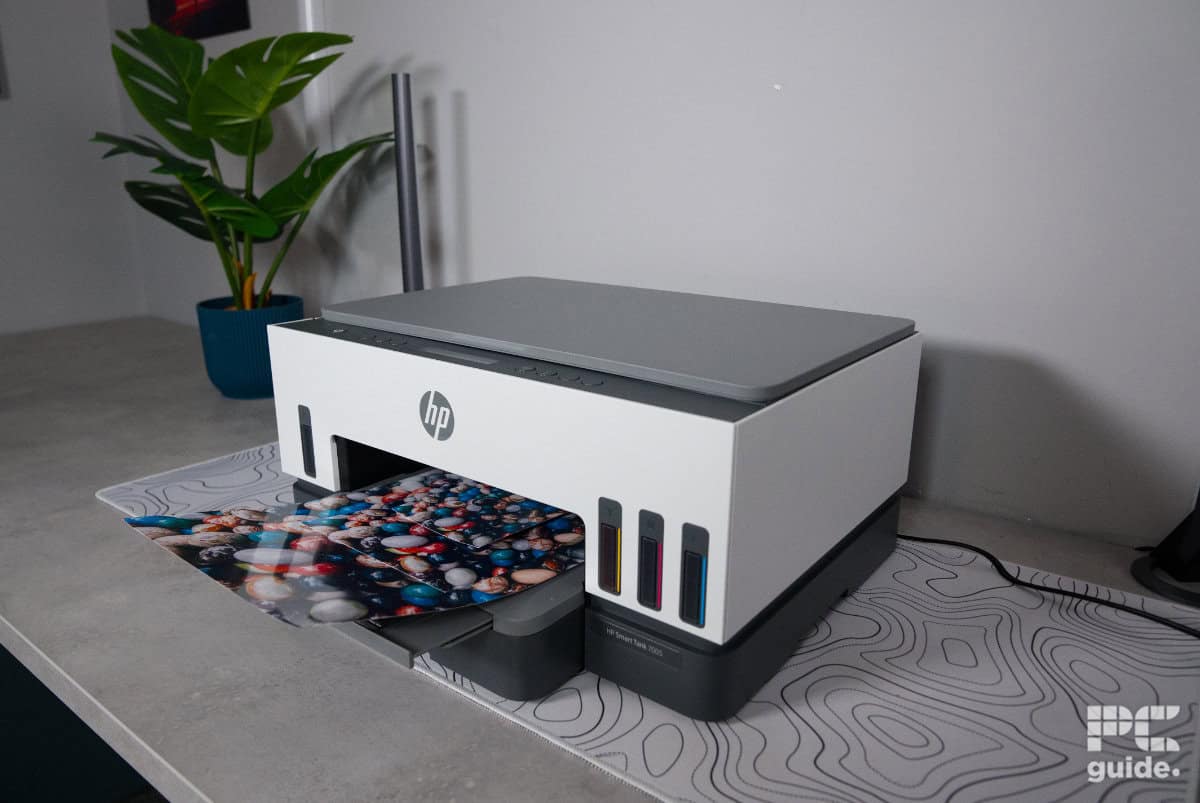
Table of Contents
When it comes to picking out the best printer in today’s market, there are a bunch of options out there to choose from. One of the big names in the industry is HP, which has a plethora of home, office, and business printers. Offering printers at a variety of budgets and for a plethora of use cases, HP usually has a printer that is perfect for your specific needs.
Now, I’ve gotten hands-on with one of its best ink tank printers, the HP Smart Tank 7005, or 7001 in the US. The all-in-one printer has a variety of features to make it a more well-rounded option. That includes color duplex printing, a scanner bed for copying as well, and support for a variety of media and connections. So here’s how it did in our printer review.

- Printer Output: Color
- Printer Type: Ink Tank (HP Thermal Inkjet)
- Connectivity Technology: WiFi, WiFi Direct, USB
- Duplex Printing: Yes, automatic
Looking at the list of pros and cons, the HP Smart Tank 7005/7001 comes across as a bit of a mixed bag, but overall it’s a strong budget printer. It does miss some of the higher-end features you’d find on more premium models, such as a wider colour range, a better display, or more connectivity options. However, for the price, it still delivers where it matters.
It’s not designed for fast, high-volume production or professional print workflows, but for occasional documents, a variety of images, or even the odd photo, it performs well. Combined with its low-cost ink refills, the HP printer stands out as a well-rounded all-in-one that’s well suited to home use.
- Comes with plenty of ink and has cheap refills
- A promise of long yields from its ink tank
- Rather impressive print quality in pages and photos
- Easy setup without even needing apps or connection, but it makes it simpler
- Inexpensive to buy in the first place
- Limited interface with a small display
- Paper handling not the best and rather slow
- Still limited in connection options, like host USB or Ethernet
- Slow to warm up and print
- Certain scan qualities do falter
Box contents and setup
As with most ink tank printers, the HP Smart Tank 7005 is a hefty bit of kit, weighing in at 9.2KG. Below is everything that comes in the box:
Latest PC & Tech deals
- AMD Ryzen™ 9 9900X 12-Core - was $499 now $337
- iBUYPOWER Element Gaming PC - was $1,999 now $1,699
- LG 27GX700A-B 27-inch Ultragear- was $599 now $485
- Samsung SSD 9100 PRO 1TB - was $339 now $249
- HP OmniBook 5 16 inch - was $961 now $799
Prices correct as of September 21st, 2026.
- HP Smart Tank 7005 All-in-One
- 2 x HP 32XL Black Original Ink Bottle
- HP 31 Cyan Original Ink Bottle
- HP 31 Magenta Original Ink Bottle
- HP 31 Yellow Original Ink Bottle
- HP Black Printhead
- HP Tri-color Printhead
- Power cord
- Many flyers

HP Smart Tank 7005 box back, Image by PC Guide

HP Smart Tank 7005 inks and extras, Image by PC Guide
Unboxing it, the printer is carefully tucked away with all the extras packed away conveniently in a box between the foam packaging. With plenty of tape securing the printer in place and protective foil wrapped around it to keep everything clean, there was certainly a lot packed into the box.

HP Smart Tank 7005 box top, Image by PC Guide

HP Smart Tank 7005 packaging, Image by PC Guide

HP Smart Tank 7005 extras, Image by PC Guide
Now, removing the printer and unpacking it took some effort; weighing in at over 6 kg (13 lbs), it does take some strength to unpack. But there is a whole bunch of things included with the printer – not just a whole wad of papers and flyers – but also all the ink and print heads to set up the unit for usage.
The setup process is fairly straightforward. Following the instructions, you’re prompted to install the HP software, although it isn’t strictly necessary. The rather extensive instruction manual also includes a manual setup method further down, which is easy enough to follow instead. From there, the process is simple: install the components, fill the ink tanks, and align the print heads by scanning the provided test print.

HP Smart Tank 7005 ink refill, Image by PC Guide

HP Smart Tank 7005 inside, Image by PC Guide
The 7005 comes with a decent amount of ink, too, providing a full tank of color for cyan, magenta, and yellow – while black also gets filled with a full bottle and about a quarter of another bottle, leaving behind plenty to refill down the line. This method skips the WiFi setup process, instead allowing you to use the printer wirelessly straight away — although using a USB connection may still be the better option for some users. Just keep in mind that you’ll need to provide your own USB cable, as one isn’t included in the box.
Design
As far as aesthetics go, the HP Smart Tank 7005 is very much a ‘standard look’ for HP printers, albeit smaller for the most part. The main body of the printer is white, with grey and black accents on the top and bottom, including the paper tray. At the front, the paper input tray sits directly underneath the output and can hold up to 250 sheets. It features an easy pull-out tab, along with internal paper guides for simple adjustment. As for the output tray, you pull out a tab, and a lip automatically extends to catch printed pages.

HP Smart Tank 7005 front on, Image by PC Guide

HP Smart Tank 7005 logo front, Image by PC Guide

HP Smart Tank 7005 top, Image by PC Guide

HP Smart Tank 7005 scanner, Image by PC Guide

HP Smart Tank 7005 buttons and display, Image by PC Guide

HP Smart Tank 7005 paper tray, Image by PC Guide

HP Smart Tank 7005 colored ink levels, Image by PC Guide

HP Smart Tank 7005 black ink levels, Image by PC Guide
Looking at the front of the unit, the printer also has windows into the ink tanks, allowing you a glimpse at the ink levels inside – meaning you can see in advance when a refill is due. On top of the printer, the setup process is very straightforward. The front edge is just a selection of eight circular buttons for the control of the printer. In between the two sets, there is a long basic screen that is used for a basic 2-line LCD screen rather than anything more advanced, like a touchscreen you might find in other models.
Around the side of the printer, there’s not much to see. There are some indented cutouts on the bottom for easier pickup and, similarly, on top of the left side for opening up the printer to access the inside.

HP Smart Tank 7005 left side, Image by PC Guide

HP Smart Tank 7005 right side, Image by PC Guide

HP Smart Tank 7005 rear, Image by PC Guide
The back has a bit more going for it, though, and yet still not much there. With the bottom right having a rather recessed power socket (which made it hard to tell if the cable was in all the way), and beside it, a more accessible USB port. Then the center shows the paper feed rollers that take the sheets to the printheads, which are on a removable door – so jams are easily accessible.

HP Smart Tank 7005 ports, Image by PC Guide

HP Smart Tank 7005 rear opening, Image by PC Guide

HP Smart Tank 7005 underside, Image by PC Guide
Print results and speed
With the setup and installation of the printer complete, I then put it to the test in our testing lab to see what it could do. That consisted of timing how long various prints took to complete, including colored, monochrome, and some longer documents. Along with assessing the print quality of those and of photo prints to see how good a printer it is.

HP Smart Tank 7005 setup (1), Image by PC Guide

HP Smart Tank 7005 setup (3), Image by PC Guide
HP Smart Tank 7005 setup prints (2), Image by PC Guide

HP Smart Tank 7005 setup prints (1), Image by PC Guide
When it comes to print quality, the 7005 offers rather decent performance for the most part, considering the price of the printer. In the color test, the text is clear and legible down to the smallest size. The colored lines show strong alignment, and the gradients and intensities of colors show up very well.
Similarly, monochrome keeps the prints clean and legible. Where it does falter, however, is in the border lines on a test page. There, you can see the lines of each print pass of the head. It can be a bit of a detractor to its quality, but in general, it doesn’t come up that often. As it doesn’t even come up in the colored pages or the images, which are surprisingly clear for being images printed on a page.
When it comes to copying, the overall quality is pretty solid, though it lacks some of the finer details. Not so much in color, but in monochrome, since the copy resolution is lower in black. There, the gradients and grid lose detail and quality.

HP Smart Tank 7005 setup prints (3), Image by PC Guide

HP Smart Tank 7005 setup prints (4), Image by PC Guide
The Smart Tank 7005 is a strong photo printer too. Although it takes a rather long time to complete, the printer puts in the effort to produce results that are well worth considering for photos around the home. With borderless printing support and strong colour saturation and finish, the photos it produces are genuinely impressive.
When it comes to the speed of getting the prints out, it’s not the quickest thing out there. From cold, a color print took over 22 seconds to complete, with a black-and-white version taking over 17 seconds. As for a longer 6-page queue, that took a total of 1 minute and 40 seconds, as many of them took well over 10 seconds to come out.
As for a 10-page double-sided monochrome script print, it took a total of 1 minute and 25 seconds, with the first page finishing both sides in 23 seconds and each subsequent one 14-16 seconds. One thing I did notice is that once or twice it did seemingly pull two sheets at once, so the handling could be better.

Specifications and price
| Printing Technology | HP Thermal Inkjet |
| Maximum Print Resolution | 4800 x 1200 DPI color, 1200 x 1200 DPI black |
| Ink Type | Ink tank – Pigment-based (black) Dye-based (color) |
| Scanner resolution and type | Contact Image Sensor (CIS) 1200 DPI scan, 600 DPI copy |
| Operating Systems | Windows 11/10/7 macOS 12 Monterey/13 Ventura/14 Sonoma/15 Sequoia Chrome OS |
| Dimensions (W x D x H) | 427.5 x 364.0 x 198.6 mm |
| Weight | 6.38 kg |
| Connectivity | 2.4/5G dual band Wi-Fi Wi-Fi Direct Hi-Speed USB 2.0 |
| Mobile and Cloud printing | Apple AirPrint Mopria™ certified HP Print Service Plugin (Android printing) HP app Wi-Fi® Direct Printing |
| Paper Sizes | 10 x 15 cm A4 A5 A6 B5 (JIS) Envelope (DL, C5, C6, Chou) Card (Hagaki, Ofuku Hagaki) Custom: 88.9 x 127 mm to 215.9 x 355.6 mm |
| Input Paper Capacity | 250 plain sheets 50 photo/card paper sheets 30 envelope sheets |
| Display | 2-line LCD Smart guided buttons, 2.8 x 0.5 in (70 x 12 mm) |
Looking over the full specs of the 7005 UK model/7001 US model shows its capabilities and supported media types. With a variety of sizes and connections available, it might be a surprise to hear that it lacks Ethernet support – leaning into its wireless functionality. As there is a strong support for mobile and cloud printing, and with both 2.4G and 5G WiFi support, there is a broader connection option to consider.

HP Smart Tank 7005 setup inks (1), Image by PC Guide

HP Smart Tank 7005 setup inks (2), Image by PC Guide

HP Smart Tank 7005 setup (2), Image by PC Guide
As for the pricing of the printer, the Smart Tank 7001 can be found in the US for $429.99 (although it’s seemingly on sale for under $300 most of the time). While the 7005 UK version is sold for £269.99 and is on the budget side of ink tanks. That puts it in a similar range to the Epson ET-2820 and Canon G3570.
As for the ink refills, in the US, the original refills can be bought for $23.99 for black, and the color three-pack can be bought for $65.99. While in the UK, black costs £14.50 with each color costing £12.49, and these provide roughly 6,000 pages in black and 8,000 in color. That means each print costs $0.004/£0.0024 in black and $0.0082/£0.0047 for color and is much more economical than cartridge printers.
- Printer Output: Color
- Printer Type: Ink Tank (HP Thermal Inkjet)
- Connectivity Technology: WiFi, WiFi Direct, USB
- Duplex Printing: Yes, automatic
Conclusion
Overall, the HP Smart Tank 7005 (or 7001 if you’re in the US) is a surprisingly decent ink tank printer. With low entry and refill costs, it does a respectable job in most printing scenarios. Sure, it might not be the fastest, lacks a modern screen, and suffers from some quality drops in large monochrome prints, but it is a versatile low-cost option. Providing clear and even nice-looking photos and prints, it does a great job overall without being tied to cartridge economy and HP’s subscriptions.
About the Author